
- Key Takeaways
- Who Should Care About This Duplicate Endpoint Error
- Prerequisites
- Understanding the Duplicate Endpoint Error
- Step-by-Step: Diagnosing and Fixing the Duplicate Endpoint Error
- Validating the Fix
- Common Errors and How to Fix Them
- Rollback Steps
- Quick Reference: Prerequisites, Validation, Errors, and Rollback
- How This Connects to Certificate Lifecycle Management
- NDES in Cloud, Hybrid, and Multi-CA PKI Environments
- Measuring Success and What to Audit Regularly
- Encryption Consulting's Take
- Conclusion
- Frequently Asked Questions
RPC_S_DUPLICATE_ENDPOINT (WIN32 error 1740, Event ID 34) stops Active Directory Certificate Services from restarting during NDES setup on Windows Server 2016, usually because a SafeNet Luna HSM Client hasn’t released its KSP handle before the service restarts. Upgrading the Luna Client, typically from version 10.3.0 to 10.5.0, clears the lock and lets certsvc restart cleanly.
This error shows up in a specific, narrow window: a two-tier PKI hierarchy is already built, OCSP is deployed, every CA looks configured correctly, and the deployment script still fails on a routine net stop certsvc && net start certsvc call. Because everything upstream succeeded, it is easy to assume the certificate authority configuration itself is broken. It is not. The Luna KSP library restarted the service faster than the hardware security module client could release its handle on the previous session, and Windows reports that collision as a duplicate RPC endpoint rather than a HSM timing issue.
This guide covers the full path: prerequisites, how to confirm you are looking at this exact error rather than a different RPC or NDES failure, the Luna Client upgrade that resolves it, validation steps after the fix, the errors administrators run into most often, and how to roll back safely if the upgrade path is not immediately available.
Key Takeaways
- RPC_S_DUPLICATE_ENDPOINT (Event ID 34, WIN32 error 1740) during an NDES or CA service restart on Windows Server 2016 is a SafeNet Luna HSM Client timing bug, not a certificate authority configuration error.
- The bug is specific to Luna Client version 10.3.0, where the KSP library does not release its handle to the service quickly enough during a fast
net stop/net startcycle. - Upgrading the Luna HSM Client to version 10.5.0 or later resolves the lock condition and is the supported fix, not a registry change or a certutil workaround.
- Validate the fix with a clean
net stop certsvc && net start certsvccycle and confirm Event ID 34 no longer appears in the Certification Authority event log source. - Enterprises relying on manual certificate and HSM client version tracking reported certificate-related downtime in 45% of cases over the past year, with 37.5% of those outages caused specifically by an expired certificate, according to DigiCert’s Trust Pulse Survey, published July 2, 2025, the same operational blind spot that lets an untracked HSM client version block an NDES rollout.
Who Should Care About This Duplicate Endpoint Error
This error blocks an NDES rollout at the infrastructure layer, before enrollment or SCEP configuration even comes into play. Here is what each team should actually do about it.
- PKI Administrators own the CA build and the NDES installation sequence. Action: check the installed Luna HSM Client version on every issuing CA before starting an NDES deployment, not after the restart fails.
- Security Architects decide which HSM client versions are approved for use across the PKI estate. Action: add Luna Client 10.5.0 or later as the documented minimum version for any new Server 2016 CA build.
- Platform and Identity Teams run the deployment scripts and are the ones who see this failure first. Action: build the Luna Client version check into the pre-flight step of the CA build script, ahead of the certsvc restart.
- Compliance and GRC track whether CA and HSM software versions are current against vendor support and security guidance. Action: add HSM client version currency to the PKI infrastructure audit checklist alongside certificate expiration.
- CISOs own the broader risk of PKI infrastructure that depends on unpatched or outdated HSM client software. Action: treat HSM client version drift as a tracked risk item, not a one-off troubleshooting note.
Prerequisites
Confirm each of these before troubleshooting a duplicate endpoint error, since several other issues produce a similar-looking RPC failure:
- A Windows Server 2016 (or later) host running Active Directory Certificate Services, with the CA hierarchy already built and OCSP deployed
- A SafeNet Luna HSM integration, with administrative access to check and upgrade the installed Luna Client version
- Enterprise admin or local admin rights sufficient to stop and start the
certsvcservice and to runcertutilcommands - Access to Event Viewer under the Microsoft-Windows-Certification Authority source, to confirm the exact Event ID and error code before acting
- A maintenance window, since resolving this requires a Luna Client upgrade and at least one additional CA service restart
Understanding the Duplicate Endpoint Error
The failure signature is consistent enough that it is worth matching exactly before applying any fix:
- Source: Microsoft-Windows-Certification Authority
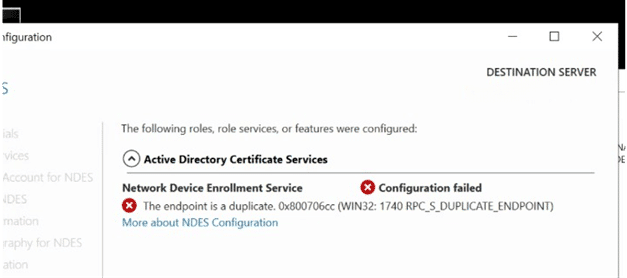
- Error Code: 0x6cc (WIN32: 1740 RPC_S_DUPLICATE_ENDPOINT)
- Event ID: 34
The failure typically surfaces on Server 2016 during PKI build-out. Every CA is built and configured, OCSP has deployed successfully, and the deployment script still cannot issue a routine service restart. After the script runs through its certutil configuration commands, it reaches:
net stop certsvc && net start certsvc
The console shows a normal-looking stop and start sequence:
The Active Directory Certificate Services service is stopping.
The Active Directory Certificate Services service was stopped successfully.
The Active Directory Certificate Services service is starting.
The Active Directory Certificate Services service was started successfully.
But the next restart attempt reports:
WIN32: 1740 RPC_S_DUPLICATE_ENDPOINT
Active Directory Certificate Services does not start, cannot initialize RPC for the Issuing CA, and reports the endpoint as a duplicate. As the setup times out and installation fails, the error surfaces as either RPC being unavailable or the endpoint text showing as duplicate. This behavior is consistent across all CAs on the affected server and blocks installing NDES.
Root Cause
The duplicate endpoint error is caused by the SafeNet KSP (Key Storage Provider) library failing to release its handle on the certificate services process before that process restarts. This is a known timing issue in Luna Client version 10.3.0: the service restart completes faster than the KSP library can release its prior session, and the RPC endpoint registration collides with the one still being torn down, which Windows reports as a duplicate endpoint rather than a timing race.
Step-by-Step: Diagnosing and Fixing the Duplicate Endpoint Error
Work through these steps in order. Do not attempt the Luna Client upgrade until the error signature is confirmed, since a different root cause needs a different fix.
Confirm the Error Signature
- Open Event Viewer and filter for source Microsoft-Windows-Certification Authority.
- Confirm the failure is logged as Event ID 34 with error code 0x6cc (WIN32: 1740 RPC_S_DUPLICATE_ENDPOINT).
- Reproduce with
net stop certsvc && net start certsvcand confirm the failure occurs specifically on the restart, not on the initial CA configuration.
Check the Installed Luna Client Version
- On the affected CA, open the Luna Client installation directory or run the Luna client’s version utility (typically
vtl.exe -vor the LunaClient uninstall entry in Programs and Features) to confirm the installed version. - Confirm the version reads 10.3.0. If it reads 10.5.0 or later, this is not the bug described here and a different root cause should be investigated.
Upgrade the Luna HSM Client
- Download Luna Client version 10.5.0 or later from Thales/SafeNet’s supported download portal, matching the version your HSM appliance firmware supports.
- Uninstall the existing 10.3.0 client, or run the vendor-supported in-place upgrade path if one is available for your Luna appliance generation.
- Install the new client version and re-register the KSP with the CA host, following Thales’s standard client registration steps for your HSM partition.
Restart Certificate Services and Validate
- Run
net stop certsvc && net start certsvcagain. - Confirm the service reports started successfully with no RPC_S_DUPLICATE_ENDPOINT error.
- Proceed with the NDES role installation now that the underlying CA service restarts cleanly.
Validating the Fix
Do not consider this resolved after a single successful restart. Confirm all of the following before moving on to NDES installation:
- Run
sc query certsvcand confirm the service reports RUNNING with no pending state. - Repeat
net stop certsvc && net start certsvcat least twice in succession to confirm the fix holds under a fast restart cycle, since that was the original trigger condition. - Check Event Viewer under Microsoft-Windows-Certification Authority and confirm Event ID 34 no longer appears on subsequent restarts.
- Run
certutil -pingagainst the CA to confirm it is responding to RPC requests normally. - Confirm the Luna Client version utility now reports 10.5.0 or later, so the fix is verifiable independent of the restart test.
Common Errors and How to Fix Them
These are the issues administrators run into most often around this fix, beyond the original duplicate endpoint error.
RPC_S_DUPLICATE_ENDPOINT Persists After the Upgrade
If the error still appears after upgrading the Luna Client, confirm the upgrade actually completed and the old 10.3.0 KSP library was fully replaced, not left registered alongside the new version. A partial upgrade that leaves two KSP registrations active reproduces the same duplicate endpoint symptom.
KSP Library Still Appears Locked
If the Luna KSP still fails to release cleanly after the upgrade, check for a stuck Luna client service or driver process holding the HSM session open, and restart the Luna client service itself before retrying the certsvc restart, rather than repeatedly cycling certsvc alone.
CA Service Fails to Start After the Client Upgrade
If certsvc fails to start with a different error immediately after the Luna Client upgrade, confirm the HSM partition registration and client certificate survived the upgrade. A client reinstall can occasionally require re-registering the client with the HSM partition before the CA can reach its keys again.
NDES Role Installation Still Fails After certsvc Restarts Cleanly
Once certsvc restarts without the duplicate endpoint error, an NDES installation failure at this point is a separate issue, not a continuation of this bug. Review NDES-specific prerequisites, including the service account permissions and IIS configuration, separately from the CA restart problem.
Rollback Steps
If the Luna Client upgrade cannot happen immediately, for example because the HSM appliance firmware needs its own validation first, roll back deliberately rather than leaving the CA in a half-configured state.
- If the Luna Client upgrade was already started but not completed, finish uninstalling the partial 10.5.0 installation and reinstall the known-working 10.3.0 client rather than leaving a mixed state.
- Confirm certsvc starts successfully on the reverted 10.3.0 client, understanding the duplicate endpoint error will return on any future fast restart cycle until the client is upgraded again.
- Avoid scripting rapid, repeated
net stop/net startcycles against certsvc as a temporary workaround while running the older client, since that is the exact condition that triggers the bug. - Document the HSM firmware and Luna Client version constraint so the next attempt at the upgrade is planned rather than repeating the same troubleshooting cycle.
Quick Reference: Prerequisites, Validation, Errors, and Rollback
Use this table as a working checklist from initial diagnosis through validation.
| Prerequisite | Command / Configuration | Validation Check | Common Error | Rollback | Owner |
|---|---|---|---|---|---|
| Confirmed error signature | Check Event Viewer for source Microsoft-Windows-Certification Authority | Event ID 34, error code 0x6cc (WIN32: 1740) | A different RPC or CA error mistaken for this bug | No rollback needed; this step only confirms diagnosis | PKI Administrator |
| Luna Client version identified | Run the Luna client version utility (e.g. vtl.exe -v) | Version reads 10.3.0 | Version already 10.5.0+, meaning this is not the cause | No rollback; investigate a different root cause | PKI Administrator |
| Luna Client upgraded | Install Luna Client 10.5.0 or later from the vendor portal | Version utility reports 10.5.0 or later | Partial upgrade leaves two KSP registrations active | Finish uninstall, reinstall known-working 10.3.0 client | Platform / Identity Team |
| certsvc restart validated | net stop certsvc && net start certsvc | Service reports RUNNING via sc query certsvc, no Event ID 34 | RPC_S_DUPLICATE_ENDPOINT still appears | Confirm upgrade completed fully; re-run client registration | Platform / Identity Team |
| CA responding to RPC | certutil -ping | CA responds without RPC error | CA fails to start after client upgrade (HSM partition registration) | Re-register the client with the HSM partition | PKI Administrator, with HSM Team |
How This Connects to Certificate Lifecycle Management
NDES exists to let network devices enroll for certificates automatically over SCEP, which makes it a foundational piece of certificate automation, not a one-time install task. An HSM client version bug that blocks NDES setup has the same root problem as most PKI outages: an infrastructure dependency that nobody was tracking until it caused a failure. DigiCert’s Trust Pulse Survey, published July 2, 2025, found that 45% of enterprises experienced certificate-related downtime in the past year, with 37.5% of those incidents caused specifically by an expired certificate, the same pattern of an untracked dependency surfacing as an outage applies just as directly to an untracked HSM client version.
Certificate lifecycle management platforms such as CertSecure Manager extend this same discipline to the certificates NDES issues once it is running, tracking enrollment, renewal, and expiration for device certificates the same way they do for server and user certificates. If you are already modernizing certificate operations elsewhere in the environment, see how PKI modernization and CLM work together and how a combined PKI and CLM roadmap accounts for infrastructure dependencies like HSM client versions, not just certificate expiry dates.
NDES in Cloud, Hybrid, and Multi-CA PKI Environments
Organizations running NDES across multiple issuing CAs, or across a hybrid on-premises and cloud PKI footprint, face this same HSM client version risk at every CA that uses a Luna integration, not just the first one built. A version mismatch discovered late in a multi-CA rollout means retrofitting the fix across every CA that has already been deployed, instead of catching it once during a standardized build process.
For organizations building or expanding NDES across multiple CAs or regions, centralizing certificate and PKI infrastructure management through a PKI-as-a-Service model removes the need to independently validate HSM client versions, CA configuration, and NDES prerequisites by hand at every site, and gives every new CA build a consistent, pre-validated baseline to start from.
Measuring Success and What to Audit Regularly
A successful fix is not just “the restart worked once.” Audit these on a recurring schedule, not only during the initial NDES build:
- Installed Luna HSM Client version on every CA and NDES server, checked against the currently approved minimum version
- Event Viewer entries under Microsoft-Windows-Certification Authority for Event ID 34 or other RPC-related failures, not just outright service-down alerts
- Certificate services restart behavior after any HSM client, firmware, or Windows update, not only at initial deployment
- NDES enrollment success rates for devices using SCEP, to catch a silent enrollment failure separately from a service-level outage
- Which CAs in a multi-CA environment still run an unpatched or outdated HSM client version
A cryptographic asset inventory such as CBOM Secure extends this same discipline beyond HSM client versions to every key, certificate, and algorithm in the environment, so a dependency like this is never discovered for the first time during a failed deployment.
Longer term, the CA/Browser Forum’s April 11, 2025 ballot to shorten maximum TLS certificate validity to 200 days, then 100 days, then 47 days by 2029 makes automated enrollment paths like NDES and SCEP more important, not less, since manual reissuance cannot keep pace with that cadence. NIST finalized its first three post-quantum cryptography standards, FIPS 203, FIPS 204, and FIPS 205, on August 13, 2024, and HSM-backed key storage providers like the Luna KSP are exactly the layer that eventually needs to support new PQC algorithms. Encryption Consulting’s PQC Center of Excellence and a PQC readiness assessment are the right place to plan that transition for HSM-dependent PKI infrastructure.
Encryption Consulting’s Take
This is a small bug with an outsized effect: one HSM client version, on one field in a version utility nobody checks by default, blocks an entire NDES rollout and looks exactly like a CA configuration failure until someone happens to know the Luna 10.3.0 history. The fix itself takes minutes once identified. The real fix is making HSM client version currency part of the standard CA build checklist, so this diagnosis never needs to happen twice.
Conclusion
RPC_S_DUPLICATE_ENDPOINT during an NDES or CA service restart on Windows Server 2016 is caused by SafeNet Luna Client version 10.3.0 failing to release its KSP handle fast enough during a service restart. Upgrading to Luna Client 10.5.0 or later resolves it. Validate the fix with a clean certsvc restart cycle and confirmed Event Viewer output before proceeding with the NDES installation.
If you need help with your PKI environment, feel free to email us at [email protected].
Frequently Asked Questions
What is the main takeaway from NDES configuration failing with duplicate endpoint error?
RPC_S_DUPLICATE_ENDPOINT during an NDES or CA restart on Windows Server 2016 is a SafeNet Luna HSM Client timing bug specific to version 10.3.0, not a certificate authority misconfiguration. Upgrading the Luna Client to version 10.5.0 or later resolves it.
Why does this matter for enterprise PKI teams?
Without knowing this is an HSM client version issue, teams can lose significant time troubleshooting CA configuration, network RPC settings, or firewall rules that were never the actual problem, delaying an NDES rollout that other projects may depend on.
What risks increase if this topic is handled manually?
Manual, untracked HSM client versions mean each new CA build risks hitting this same bug independently, with no standard check to catch it before the restart fails, and no record of which CAs in a multi-CA environment still run the affected version.
Which teams should own this change?
PKI administrators own the CA build sequence and HSM client version checks. Platform or identity teams run the deployment scripts and perform the client upgrade. Security architects set the approved minimum HSM client version. Compliance and CISOs track version currency as part of the broader PKI risk program.
How does this connect to certificate lifecycle management?
NDES is the enrollment path for device certificates issued over SCEP, so a delay here delays automated certificate issuance downstream. Certificate lifecycle management tools like CertSecure Manager then take over managing renewal and expiration for the certificates NDES issues once it is operational.
How should organizations measure success?
Success looks like a certsvc restart that completes with no Event ID 34, a Luna Client version utility confirming 10.5.0 or later, and an NDES installation that proceeds without a repeat RPC failure, verified with at least two consecutive restart cycles.
What should be audited or monitored regularly?
Audit the installed Luna HSM Client version on every CA and NDES server, Event Viewer entries for Event ID 34 or other RPC failures, certificate services restart behavior after updates, and NDES SCEP enrollment success rates.
How does this topic affect cloud, hybrid, or multi-CA PKI?
Every CA in a multi-CA or hybrid environment that uses a Luna HSM integration carries the same version risk independently. A version mismatch caught late in a multi-CA rollout means retrofitting the Luna Client upgrade across every already-deployed CA rather than catching it once in a standardized build.
What prerequisites are required before implementation?
You need a Windows Server 2016 or later host with the CA hierarchy already built and OCSP deployed, a SafeNet Luna HSM integration, admin rights to stop and start certsvc and run certutil, and access to Event Viewer to confirm the exact error signature before acting.
What common errors should administrators watch for?
Watch for RPC_S_DUPLICATE_ENDPOINT persisting after an incomplete Luna Client upgrade, a KSP library that still appears locked, certsvc failing to start with an HSM partition registration issue right after the client upgrade, and NDES role installation failures that are unrelated once certsvc itself restarts cleanly.
- Key Takeaways
- Who Should Care About This Duplicate Endpoint Error
- Prerequisites
- Understanding the Duplicate Endpoint Error
- Step-by-Step: Diagnosing and Fixing the Duplicate Endpoint Error
- Validating the Fix
- Common Errors and How to Fix Them
- Rollback Steps
- Quick Reference: Prerequisites, Validation, Errors, and Rollback
- How This Connects to Certificate Lifecycle Management
- NDES in Cloud, Hybrid, and Multi-CA PKI Environments
- Measuring Success and What to Audit Regularly
- Encryption Consulting's Take
- Conclusion
- Frequently Asked Questions
- What is the main takeaway from NDES configuration failing with duplicate endpoint error?
- Why does this matter for enterprise PKI teams?
- What risks increase if this topic is handled manually?
- Which teams should own this change?
- How does this connect to certificate lifecycle management?
- How should organizations measure success?
- What should be audited or monitored regularly?
- How does this topic affect cloud, hybrid, or multi-CA PKI?
- What prerequisites are required before implementation?
- What common errors should administrators watch for?


