

- Introduction
- Quick Answer: How Do You Build Your Own PKI?
- Executive Summary
- Who Should Care About Building Your Own PKI
- Why This Matters: Data and Deadlines
- Glossary: Key PKI Terms
- What is a PKI and how does a PKI work?
- Components of PKI
- Certificate Details
- Common Use Cases of Digital Certificates
- Key elements to setup your own PKI
- Basic Architectures
- Common Deployment Mistakes
- Practical Checklist Before You Go Live
- Issue, Impact, and Ownership Table
- PKI as a Service
- Certificate Lifecycle Management and PKI Modernization
- Measuring Success and Ongoing Audits
- Frequently Asked Questions
Introduction
With the ever-changing and expanding enterprise infrastructure, it has become extremely important that every organization have their own robust and mature Public Key Infrastructure (PKI) set up that can establish trust between their systems, applications, users, and devices on untrusted networks. The adoption of private cloud, public cloud, DevOps, microservices, and the addition of IOT and network connected devices presents a wide range of areas to protect. A Public Key Infrastructure not only provides trusted identities to users and devices, but also provides a secure channel to protect communications in-transit.
Today, most PKI setups in organizations are decades old and need to be revamped and upgraded to match the changing IT landscape. The biggest need for most organizations is to provide a highly secure and very robust PKI setup that can issue and manage digital certificates quickly through self-provisioned systems. An internal PKI setup by the organization should also support both on-premises and Cloud systems, to meet DevOps requirements. But how does a PKI work?
Quick Answer: How Do You Build Your Own PKI?
Building your own Public Key Infrastructure means standing up a Root CA (kept offline), one or more Issuing CAs to handle day-to-day certificate issuance, and the supporting components: HSM-protected private keys, a Certificate Policy and Certificate Practice Statement, and a working CRL/revocation process. Most organizations choose a two-tier architecture for the right balance of security and operational simplicity.
Last updated: August 2026 · Last verified: August 2026 · Recommended refresh cadence: 6 months, since this is an evergreen explainer of PKI architecture fundamentals.
Executive Summary
- Two architectures dominate: a two-tier PKI (Root CA + Issuing CAs) covers most needs; a three-tier PKI adds Intermediate CAs for organizations that need an extra layer of isolation between the Root CA and issuance.
- The Root CA’s security is the whole PKI’s security: keep it offline, protect its private key in an HSM, and a single compromise there invalidates every certificate the PKI has ever issued.
- Certificate lifecycle management is not optional: enrollment, issuance, validity checking, revocation, and renewal all have to be automated, or manual gaps become outages and attack surface.
- Modern PKI has to support hybrid environments: on-premises and cloud workloads, DevOps pipelines, and IoT devices all need certificates issued and renewed without manual intervention.
Who Should Care About Building Your Own PKI
Standing up a PKI is a cross-functional decision. Here’s what each role should own.
PKI Administrators
Run day-to-day CA operations: certificate issuance, renewal, revocation, and CRL publishing, and keep the certificate inventory current.
Security Architects
Choose the PKI architecture (two-tier vs. three-tier), decide which CA vendor fits the organization’s ecosystem, and design the HSM and key protection strategy for the Root and Issuing CAs.
Platform Teams
Automate certificate provisioning and deprovisioning for DevOps, CI/CD, and cloud workloads so certificate operations are zero-touch rather than manual tickets.
Compliance Teams
Own the Certificate Policy (CP) and Certificate Practice Statement (CPS), and confirm the PKI’s operational evidence maps to the organization’s compliance framework.
CISOs
Own the residual-risk decision on Root CA security, architecture tier, and whether to build in-house or use PKI-as-a-Service, since a compromised Root CA means rebuilding the PKI from scratch.
Why This Matters: Data and Deadlines
According to DigiCert’s Trust Pulse survey (published July 2, 2025), nearly half of enterprises experienced a certificate-related outage in the past year, and 18.5% of affected organizations reported losses over $250,000. A PKI built without automated certificate lifecycle management is exactly the setup that produces this kind of outage: manual renewal and revocation processes eventually miss a certificate.
The CA/Browser Forum’s Ballot SC-081v3 (approved April 11, 2025) shortens maximum TLS certificate validity to 200 days starting March 15, 2026, 100 days starting March 15, 2027, and 47 days starting March 15, 2029. A PKI designed around today’s longer validity periods and manual renewal will need far more frequent certificate operations under this schedule, which makes automation a design requirement rather than a nice-to-have for any PKI built now.
On the algorithm side, NIST finalized its first three post-quantum standards, FIPS 203 (ML-KEM), FIPS 204 (ML-DSA), and FIPS 205 (SLH-DSA), on August 13, 2024. A PKI built today should plan for eventual PQC algorithm support in its CA software and HSMs, since a hierarchy designed with crypto agility in mind will migrate far more easily than one that wasn’t.
Glossary: Key PKI Terms
| Term | Definition |
|---|---|
| Root CA | The most important component of a PKI; issues certificates to Issuing (and, in a three-tier model, Intermediate) CAs and establishes the root of trust for the entire hierarchy. Normally kept offline. |
| Intermediate CA | A Certificate Authority positioned between the Root CA and the Issuing CA, used only in a three-tier architecture to add an extra layer of isolation. |
| Issuing CA | The CA that actually issues certificates to end-users, devices, and applications; used in both two-tier and three-tier architectures. |
| Certificate Revocation List (CRL) | A published list of revoked certificates and the reason for each revocation, checked by clients to confirm a certificate is still trusted. |
| Certificate Policy (CP) | The document defining what a CA can do: who it can issue certificates to and the boundaries it operates within. |
| Certificate Practice Statement (CPS) | The document defining how a CA implements the standards set out in its Certificate Policy. |
| HSM (Hardware Security Module) | A tamper-resistant hardware device used to securely generate and store the private keys of the Root and Issuing CAs. |
What is a PKI and how does a PKI work?
A PKI is a setup that provides digital certificates to end-users, systems, devices, and applications to provide them with trusted identities. These identities are used for authentication of the certificate holder, as well as for establishing secure communications to other certificate holders within the network. A PKI infrastructure is based upon asymmetric key cryptography utilizing a public key and private key pair associated with a digital certificate issued by an Issuing Certificate Authority (CA). This certificate authority establishes trust between two certificate holders with the help of these digital certificates. Along with providing the certificate holders with their identity, these certificates also provide access rights and enables the certificate holder to establish a secure channel between two certificate holders to communicate.
Components of PKI
- Root CA: The Root CA is the most important component of a PKI infrastructure. The Root CA issues certificates and establishes the root of trust between identities to which it issues a digital certificate. The Root CA also issues certificates to Issuing CAs, giving them the power to issue certificates for the Rot CA, as it is normally kept offline.
- Intermediate CA: An Intermediate CA, also known as a Subordinate CA, is a Certificate Authority that is set between the Issuing CA, which issues certificates on behalf of the root CA. Root CAs can have a lot of Intermediate CAs underneath them in the PKI hierarchy, but each Intermediate CA can only have one Root CA. The Intermediate CA is normally only used in a three-tier PKI architecture.
- Issuing CA: The Issuing CA issues certificates to end-users, devices, and other certificate requestors. Issuing CAs act like online Root CAs, issuing certificates to users who need them. Issuing CAs are used in both two-tier and three-tier CAs.
- Public Key: A cryptographic key which is created by an asymmetric key algorithm, such as RSA, and that can be issued to the public along with a digital certificate. A public key is not required to be stored securely and is used for public distribution. The public key is one half of the asymmetric key pair created with an asymmetric key algorithm.
- Private Key: A cryptographic key which is the other half of an asymmetric key pair. The private key is the most important component of authentication and should be stored securely.
- Certificate Store: A certificate store is used to store root certificates issued from multiple CAs. Certificate stores also contains Intermediate CA root certificates and end user certificates. The certificate store tells a computer which CAs are trusted CAs.
- Certificate Revocation List (CRL): A CRL is a list that that contains information on revoked certificates, including their certificate information and the reason for the certificate’s revocation. CRLs are published at certain time intervals, potentially causing issues with certificates revoked between CRL publication times.
- Delta CRLs: Delta CRLs are CRLs published in the time interval between CRLs being published. This covers the potential for overlooking a certificate revoked before the publishing of the next CRL.
- HSM (Hardware Security Module): An HSM is a very important component of a secure PKI setup and is advised to be used to store the Root CA’s private key. HSMs can also be used to store the private keys of Intermediate Certificate Authorities. HSMs are extremely secure, with tamper-resistant and tamper-evident safety mechanisms.
- Certificate Management: Certificate Management is an important aspect of a PKI infrastructure, as it helps with keeping certificates up-to-date and secure. The following are different phases of the Certificate Lifecycle that are used for Certificate Management.
- Certificate Enrollment: This phase relates to the initial creation of a certificate for the certificate requestor. An online user, organization, or device sends out a Certificate Signing Request, or CSR, to the Certificate Authority. The CSR contains the public key of the requestor and other information relating to the requestor. The CA then verifies the given information and, if it is legitimate, creates the certificate and enrolls the user in the PKI. The Certificate Authority used to create the certificate can be owned by the organization that desires the certificate, or by a third-party. If the certificate is obtained from a third-party, then it must be purchased from them.
- Certificate Issuance: Once the certificate has been created, and the user has been enrolled in the PKI, the certificate is issued to the user. As previously mentioned, the user now uses this certificate to identify themselves within the network. This ensures that each member of the PKI trusts the certificate holder.
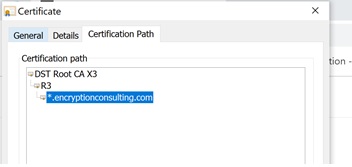
- Certificate Validity: Certificate validity involves the checking of the validity of the certificate when interacting with another member of the network. The way this certificate is verified is by following the chain of trust of the certificate. This chain of trust, or certification path, shows the certificate of the Issuing CA that issued the certificate being verified. The certification path of the Issuing CA’s certificate is then checked, going all the way up until the Root CA’s certificate is reached. Once the chain of trust is verified up to the Root CA, that certificate originally being verified is now seen as valid.
- Certificate Revocation: This step only occurs if the certificate expires and is no longer needed, if the certificate is stolen and misused, or if the certificate in general is no longer needed. If any of these situations occur, then the certificate is revoked and can no longer be used. The revoked certificate is then added to the CRL.
- Certificate Renewal: When a certificate expires, it must be renewed. This process reissues the certificate, using the same key pair and information, but with a newly updated expiration date.
- Certificate Policy (CP): The Certificate Policy is a document setting forth standards of the PKI. The CP lets users and PKI maintainers know how to apply for a certificate, the naming standards for certificates, and more. The CPS follows the standards set forth in the CP.
- Certificate Practice Statement (CPS): The Certificate Practice Statement sets forth the procedures used in the PKI. These procedures are based around the Certificate Policy’s standards. The CP tells a user or maintainer what to do, while the CPS tells them how to do it.
Certificate Details
A digital certificate contains the following information to prove the identity of the certificate holder:
-
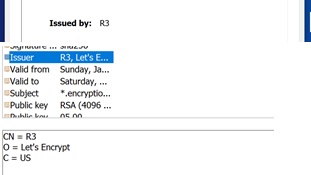
Details of Certificate Issuer: The Issuer details include the name of the Issuing CA, shown on the General tab under the “Issued by” field and in the Details tab under the “Issuer” field. The “Issuer” field not only shows the name of the Issuing CA, but also the Common Name, Organization name, and Country of the the Issuer.
-
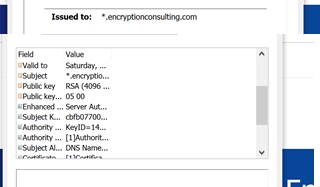
Details of the Certificate holder: The Certificate holder details in the certificate include the holder’s public key, their public key, and the name of the certificate holder.
-
Certification Path: Also included in a digital certificate is the certification path of the certificate. This helps other users, applications, or devices within the network verify the validity of the certificate.
-
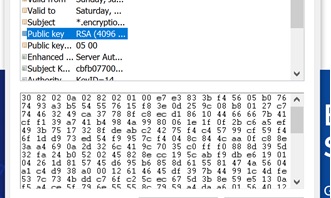
Public key: As mentioned, the certificate holders public key is stored within the certificate. This, along with their own private key, verifies that the key holder matches the public key within the certificate.
-
Key usage & extended key usage: The “Key Usage” field tells the viewer what the key is used for. There is also a chance that the certificate has an “Extended Key Usage” field, which tells of other uses for the key, that is not included in the “Key Usage” field.

-
Digital signature of the issuer: One other important part of a digital certificate is the issuer’s digital signature. This helps with verification of the certificate, as it lets the viewer know who issued the certificate.

- SSL/TLS certificates to secure communication channels – One of the main certificate uses is for SSL/TLS communication. This involves keeping communications secure between a client and server or a client and another client.
- Digital signatures for documents – Certificates can also be used as digital signatures for documents. Digitally signing a document lets the recipient of the document know that the signer has sent the document and that there is nothing malicious within the document.
- Code signing – Code signing with certificates is very similar to document signing. When code is created, the code designer signs the code to verify they have created it and that no malicious code is hidden within.
- Client-server authentication – Client-server authentication verifies the identity of both the client and server to the other party of the communication. The respective communicators check the certification path of the other’s certificate, verifying that their certificate is valid.
- VPN authentication – Similarly to client-server authentication, VPN authentication verifies the identity of each member of the connection using their certificate’s certification path.
- Email & data encryption – Email and data encryption uses the sender’s private key to encrypt data. Once the email is received, since the certificate is public knowledge and contains the sender’s public key, the message can be decrypted and the recipient will know that the sender is who they say they are.
- Wifi authentication – Wifi authentication also verifies the identity of each member of the connection using their certificate’s certification path.
- Identify your certificate requirements – You must first identify all current and future requirements for digital certificates. This refers to what your certificates within your PKI are, and will, be used for. See the Common Use Cases for Digital Certificates section above for more information.
- Selecting the Right Certificate Authority – Based upon your requirements, you must select the type of Certificate Authority you want to setup. If you are typically using your PKI to support your enterprise requirements, which are mostly based on Microsoft services, then setting up a Microsoft CA would be a good option for your organization. Other types of CAs are Google and Amazon CAs.
- Cloud vs On-premises hosting – Traditionally, all internal PKIs aare setup on-premises. More and more often, however, applications and services are migrating to the Cloud, so it is important to support Cloud requirements. In situations where the majority of services and products are on the Cloud, it is important to ensure that the CA you are setting up supports Cloud-based requirements.
- Certificate Management – Just setting up an internal PKI infrastructure does not ensure that your organization will be able to meet and manage all PKI-related requirements. One of the most important requirements of a PKI infrastructure is automating certificate management operations. More so with DevOps, continuation, and CI/CD pipeline, it is also very important to make provisioning and deprovisioning certificates zero touch and instant. This ensures all certificate operations necessary are quick to be completed and human error will not effect them.
- Securing your Root & Issuing CA private keys – The private keys of the Root and Issuing CA’s have to be stored with the utmost security because they form the root of trust. As such, it is important that these private keys are stored securely on an HSM. Typically the Root & Issuing CA private keys are stored on the HSM, which provides maximum security and stops any tampering or misuse with these keys.
- Creating CP (Certificate Policy) & CPS (Certificate Policy Statement) creation – The CP & CPS of the PKI define the policies for your Certificate Authorities and will help you design your PKI infrastructure. These documents also act as the framework and scope of your Certificate Authority, telling it to whom it can issue certificates, what the boundaries within which the CA will work are, and the procedures used to manage your CA.
- Certificate revocation and CRL checking – One more important step in creating your PKI is ensuring that certificates are revoked when necessary, and that when they are revoked, they are placed into the CRL. It is also important to have your CAs regularly check for new CRLs, allowing them to be up-to-date on the latest revoked certificates.
- Lack of planning and tracking: One of the more common mistakes with a PKI is the lack of planning and tracking. Poor planning in a PKI can hurt a PKI critically, as there may be security gaps that an attacker could exploit. Poor planning can also lead to poor certificate and key management, offering another avenue for attackers to exploit. Along with planning, poorly tracking PKI assets can also cause issues. To fix these issues, ensure proper planning is completed by PKI professionals, to ensure the best quality PKI. Utilizing SIEM tools can also help track the different components of your PKI, giving you more transparency into it’s inner workings.
- Root CA Security: As the root of trust, the Root CA is vitally important to the PKI, and thus must be well secured. If the Root CA were to be compromised, the entire PKI would need to be recreated from scratch, as no certificates issued within that PKI would be trusted any more. To fix this, utilize an HSM to keep the Root CA’s keys secure from outside attack.
- Bad Certificate Lifecycle management: Another common PKI deployment mistake is poor certificate lifecycle management. If certificates are compromised or left unused, malicious users could use the certificates to steal or access sensitive data. Also, if a user or application’s certificate were to expire without renewal, a loss of service could occur for that user or application. Proper automation and monitoring of the certificate lifecycle can stop this mistake from occurring.
- Identify current and future certificate requirements before selecting a CA vendor or architecture.
- Choose two-tier vs. three-tier architecture based on how much isolation the Root CA needs from issuance.
- Store the Root and Issuing CA private keys in an HSM, not in software-only key storage.
- Draft and approve a Certificate Policy (CP) and Certificate Practice Statement (CPS) before issuing production certificates.
- Automate certificate enrollment, issuance, renewal, and revocation so DevOps and cloud workloads don’t depend on manual tickets.
- Confirm CRL and revocation checking works end to end, and that CAs regularly check for new CRLs.
- Decide whether to build in-house or use PKI-as-a-Service based on available PKI expertise and headcount.
Common Use Cases of Digital Certificates
The “Key Usage” field can offer a lot of different uses for the digital certificate. The following are some of the most common usages for certificates:
Key elements to setup your own PKI
Basic Architectures
The two most common PKI architectures are the two-tier and three-tier architecture. Below are the PKI components that make up each type of PKI architecture:
Two-Tier Architecture
A two-tier architecture is the most common form of PKI hierarchy, and also the most balanced architecture. It involves only a Root CA and the Issuing CAs in the PKI. This format makes it simple to deploy a two-tier PKI, without losing the security of the PKI. The below image shows how the setup of a two-tier PKI looks.
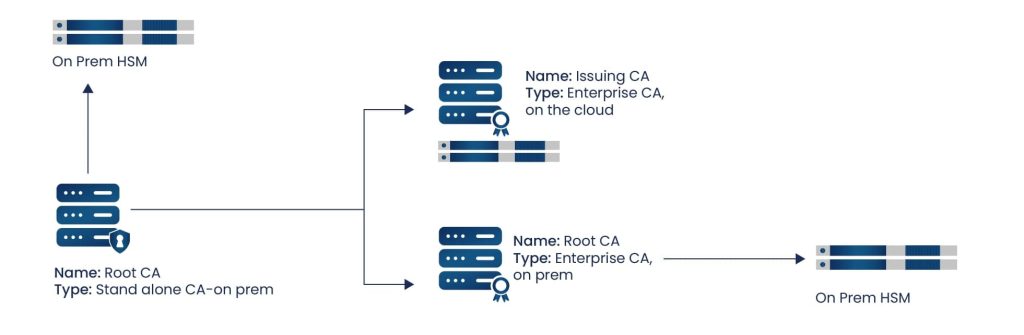
The design of a two-tier PKI architecture works with security and simplicity in mind, allowing the root of trust, the Root CA, to stay offline, protecting it from attack. Since the Root CA cannot be compromised, there is no worry that certificates are being misused or given to untrusted users. Instead of the Root CA giving out certificates, it creates the certificates for its original Issuing CAs, and allows them to to issue certificates to end-users. Two-tier PKI architectures are the most common type of hierarchy used.
Three-Tier architecture
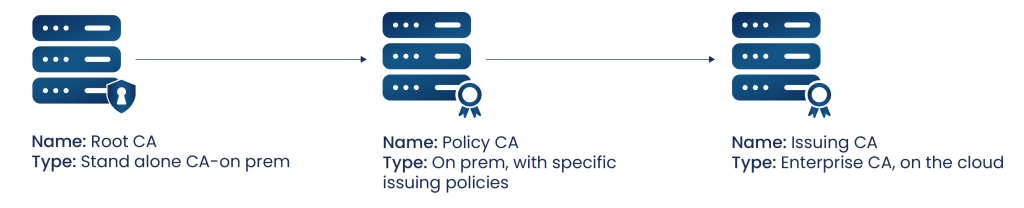
The three-tier architecture is the most secure, as there are more links in the chain that would need to be compromised by attackers. However, setting up a three-tier architecture is a much more complicated process than setting up a two-tier architecture. With Intermediate CAs added into the mix, there are many more CAs to set up and integrate within the PKI, especially if a large number of Issuing and Intermediate CAs need to be created. The more CAs needed in a PKI, the more complicated implementation and maintainence is. A three-tier architecture is used much less often than a two-tier architecture.
Common Deployment Mistakes
Practical Checklist Before You Go Live
Issue, Impact, and Ownership Table
| Issue | Business Impact | Recommended Action | Owner |
|---|---|---|---|
| Root CA kept online or under weak access controls | A single compromise invalidates every certificate the PKI has ever issued, forcing a full rebuild | Keep the Root CA offline and store its private key in an HSM | Security Architect |
| No planning or asset tracking before deployment | Undiscovered security gaps and poor certificate/key management attackers can exploit | Complete architecture planning with PKI professionals and track assets with SIEM tooling | Security Architect |
| Manual certificate lifecycle management | Missed renewals cause service outages; unused or compromised certificates go undetected | Automate enrollment, issuance, renewal, and revocation across on-prem and cloud | Platform Team |
| No documented CP/CPS | No framework for who can request certificates or how the CA is operated, complicating audits | Draft and approve a Certificate Policy and Certificate Practice Statement | Compliance Team |
| No CRL/revocation checking | Compromised certificates remain trusted longer than they should, extending attacker access | Implement and regularly test CRL publishing and revocation checking | PKI Administrator |
PKI as a Service
One form of PKI becoming more and more common is PKI as a Service. The way PKI as a Service works is that a provider will have the PKI setup, whether at their own data center or within your organization, and handle all of the management and updating in the PKI. This allows the organizations purchasing this service to not need to train or hire PKI professionals, thus saving them money and manpower. If the PKI is setup at the provider’s data center, the organization purchasing their services will most likely have the PKI issue certificates to their users, without having their own Issuing CA. PKI as a Service is one of the many services provided by Encryption Consulting. We assist your organization in the design, implementation, and deployment of your PKI. Part of our PKI setup includes the use of an on-premises Thales-SafeNet, nCipher, or Utimaco HSM. We can implement it in our data center in Dallas, Texas, or onto your site. Whichever hardware security module you choose to use, they are all FIPS 140-2 Level 2 and 3 compliant, so you should reach all of your compliance requirements. Along with an HSM, we also help you build and design a backup for your PKI, for minimal to no loss of service from unseen circumstances. We can also implement different SIEM tools into your PKI, allowing you to monitor certificates and keys, to keep you up to date on revoked certificates, unused keys, etc. Our PKI as a Service can also be set up either on-premises or on the Cloud.
Certificate Lifecycle Management and PKI Modernization
Every PKI, whether built in-house or delivered as a service, lives or dies on how well it handles certificate lifecycle management: enrollment, issuance, validity checking, revocation, and renewal, at scale, without manual intervention. CertSecure Manager automates certificate lifecycle management and certificate automation across on-premises and cloud CAs, closing the gap between “PKI is set up” and “PKI operations don’t depend on a human remembering to renew a certificate.” Organizations weighing whether to build in-house or outsource should also evaluate PKI-as-a-Service for PKI modernization with issuance, HSM key protection, and monitoring already built in.
Because a new PKI should be built with crypto agility in mind from day one, pair the architecture decisions above with a broader inventory: the PQC Center of Excellence offers hands-on post-quantum testing, and a PQC readiness assessment can identify which algorithms and certificate types will need attention as PQC requirements arrive. Pair both with CBOM Secure for ongoing certificate discovery and machine identity inventory across the entire hierarchy as it grows.
For more on the surrounding lifecycle, see What Are the Stages in a Certificate Lifecycle? and How to Avoid Certificate Outages.
Measuring Success and Ongoing Audits
Success looks like a Root CA that has stayed offline and uncompromised, zero certificate-related outages traced to a missed renewal, a documented and current CP/CPS, and revocation checking that’s tested and working across every Issuing CA.
Re-audit the PKI architecture, HSM key protection, CP/CPS documentation, and certificate lifecycle automation on a 6-month cadence, since this is foundational PKI architecture guidance rather than a policy tied to a shifting vendor deadline.
Frequently Asked Questions
What is the main takeaway from A Detailed Guide on Building your own PKI?
The main takeaway is that a PKI’s security rests almost entirely on the Root CA staying offline and HSM-protected, while its day-to-day usability rests on automating certificate lifecycle management, most organizations get the best balance of both with a two-tier architecture.
Why does this matter for enterprise PKI teams?
Enterprise PKI teams are the ones who inherit the architecture decisions made when a PKI is first built, so a poorly planned Root CA, missing CP/CPS, or manual certificate lifecycle becomes their ongoing operational burden and risk exposure.
What risks increase if this topic is handled manually?
Handling PKI operations manually increases the risk of missed certificate renewals causing outages, undetected compromised or unused certificates, and a Root CA or Issuing CA whose security posture drifts over time without anyone tracking it.
Which teams should own this change?
PKI administrators run day-to-day CA operations; security architects choose the architecture and HSM strategy; platform teams automate certificate provisioning for DevOps and cloud; compliance teams own the CP/CPS; and CISOs own the build-vs-outsource and residual-risk decisions.
How does this connect to certificate lifecycle management?
A PKI’s whole purpose is to run certificate lifecycle management at scale: enrollment, issuance, validity checking, revocation, and renewal are the operational core of any PKI, whether built in-house or delivered as PKI-as-a-Service.
How should organizations measure success?
Success looks like a Root CA that has stayed offline and uncompromised, zero certificate-related outages traced to a missed renewal, a documented and current CP/CPS, and revocation checking that’s tested and working across every Issuing CA.
What should be audited or monitored regularly?
Organizations should monitor certificate issuance and renewal continuously, and audit Root CA security, HSM key protection, CP/CPS currency, and CRL/revocation checking on a 6-month cadence.
How does this topic affect cloud, hybrid, or multi-CA PKI?
A modern PKI needs to support both on-premises and cloud systems to meet DevOps requirements, and in a multi-CA environment each Issuing CA’s certificate lifecycle automation and revocation posture needs to be verified individually rather than assumed consistent across the hierarchy.
What common mistakes should teams avoid?
Common mistakes include lack of planning and asset tracking before deployment, inadequate Root CA security (not using an HSM or keeping it online), and poor certificate lifecycle management that leaves certificates unmonitored until they expire or are compromised.
What should be refreshed quarterly?
Because this is foundational architecture guidance rather than a policy tied to a shifting deadline, a 6-month cadence is recommended for re-auditing PKI architecture, HSM key protection, CP/CPS documentation, and certificate lifecycle automation.
- Introduction
- Quick Answer: How Do You Build Your Own PKI?
- Executive Summary
- Who Should Care About Building Your Own PKI
- Why This Matters: Data and Deadlines
- Glossary: Key PKI Terms
- What is a PKI and how does a PKI work?
- Components of PKI
- Certificate Details
- Common Use Cases of Digital Certificates
- Key elements to setup your own PKI
- Basic Architectures
- Common Deployment Mistakes
- Practical Checklist Before You Go Live
- Issue, Impact, and Ownership Table
- PKI as a Service
- Certificate Lifecycle Management and PKI Modernization
- Measuring Success and Ongoing Audits
- Frequently Asked Questions
- What is the main takeaway from A Detailed Guide on Building your own PKI?
- Why does this matter for enterprise PKI teams?
- What risks increase if this topic is handled manually?
- Which teams should own this change?
- How does this connect to certificate lifecycle management?
- How should organizations measure success?
- What should be audited or monitored regularly?
- How does this topic affect cloud, hybrid, or multi-CA PKI?
- What common mistakes should teams avoid?
- What should be refreshed quarterly?


