- Key Takeaways
- Certificate Authority
- How Does a Certificate Authority Work?
- What Is a Digital Certificate?
- Why Digital Certificates Matter
- Types of Digital Certificates
- Benefits of Digital Certificates
- Digital Certificate vs Digital Signature: What Is the Difference?
- Why Certificate Lifecycle Management Matters
- The Stages of a Certificate Lifecycle
- Certificate Lifecycle Management and the Shift to 47 Day TLS Certificates
- The Cost of Manual Certificate Lifecycle Management
- Certificate Lifecycle Management in Multi-Cloud and Hybrid PKI Environments
- Decision Matrix: Certificate Lifecycle Management Actions by Team
- How Encryption Consulting Can Help
- Conclusion
- Frequently Asked Questions
Quick answer: Certificate lifecycle management (CLM) is the process of issuing, deploying, monitoring, renewing, and revoking digital certificates across their full lifespan so encrypted connections never fail from an expired certificate. A mature CLM program combines a certificate authority, a full certificate inventory, and automated renewal so PKI and security teams are not tracking expiration dates by hand.
Nearly half of enterprises (45 percent) experienced service downtime from a certificate related incident in the past year, and 37.5 percent of those outages were traced directly to an expired certificate, according to DigiCert’s 2025 Trust Pulse Survey. As public certificate lifespans shrink under the CA/Browser Forum’s new validity schedule, a manual, spreadsheet driven approach to certificate tracking is no longer a viable option for most organizations. This guide walks through what certificate lifecycle management actually involves, why it matters more today than it did even two years ago, and what PKI, security, platform, and compliance teams should each be doing about it.
Key Takeaways
- Certificate lifecycle management covers seven stages: enrollment, distribution, validation, revocation, renewal, destruction, and auditing.
- Public TLS certificate validity is shrinking on a fixed CA/Browser Forum schedule: 200 days from March 2026, 100 days from March 2027, and 47-day TLS certificates by March 2029.
- Manual certificate tracking is now a measurable business risk: 45 percent of enterprises reported certificate related downtime in the past year, and 37.5 percent of that downtime came from expired certificates.
- Automation, not headcount, is the practical answer to shrinking validity windows. Manual renewal cycles that worked at 398 days will not scale at 47 days.
- Multi-cloud and hybrid PKI environments need a centralized certificate inventory before automation can work, since certificates issued across multiple CAs and cloud providers are otherwise invisible to a single management console.
Certificate Authority
A certificate authority (CA) is one of the most important pillars of public key infrastructure (PKI). A CA is a trusted entity responsible for signing and issuing digital certificates. Before issuing a certificate, a CA examines records and documentation from official sources to confirm that the requesting business is genuine, then issues the certificate. A CA performs three core functions:
- Issues certificates
- Certifies the identity of the certificate owner
- Confirms the validity of the certificate
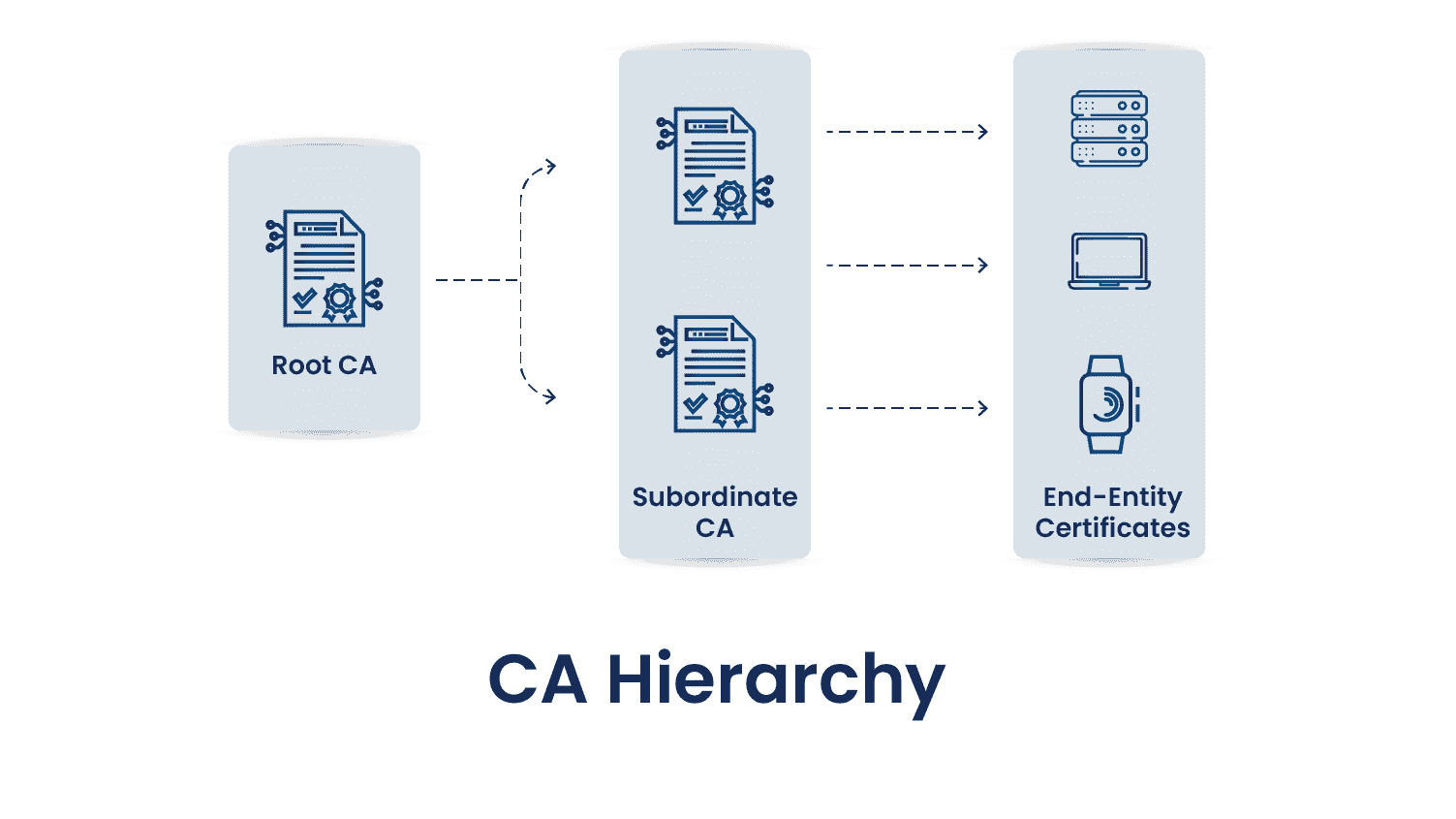
As the diagram above shows, CAs follow a defined hierarchy, and each tier has a distinct role in the PKI architecture. There are generally three types of hierarchies: one tier, two tier, and three tier. Here is what each entity in the diagram does.
Root CA
The root CA sits at the top of the hierarchy. It issues and signs certificates for intermediate or subordinate CAs, which in turn issue certificates to end entities such as computers, users, or services. Because of its importance to the PKI infrastructure, the root CA’s private key is kept highly secure, most often offline, to protect it from compromise. Root CAs typically have a long lifespan of 20 years or more, but they still require renewal on schedule to keep the chain of trust intact.
Subordinate CA
A subordinate CA sits between the root CA and end entity certificates and acts as an intermediary. It receives its own certificate from the root CA and can then issue certificates to users, devices, or other entities. Every certificate issued by a subordinate CA forms part of a chain of trust that ultimately links back to the root CA. That chain matters because when a certificate is validated, the entire chain is checked to confirm the certificate is trusted.
End Entity Certificates
End entity certificates are the final certificates issued by a CA. They do not issue certificates to other entities, so they sit at the bottom of the certificate hierarchy. These certificates are installed on servers, machines, and other devices. A common example is a TLS/SSL certificate, which establishes a secure connection between a browser and a server and protects data privacy and integrity.
How Does a Certificate Authority Work?
Getting a CA to issue a signed certificate follows three steps:
- The requester creates a key pair (public and private key) and submits a certificate signing request (CSR) to a trusted CA. The CSR contains the requester’s public key and identifying information.
- The CA validates the information in the CSR. If it checks out, the CA signs a certificate using its own private key and returns it to the requester.
- The requester installs the signed certificate on the relevant server or device for use in the appropriate security protocol.
What Is a Digital Certificate?
A digital certificate is an electronic credential that proves the authenticity of a system using public key cryptography. It lets organizations confirm that only trusted devices or users can connect to a network. Digital certificates are also used to confirm a website’s authenticity to a browser, most commonly as a Transport Layer Security (TLS) certificate.
A digital certificate contains identifying details such as the holder’s name, organization, and IP address or serial number, along with a copy of the holder’s public key. The public key must match a corresponding private key to verify authenticity. A CA signs the certificate to verify the credentials of the requesting device. A certificate typically contains the following fields:
-
Subject:
The name of the computer, user, network device, or service to which the CA issues the certificate.
-
Serial number:
A unique identifier assigned to each certificate a CA issues.
-
Issuer:
The distinguished name of the CA that issued the certificate.
-
Valid from:
The date and time the certificate becomes valid.
-
Valid to:
The date and time the certificate stops being valid.
-
Public key:
The public half of the key pair associated with the certificate.
-
Signature algorithm:
The algorithm used to sign the certificate.
-
Signature value:
The bit string that contains the digital signature.
Why Digital Certificates Matter
Organizations, individuals, and websites can all request digital certificates. A public key is submitted through a signing request to validate the requester’s information. Once a trusted CA validates that information, it signs the data with a key that extends a chain of trust to the certificate. This process lets the certificate verify the authenticity of a document, authenticate an identity, or prove a website’s credentials.
Types of Digital Certificates
-
Transport Layer Security (TLS/SSL) certificate:
A TLS/SSL certificate keeps communication between a server and its clients encrypted and private by authenticating the server before it sends or receives encrypted messages. TLS/SSL certificates come in three validation levels:
-
Domain Validated:
A fast, low cost validation method that any website can use and that can be issued within minutes.
-
Organization Validated:
Provides light business authentication and works well for organizations selling products online.
-
Extended Validation:
Provides full business authentication for organizations handling sensitive or private data. It is generally used by financial institutions to establish trust and security.
-
-
Code signing certificate:
Confirms the authenticity of downloaded files or software. Developers and publishers use it to prove that software is genuine and has not been tampered with before a user downloads it.
-
Client certificate:
Identifies an individual user to another user or machine, or one machine to another. In email, a sender signs a message digitally while the recipient verifies the signature. Client certificates can also help control access to protected databases.
Benefits of Digital Certificates
Digital certificates matter more as cyberattacks grow in volume and sophistication. Their core benefits include:
-
Security:
Digital certificates encrypt internal and external communications so attackers cannot intercept or steal sensitive data in transit. A TLS/SSL certificate, for example, encrypts data between a browser and a web server so an attacker cannot read a visitor’s traffic.
-
Scalability:
Digital certificates give organizations of any size the same quality of encryption. They can be issued, revoked, and renewed at scale and managed through a centralized platform.
-
Authenticity:
Digital certificates confirm that a message reaches its intended recipient and that communication is genuine. Common use cases include document signing certificates, TLS/SSL certificates for websites, and S/MIME certificates for email encryption.
-
Public trust:
A digital certificate confirms that a website, document, or email is properly authenticated, which reassures customers that they are dealing with a company that takes security and privacy seriously.
-
Reliability:
Only publicly trusted CAs that pass rigorous vetting can issue digital certificates, which makes it harder for attackers to trick victims with a fraudulent certificate.
Digital Certificate vs Digital Signature: What Is the Difference?
A digital certificate is a file used to verify the identity of a user or device and to enable encrypted connections. A digital signature is a hashing method that uses numeric strings to validate identity and provide authenticity. A cryptographic key attaches a digital signature to a document or email. The signature is hashed, and when the recipient receives it, the same hash function runs again to verify the message has not been altered.
Why Certificate Lifecycle Management Matters
Digital certificates rely on public key cryptography, a form of asymmetric cryptography where the sender and receiver each hold half of a public private key pair. Each side uses its half to encrypt communications that only the holder of the other half can decrypt. This is more secure than hash based, credential only systems, but it also requires more moving parts to manage correctly.
Because of that asymmetric structure, two parties need a mutually trusted CA to establish secure communication and provision the public private key pair. A certificate lifecycle management (CLM) system is the tool that lets a team view, manage, and control every stage of that process instead of tracking it by hand.
The Stages of a Certificate Lifecycle
A CA issues and confirms digital certificates to authenticate an identity. Passwords rely on phrases a person creates and remembers. Certificates instead use public private key encryption and are commonly authenticated using Extensible Authentication Protocol TLS (EAP-TLS), one of the more secure authentication protocols, defined in RFC 3748, which supports multiple authentication methods.
Certificates are generally easier to use and more secure than credential based authentication, which is why most IT security teams now prefer certificate based authentication over passwords where it is practical to deploy. Certificates still expire, though, and their lifecycle depends on an organization’s own policies. The stages of a certificate lifecycle are:
- Certificate enrollment
- Certificate distribution
- Certificate validation
- Certificate revocation
- Certificate renewal
- Certificate destruction
- Certificate auditing
Certificate Enrollment
Certificate enrollment is the first stage of the lifecycle. It typically begins when a user or device requests a certificate from a CA, submitting a public key and other enrollment details. The CA verifies that information against a defined set of rules. If the information checks out, the CA creates the certificate and issues it to the requesting party. Enrollment generally involves four steps:
-
Request a certificate:
The process starts when a user submits an enrollment request to a CA. The request should include enough information for the CA to verify identity, typically the domain name, a publicly available business telephone number, and authorization, technical, and billing contacts. The CA may request additional information depending on the certificate type.
-
Add required details:
Before submitting the request, the user also provides a public key for the CA to sign, along with the hashing algorithm used to generate the digital signature. A Cryptographic Service Provider (CSP) generates the public and private key pair after receiving the request and passes it along to the CA.
-
CA validates the request:
After receiving the request, the CA uses the public key to decrypt the digital signature, calculates a hash, and checks it against the decrypted signature. It also verifies the submitted identity information. If validation succeeds, the CA signs the public key and sends the completed certificate to the user.
-
Install the certificate:
Once verification is complete, the user installs the certificate on the relevant server and records where it lives. Users should also store the certificate’s associated keys securely and, where relevant, publish the certificate so browsers can validate it.
Certificate Distribution
Certificate distribution happens when the CA delivers the certificate to the user. This is treated as a separate step because it requires management intervention from the CA, which sets the policies governing how the certificate can be used. Distribution in a managed environment typically follows a sequence like this:
- Create a new root certificate with a name distinct from any existing root certificate in use.
- Schedule distribution of the new root certificate across all relevant infrastructure nodes.
- Create new security profiles in the management database to replace existing application specific certificate profiles.
- Schedule distribution of the new certificates to every relevant node.
- Delete the previous certificates once the new ones are confirmed in place.
- Remove the old security profiles tied to the application specific certificates.
Certificate Validation
Every time a certificate is used, its current status is checked to confirm it is still valid. A private key compromise, a compromised CA, or a security policy violation can all cause a certificate to become invalid before its natural expiration date. This is where the Certificate Revocation List (CRL) comes in: it is the list of certificates a CA has revoked before their scheduled expiration.
Without a CRL, a PKI environment has no way to know a certificate has been revoked ahead of schedule. A RADIUS server checks the CRL and rejects a connection request if the device’s certificate serial number appears on it. This is useful when a device is stolen, an employee’s access changes, or a similar event occurs.
Certificate Revocation
Certificate revocation is the stage where a certificate expires, or where a CA revokes it ahead of the expiry date. The CA automatically adds a revoked certificate to the CRL, which tells RADIUS servers to stop authenticating it.
A CRL can grow large, and any client checking revocation status has to parse the full list to find out whether a given certificate is present. The Online Certificate Status Protocol (OCSP) offers a faster alternative, since the CA itself answers the revocation check rather than requiring the client to search a full list.
With OCSP, instead of downloading and parsing the entire CRL, a client sends the certificate in question to the CA, which returns a status such as “Good,” “Revoked,” or “Unknown.” This involves far less overhead than the CRL method.
Certificate Renewal
If policy allows, a certificate that has reached its expiration date is renewed either automatically or through user action. During renewal, the user decides whether to generate a new public private key pair or reuse the existing one. Generating a new key pair adds a fresh layer of security and reduces the risk of a key being compromised over time.
Renewal also involves generating a new CSR that includes the information the CA needs to issue the renewed certificate, such as the public key, organization details, and domain name. The CA validates the request against its policies and procedures, then issues the renewed certificate once validation is complete.
Certificate Destruction
Once a certificate has no further use, that certificate along with any backup copies or archives, and its associated private key, needs to be destroyed. This prevents the certificate from being compromised or reused. Teams typically handle this through secure digital shredding or physical destruction of storage devices, so no remnants of the certificate remain recoverable.
Destruction should be documented and tied into a key management system to maintain audit logs, which supports compliance with organizational policy and regulatory requirements and prevents unauthorized reuse of the certificate.
Certificate Auditing
Certificate auditing tracks the creation, expiration, and revocation of certificates, and in some cases tracks successful use as well. This includes maintaining detailed records of certificate issuance, such as the issuer, issuance date, and purpose, which supports tracking the certificate’s full lifecycle and holding teams accountable for it.
Monitoring expiration dates enables timely renewals and helps prevent service disruptions. Logging revocations is equally important, since it prevents compromised or obsolete certificates from continuing to be trusted and keeps CRLs current.
Certificate Lifecycle Management and the Shift to 47 Day TLS Certificates
Certificate lifecycle management has become urgent because public certificate validity is shrinking on a fixed timeline. On April 11, 2025, the CA/Browser Forum passed Ballot SC-081v3, a measure proposed by Apple and endorsed by Sectigo, Google, and Mozilla, that phases the maximum validity of publicly trusted TLS certificates down from 398 days to 47 days. The rollout happens in three steps: 200 days starting March 15, 2026, 100 days starting March 15, 2027, and 47 days starting March 15, 2029.
Each step also tightens how long a CA may reuse prior domain validation evidence, dropping to just 10 days by the final phase. That means teams cannot rely on infrequent, manual renewal cycles once 100-day and 47-day certificates become the norm. A process built around annual renewal reminders breaks down the moment certificates need to turn over every six to seven weeks, which is exactly what makes automated certificate automation a requirement rather than a convenience going forward. For context, an organization managing 2,000 certificates today would face roughly 15,500 renewal actions a year once 47-day validity is fully in effect, compared with about 1,800 a year at today’s 398-day maximum.
The Cost of Manual Certificate Lifecycle Management
DigiCert’s July 2025 Trust Pulse Survey put a number on what manual certificate tracking is already costing enterprises. Forty five percent of respondents reported service downtime tied to a certificate related incident in the past year, and 37.5 percent of those outages were caused specifically by an expired certificate, one of the most preventable failure modes in the entire lifecycle. On the financial side, 31 percent of organizations reported losses between $50,000 and $250,000 tied to certificate issues, and 18.5 percent reported losses above $250,000.
Those figures line up with what we see in the field: certificate outages rarely come from a lack of awareness that certificates expire. They come from certificates nobody knew existed, issued outside the primary CA relationship, on a server nobody was actively monitoring. That gap is exactly what a proper certificate discovery and inventory process is meant to close before automation can do its job.
Certificate Lifecycle Management in Multi-Cloud and Hybrid PKI Environments
Most enterprises no longer run a single CA feeding a single environment. Certificates now come from public CAs, private internal CAs, and cloud native certificate services across AWS, Azure, and Google Cloud, often issued by different teams for different purposes. In a multi-cloud or hybrid PKI setup, the first practical problem is visibility: a certificate issued directly through a cloud provider’s own console is invisible to a centralized CLM platform unless that platform actively discovers it.
The fix is to treat discovery as a continuous process rather than a one time project. A living inventory, sometimes built and maintained as a CBOM (cryptographic bill of materials), gives PKI and platform teams one place to see every certificate in play regardless of which CA or cloud provider issued it. Once that inventory exists, automated renewal, revocation, and policy enforcement can be layered on top of it consistently across on-premises, cloud, and hybrid infrastructure. This same discovery-first approach is also the foundation for PQC readiness, since an organization cannot plan a migration to quantum-safe algorithms without first knowing where every certificate and cryptographic asset actually lives, a requirement that ties directly into building durable crypto agility across the environment.
Decision Matrix: Certificate Lifecycle Management Actions by Team
Use this matrix as a quick reference for who owns which certificate lifecycle problem and what a good outcome looks like once it is addressed.
| Use Case | Recommendation | Operational Owner | Expected Outcome |
|---|---|---|---|
| Certificates tracked manually in spreadsheets | Deploy an automated CLM platform with discovery, renewal, and revocation workflows | PKI team | Fewer missed renewals and reduced outage risk |
| Unknown or undiscovered certificates across cloud accounts | Run continuous certificate and cryptographic discovery across all environments | Platform team | Complete, current certificate inventory |
| Preparing for 100-day and 47-day validity periods | Automate issuance and renewal end to end before the 2027 and 2029 deadlines | PKI and security teams | No manual renewal bottleneck as validity windows shrink |
| Certificates spread across multiple clouds or hybrid infrastructure | Centralize visibility with a single inventory that spans every CA and cloud provider | Platform team | Consistent policy enforcement across environments |
| Audit or regulatory review of certificate controls | Maintain continuous, exportable audit logs of issuance, renewal, and revocation | Compliance team | Audit-ready evidence without manual collection |
| Planning a post-quantum cryptography migration | Build a cryptographic inventory before selecting new algorithms or timelines | Security and PKI teams | A migration plan grounded in actual environment data |
What to Do Next, by Team
- PKI team: deploy or confirm automated CLM discovery and renewal workflows before the March 2026 deadline.
- Security team: fold certificate expiry into existing risk and vulnerability tracking rather than a separate spreadsheet.
- Platform team: run continuous discovery across every cloud account and on-premises CA so no certificate stays invisible.
- Compliance team: confirm CLM audit logs already meet your evidence requirements ahead of the next review cycle.
How Encryption Consulting Can Help
Encryption Consulting’s CertSecure Manager covers the full certificate lifecycle management process, from discovery and inventory through issuance, deployment, renewal, revocation, and reporting. It adds automated deployment, intelligent alerting, and reporting on top of that foundation, which matters as validity periods shrink toward the 47-day mark and manual tracking stops being a realistic option.
For organizations further along in planning, CBOM Secure extends that same discovery work across every cryptographic asset, not just certificates, and our PQC Center of Excellence helps translate that inventory into a concrete post-quantum migration plan.
Conclusion
A strong certificate lifecycle management program depends on disciplined governance, not just tooling. Organizations without one are prone to security gaps and operational surprises: certificates get lost in the system, expire unnoticed, and cause downtime or lost revenue. For certificate lifecycle management to work at scale, every certificate an organization generates needs to sit inside a single, consolidated inventory rather than scattered across teams and consoles.
Frequently Asked Questions
What is the main takeaway from What is Certificate Lifecycle Management?
Certificate lifecycle management is the structured process of issuing, distributing, validating, renewing, revoking, and eventually destroying digital certificates. The main takeaway is that manual tracking cannot keep pace with shrinking public certificate validity, so automation and a centralized inventory are now operational requirements rather than optional upgrades.
Why does this matter for enterprise certificate lifecycle management?
Enterprises typically run thousands of certificates across web servers, APIs, devices, and internal systems. A single expired certificate can take down a customer facing service, and 45 percent of enterprises reported certificate related downtime in the past year. At enterprise scale, that risk multiplies unless certificates are tracked and renewed systematically.
What teams are responsible for acting on this guidance?
PKI teams typically own the certificate authorities and enrollment process, security teams own risk tracking and policy, platform teams own discovery across cloud and on-premises infrastructure, and compliance teams own audit evidence. Certificate lifecycle management works best when these teams share one inventory rather than working from separate records.
What risks increase if this topic is handled manually?
Manual certificate tracking increases the odds of missed renewals, undiscovered shadow certificates, and inconsistent revocation. DigiCert’s 2025 survey found that 37.5 percent of certificate related outages came specifically from expired certificates, and more than half of affected organizations experienced five or more hours of downtime as a result.
How does automation reduce certificate outage risk?
Automation removes the dependency on someone remembering an expiration date. An automated CLM platform can discover certificates continuously, trigger renewal ahead of expiry, and revoke certificates immediately when a key is compromised, all without waiting on a manual review cycle that shrinking validity periods no longer leave room for.
What metrics should teams track after implementation?
Useful metrics include the percentage of certificates under active automated management, the number of certificates discovered outside the primary CA relationship, mean time to renew before expiry, and the number of certificate related incidents per quarter. Tracking these over time shows whether the program is actually closing gaps.
How does this connect to 47-day TLS certificate readiness?
The CA/Browser Forum’s schedule cuts maximum public TLS certificate validity to 100 days by March 2027 and 47 days by March 2029. A certificate lifecycle management program built on discovery and automation now is what makes it possible to keep up with renewal cycles that frequent without adding headcount.
How should this be handled in multi-cloud or hybrid PKI environments?
Start with continuous discovery across every cloud provider, private CA, and on-premises system so certificates issued outside the primary CA relationship do not stay invisible. Once that inventory is complete, centralized automation and policy enforcement can be applied consistently across the entire hybrid environment rather than one silo at a time.
- Key Takeaways
- Certificate Authority
- How Does a Certificate Authority Work?
- What Is a Digital Certificate?
- Why Digital Certificates Matter
- Types of Digital Certificates
- Benefits of Digital Certificates
- Digital Certificate vs Digital Signature: What Is the Difference?
- Why Certificate Lifecycle Management Matters
- The Stages of a Certificate Lifecycle
- Certificate Lifecycle Management and the Shift to 47 Day TLS Certificates
- The Cost of Manual Certificate Lifecycle Management
- Certificate Lifecycle Management in Multi-Cloud and Hybrid PKI Environments
- Decision Matrix: Certificate Lifecycle Management Actions by Team
- How Encryption Consulting Can Help
- Conclusion
- Frequently Asked Questions