

- Key Takeaways
- Who Should Care About Enabling LDAPS
- Prerequisites
- Installing AD LDS
- Configuring AD LDS
- Publishing a certificate that supports Server Authentication
- Issue the Certificate on Issuing CA
- Requesting a certificate for Server Authentication
- Validating LDAPS connection
- Common Errors and How to Fix Them
- Rollback Steps
- Quick Reference: Prerequisites, Validation, Errors, and Rollback by Step
- How Enabling LDAPS Connects to Certificate Lifecycle Management
- LDAPS in Cloud, Hybrid, and Multi-CA PKI Environments
- Measuring Success and What to Audit Regularly
- Encryption Consulting's Take
- Conclusion
- Frequently Asked Questions
LDAPS encrypts LDAP traffic between clients and domain controllers by wrapping standard LDAP communication in TLS, using a server authentication certificate issued from your Microsoft PKI. Without LDAPS, LDAP simple binds send usernames and passwords across the network in clear text, visible to anyone running a packet capture.
This is especially risky with an LDAP simple bind, where credentials travel unencrypted end to end. A single packet capture on the wire, or a compromised switch port, is enough to harvest domain credentials. LDAPS closes that gap by binding a certificate to the domain controller and requiring TLS for the connection.
This guide covers the full path: prerequisites, installing and configuring AD LDS where needed, issuing and binding a Server Authentication certificate from your Microsoft PKI, validating the LDAPS connection with ldp.exe, the errors administrators run into most often, and how to roll back safely if something breaks.
Key Takeaways
- LDAPS requires a certificate with the Server Authentication EKU, issued from a CA every client trusts, bound to each domain controller or AD LDS instance that needs to accept encrypted LDAP connections.
- The most common failure after enabling LDAPS is a Schannel event 36870 or 36872, caused by a broken certificate chain, an expired certificate, or restrictive permissions on the machine key store, not a misconfigured client.
- Validate every LDAPS deployment with ldp.exe over port 636 (or 50001 for AD LDS) before relying on it in production, and confirm the certificate’s remaining validity rather than assuming it will keep working.
- Treat the LDAPS certificate like any other managed PKI asset: track its expiration, automate renewal, and monitor Schannel and CAPI2 event logs, instead of discovering failures when a directory-dependent application goes down.
- Enterprises relying on manual certificate processes reported certificate-related downtime in 45% of cases over the past year, with 37.5% of those outages caused specifically by an expired certificate, according to DigiCert’s Trust Pulse Survey, published July 2, 2025.
Who Should Care About Enabling LDAPS
Enabling LDAPS touches more roles than the person running the wizard. Here is what each team should actually do with this guide.
- PKI Administrators own the certificate template, issuance policy, and per-DC binding. Action: audit every domain controller’s bound certificate expiration date this week.
- Security Architects decide whether to enforce LDAP channel binding and signing organization-wide once LDAPS is live. Action: document the enforcement policy and a phased rollout order before turning on strict enforcement.
- Platform and Identity Teams operate the domain controllers and AD LDS instances day to day. Action: schedule certificate installation in a maintenance window and validate with ldp.exe before a wide rollout.
- Compliance and GRC map LDAPS encryption to whatever framework requires encrypted directory traffic internally. Action: add LDAPS certificate status to the next PKI audit checklist.
- CISOs own the broader narrative of reducing manual certificate risk across the environment. Action: track LDAPS certificate health as one line item inside the same program addressing the industry-wide move toward shorter certificate lifespans.
Prerequisites
A functional Microsoft PKI should be available and configured. While viewing PKIView.msc, no errors should appear
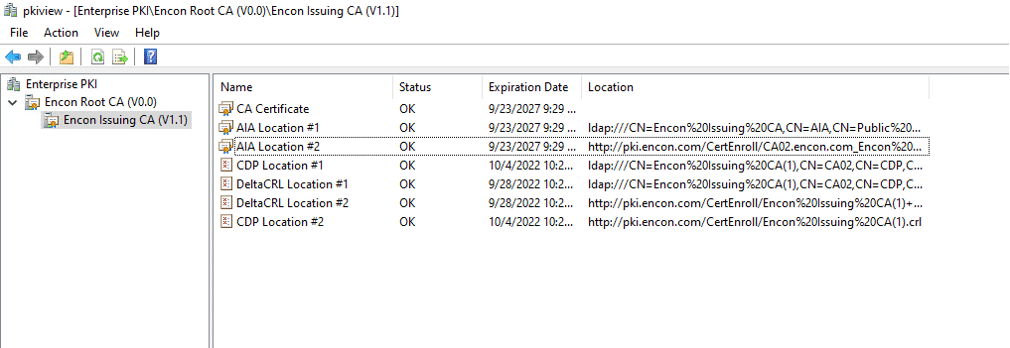
If you need help in deploying your own PKI, you can refer to this article to build your own Two Tier PKI
Beyond a healthy PKI hierarchy, confirm each of these before you start:
- An issuing CA reachable from every domain controller or AD LDS server that needs a certificate
- Enterprise admin rights on the domain and local admin rights on the target server
- A certificate template that supports the Server Authentication EKU (the walkthrough below duplicates the default Kerberos Authentication template for this)
- Network access from LDAP clients to TCP 636, or TCP 50001 if you are using AD LDS with default SSL ports, not just port 389
- A rollback plan and a maintenance window, since binding a certificate to a domain controller should never be treated as a zero-risk change
Installing AD LDS
This step should be carried out on LDAP Server or on Domain Controllers which would be responsible for hosting LDAPS service.
- Open Server Manager
- From manage, open Add Roles and Features
- On Before you Begin, click Next
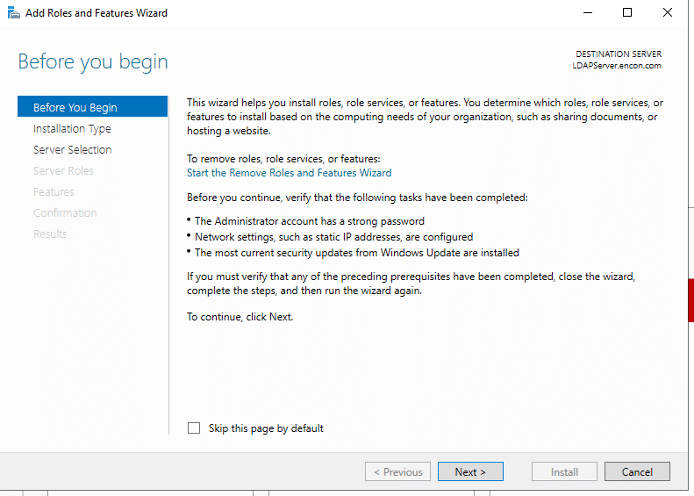
- On Installation type, ensure Role based or feature based installation, and click Next

- On Server Selection, click Next.
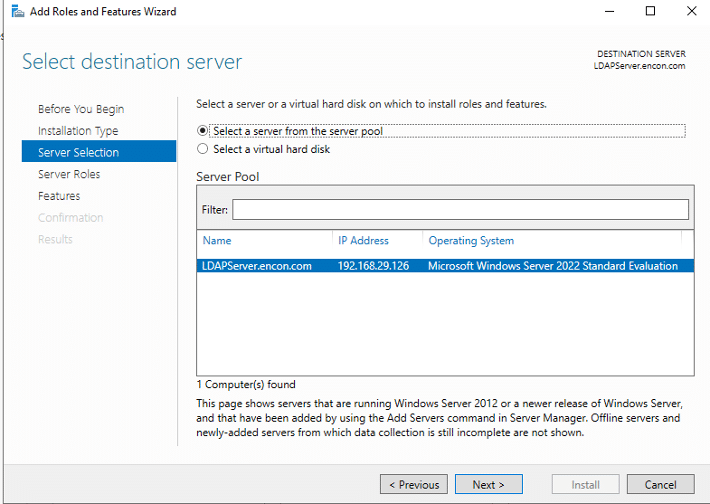
- On Server Roles, click Active Directory Lightweight Directory Services, and click Add Features, and then click Next
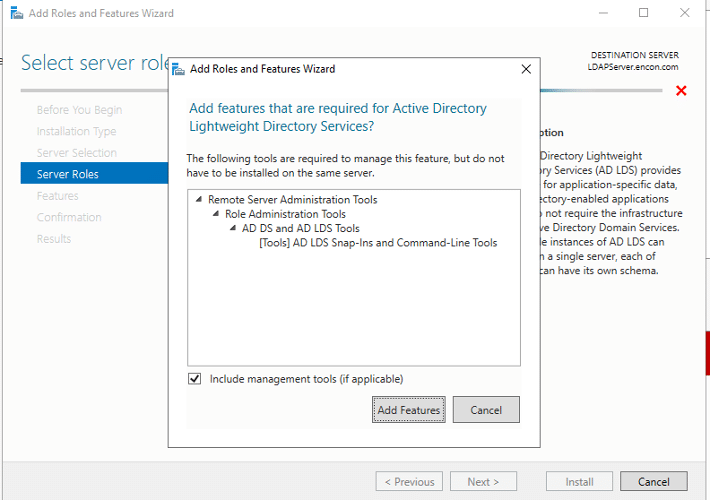
- On Features, click Next
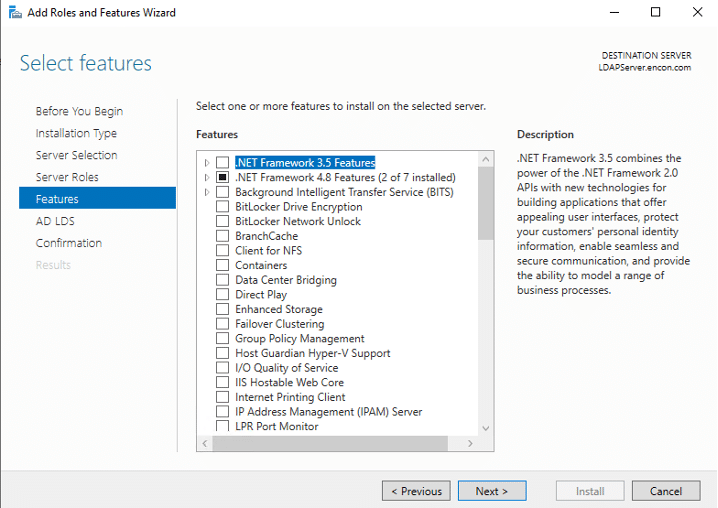
- On AD LDS, click Next
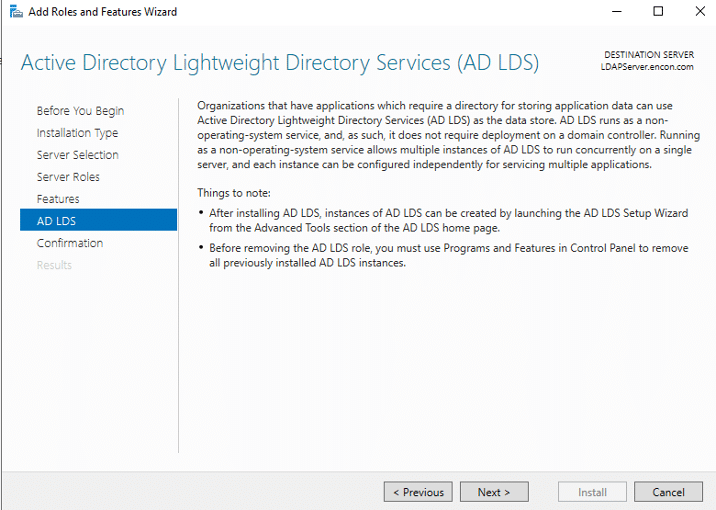
- On Confirmation, click Install
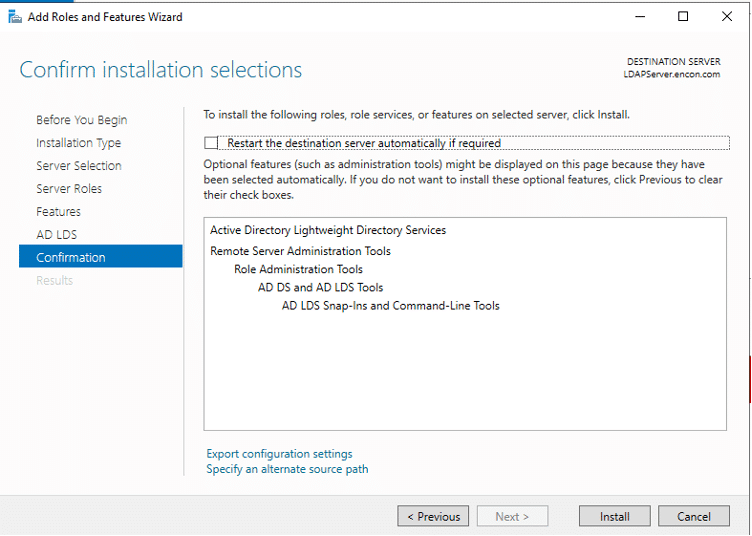
- Post Installation, AD LDS needs to be configured
Configuring AD LDS
- Run AD LDS setup wizard. Click Next on first page.
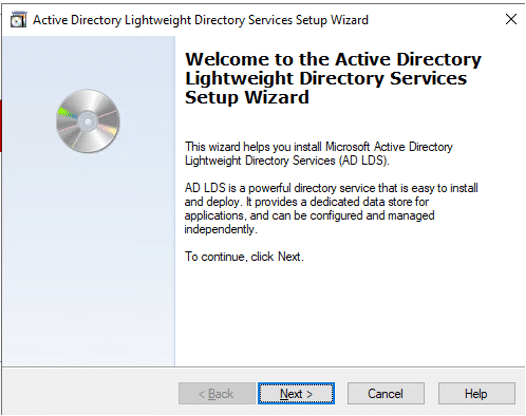
- Ensure unique instance is selected, and click Next
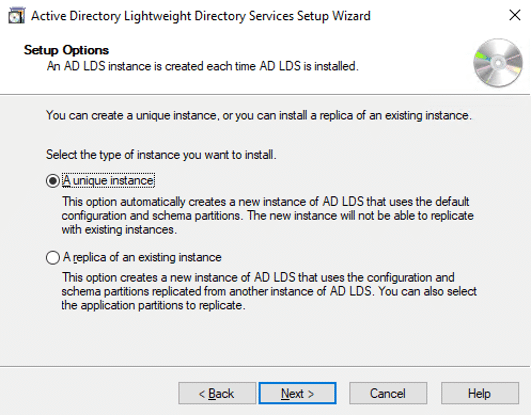
- Provide Instance name and Description, and click Next
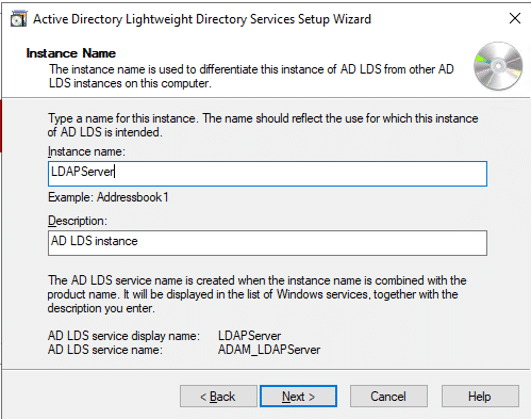
- Leave default ports and click Next
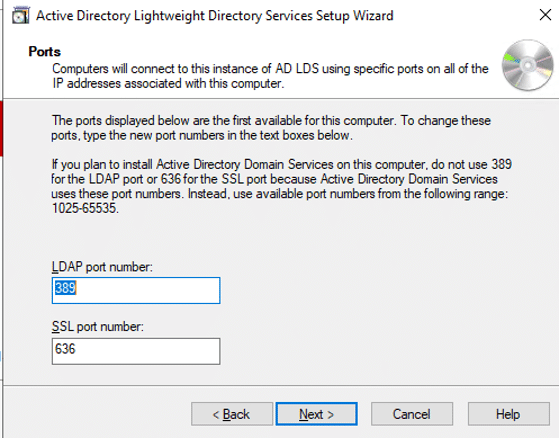
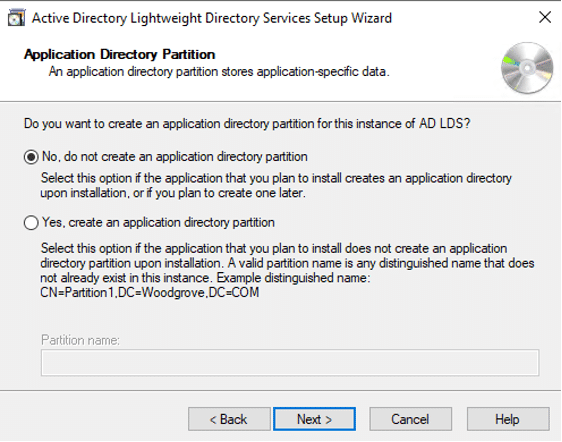
If AD LDS is installed on domain controller, then LDAP port would be 50000 and SSL port would be 50001
- On Application Directory Partition, click Next
- On File locations, click Next
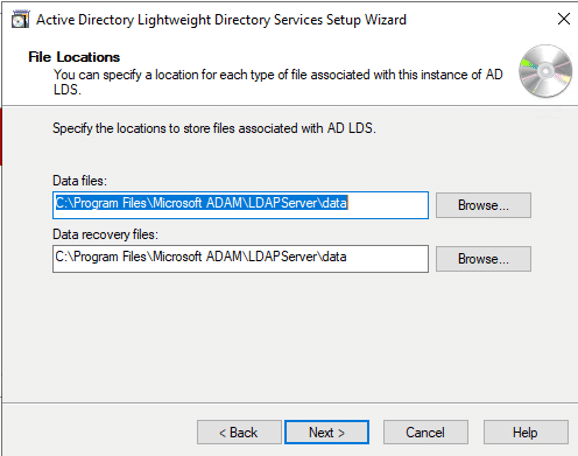
- On Service Account Selection, you may leave it on the Network service account, or choose a preferred account that can control LDAPS service
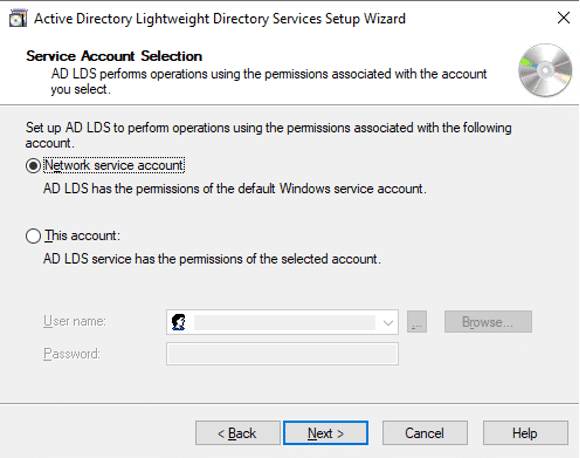
- On AD LDS administrators, leave the current admin, or choose another account from the domain
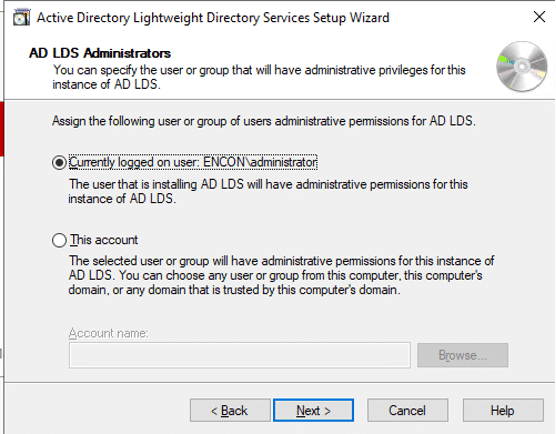
- Choose all LDF Files to be imported, and click Next
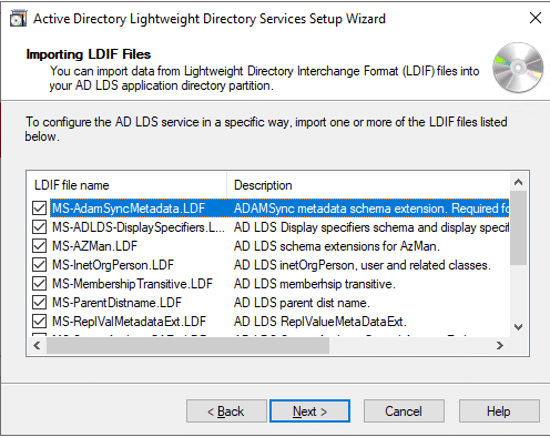
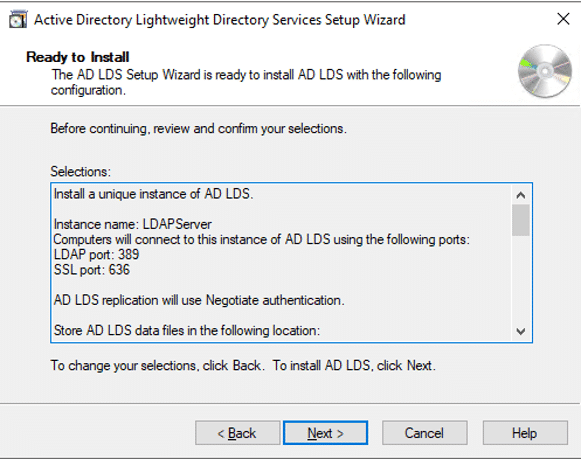
- On Ready to Install, click Next
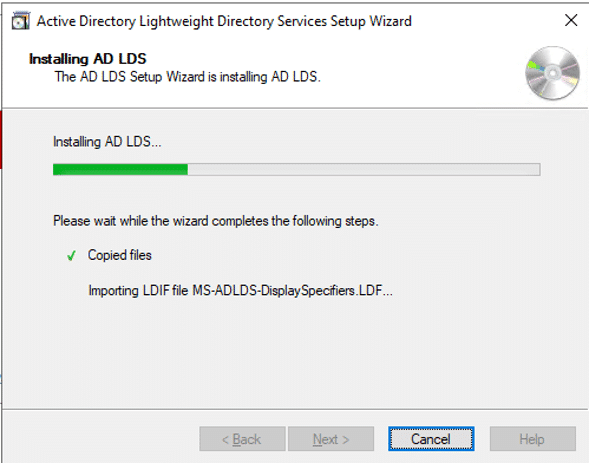
- After Installation, click Finish
Publishing a certificate that supports Server Authentication
- Login to the Issuing CA as enterprise admin
- Ensure you are in Server Manager
- From the Tools menu, open Certificate Authority

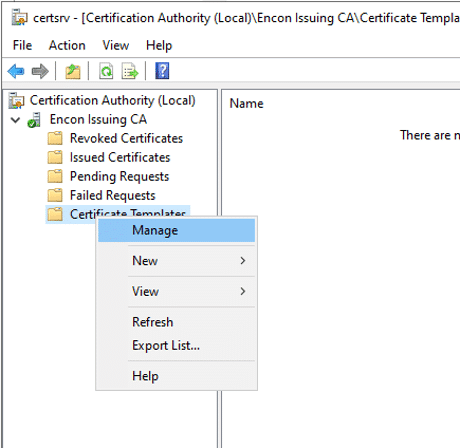
Expand the console tree, and right click on Certificate Templates
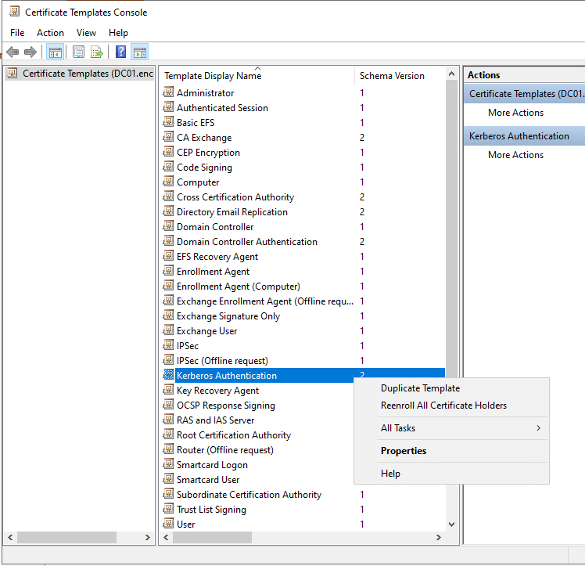
- Select Kerberos Authentication (as it provides Server Authentication). Right click and select Duplicate Template. We can now customize the template.
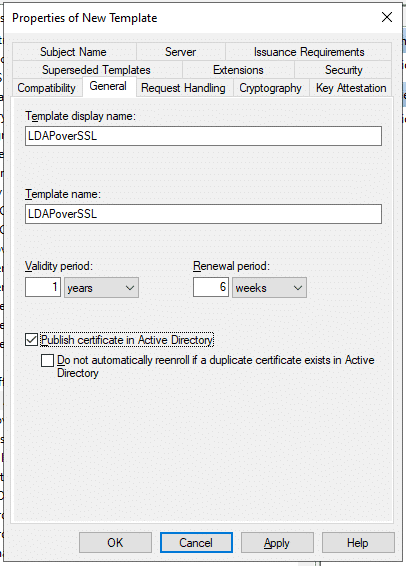
- Change Template Display Name and Template Name on General tab. Check Publish Certificate in Active Directory. This will ensure that the certificate appears when we enrol domain controllers using that template
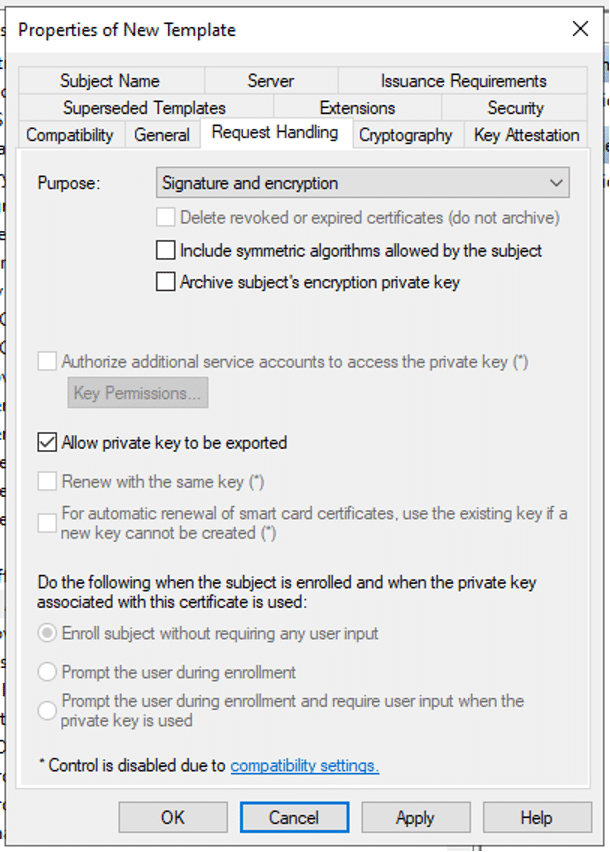
- On Request Handling, check Allow private key to be exported.
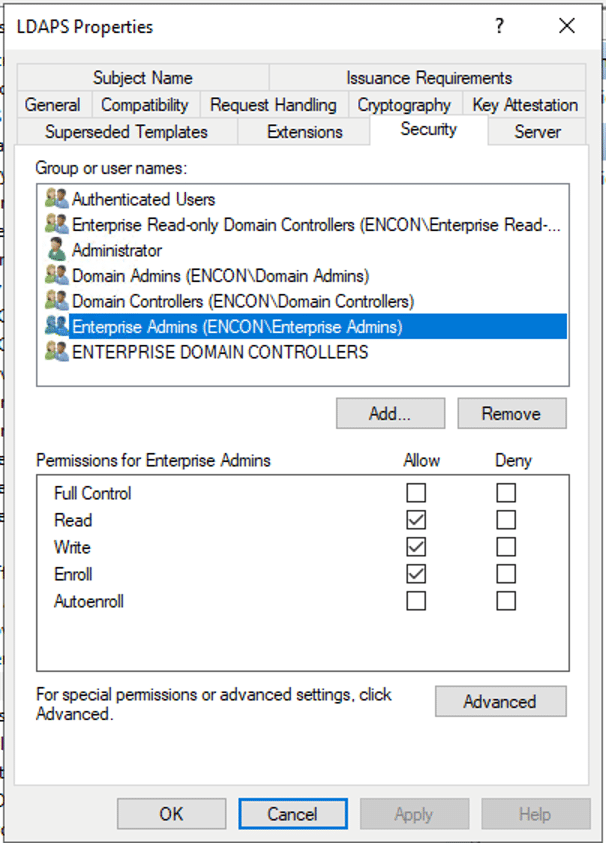
- On the Security tab, provide Enroll permissions to appropriate users
- Click Apply
Issue the Certificate on Issuing CA
- Login to the Issuing CA as enterprise admin
- Ensure you are in Server Manager
- From the Tools menu, open Certificate Authority

Expand the console tree, and click on Certificate Templates
On the menu bar, click Action > New > Certificate Template to Issue
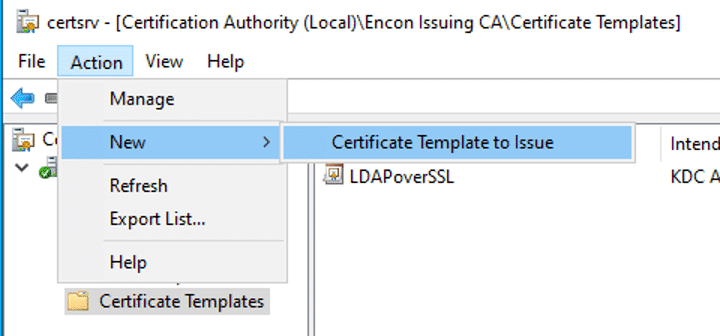
- Choose the LDAPS certificate
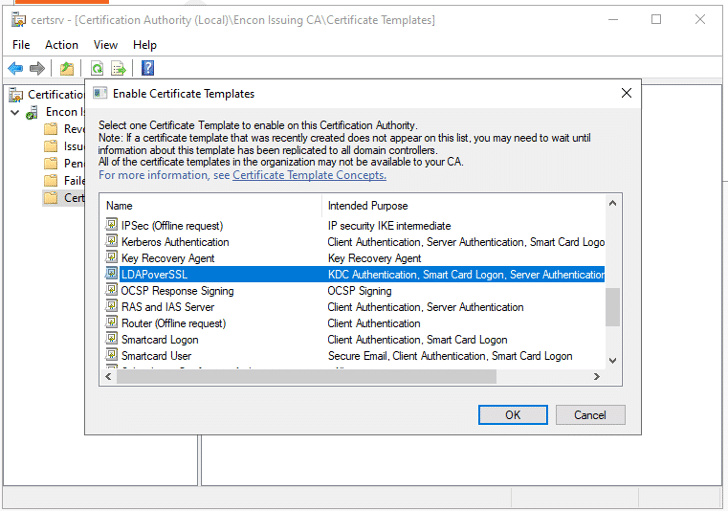
- Click OK and it should now appear in Certificate Templates
Requesting a certificate for Server Authentication
- Log into LDAP server or domain controller.
- Type win+R and run mmc
- Click File and click Add/Remove Snap-in
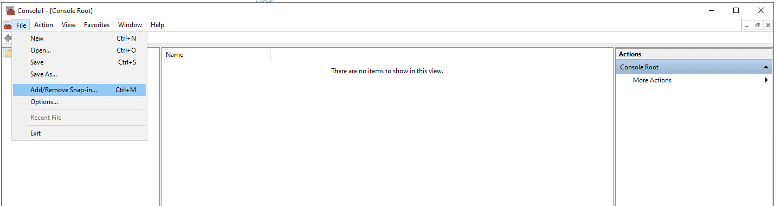
- Choose Certificates and click Add
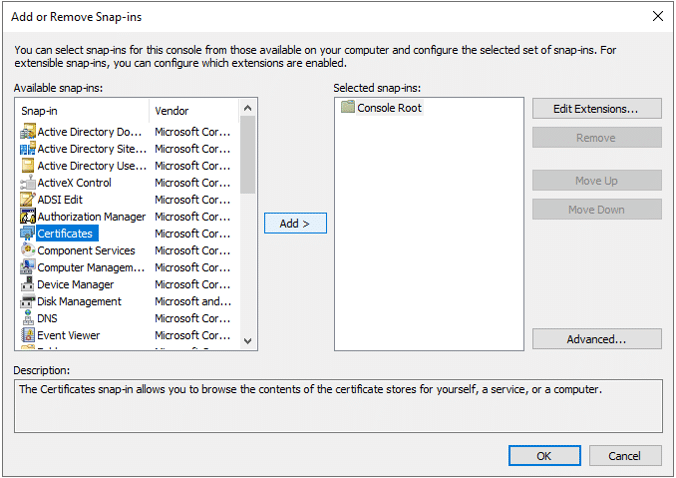
- Choose Computer account
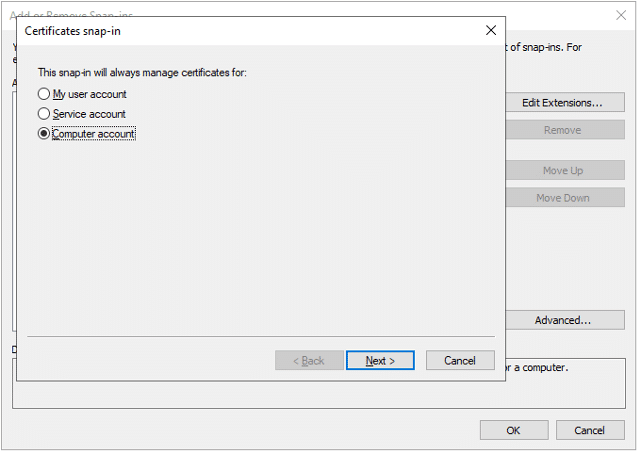
- If the steps are followed on LDAPServer where AD LDS is installed, click Local computer, or choose Another computer and choose where it would need to be installed
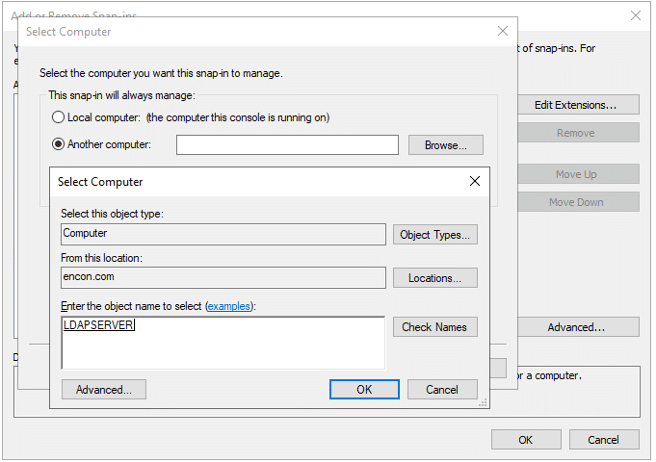
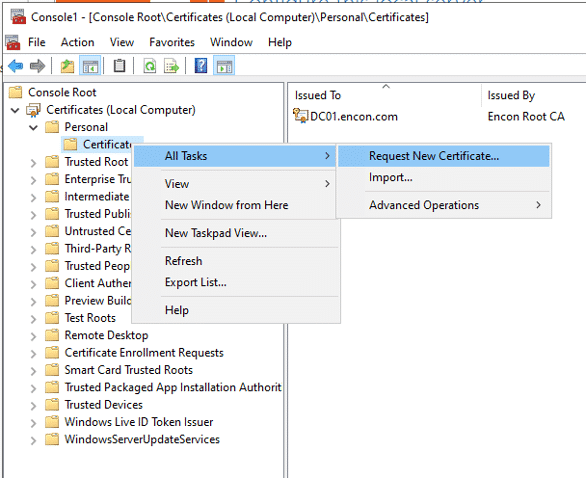
- Expand the console tree, and inside Personal, click Certificates
- Right click on Certificates and click All Tasks and select Request New Certificate
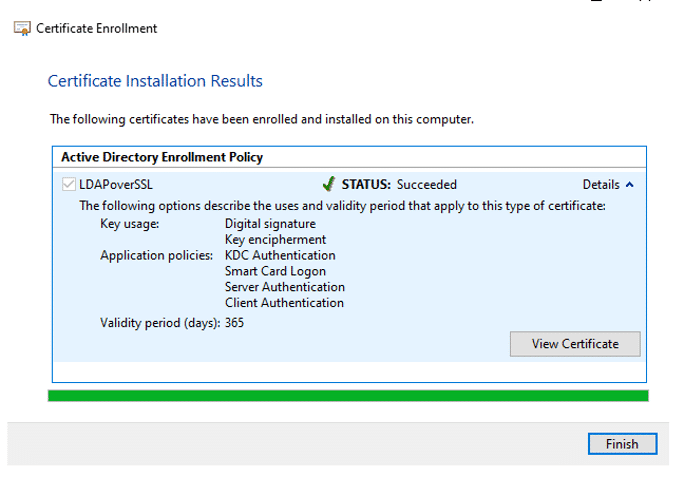
- Follow the instructions, choose LDAPS template that we issued earlier and Install.
- Once Installed click Finish
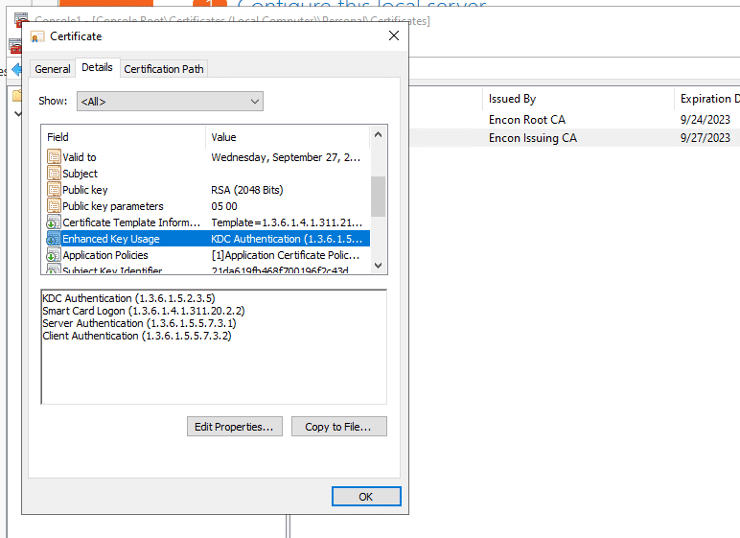
- Open the certificate, and in Details tab, navigate to Enhanced Key Usage to ensure Server Authentication is present.
Validating LDAPS connection
- Login to LDAP Server as Enterprise admin
- Type win+R and run ldp.exe
- On the top menu, click on Connections, and then click Connect
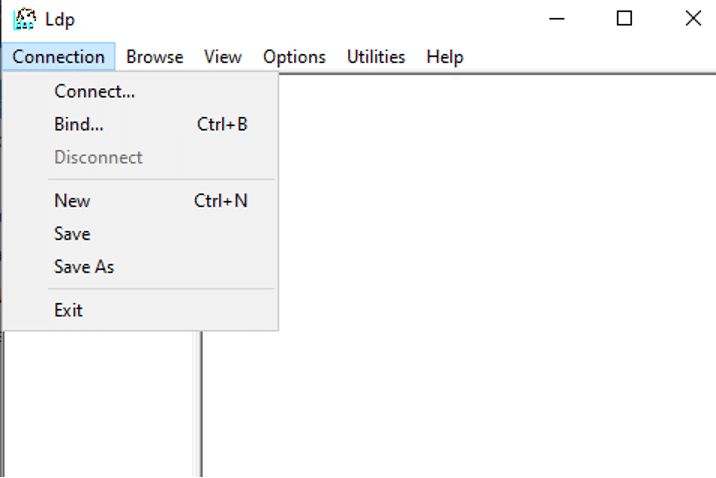
- In server, provide domain name, ensure SSL is checked and proper port is provided and click OK
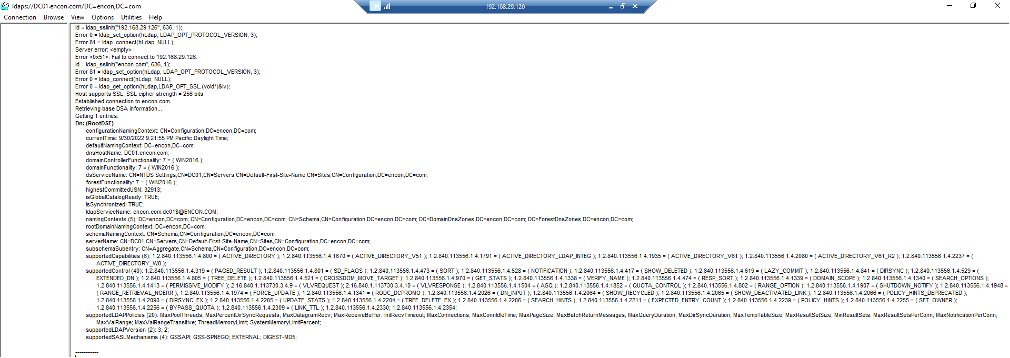
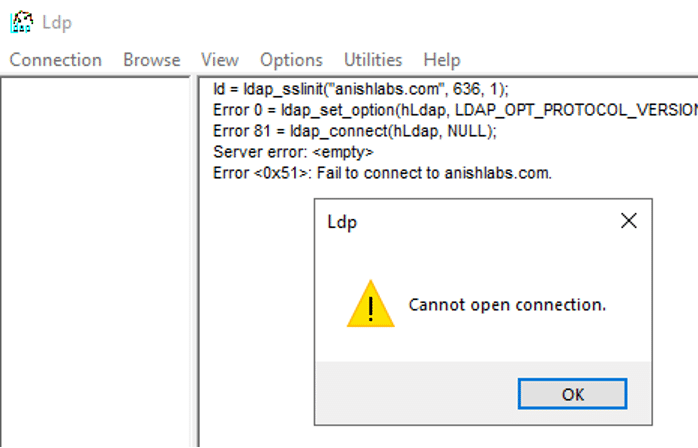
- No errors should appear. If connection was unsuccessful, the following output may appear
Common Errors and How to Fix Them
These are the errors administrators run into most often when enabling LDAPS, and what actually causes them.
Schannel Event 36870 or 36872 (Certificate or Key Problem)
Both events point to a problem with the server certificate itself, not the LDAP configuration. Five causes account for nearly all occurrences: incorrect ACLs on the MachineKeys folder that block the System account from reading the private key, a certificate revocation check that fails because the domain controller cannot reach a CRL or OCSP responder, a broken certificate chain because the root CA is not in the Trusted Root store, a certificate with a missing or mismatched Subject Alternative Name that does not match the domain controller’s DNS name, or an expired certificate. Run certutil -v -verify -urlfetch <cert.cer> under the System context (using psexec -s) to confirm which of the five applies.
ldp.exe Shows “Cannot Open Connection” or “A Local Error Occurred”
This almost always means port 636, or the AD LDS SSL port (50001 by default), is not listening or is blocked by a firewall, or that no valid certificate is bound to the server yet. Confirm the certificate appears in the computer’s Personal store with Server Authentication in its Enhanced Key Usage before troubleshooting the network path.
Certificate Missing the Server Authentication EKU
If the certificate template was duplicated from something other than Kerberos Authentication, or the Extended Key Usage was edited during customization, Schannel will not offer the certificate for LDAPS even if it is correctly bound. Reissue from a template that carries Server Authentication in its Enhanced Key Usage.
Broken Certificate Chain on the Client
LDAPS fails on the client side when the issuing CA’s root is not in that machine’s Trusted Root Certification Authorities store. This is common on non-domain-joined clients, jump boxes, and third-party applications performing LDAP binds. Distribute the root and any intermediate certificates to those machines explicitly rather than assuming domain-joined trust covers them.
CRL or OCSP Retrieval Failures
Domain controllers validate the LDAPS certificate’s revocation status as part of the TLS handshake. If a CRL distribution point or OCSP responder is unreachable, sits behind an authenticating proxy the System account cannot pass through, or is offline, certificate validation fails even though the certificate itself is fine. Enable CAPI2 logging to confirm this is the cause before assuming the certificate is bad.
Rollback Steps
If LDAPS causes an outage or breaks a dependent application, roll back deliberately rather than disabling a security control as a shortcut.
- Check whether the previous certificate is still available, either exported as a backup or still present but superseded. If so, re-bind it in the computer’s Personal store instead of leaving the server without a valid Server Authentication certificate.
- If no prior certificate exists, remove the newly issued certificate from the Personal store and revert the domain controller to LDAP-only until a corrected certificate is ready to reissue.
- If the issue traces to newly enabled LDAP channel binding or signing enforcement, set the relevant registry value back to its previous, less strict setting only long enough to remediate the legacy client or application causing the failure, then re-enable enforcement. Do not leave enforcement permanently relaxed as the fix.
- Re-validate with ldp.exe after every rollback step, and document the root cause before attempting the change again.
- Do not disable certificate revocation checking as a way around a CRL or OCSP failure. Fix connectivity to the revocation endpoint instead, since disabling revocation checking removes the exact control LDAPS is meant to provide.
Quick Reference: Prerequisites, Validation, Errors, and Rollback by Step
Use this table as a working checklist across the rollout, from template design through validation.
| Prerequisite | Command / Configuration | Validation Check | Common Error | Rollback | Owner |
|---|---|---|---|---|---|
| Healthy PKI hierarchy | Run PKIView.msc on each CA | No error icons shown in PKIView | Broken chain or a revoked intermediate | Fix the hierarchy before proceeding; this step has no rollback of its own | PKI Administrator |
| Server Authentication certificate template | Duplicate the Kerberos Authentication template; enable “Publish Certificate in Active Directory” | Template appears in the Certificate Templates console with the correct EKU | Template missing the Server Authentication EKU | Remove the template from “Certificate Templates to Issue” | PKI Administrator |
| Template issued by the CA | Certificate Authority console > Action > New > Certificate Template to Issue | Template is listed under the issuing CA | Template not visible to the requesting server (enrollment permissions) | Right-click the template > All Tasks > Do Not Issue | PKI Administrator |
| Certificate requested and bound on the server | mmc > Certificates (Computer account) > Request New Certificate | Certificate appears in the Personal store with Server Authentication in Enhanced Key Usage | Schannel event 36870 or 36872 (ACL, chain, SAN, or expiry issue) | Remove the certificate from the Personal store; restore the previous certificate if one existed | Platform / Identity Team |
| LDAPS connectivity validated | ldp.exe > Connection > Connect (SSL checked, port 636 or 50001) | Connects with no error dialog | “Cannot open connection” (port blocked or no certificate bound) | Revert the firewall rule, or re-bind the previous certificate | Platform / Identity Team, with Network Team |
| Channel binding / LDAP signing enforcement (optional hardening) | Set the LdapEnforceChannelBinding registry value | Legacy LDAP clients still authenticate after enforcement | Legacy applications break under strict enforcement | Set enforcement back to a permissive value temporarily while remediating the client application | Security Architect |
How Enabling LDAPS Connects to Certificate Lifecycle Management
The LDAPS certificate bound to a domain controller is not a special case. It is one more short-lived, renewable certificate that will expire, need rotation, and eventually need reissuing against a new template or algorithm. Treating it as a one-time setup task is exactly the manual pattern that produces certificate-related outages elsewhere in the environment: DigiCert’s Trust Pulse Survey, published July 2, 2025, found that 45% of enterprises experienced certificate-related downtime in the past year, with 37.5% of those incidents caused specifically by an expired certificate. A domain controller losing its LDAPS certificate silently is the same failure mode with a more disruptive blast radius, since every LDAP-dependent application and login path behind that DC is affected at once.
Certificate lifecycle management platforms such as CertSecure Manager close this gap by discovering every certificate bound across your domain controllers and AD LDS instances, tracking expiration centrally, and automating renewal before an administrator has to notice a Schannel error first. If you are already modernizing certificate operations elsewhere in the environment, see how PKI modernization and CLM work together and how a combined PKI and CLM roadmap accounts for exactly this kind of internal, non-public certificate.
LDAPS in Cloud, Hybrid, and Multi-CA PKI Environments
Domain controllers hosted in Azure, AWS, or a hybrid Active Directory footprint still need a certificate issued by a CA that every connecting client trusts, which gets harder as domain controllers spread across regions and network boundaries. Multi-CA hierarchies, where regional issuing CAs each publish their own Server Authentication template, need every template and every issuing CA to chain back to the same trusted root, or clients in one region will fail LDAPS validation against a DC in another.
For organizations running domain controllers across multiple regions or cloud providers, centralizing certificate issuance through a PKI-as-a-Service model removes the need to replicate template configuration and CA trust by hand at every site, and gives every issuing CA in a multi-CA hierarchy a consistent policy to enforce.
Measuring Success and What to Audit Regularly
A successful LDAPS rollout is not just “it connected once.” Audit these on a recurring schedule, not only during initial setup:
- Certificate expiration dates on every domain controller and AD LDS instance’s LDAPS binding, with alerting well before expiry
- Schannel and CAPI2 event logs for TLS or certificate validation failures, not just outright connection failures
- CRL and OCSP reachability from every domain controller, including through any proxy in the path
- Which clients or applications still fall back to unencrypted simple bind on port 389 after LDAPS is available
- Whether LDAP channel binding and signing enforcement is configured as intended, and which legacy clients would break if enforcement were tightened
A cryptographic asset inventory such as CBOM Secure extends this same discipline beyond LDAPS certificates to every key, certificate, and algorithm in the environment, so nothing is discovered for the first time during an outage.
Longer term, treat the Server Authentication certificate template the same way you would treat any certificate profile facing an eventual algorithm transition. NIST finalized its first three post-quantum cryptography standards, FIPS 203, FIPS 204, and FIPS 205, on August 13, 2024. Internal PKI templates used for infrastructure like domain controllers are exactly the kind of long-lived, easy-to-forget certificate profile that needs a crypto-agility plan before that transition reaches internal systems. Encryption Consulting’s PQC Center of Excellence and a PQC readiness assessment are the right place to build that crypto-agility roadmap.
Encryption Consulting’s Take
Most LDAPS outages we see are not caused by a misunderstood concept. They are caused by a certificate that was issued once, worked, and was never looked at again until it expired or a CAPI2 log started filling up with revocation failures. The fix is not a better one-time walkthrough, the steps above hold up fine. It is making sure this certificate is visible in whatever system already tracks certificate expiration for the rest of your PKI, instead of living only in the memory of whoever set it up. If you are running more than a handful of domain controllers, that means a lifecycle tool, not a spreadsheet someone forgets to open.
Conclusion
Following the steps above enables LDAPS and properly protects credentials used in your PKI environment, along with any other application that can take advantage of encrypted LDAP. Treat the certificate you just issued as a managed asset from day one: track its expiry, watch for Schannel and CAPI2 errors, and keep the rollback plan on hand rather than improvising one during an outage.
If you need help with your PKI environment, feel free to email us at [email protected].
Frequently Asked Questions
What is the main takeaway from enabling LDAPS with Microsoft PKI?
LDAPS replaces unencrypted LDAP simple binds with a TLS-protected connection, using a Server Authentication certificate issued from your Microsoft PKI and bound to each domain controller or AD LDS instance. Once bound, that certificate needs the same ongoing management as any other certificate in your environment.
Why does this matter for enterprise PKI teams?
Unencrypted LDAP simple binds send domain credentials in clear text, and directory traffic touches nearly every identity-dependent application in an enterprise. PKI teams that skip LDAPS leave a wide, well-known credential exposure open across the network, one that a basic packet capture can exploit.
What risks increase if this topic is handled manually?
Manual handling means the LDAPS certificate’s expiration is tracked nowhere except institutional memory, templates drift between domain controllers, private keys are not consistently marked exportable for backup, and nobody is watching Schannel or CAPI2 logs until an outage forces the issue.
Which teams should own this change?
PKI administrators own the certificate template and issuance. Platform or identity teams manage the domain controller binding and day-to-day operation. Security architects decide on channel binding and LDAP signing enforcement. Compliance and CISOs track it as part of the broader certificate risk program.
How does this connect to certificate lifecycle management?
The LDAPS certificate is one more asset that needs discovery, expiration tracking, and automated renewal. Certificate lifecycle management tools like CertSecure Manager apply the same automation to domain controller certificates that they apply to public TLS certificates, closing the gap that manual, one-time issuance leaves open.
How should organizations measure success?
Success looks like zero unplanned LDAPS outages, every domain controller holding a valid certificate with the correct Server Authentication EKU well ahead of expiry, ldp.exe validation passing without Schannel or CAPI2 errors, and channel binding or LDAP signing enforced without breaking legacy clients.
What should be audited or monitored regularly?
Audit certificate expiration on every LDAPS binding, Schannel events in the 36870 to 36888 range, CRL and OCSP reachability from each domain controller, which clients still fall back to unencrypted port 389, and whether channel binding enforcement matches your documented policy.
How does this topic affect cloud, hybrid, or multi-CA PKI?
Domain controllers in cloud or hybrid deployments still need a certificate from a CA every client trusts, which is harder to guarantee across regions and network boundaries. Multi-CA hierarchies need every regional issuing CA’s template to chain to the same trusted root, or LDAPS validation will fail for clients in a different region than the domain controller.
What prerequisites are required before implementation?
You need a healthy PKI hierarchy with no errors in PKIView.msc, an issuing CA reachable from every target server, enterprise admin rights, a certificate template that carries the Server Authentication EKU, and open network access to port 636 (or 50001 for AD LDS).
What common errors should administrators watch for?
Watch for Schannel events 36870 and 36872 from a bad certificate, key ACL, chain, SAN, or expiry issue; ldp.exe connection failures from a blocked port or missing certificate; a certificate missing the Server Authentication EKU; a broken trust chain on the client; and CRL or OCSP retrieval failures during the TLS handshake.
- Key Takeaways
- Who Should Care About Enabling LDAPS
- Prerequisites
- Installing AD LDS
- Configuring AD LDS
- Publishing a certificate that supports Server Authentication
- Issue the Certificate on Issuing CA
- Requesting a certificate for Server Authentication
- Validating LDAPS connection
- Common Errors and How to Fix Them
- Rollback Steps
- Quick Reference: Prerequisites, Validation, Errors, and Rollback by Step
- How Enabling LDAPS Connects to Certificate Lifecycle Management
- LDAPS in Cloud, Hybrid, and Multi-CA PKI Environments
- Measuring Success and What to Audit Regularly
- Encryption Consulting's Take
- Conclusion
- Frequently Asked Questions
- What is the main takeaway from enabling LDAPS with Microsoft PKI?
- Why does this matter for enterprise PKI teams?
- What risks increase if this topic is handled manually?
- Which teams should own this change?
- How does this connect to certificate lifecycle management?
- How should organizations measure success?
- What should be audited or monitored regularly?
- How does this topic affect cloud, hybrid, or multi-CA PKI?
- What prerequisites are required before implementation?
- What common errors should administrators watch for?


