- What Is the "Certbot" Silo Problem?
- Centralized ACME Orchestration Is the Solution You Need!
- CertSecure Manager’s Automation Workflow for Let’s Encrypt
- CertSecure Manager’s Dashboard Metrics Give Governance Insights at a Glance
- Why This Matters for the Enterprise
- How Encryption Consulting Helps
- Conclusion
Over the past several years, in nearly every enterprise PKI assessment we’ve conducted, a familiar pattern continues to appear. The security team has a tight grip on their paid, high-assurance certificates from authorities like DigiCert or GlobalSign. They have inventories, expiration alerts, and budget approvals.
But when we run a discovery scan on their development environments, cloud load balancers, and lower-tier web servers, we find a massive blind spot in the widespread, unmanaged use of free Let’s Encrypt Certificates.
Let’s Encrypt has revolutionized the internet by making SSL/TLS free and accessible via the ACME protocol. However, in the enterprise, it often creates “Shadow PKI.” Developers spin up certbot on individual servers, set up cron jobs, and forget about them. There is no central visibility. If a cron job fails, the certificate expires, the service goes down, and the SecOps team has no idea why, or even that the certificate existed in the first place.
With the release of CertSecure Manager v3.2, we are changing that dynamic. We are bringing the “Wild West” of Let’s Encrypt under the same governance umbrella as your premium OV/EV certificates.
Here is how we are doing it, and why this integration is a game-changer for your operational sanity.
What Is the “Certbot” Silo Problem?
The standard way to use Let’s Encrypt is to install an ACME client (like Certbot) directly on the endpoint.
- The Issue: This creates thousands of isolated operational islands. Each server manages its own renewal logic. There is no centralized reporting to indicate whether a validation failed or a cron job was deleted during a patch cycle.
- The Risk: When you manage thousands of 90-day certificates (and with the industry moving toward 47 days), “set it and forget it” eventually becomes “it broke, and we don’t know why.”
Centralized ACME Orchestration Is the Solution You Need!
CertSecure Manager v3.2 introduces native Let’s Encrypt Integration. Instead of every server talking to Let’s Encrypt independently, CertSecure Manager acts as the centralized ACME command center.
It handles account binding, challenge validation (e.g., DNS-01) with your domain providers (e.g., Cloudflare, Amazon Route 53, Linode, and others), and certificate retrieval. Then, it uses our established Renewal Agents to push those certificates to the target infrastructure.
This gives you a Unified Dashboard. You can now see a free Let’s Encrypt certificate used on a dev server right next to the high-value DigiCert certificate used on your corporate websites.
CertSecure Manager’s Automation Workflow for Let’s Encrypt
Let’s look at how this works in practice, specifically for complex endpoints like F5 Load Balancers and IIS Web Servers, which are notoriously difficult to automate with standard Certbot scripts.
-
One-Click Integration Setup
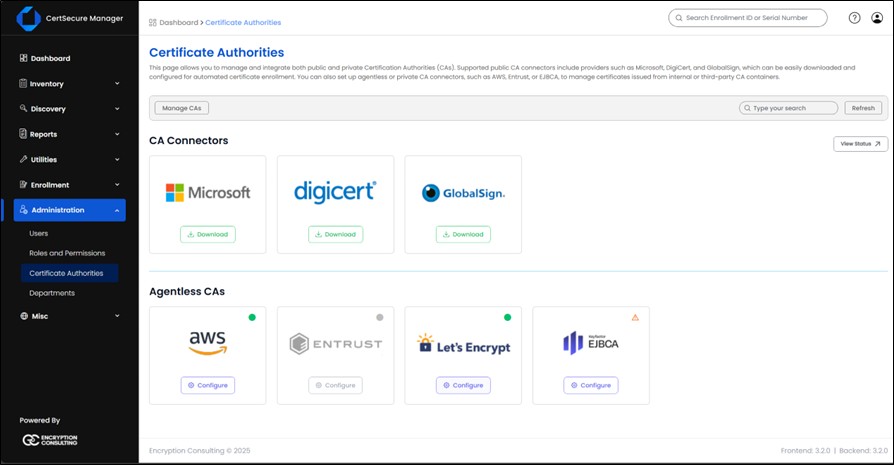
In v3.2, adding Let’s Encrypt is no longer a script-heavy process.
- Navigate to Administration > Certificate Authorities.
- Click on Let’s Encrypt from the available list.
- Onboard the required ACME URL. For Let’s Encrypt, type in https://acme-v02.api.letsencrypt.org/directory
- Click on Let’s Encrypt from the available list.
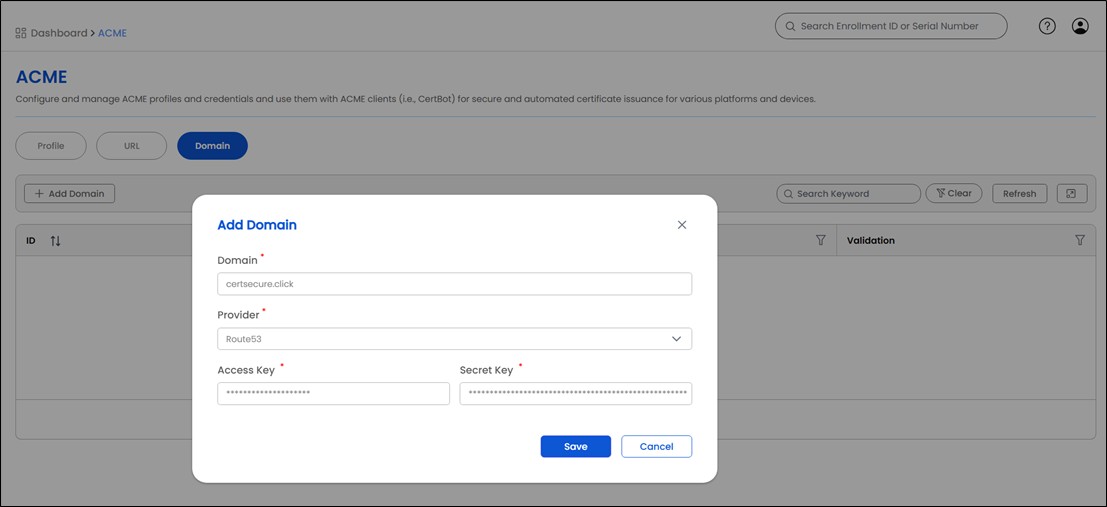
- Onboard your domains in the next “Domain” tab.
- CertSecure automatically initiates the domain validation process with your provider. Depending on the vendor, auto-validation can take 1-3 minutes.
- Once validation is completed, the domain will be available for certificate requests.



-
Certificate Automation with CertSecure Renewal Agents
This is where the heavy-lifting happens. We don’t just get the certificate; we apply and bind it to your target appliances.
-
F5 BIG-IP Load Balancers- Many organizations use Let’s Encrypt digital certificates on their F5 devices, but manually getting a certificate, importing it to the F5 device, and then updating the corresponding F5 SSL profile is already tedious and becomes unmanageable with shorter certificate lifecycles.
- The Workflow: CertSecure Manager requests the cert from Let’s Encrypt. Once issued, our F5 Renewal Agent pushes the new cert and key to the specific F5 partition and updates the onboarded SSL Profile.
- The Result: You get free, automated SSL on your load balancer without having to install and bind it every time manually.
- Web Servers (IIS / Apache / Nginx / Tomcat)- CertSecure Manager also provides seamless certificate automation for your web servers. Once a Let’s Encrypt certificate is issued, our agent handles deployment end-to-end—delivering the new certificate, updating the server’s SSL configuration, and ensuring it’s activated with no manual steps required. This gives you fully automated, consistently renewed TLS across your entire web server environment.
We have recently recorded a detailed walkthrough of this F5 setup. You can see exactly how the certificate renewal and binding work in the video below:
-
F5 BIG-IP Load Balancers- Many organizations use Let’s Encrypt digital certificates on their F5 devices, but manually getting a certificate, importing it to the F5 device, and then updating the corresponding F5 SSL profile is already tedious and becomes unmanageable with shorter certificate lifecycles.
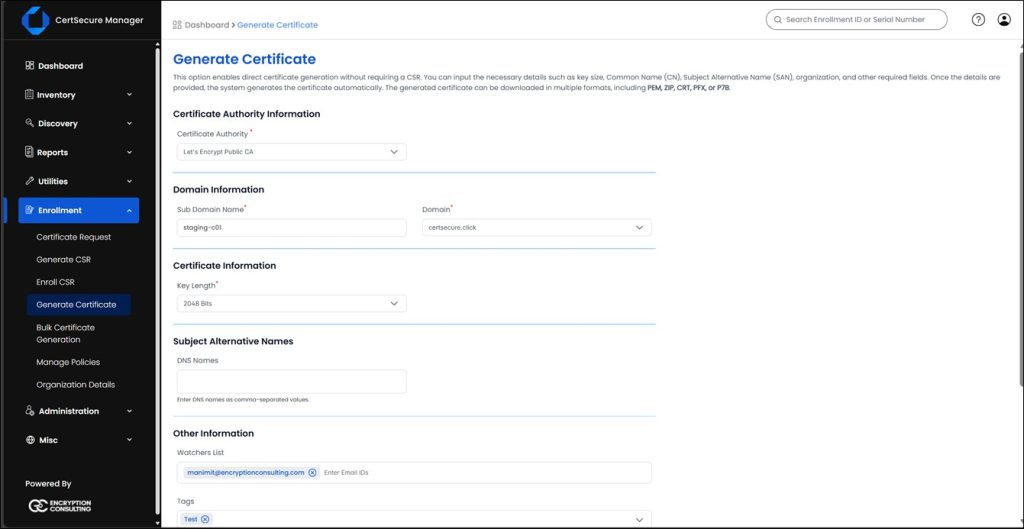
CertSecure Manager also allows you to request a Let’s Encrypt certificate manually from the CLM Platform from the Enrollment > Generate Certificate tool. You can always view, download, and use these certificates for any manual requirements in your organization.
CertSecure Manager’s Dashboard Metrics Give Governance Insights at a Glance
The v3.2 update integrates Let’s Encrypt Public Certificate issuance data directly into CertSecure Manager’s centralized reporting engine. Since these certificates cycle every 60-90 days, relying on scattered emails, Excel files, or cron logs is insufficient and inefficient at scale.
CertSecure Manager provides certificate insights and alerts:
- Unified KPI Dashboard: View your Let’s Encrypt inventory alongside your paid certificates. The dashboard features 12 distinct KPIs, highlighting critical metrics like Active, Expired, Pending, and High-Risk certificates in a single view. This ensures that no “free” certificate becomes a costly, unmonitored point of failure.
- Expiration Alerts: Instead of relying on a developer’s personal email to catch renewal failures, CertSecure integrates directly with ITSM tools like ServiceNow, Microsoft Teams, and your organization’s SMTP. You receive automated notifications 7, 30, or 60 days before a Let’s Encrypt certificate expires, ensuring your team is alerted to potential failures well before impact.
Why This Matters for the Enterprise
This integration allows you to adopt a Tiered Certificate Strategy without fragmenting your management tools:
- Tier 1 (Public Trust/High Value): Use Paid CAs (DigiCert/Entrust) managed by CertSecure.
- Tier 2 (Internal Trust): Use Microsoft CA / AWS Private CA managed by CertSecure.
- Tier 3 (Public Trust/Low Value): Use Let’s Encrypt managed by CertSecure.
You get the cost benefits of Let’s Encrypt with the governance rigor of an enterprise CLM Solution.
How Encryption Consulting Helps
Addressing “Shadow PKI” is less about software and more about having the right strategy. CertSecure Manager provides the technical controls, and Encryption Consulting ensures they’re implemented effectively across your enterprise.
- Establish a Trust Strategy: We help classify assets and define where Let’s Encrypt fits versus where higher-assurance CAs are needed – turning informal usage into a clear Tiered Certificate Policy.
- Ensure Smooth Implementation: Our engineers deploy CertSecure Manager, configure ACME integrations, and optimize renewal workflows to maintain uptime during the transition.
- Align Security and DevOps: We integrate CertSecure APIs into existing CI/CD pipelines (Jenkins, Ansible, Terraform) to preserve delivery speed while strengthening governance.
- Provide Managed PKI: Our PKIaaS team can operate your certificate lifecycle infrastructure with 24/7 monitoring and expert support.
If your organization needs better visibility and governance over certificate usage, it’s time to centralize. Contact us for a demo and start building a resilient, automated PKI foundation.
Conclusion
By centralizing Let’s Encrypt management with CertSecure Manager v3.2, your enterprise can eliminate blind spots and operational chaos caused by unmanaged certificates. The combination of automated ACME workflows, renewal agents, and a unified dashboard ensures that every certificate, whether free or paid, is tracked, renewed, and deployed correctly. This not only reduces the risk of unexpected outages but also strengthens overall PKI governance, giving security and DevOps teams confidence that their SSL/TLS infrastructure is reliable, compliant, and easy to manage at scale.
- What Is the "Certbot" Silo Problem?
- Centralized ACME Orchestration Is the Solution You Need!
- CertSecure Manager’s Automation Workflow for Let’s Encrypt
- CertSecure Manager’s Dashboard Metrics Give Governance Insights at a Glance
- Why This Matters for the Enterprise
- How Encryption Consulting Helps
- Conclusion