
- What Is Certificate Automation?
- Why Successful Certificate Automation Does Not Guarantee Successful Deployment
- The Missing Step in Certificate Automation: Continuous Certificate Verification
- Common Gaps in Certificate Automation
- Addressing the Missing Step in Certificate Automation
- How Encryption Consulting Can Help
- Conclusion
- Frequently Asked Questions (FAQs)
Certificate automation has transformed how organizations manage digital certificates. Activities such as certificate enrollment, issuance, renewal, and deployment can now be automated, reducing manual effort and the risk of human error.
However, certificate automation does not always guarantee success. The missing step in certificate automation is continuous verification, which ensures that renewed certificates are not only issued and deployed but are also actively used and trusted by the intended applications.
Many Java applications using a default keystore configuration read it only at startup. A renewal job drops the new certificate into the keystore, the platform logs “success”, and the application keeps serving the old certificate until someone restarts it. Nothing alerts, and the dashboard stays green. The same pattern shows up in Kubernetes workloads that load a certificate Secret at startup, and in gateways and proxies that need a manual reload. This creates a critical gap between what automation reports and what is actually happening across the infrastructure.
As certificate lifetimes become shorter and IT environments increasingly distributed, organizations must move beyond basic certificate automation. They must also verify that certificates are correctly deployed, actively used, and trusted by the systems relying on them.
The pressure is already here. Under CA/Browser Forum Ballot SC-081v3, the maximum validity of public TLS certificates dropped to 200 days on 15 March 2026. It falls to 100 days on 15 March 2027 and to 47 days on 15 March 2029. Domain control validation (DCV) reuse shrinks on the same schedule, to just 10 days by 2029, so validation also has to be automated. At 47 days, each endpoint needs roughly eight renewals a year instead of one, so every chance for a silent deployment failure comes up roughly eight times as often.
What Is Certificate Automation?
Certificate automation uses software and integrations to manage activities throughout a certificate’s lifecycle with minimal manual intervention.
A typical certificate lifecycle includes:
- Discovery: Identifying certificates across servers, applications, and infrastructure.
- Enrollment and Issuance: Requesting and obtaining certificates from Certificate Authorities (CAs).
- Deployment: Installing certificates on their intended endpoints.
- Monitoring: Tracking certificate validity, expiration, and status.
- Renewal: Replacing certificates before they expire.
- Revocation: Invalidating certificates before expiry when they are compromised or no longer required.
Although automation simplifies these processes, the missing step in certificate automation is ensuring that every stage succeeds. For example, a CA may issue a renewed certificate successfully, but a failed service reload may prevent the application from using it.
This makes verification the missing step in certificate automation.
Why Successful Certificate Automation Does Not Guarantee Successful Deployment
Consider an organization managing multiple web servers through a certificate automation platform.
When a certificate approaches expiration, the platform automatically requests a replacement. The CA issues the new certificate, and the platform transfers it to the intended server.
However, the web server requires a configuration reload before it starts using the replacement certificate. If that operation fails, the server continues presenting the old certificate. The automation platform reports success, but the missing step in certificate automation leaves the actual certificate state unchanged.
Similar problems can occur due to:
- Service reload failures: Applications continue using previously loaded certificates.
- Incorrect certificate binding: The new certificate is installed but not associated with the correct application or listener.
- Partial deployment: Some servers receive the renewed certificate while others do not.
- Incomplete certificate chains: Required intermediate certificates are missing.
- Configuration inconsistencies: Certificates are installed in incorrect stores or locations.
Certificate failures are rarely small. In December 2018, an expired certificate in Ericsson software used by mobile operators took down data services for O2 in the UK and SoftBank in Japan, across networks in 11 countries. In the 2017 Equifax breach, an expired certificate on a traffic inspection device meant encrypted traffic went uninspected for months, which let attackers exfiltrate data unnoticed. In both cases an expired certificate went unnoticed, because nobody had visibility into its real state. Neither was a deployment failure, which is why checking the live endpoint matters as much as checking the deployment.
These failures went unnoticed because no one was checking what the endpoints were actually presenting. Tracking issuance and expiry dates is not enough without independent verification.
The Missing Step in Certificate Automation: Continuous Certificate Verification
The missing step in certificate automation is making verification an integral part of the certificate lifecycle.
Organizations should distinguish between three stages:
- Issued: The CA has successfully generated the certificate.
- Deployed: The certificate has been installed on its intended endpoint.
- Active: The application or service is actually presenting the new certificate during connections.
Addressing the missing step in certificate automation means ensuring that deployed certificates become active.
To address the missing step in certificate automation, organizations should implement continuous verification practices that confirm the actual state of certificates across their infrastructure.
1. Endpoint-Level Verification
Perform TLS handshakes against the intended endpoints to retrieve the certificate currently being presented. Compare its fingerprint, serial number, Subject Alternative Names (SANs), and validity period with the expected certificate.
For example, OpenSSL can retrieve the certificate presented by an HTTPS endpoint:
openssl s_client -connect example.com:443 -servername example.com </dev/null 2>/dev/null | openssl x509 -noout -subject -issuer -serial -dates -fingerprint -sha256 -ext subjectAltName
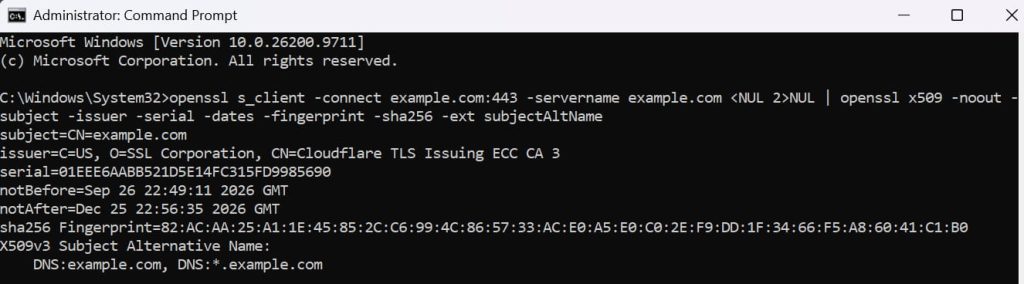
This command demonstrates the missing step in certificate automation by retrieving certificate details from the live TLS endpoint.
2. Certificate Chain Validation
The missing step in certificate automation also involves verifying that certificates chain to the expected trusted root CA and include the required intermediate certificates. Check revocation status using the Certificate Revocation List (CRL) published at the certificate’s CRL Distribution Point (CDP).
To confirm the server presents a complete chain that leads to the root you expect, run:
echo | openssl s_client -connect example.com:443 -servername example.com -CAfile /path/to/expected-root.pem -verify_return_error 2>&1 | grep -E “Verification|Verify return code”
Verify return code: 0 (ok) means the chain is complete and trusted. An error such as “unable to get local issuer certificate” usually means the server isn’t sending its intermediate.
To check revocation with the CRL, first save the certificate the server presents and find its CDP:
echo | openssl s_client -connect example.com:443 -servername example.com 2>/dev/null | openssl x509 -outform PEM > leaf.pem
openssl x509 -in leaf.pem -noout -ext crlDistributionPoints
Download the CRL from the URL shown and convert it to PEM, since CRLs are usually published in DER format:
curl -s -o ca.crl http://<CDP-URL-from-above>
openssl crl -inform DER -in ca.crl -out ca-crl.pem
Then verify the certificate against the CRL:
openssl verify -crl_check -CAfile root.pem -untrusted intermediate.pem -CRLfile ca-crl.pem leaf.pem

leaf.pem: OK means the certificate is not on the CRL. certificate revoked means it is. Use -crl_check_all to check every certificate in the chain, which needs a CRL for each CA.
3. Service Health Checks
Address the missing step in certificate automation by confirming that applications and web servers are accepting connections using the updated certificate. Reloading a service is a remediation step, not proof. If a reload is needed, validate and reload first:
sudo nginx -t && sudo systemctl reload nginx
Then confirm that the endpoint is actually serving the new certificate by comparing the live fingerprint with the file you deployed:
echo | openssl s_client -connect example.com:443 -servername example.com 2>/dev/null | openssl x509 -noout -serial -fingerprint -sha256
openssl x509 -in /etc/nginx/ssl/example.com.crt -noout -serial -fingerprint -sha256

If the two fingerprints match, the certificate is active. If they don’t, the endpoint isn’t serving the deployed certificate; check the reload, the binding, and anything in front of the server.
4. Per-Node Verification
The missing step in certificate automation requires verifying every server individually in distributed environments. A successful deployment on one node does not guarantee that all other nodes have received the update.
For example, administrators can inspect the certificate presented by individual servers using:
for ip in 10.0.1.11 10.0.1.12 10.0.1.13; do
echo “== $ip”
echo | openssl s_client -connect $ip:443 -servername example.com 2>/dev/null \
| openssl x509 -noout -serial -enddate -fingerprint -sha256
done
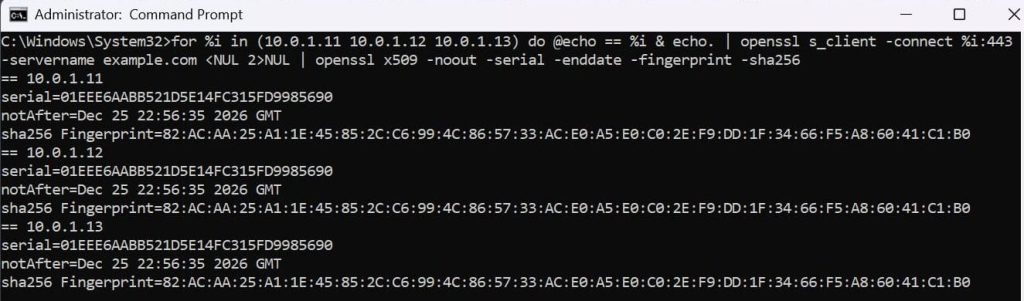
Note: No output means the handshake failed. Remove 2>/dev/null to see the error.
Connecting to each node’s IP and passing the hostname through -servername bypasses the load balancer, so you see what each server presents. Note that back-end nodes behind a load balancer or TLS-terminating proxy may not present the public certificate at all, so decide first which tier you expect to carry it (edge nodes, back ends, or both) and check that tier. Repeat the check for every SAN/SNI name the node serves, since each can map to a different certificate, and for IPv6 addresses where they are used, for example -connect [2001:db8::11]:443. Every node expected to present the public certificate should return the same serial number and fingerprint.
5. Continuous Monitoring
Verification only works if it keeps running. After every renewal, and on a schedule in between, probe each endpoint, compare the presented certificate with the expected one, and alert on any mismatch or on certificates close to expiry.
For example, on Linux a cron job can run the handshake check from Practice 1 and compare the fingerprint with the expected value:
echo | openssl s_client -connect example.com:443 -servername example.com 2>/dev/null | openssl x509 -noout -fingerprint -sha256 | grep -q “<EXPECTED-FINGERPRINT>” || echo “MISMATCH: example.com”

Also watch Certificate Transparency (CT) logs with a monitor such as crt.sh or Cert Spotter. They alert you when a certificate is issued for your domains that you didn’t request.
Done manually, these checks don’t scale to a 47-day lifecycle. They need to run automatically after every renewal.
Common Gaps in Certificate Automation
Even organizations with established automation processes can overlook important aspects of certificate management. These gaps highlight why the missing step in certificate automation cannot be addressed through issuance and renewal workflows alone. Organizations need independent checks to confirm that certificates are functioning correctly across their environments.
1. Treating Issuance as Completion
Organizations often consider a certificate lifecycle operation successful once the CA issues the replacement certificate.
What organizations should do: Extend certificate automation workflows to include deployment confirmation and endpoint verification.
2. Relying Only on Centralized Inventory
A certificate inventory provides visibility into certificate ownership and expiration, but may not reflect the certificate currently presented by a running application.
What organizations should do: Combine centralized inventory with endpoint-level discovery and verification.
3. Overlooking Distributed Infrastructure
Different servers, load balancers, and cloud environments may have different deployment configurations. A successful update on one endpoint does not guarantee consistency across the infrastructure.
What organizations should do: Implement per-endpoint verification and centralized monitoring.
4. Insufficient Post-Deployment Monitoring
Monitoring expiration dates alone does not identify failed deployments, incorrect configurations, or applications continuing to use outdated certificates.
What organizations should do: Monitor certificate status and application behavior after every renewal and deployment.
Addressing the Missing Step in Certificate Automation
Organizations should measure certificate automation success not only through successful issuance and renewal operations but also through the actual state of deployed certificates.
A verification-driven lifecycle should cover the following stages:
Discover → Request → Issue → Deploy → Activate → Verify → Monitor → Renew → Revoke/Retire
Each stage should have a defined outcome.
| Stage | Expected Outcome |
| Discover | Certificates and endpoints are identified. |
| Request | The request reaches the CA and is approved under policy. |
| Issue | The intended CA issues the certificate. |
| Deploy | The certificate reaches the correct endpoint. |
| Activate | The application starts using the updated certificate. |
| Verify | The endpoint presents the expected certificate and trust chain. |
| Monitor | Certificate status and expiration are continuously tracked. |
| Renew | The cycle repeats before expiration. |
| Revoke/Retire | Compromised or unneeded certificates are revoked and removed from endpoints. |
When verification fails: If the previous certificate is still valid and not compromised, roll back to it so the endpoint stays up, then retry the deployment. If the retry fails, escalate to the endpoint’s named owner, because the PKI team usually can’t fix an application’s reload or binding on their own. Every endpoint should have an owner and a defined time limit for resolution, so a failed verification can’t go unnoticed.
Organizations should also track metrics such as:
- Time from issuance to verified-active.
- Percentage of renewals that are automatically verified.
- Number of endpoints presenting outdated certificates.
- Certificate renewal, deployment and verification failure rates.
- Average time to resolve certificate-related incidents.
- Percentage of managed endpoints covered by monitoring.
These indicators help measure whether the missing step in certificate automation is being addressed effectively.
How Encryption Consulting Can Help
Encryption Consulting helps organizations strengthen certificate lifecycle management through CertSecure Manager, its centralized Certificate Lifecycle Management (CLM) platform. By combining centralized certificate lifecycle management with effective verification practices, organizations can address the missing step in certificate automation and gain greater confidence in their certificate infrastructure.
CertSecure Manager supports certificate discovery, enrollment, issuance, deployment, renewal, revocation, and monitoring across public and private Certificate Authorities.
Key capabilities include:
Centralized Certificate Discovery
Provides visibility into certificates across infrastructure, helping organizations identify unmanaged certificates and maintain an accurate inventory.
Automated Certificate Lifecycle Management
Automates enrollment, deployment, and renewal workflows, reducing manual intervention and administrative overhead.
Infrastructure Integrations
Supports certificate deployment across different infrastructure environments, helping organizations manage certificates consistently.
Monitoring and Alerts
Helps administrators track certificate validity, expiration, and lifecycle activities through centralized monitoring and reporting.
Access Control and Policy Enforcement
Supports role-based access control and approval workflows to establish accountability and ensure certificate operations follow organizational policies.
These capabilities provide a foundation for a more centralized and controlled certificate management environment.
Conclusion
The missing step in certificate automation is verifying that certificates are actually active and trusted after issuance and deployment. While certificate automation is essential for managing complex environments and shrinking validity periods, successful issuance or deployment logs alone do not prove that an application is using the correct certificate.A renewed certificate can sit unused, an expired one can keep being served, and individual nodes can be missed without any alert. At 47-day lifetimes, these silent failures will come up far more often, so verification has to be a built-in step of the lifecycle and not something done after an outage.
By addressing the missing step in certificate automation through endpoint validation, per-node checks, continuous monitoring and accountability, organizations can confirm actual outcomes. Certificate automation tells you what should have happened. Verification tells you what actually happened.
Frequently Asked Questions (FAQs)
1. What is certificate verification in certificate automation?
Certificate verification confirms that a certificate has been correctly installed, activated, and is being presented by its intended endpoint. It includes checking certificate attributes, validity, and trust chains.
2. Why is deployment verification important?
It identifies situations where certificate automation reports successful deployment, but the application continues using an outdated or incorrectly configured certificate, potentially causing security and availability issues.
3. When do certificate lifetimes drop to 47 days?
Under CA/B Forum Ballot SC-081v3, public TLS certificates have dropped to 200 days since 15 March 2026, and will drop to 100 days on 15 March 2027 and 47 days on 15 March 2029.
4. What is the difference between certificate issuance, deployment, and activation?
Issuance means the CA generates the certificate. Deployment means it is installed on the intended system. Activation means the application or service is actually using and presenting it.
5. How can organizations verify a renewed TLS certificate?
Organizations can perform TLS handshakes against their endpoints and compare the presented certificate’s fingerprint, serial number, SANs, issuer, and validity period against the expected certificate.
6. How does CertSecure Manager help with certificate automation?
CertSecure Manager centralizes certificate discovery and lifecycle management across public and private CAs. It supports automated enrollment, deployment, renewal, monitoring, reporting, and policy enforcement.
7. Does certificate automation eliminate the need for continuous monitoring?
No. Certificate automation reduces manual effort but cannot eliminate deployment failures or configuration issues. Continuous monitoring and endpoint verification remain essential for ensuring certificates function as intended.
8. What is the missing step in certificate automation?
The missing step in certificate automation is continuous certificate verification. It involves checking whether renewed certificates are correctly deployed, actively presented by endpoints, trusted by clients, and monitored throughout their lifecycle.
- What Is Certificate Automation?
- Why Successful Certificate Automation Does Not Guarantee Successful Deployment
- The Missing Step in Certificate Automation: Continuous Certificate Verification
- Common Gaps in Certificate Automation
- Addressing the Missing Step in Certificate Automation
- How Encryption Consulting Can Help
- Conclusion
- Frequently Asked Questions (FAQs)