
- LMS on Luna: Terminology and Parameters
- Lab Environment
- LMS Key Generation
- Inspect the Generated Key
- Where the LMS Key and Its State Are Stored
- LMS Message Signing
- LMS Signature Verification
- Verify the Remaining Signature Capacity
- Operational Considerations for Luna
- Planning for Key Rotation and Recovery
- How Encryption Consulting Can Help
- Frequently Asked Questions (FAQs)
- Conclusion
LMS Post-Quantum Digital Signature technology provides a way to generate and verify digital signatures designed to withstand the security challenges posed by quantum computing. The advancement of quantum computing has raised concerns about the long-term security of traditional public-key cryptographic algorithms such as RSA and Elliptic Curve Cryptography (ECC). A sufficiently powerful quantum computer could break these algorithms, creating a need for cryptographic solutions designed to withstand quantum attacks.
Post-Quantum Cryptography (PQC) focuses on algorithms that remain secure even in the presence of quantum computing capabilities.
The Leighton-Micali Signature (LMS) scheme is a hash-based digital signature algorithm designed to provide post-quantum security. It is specified in RFC 8554 and approved by NIST in Special Publication 800-208, Recommendation for Stateful Hash-Based Signature Schemes. The NSA’s Commercial National Security Algorithm Suite 2.0 (CNSA 2.0) also calls for LMS or XMSS for software and firmware signing, making LMS especially relevant for code-signing and firmware-signing use cases.
Unlike traditional signature algorithms, LMS is a stateful signature scheme. It keeps a record of the one-time signature positions already used, and every signing operation consumes one position. Proper state management is therefore essential, and this is where the choice of HSM matters.
This blog demonstrates how to generate an LMS key inside a Thales Luna Network HSM 7, sign a message, verify the signature, and inspect the remaining signing capacity. It also explains how Luna handles LMS key state, which has direct consequences for backup, high availability, and recovery.
This LMS Post-Quantum Digital Signature implementation demonstrates how hash-based signing can be performed using a hardware-backed key, while maintaining the signing state required by the LMS scheme.
LMS on Luna: Terminology and Parameters
LMS and HSS
The Luna documentation, the PKCS#11 interface and the Luna tools use the name HSS (Hierarchical Signature System) rather than LMS. HSS is a chain of LMS trees, and the number of trees is the number of HSS levels. An HSS key with one level is functionally an LMS key, and that is what this demonstration uses.
Understanding this relationship is important when implementing an LMS Post-Quantum Digital Signature workflow through Luna, as the HSM exposes the functionality through its HSS mechanism.
A few terms are used throughout this blog.
Merkle tree and tree height (h). The leaves of the tree are one-time public keys. The root forms part of the public key. The tree height sets the signature capacity: Capacity = 2^h. A height of 5 gives 32 signatures.
LM-OTS and the Winternitz parameter (w). LM-OTS is the one-time signature mechanism used at each leaf. The Winternitz parameter controls the trade-off between signature size and computation: a larger w gives smaller signatures but more hash computation.
Statefulness. Each signature uses one leaf, and reusing a leaf breaks the security of the scheme. Signing consumes a position; verification never does.
Parameter Sets Used in This Demonstration
Luna accepts an LMS type and an LM-OTS type for every level of the key. For this demonstration we use:
- LMS type: LMS_SHA256_M32_H5 (SHA-256, 32-byte hash output, tree height 5)
- LM-OTS type: LMOTS_SHA256_N32_W8 (SHA-256, 32-byte hash output, Winternitz parameter 8)
- HSS levels: 1
The table below shows how tree height maps to signature capacity for the SHA-256, 32-byte parameter sets that Luna supports:
| Tree height | LMS type | Type identifier | Maximum signatures |
|---|---|---|---|
| h5 | LMS_SHA256_M32_H5 | 00000005 | 32 |
| h10 | LMS_SHA256_M32_H10 | 00000006 | 1,024 |
| h15 | LMS_SHA256_M32_H15 | 00000007 | 32,768 |
| h20 | LMS_SHA256_M32_H20 | 00000008 | 1,048,576 |
The LMS standard also defines a height of 25. Although the Luna tools let you select it, the HSM does not support height 25, so it is left out of the table above. A larger tree needs more time to generate, so choose the smallest height that covers the signing volume you expect over the key’s lifetime.
The next table lists the LM-OTS parameter sets and the effect of the Winternitz parameter on signature size:
| Winternitz parameter | LM-OTS type | Type identifier | LM-OTS signature size |
|---|---|---|---|
| w1 | LMOTS_SHA256_N32_W1 | 00000001 | 8,516 bytes |
| w2 | LMOTS_SHA256_N32_W2 | 00000002 | 4,292 bytes |
| w4 | LMOTS_SHA256_N32_W4 | 00000003 | 2,180 bytes |
| w8 | LMOTS_SHA256_N32_W8 | 00000004 | 1,124 bytes |
Besides the 32-byte parameter sets above, Luna also supports the 24-byte (SHA-256/192) variants approved in NIST SP 800-208. These use the N24 and M24 types with their own identifiers. The SHAKE-based variants are not supported.
The third table shows how the signature size grows with tree height for w8, because each extra level adds one more 32-byte value to the authentication path:
| Tree height | LMS signature size (w8) | HSS signature size, 1 level (w8) |
|---|---|---|
| h5 | 1,292 bytes | 1,296 bytes |
| h10 | 1,452 bytes | 1,456 bytes |
| h15 | 1,612 bytes | 1,616 bytes |
| h20 | 1,772 bytes | 1,776 bytes |
The HSS column is 4 bytes larger because an HSS signature starts with a 4-byte field holding the number of signed public keys (L−1). A one-level key has none, so the field is zero. If a relying party expects a raw LMS signature, it simply removes these 4 bytes.
Understanding the Luna Public Key
An HSS public key exported from Luna follows this layout:
- L: number of levels (4 bytes)
- LMS type of the top level (4 bytes)
- LM-OTS type of the top level (4 bytes)
- I: key identifier (16 bytes)
- K: Merkle tree root (m bytes, 32 for the SHA-256 M32 sets)
For our key (one level, h5, w8), the exported public key therefore begins with:
00000001 00000005 00000004
A raw LMS public key is the same structure without the leading level field, so it begins with 00000005 00000004. Converting between the two only requires adding or removing the first 4 bytes (checking that they equal 00000001).
Lab Environment
The demonstration uses the following components.
- HSM: Thales Luna Network HSM 7 (Luna K7)
- Appliance software: 7.9.1-282
- HSM firmware: 7.9.2
- Luna HSM Client: 10.9.5.160
- Host operating system: Windows Server 2022
- Partition: labpartition (registered to the client and accessible in slot 0)
The HSM was accessed remotely through an SSH connection to the Luna Network HSM command-line shell (LunaSH). The hsm show command confirmed the appliance software version, HSM model, firmware version, and available partitions.
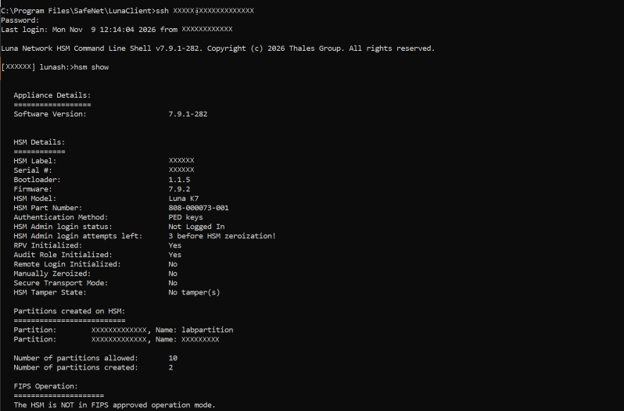
The Luna client connection was also verified using vtl verify, which displayed labpartition in slot 0.
The Luna HSM Client and firmware are available through the Thales Customer Support Portal, which requires an account linked to your Thales entitlement.
This blog assumes that the HSM is already initialized, a partition has been created, and the client has been registered with the partition.
Verify the Client Installation
Run the following command from a command prompt on the client host:
vtl verify
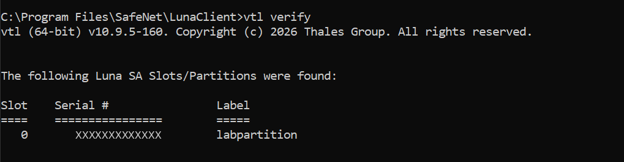
The output listed the registered partition in slot 0 with the label labpartition, confirming that the client can see the partition.
Verify the HSM and Partition with LunaCM
Open the Luna command-line utility:
Lunacm
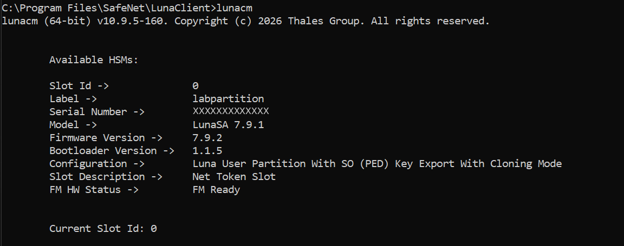
Then run the following commands:
slot list
partition showinfo
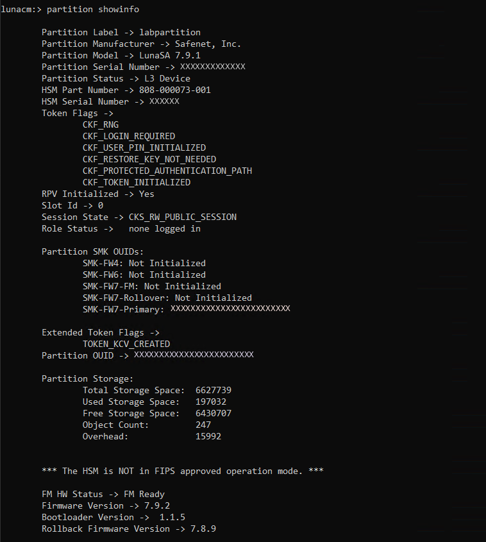
Check the following details in the output:
- The partition appears as a PKCS#11 slot and its label matches the expected partition.
- Record the firmware version shown by the HSM. The lab reports firmware 7.9.2, which supports LMS/HSS signing and multi-part signing.
- The partition is in a usable, initialised state.
- Note the slot number, which is used in later commands.
Log In as Crypto Officer
LMS keys must be created on a partition. Log in with the partition’s Crypto Officer role before running key operations. This can be done inside lunacm (for example with role login -name co) or by supplying the partition password to the tool being used.
Two Luna-specific restrictions apply to HSS keys:
- HSS key creation and use is supported only in partition mode, not in key rings.
- HSS keys do not support per-key authentication (PKA).
LMS Key Generation
The LMS key is generated with the Luna Certificate Management Utility (cmu), which creates an HSS key pair on the partition. Run:
cmu generatekeypair -keyType=HSS -hssparams=LMS_SHA256_M32_H5,LMOTS_SHA256_N32_W8 -slot=0 -labelPublic=lms-test-pub -labelPrivate=lms-test-priv -sign=true -verify=true
The options are:
- -keyType=HSS: selects the HSS/LMS key type.
- -hssparams: a comma-separated list containing one LMS type and one LM-OTS type for each level, starting from the top level. One pair means a one-level (LMS) key.
- -slot: the partition’s slot number from slot list.
- -labelPublic and -labelPrivate: labels for the two key objects, which make them easy to find later.

Two things are fixed by the HSM and cannot be changed. The private key is always created as sensitive and non-extractable. Specifying extractable=1 makes key generation fail. Also, the key can never be copied, wrapped or exported.
Key generation can take noticeable time on larger trees. The first signature after generation, or after an HSM reboot, is also much slower than later ones. If you stop a long-running key generation from the client side, the HSM stays committed to the task until it finishes or is reset with lunareset, so let it complete.
Inspect the Generated Key
List the objects on the partition and note the handle of each key:
cmu list -slot=0
Then read the HSS attributes of the private key:
cmu getattribute -handle=510 -slot=0 -attribute=hsslevels,hsslmstypes,hsslmotstypes,hsskeysremaining

For the demonstrated parameter set, the key attributes should indicate:
- Levels: 1 (expected for this one-level HSS/LMS configuration)
- LMS type: LMS_SHA256_M32_H5 (expected)
- LM-OTS type: LMOTS_SHA256_N32_W8 (expected)
- Keys remaining: 32 (initial capacity expected for h5)
The hsskeysremaining attribute is the Luna equivalent of a remaining-signatures counter. Because the tree height is 5, the key starts with 2^5 = 32 signature positions, and this counter goes down by one after every signature.
Where the LMS Key and Its State Are Stored
An LMS key has two parts: the key material and the signing state, which records which one-time positions have been used. On Luna, both live inside the HSM partition. The private key never leaves the HSM, and the HSM updates the state itself on every signature.
Thales designed HSS support so that a private key exists in exactly one place. As a result:
- HSS private keys cannot be cloned, so they cannot be backed up or restored.
- They cannot be placed in an HA group. Do not generate an HSS key on an HA virtual slot, and do not add a partition to an HA group if it holds an HSS private key.
- Copy, create, wrap and unwrap operations are blocked for HSS private keys.
- If the HSM or partition is lost, the key and its remaining signatures are lost with it.
This behaviour protects against the main risk of stateful signatures, which is a restored backup that makes the HSM reuse a one-time position. The trade-off is operational: you cannot rely on backups for recovery, so you must plan for key replacement.
LMS Message Signing
The ckdemo utility that ships with the Luna HSM Client lets you perform individual PKCS#11 operations, including HSS signing. It is a demonstration tool and is not intended for production use. In production, applications call the CKM_HSS mechanism through the Luna PKCS#11 library.
The following steps demonstrate LMS Post-Quantum Digital Signature generation using the HSS mechanism supported by the Luna HSM.
Create the Message File
Create a file that contains exactly the text hello, with no line break:
mkdir C:\tmp
<nul set /p=hello>C:\tmp\message.txt

dir C:\tmp\message.txt
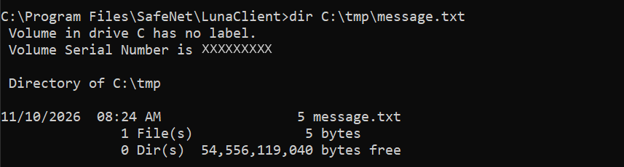
The file size should be 5 bytes, which is the length of the word hello.
Sign the Message
Start ckdemo, open a session and log in to the partition as Crypto Officer. In the Security menu, choose Sign (42), select the HSS mechanism, provide the message and select the HSS private key. The private-key handle recorded in this lab was 510. Use 0 at the key prompt to list available objects.
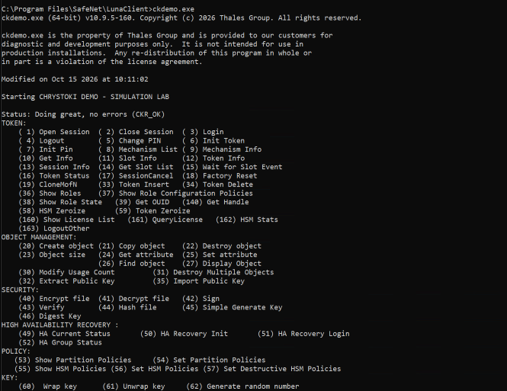
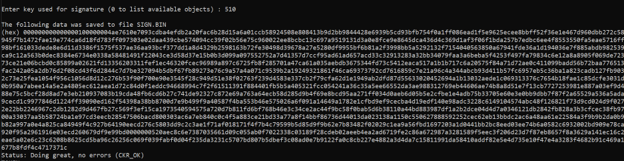
The signature is written to a file named SIGN.BIN. Rename or copy it to C:\tmp\message.sig so that it is easy to find.

For files larger than the single-part limit (about 48 KB), turn on multi-part operations in ckdemo (option 98, then option 14) and set the input to come from a file (option 9). This needs firmware 7.9.1 or newer.
Check the Signature Size
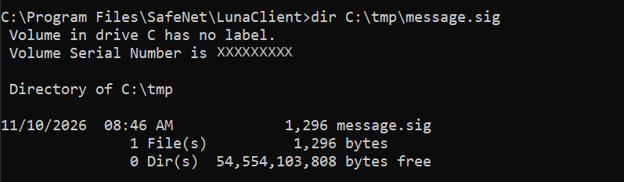
Check the size of the saved signature:
dir C:\tmp\message.sig
For an h5, w8, one-level key the file should be 1,296 bytes. This is the 1,292-byte LMS signature (see the signature size table under Parameter Sets Used in This Demonstration) plus the 4-byte HSS prefix at the start. The first four bytes are all zero for a one-level key.
LMS Signature Verification
Verify Inside the HSM
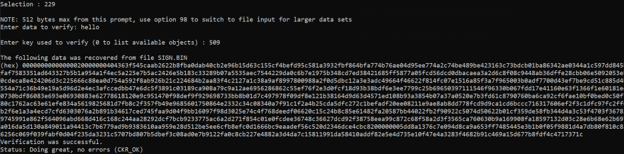
In ckdemo, choose Verify (43), select the HSS mechanism, provide the original message and select the HSS public key. The public-key handle recorded in this lab was 509. Supply the signature file when prompted and complete verification.
Expected result: Verification was successful.
Verify the Remaining Signature Capacity
After completing the signing and verification operations, check the remaining HSS signature capacity using the following command:
cmu getattribute -handle=510 -slot=0 -attribute=hsskeysremaining
Enter the Crypto Officer PIN when prompted.
The command returns:
hsskeysremaining=31
The HSS key was initially configured with 32 signing positions for an h5 tree. The lab output confirms that 31 signing positions remain after the signing operation.
Each successful signing operation consumes one position, whereas signature verification does not consume any signing capacity.
This demonstrates the stateful nature of LMS/HSS: the HSM tracks the remaining signing capacity to prevent reuse of a one-time signing position. Once the available capacity is exhausted, the key can no longer generate signatures.

Operational Considerations for Luna
The table below summarises the points that most affect how an LMS signing service is designed on Luna.
| Topic | Behaviour on Luna | What to do |
|---|---|---|
| Backup and restore | HSS keys cannot be cloned or backed up | Plan for replacement, not restoration |
| High availability | HSS keys cannot be used in HA groups | Treat each LMS key as a single-HSM service |
| Key location | Key and state stay in the partition | Protect and monitor that partition and HSM |
| Capacity | Fixed by tree height at generation time | Size the tree for the full key lifetime |
| Exhaustion | Signing fails with CKR_KEY_EXHAUSTED | Monitor hsskeysremaining and rotate early |
| First signature | Slower after generation or HSM reboot | Allow for this in timeouts and service checks |
| Timeouts | Generation and signing can take minutes | Tune the HSSKeyGenSignTimeout setting if needed |
| Maximum signature size | About 64 KB | Avoid very deep HSS hierarchies |
A few practical recommendations follow from this:
- Size the tree deliberately. A tree that is too small runs out quickly, while a very large one takes longer to generate.
- Use a dedicated partition or clear ownership for LMS signing keys, so that no other workload or administrator action risks the HSM that holds the only copy.
- Alert on remaining capacity. Set a threshold well before zero so a new key can be generated and its public key distributed in time.
- Never try to work around the no-clone rule. Any approach that allows state to be rolled back can cause one-time signature positions to be reused.
Planning for Key Rotation and Recovery
Because an HSS key cannot be restored, recovery means generating a new key and having relying parties trust its public key. Plan this in advance:
- Decide how public keys are distributed and trusted (for example, embedded in firmware, published in a trust store, or certified).
- Generate and publish the replacement public key before the current key is exhausted or if the HSM is retired.
- Keep a record of the public key, its parameters and the date it was put into service.
- For high-volume or high-availability needs, use several independent LMS keys, each on its own HSM, rather than trying to share one key.
Luna also supports X.509 certificates for HSS public keys, using the id-alg-hss-lms-hashsig algorithm identifier, so an LMS public key can be certified like any other public key.
How Encryption Consulting Can Help
As organizations prepare for the transition to post-quantum cryptography, protecting digital signatures and code-signing processes against future quantum threats becomes increasingly important.
Encryption Consulting helps organizations strengthen their cryptographic infrastructure through solutions and services focused on cryptographic security, HSM integration and post-quantum readiness.
CodeSign Secure and LMS Signing: Encryption Consulting’s CodeSign Secure platform helps organizations manage and secure their code-signing processes. As organizations explore post-quantum signature algorithms such as LMS, integration with suitable HSM infrastructure is an important consideration. The workflow in this blog shows how an LMS private key can be generated and used inside a Thales Luna Network HSM.
HSM Services and Integration: Encryption Consulting’s HSM services can help organizations with:
- HSM deployment, configuration and integration.
- Secure cryptographic key generation and lifecycle management.
- Integration of HSM infrastructure with enterprise applications and signing workflows.
- Assessment of cryptographic environments for post-quantum readiness.
For organizations evaluating LMS-based signing or planning their transition to post-quantum cryptography, Encryption Consulting can help assess the requirements and identify an appropriate implementation approach.
Frequently Asked Questions (FAQs)
1. What is LMS in post-quantum cryptography?
LMS (Leighton-Micali Signature) is a hash-based digital signature scheme designed to provide security against attacks from both classical and quantum computers. It is specified in RFC 8554 and NIST SP 800-208.
2. Is LMS a stateful or stateless signature scheme?
LMS is stateful. It keeps a record of the one-time signature positions used, and each signing operation consumes one position, so proper state management is essential.
3. What is the difference between LMS and HSS?
HSS is a hierarchy of LMS trees. An HSS key with a single level is equivalent to an LMS key. On Luna, keys are created with the HSS key type, and a one-level HSS signature is an LMS signature with 4 extra bytes at the start.
4. How many signatures can an LMS key generate?
The number depends on the tree height. A height of 5 gives 32 signatures, and a height of 10 gives 1,024. On Luna, heights up to 20 (about 1 million signatures per tree) are supported.
5. Does verification consume a signature position?
No. Only signing consumes positions. Verification uses the public key and can be repeated any number of times.
6. Can an LMS key on a Luna HSM be backed up or used in an HA group?
No. HSS private keys cannot be cloned, so they cannot be backed up, restored or placed in an HA group. This prevents state rollback, but it means recovery requires generating a new key.
Conclusion
As quantum computing continues to advance, organizations must prepare for the potential impact on traditional public-key algorithms such as RSA and ECDSA. Adopting post-quantum cryptography is an important step toward strengthening long-term digital security.
The Leighton-Micali Signature (LMS) scheme provides a hash-based approach to digital signatures designed to withstand attacks from both classical and quantum computers. In this demonstration, an LMS key was generated within a Thales Luna Network HSM 7, a test message was signed, the resulting signature was verified, and the remaining signing capacity was inspected.
One of the most important aspects of LMS is its stateful nature. Every signing operation consumes a one-time signature position, while verification does not. The Luna HSM manages this state internally and prevents the private key from being cloned or restored. Although this helps prevent signature-state reuse, it also makes capacity planning and key lifecycle management essential.
Organizations implementing LMS-based signing should carefully select tree parameters, monitor remaining signature capacity, protect the HSM partition, and plan key rotation before the available signing positions are exhausted.
This lab provides a practical starting point for understanding LMS implementation with a Luna Network HSM and highlights the operational considerations involved in adopting stateful post-quantum digital signatures.
- LMS on Luna: Terminology and Parameters
- Lab Environment
- LMS Key Generation
- Inspect the Generated Key
- Where the LMS Key and Its State Are Stored
- LMS Message Signing
- LMS Signature Verification
- Verify the Remaining Signature Capacity
- Operational Considerations for Luna
- Planning for Key Rotation and Recovery
- How Encryption Consulting Can Help
- Frequently Asked Questions (FAQs)
- Conclusion