
- LMS Post-Quantum Digital Signature Parameters, Capacity and Key Sizes
- Lab Environment for the LMS Post-Quantum Digital Signature Demo
- PQSDK Installation and Verification
- LMS Post-Quantum Digital Signature Key Generation
- Inspect the Generated LMS Key
- LMS Post-Quantum Digital Signature Signing and Verification
- How Encryption Consulting Can Help
- Conclusion
- Frequently asked questions
LMS Post-Quantum Digital Signatures address the growing need for cryptographic solutions that can withstand the potential threats posed by quantum computing. Traditional public-key cryptographic algorithms, such as RSA and Elliptic Curve Cryptography (ECC), may become vulnerable to sufficiently powerful quantum computers, making post-quantum cryptography increasingly important.
Post-Quantum Cryptography (PQC) focuses on developing cryptographic algorithms that can remain secure in the presence of quantum computing capabilities.
The Leighton-Micali Signature (LMS) scheme is a hash-based digital signature algorithm designed to provide post-quantum security. It is specified in RFC 8554 and approved by NIST in Special Publication 800-208, Recommendation for Stateful Hash-Based Signature Schemes. The NSA’s Commercial National Security Algorithm Suite 2.0 (CNSA 2.0) also calls for LMS or XMSS for software and firmware signing, which makes LMS especially relevant for code-signing and firmware-signing use cases.
Unlike traditional signature algorithms, LMS is a stateful signature scheme. It maintains a record of the one-time signature positions used during signing operations. Each signing operation consumes a signature position, making proper state management essential.
This guide demonstrates how to generate and validate an LMS Post-Quantum Digital Signature using Entrust PQSDK 1.4.3 with an nShield Connect XC Hardware Security Module (HSM). It covers LMS key generation, signing operations, signature verification, and signature-state management.
The practical demonstration covers the lab environment, HSM readiness checks, PQSDK setup, LMS key generation, signing operations, signature verification, and LMS signature-state inspection.
LMS Post-Quantum Digital Signature Parameters, Capacity and Key Sizes
LMS key characteristics are determined by two parameter sets: the LMS parameter set (lmscode) and the LM-OTS parameter set (lmotscode). These parameters determine the hash function, hash output length, Merkle tree height, signature capacity, and signature size.
Understanding the LMS and LM-OTS Parameters
Before examining the available parameter choices, it is important to understand the main terms used in LMS.
Merkle Tree
A Merkle tree is a tree structure in which leaf nodes represent one-time public keys. Parent nodes are calculated by hashing their child nodes. The root of the tree forms part of the LMS public key and is used during signature verification.
Tree Height (h)
The tree height determines the number of leaf nodes and therefore the maximum number of one-time signature positions available in an LMS key.
The total signature capacity is calculated as:
Capacity = 2^h
For example, a tree with height 5 provides 32 signature positions.
LM-OTS (Leighton-Micali One-Time Signature)
LM-OTS is the one-time signature mechanism used by LMS. It uses hash chains to generate and verify signatures. Each LMS signature position uses its own one-time signing material.
Winternitz Parameter (w)
The Winternitz parameter controls the construction of the LM-OTS hash chains. It affects the signature size and the computational effort required for signing and verification.
Stateful Key Management
LMS is a stateful signature scheme because it must keep track of which one-time signature positions have already been used. Every successful signing operation consumes one signature position. Reusing a position can compromise the security of the key. Signature verification does not consume a signature position.
LMS Parameter Set (lmscode)
The LMS parameter set defines the hash function, hash output length, and Merkle tree height.
For this demonstration, the following parameter set was used:
sha256_m32_h5
- SHA-256: Hash function used by LMS.
- m32: 32-byte hash output.
- h5: Merkle tree height of 5.
The tree height determines the maximum number of available one-time signature positions.
LMS tree height and signature capacity:
| Tree height | Maximum signature positions |
|---|---|
| h5 | 32 |
| h10 | 1,024 |
| h15 | 32,768 |
| h20 | 1,048,576 |
| h25 | 33,554,432 |
A larger tree height provides more signature positions but generally requires more computation, storage, and resources to generate and manage the Merkle tree.
LM-OTS Parameter Set (lmotscode)
The LM-OTS parameter set defines the hash function, hash output length and Winternitz parameter.
For this demonstration, the following parameter set was used:
sha256_n32_w8
- SHA-256: Hash function used by LM-OTS.
- n32: 32-byte hash output.
- w8: Winternitz parameter of 8.
The standard LM-OTS parameter choices include w1, w2, w4, and w8.
LM-OTS parameter comparison
The following table shows the standard parameter characteristics for SHA-256 with a 32-byte hash output.
| Winternitz parameter | Number of hash chains (p) | Maximum hash-chain iterations | LM-OTS signature size |
|---|---|---|---|
| w1 | 265 | 265 | 8,516 bytes |
| w2 | 133 | 399 | 4,292 bytes |
| w4 | 67 | 1,005 | 2,180 bytes |
| w8 | 34 | 8,670 | 1,124 bytes |
The maximum hash-chain iterations represent the maximum total number of iterations across all chains.
Advantages and trade-offs
- w1: Produces larger signatures but requires fewer maximum hash-chain iterations.
- w2: Reduces signature size compared with w1, with a moderate increase in hash-chain computation.
- w4: Provides smaller signatures, with additional hash-chain computation.
- w8: Produces the smallest signatures among these choices but requires substantially more maximum hash-chain computation.
The Winternitz parameter therefore involves a trade-off between signature size and computational effort. The exact parameter combinations supported by PQSDK 1.4.3 should be confirmed using its version-specific documentation.
LMS Signature Size Comparison
The complete LMS signature includes the LM-OTS signature, LMS-related fields, and the Merkle authentication path.
For the SHA-256, 32-byte parameter sets, the resulting LMS signature sizes are:
Signature sizes for different Winternitz parameters at tree height h5
| LM-OTS parameter | LMS signature size |
|---|---|
| w1 | 8,684 bytes |
| w2 | 4,460 bytes |
| w4 | 2,348 bytes |
| w8 | 1,292 bytes |
The LMS signature size also increases with tree height because each additional tree level contributes another 32-byte authentication-path value.
Signature sizes for w8 at different tree heights
| Tree height | LMS signature size |
|---|---|
| h5 | 1,292 bytes |
| h10 | 1,452 bytes |
| h15 | 1,612 bytes |
| h20 | 1,772 bytes |
| h25 | 1,932 bytes |
For the demonstration, the selected parameters were h5 and w8. The generated signature size was 1,292 bytes, consistent with the standard size calculation.
Additional LMS Key Generation Options
PQSDK provides additional options for managing LMS key generation.
- expchunk: Controls how the LMS Merkle tree is partitioned during generation.
- expcache: Controls how much of the Merkle tree is cached for future use, helping reduce recalculation when loading the key.
These options are particularly relevant when generating and managing larger LMS trees.
Understanding the LMS Public Key
The generated LMS public key begins with two hexadecimal parameter identifiers, followed by the remaining public-key data.
The captured output begins with:
00000005 00000004
These values identify the LMS and LM-OTS parameter sets, respectively.
LMS parameter type identifiers:
The LMS parameter set defines the hash function, hash output length, and Merkle tree height. The table below maps each LMS tree height to its parameter name and corresponding type identifier.
| LMS tree height | Parameter name | Type identifier |
|---|---|---|
| h5 | sha256_m32_h5 | 00000005 |
| h10 | sha256_m32_h10 | 00000006 |
| h15 | sha256_m32_h15 | 00000007 |
| h20 | sha256_m32_h20 | 00000008 |
| h25 | sha256_m32_h25 | 00000009 |
LM-OTS parameter type identifiers:
LM-OTS is the one-time signature component used by LMS. Its Winternitz parameter controls the hash-chain construction and affects signature size and computational effort.
The following table maps the Winternitz parameter choices to their parameter names and type identifiers.
| Winternitz parameter | Parameter name | Type identifier |
|---|---|---|
| w1 | sha256_n32_w1 | 00000001 |
| w2 | sha256_n32_w2 | 00000002 |
| w4 | sha256_n32_w4 | 00000003 |
| w8 | sha256_n32_w8 | 00000004 |
Examples of combined public-key prefixes:
The LMS and LM-OTS identifiers are combined to form the beginning of the LMS public key. The examples below show the resulting prefixes for different parameter combinations.
| LMS tree height | LM-OTS parameter | Public-key prefix |
|---|---|---|
| h5 | w1 | 00000005 00000001 |
| h5 | w2 | 00000005 00000002 |
| h5 | w4 | 00000005 00000003 |
| h5 | w8 | 00000005 00000004 |
| h10 | w1 | 00000006 00000001 |
| h10 | w2 | 00000006 00000002 |
| h10 | w4 | 00000006 00000003 |
| h10 | w8 | 00000006 00000004 |
| h15 | w1 | 00000007 00000001 |
| h15 | w2 | 00000007 00000002 |
| h15 | w4 | 00000007 00000003 |
| h15 | w8 | 00000007 00000004 |
| h20 | w1 | 00000008 00000001 |
| h20 | w2 | 00000008 00000002 |
| h20 | w4 | 00000008 00000003 |
| h20 | w8 | 00000008 00000004 |
| h25 | w1 | 00000009 00000001 |
| h25 | w2 | 00000009 00000002 |
| h25 | w4 | 00000009 00000003 |
| h25 | w8 | 00000009 00000004 |
The remaining bytes contain the public-key identifier and Merkle tree root.
The public key is used by relying parties to verify signatures generated using the corresponding LMS private key.
Lab Environment for the LMS Post-Quantum Digital Signature Demo
The demonstration uses an Entrust nShield Connect XC HSM connected to a Windows Server environment.
The lab components include:
- HSM: Entrust nShield Connect XC
- Security World Software: Version 13.9.6
- HSM Module Firmware: Version 13.8.3
- nShield Connect Image: Version 13.9.3 (build 13.9.3-276)
- PQSDK: Version 1.4.3
- Operating System: Windows Server 2022 Standard
Verify the nShield Environment
Before configuring PQSDK, verify that the nShield HSM is connected and operational, and that the Security World is initialised.
Check HSM Connectivity Using enquiry.exe
Run the following command from the nShield command prompt:
enquiry.exe
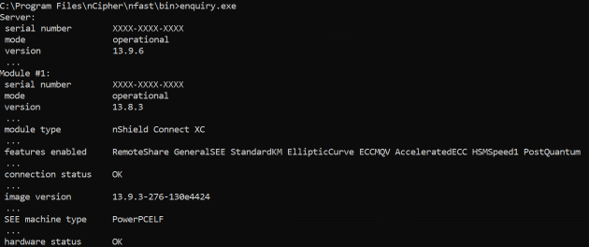
This command displays information about the connected nShield HSM, including its operational status, firmware version, supported features, and connection status.
The following details should be verified in the output:
- HSM mode: operational
- Module type: nShield Connect XC
- Connection status: OK
- Features enabled: PostQuantum, GeneralSEE
- SEE machine type: PowerPCELF
- Hardware status: OK
These results confirm that the HSM is operational, connected, and reports Post-Quantum and SEE (GeneralSEE) feature availability.
The SEE machine type indicates the execution architecture reported by the HSM. This information alone does not confirm that the PQSDK SEE machine has been configured and loaded which are a pre-requisite for performing LMS signing and verification operations.
Verify Security World Using nfkminfo.exe
Run the following command:
nfkminfo.exe

This command displays Security World information, including its initialisation status, available HSM modules, and module usability.
The following details should be verified in the output:
- World generation: 2
- World state: Initialised
- Number of modules: 1
- Module number: 1
- Module state: Usable
These results confirm that the Security World is initialised and the connected HSM module is available for use.
Confirm the PQSDK SEE Machine Is Loaded
The enquiry output confirms that the HSM supports SEE. To confirm that the PQSDK SEE machine is loaded and running on the HSM, run the following command from the extracted PQSDK directory:
pipsqueak.exe

The HSM returns its serial number and the PQSDK machine version (1.4.3) in the brackets. This response is generated by the machine running on the HSM, which confirms that the PQSDK SEE machine is loaded and reachable.
PQSDK Installation and Verification
Entrust PQSDK provides the tools required to work with Post-Quantum Cryptographic algorithms supported by the nShield environment.
For this demonstration, PQSDK version 1.4.3 is used. The package includes the Pipsqueak utility and Java-based components used during the LMS key-generation workflow.
Before proceeding with the LMS operations, the PQSDK package and its required supporting files must be verified.
Verify PQSDK Package and Java Installation
The PQSDK 1.4.3 package was extracted on the Windows Server. The extracted package includes the pipsqueak.exe utility, which can be used directly to perform LMS key operations.
PQSDK supports two command-line approaches in this demonstration:
- Pipsqueak executable: Can be used directly without running the PQSDK Java application.
- PQSDK Java application (JAR): Requires a compatible Java installation and the nShield Java library.
Java installation is therefore required only when using the PQSDK JAR approach. It is not a prerequisite for using pipsqueak.exe.
Java availability was checked for the JAR-based approach using:
java -version

The system reported Java version 27.0.1.0.3.
The nShield Java library, nCipherKM.jar, was also checked and found at:
C:\Program Files\nCipher\nfast\java\classes\nCipherKM.jar
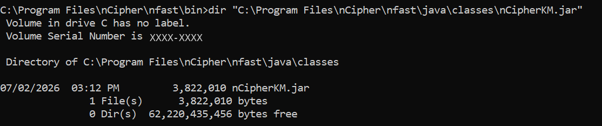
This library provides the Java integration component required for applications communicating with the nShield environment.
PQSDK Package Contents
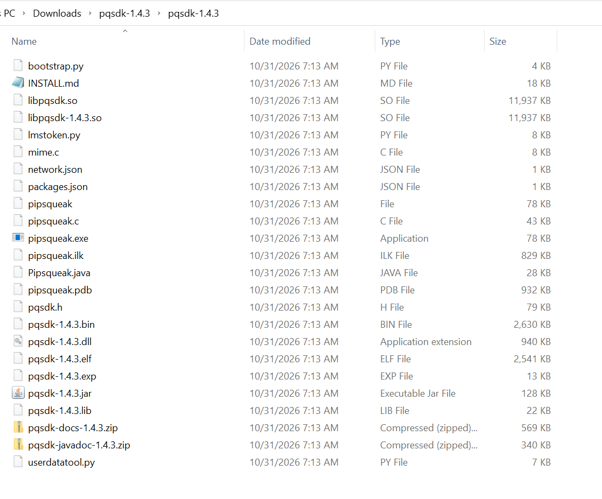
The extracted PQSDK 1.4.3 package contains the Java-based PQSDK application, Pipsqueak executable, supporting libraries, and other utility files.
The primary files used in this demonstration are:
- pqsdk-1.4.3.jar – Java-based PQSDK application.
- pipsqueak.exe – Windows executable used for LMS operations.
- pqsdk-1.4.3.dll – Supporting Windows library.
- pqsdk-1.4.3.bin and pqsdk-1.4.3.elf – PQSDK binary and ELF files.
These files provide the components required for the subsequent PQSDK setup and LMS demonstration.
Verify Pipsqueak Executable
Open Command Prompt and navigate to the extracted PQSDK directory:
cd /d “C:\Users\Administrator\Downloads\pqsdk-1.4.3\pqsdk-1.4.3”

Run the Pipsqueak executable:
pipsqueak.exe
The utility displays its PQSDK version and associated HSM information.
Expected output:
PQSDK: PQSDK_VERSION (<HSM_SERIAL_NUMBER>: 1.4.3)

The output confirms that the Pipsqueak executable launches successfully and reports PQSDK version 1.4.3.
Verify Java-Based PQSDK Application
The Java-based PQSDK application was launched using the JAR file and the nShield Java library.
Run the following command from the extracted PQSDK directory:
java -cp “pqsdk-1.4.3.jar;C:\Program Files\nCipher\nfast\java\classes\nCipherKM.jar” com.entrust.nshield.pqsdk.Pipsqueak
Expected output:
PQSDK: 1.4.3 ()

The output confirms that the Java-based PQSDK application launches successfully and reports version 1.4.3.
LMS Post-Quantum Digital Signature Key Generation
After verifying the PQSDK installation, a new key for the LMS post-quantum digital signature was generated using the Pipsqueak utility.
The following command was executed:
pipsqueak.exe generate alias=lms-test algorithm=lms lmscode=sha256_m32_h5 lmotscode=sha256_n32_w8

The command uses the following parameters:
- alias=lms-test: Assigns the name lms-test to the generated key.
- algorithm=lms: Selects the LMS signature algorithm.
- lmscode=sha256_m32_h5: Specifies SHA-256 with a 32-byte hash output and LMS tree height of 5.
- lmotscode=sha256_n32_w8: Specifies SHA-256 with a 32-byte hash output and Winternitz parameter 8 for LM-OTS.
The key-generation process completed successfully, and the utility displayed the generated public key.
Inspect the Generated LMS Key
After successful key generation, the key information was inspected using the following command:
pipsqueak.exe showinfo alias=lms-test
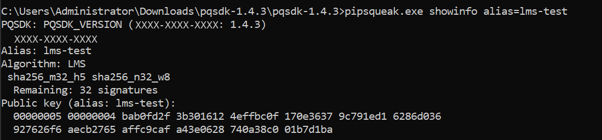
The command displays the key alias, algorithm, LMS and LM-OTS parameters, public key, and remaining signature capacity.
The output confirmed the following:
- Key alias: lms-test
- Algorithm: LMS
- LMS parameters: sha256_m32_h5
- LM-OTS parameters: sha256_n32_w8
- Remaining signatures: 32
The generated key initially provides 32 signature positions because the LMS tree height is 5 (2⁵ = 32).
Since LMS is a stateful signature scheme, each signing operation consumes one signature position. Therefore, the remaining signature count must be monitored throughout the key’s lifetime.
Verify the Key Using the Java-Based PQSDK
The Java-based PQSDK can also access the LMS keys held on the HSM. To confirm this, run the following command from the extracted PQSDK directory:
java -cp “pqsdk-1.4.3.jar;C:\Program Files\nCipher\nfast\java\classes\nCipherKM.jar” com.entrust.nshield.pqsdk.Pipsqueak list

The output lists the key lms-test with the type LMS. This is the same key that was created with pipsqueak.exe, which shows that both interfaces work with the same key stored on the HSM.
Where the LMS Key and Its State Are Stored
An LMS key has two parts to manage: the key itself and its signing state, which records which one-time signature positions have been used.
The key. The key is stored as a Security World key file on the host, in
C:\ProgramData\nCipher\Key Management Data\local
For the key created in this blog the file is key_pqsdk_lms-test.

The state. The signing state is not kept in this file. A key file that had been used for signing after it was created kept its original modification date, so signing does not rewrite it. This is consistent with Entrust’s PQC Option Pack guide, which states that, for a singular key, all signatures are assigned to the HSM where the key was generated. The remaining count shown by showinfo therefore belongs to that HSM.
Backup and recovery. A backup of the Security World folder preserves the key file but not the remaining signatures. If the HSM fails, all remaining signatures are lost. Because LMS is stateful, state must never be rolled back, as that could allow a one-time signature position to be used twice. Sectorized keys reduce reliance on a single HSM by spreading signatures across smart cards.
LMS Post-Quantum Digital Signature Signing and Verification
After generating the LMS key, a test message was signed to create an LMS post-quantum digital signature using the Pipsqueak utility.
The following command was executed:
pipsqueak.exe alias=lms-test message=hello
The command uses the LMS private key associated with the alias lms-test to generate a digital signature for the message hello.
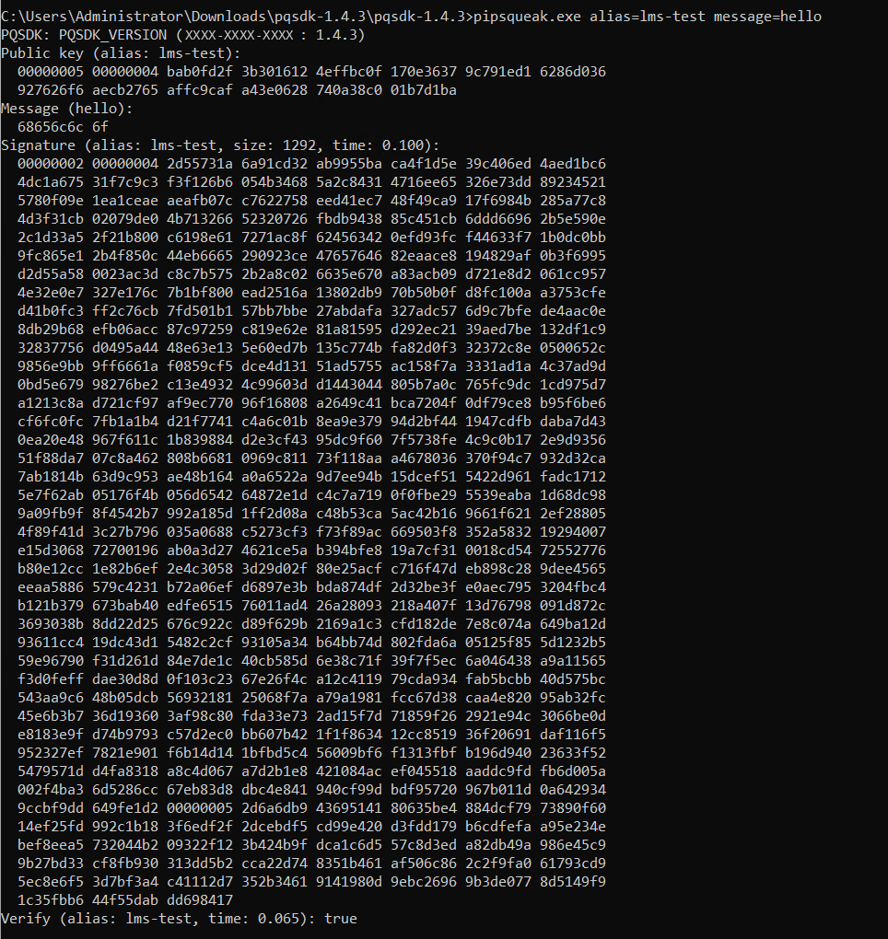
The output displays the public key, input message, generated signature, and verification result.
Observed results:
- Key alias: lms-test
- Input message: hello
- Signature size: 1292 bytes
- Verification result: true
The verification result confirms that the generated signature passed Pipsqueak’s built-in verification check.
Sign a Message and Save the Signature
In addition to the direct message-signing operation, PQSDK supports signing a message stored in a file and saving the generated signature separately.
A folder named C:\tmp was created to hold the message and signature files:
mkdir C:\tmp

The message file was then created with the following command, which writes the text hello without adding a line break:
<nul set /p=hello>C:\tmp\message.txt

The file size was then checked:
dir C:\tmp\message.txt
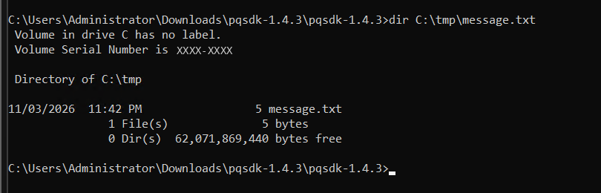
The file is 5 bytes, which is exactly the length of the word hello. This confirms that the file contains the same message that is signed in the next step.
Using the Pipsqueak Executable
The following command was executed:
pipsqueak.exe alias=lms-test msgfile=C:\tmp\message.txt sigfile=C:\tmp\message.sig

The command reads the message from the specified file, signs it using the LMS private key associated with the alias lms-test, and saves the generated signature to C:\tmp\message.sig.
Observed results:
- Key alias: lms-test
- Message file: C:\tmp\message.txt
- Signature file: C:\tmp\message.sig
- Signature size: 1,292 bytes
The command completed successfully, and the signature was saved to the specified file.

The generated signature file, message.sig, is available in the specified output directory alongside the original message file.
Using the PQSDK Java Application
The same file-based signing operation was also performed using the PQSDK Java application. This demonstrates that the same LMS key can be accessed through both the Pipsqueak executable and the Java application.
Java is required for this approach. The Pipsqueak executable can be used without invoking the Java application.
The following command was executed:
java -cp “pqsdk-1.4.3.jar;C:\Program Files\nCipher\nfast\java\classes\nCipherKM.jar” com.entrust.nshield.pqsdk.Pipsqueak alias=lms-test msgfile=C:\tmp\message.txt sigfile=C:\tmp\message-java.sig

The command reads the message from C:\tmp\message.txt, signs it using the LMS private key associated with lms-test, saves the signature to C:\tmp\message-java.sig, and performs built-in verification.
Observed results:
- Key alias: lms-test
- Message file: C:\tmp\message.txt
- Signature file: C:\tmp\message-java.sig
- Signature size: 1,292 bytes
- Built-in verification result: true
The output confirms that the Java application successfully generated the LMS signature, saved it to the specified file, and passed its built-in signature verification check.
Verify the Saved LMS Post-Quantum Digital Signature
Using the Pipsqueak Executable
After saving the signature, a separate command-line verification operation was performed using the original message file and the generated signature file.
The following command was executed:
pipsqueak.exe alias=lms-test msgfile=C:\tmp\message.txt verify=C:\tmp\message.sig
The command verifies the saved signature against the original message using the public key associated with the lms-test alias.
Verification output:
Verify (alias: lms-test): true
The verification result confirms that the saved LMS signature successfully passed verification.
Using the PQSDK Java Application
The saved LMS signature generated through the PQSDK Java application was also verified using the Java command-line interface. The original message file and the Java-generated signature file were supplied as inputs.
java -cp “pqsdk-1.4.3.jar;C:\Program Files\nCipher\nfast\java\classes\nCipherKM.jar” com.entrust.nshield.pqsdk.Pipsqueak alias=lms-test verfile=C:\tmp\message.txt sigfile=C:\tmp\message-java.sig

The verfile argument specifies the original message file, while sigfile specifies the saved signature file.
Verification output:
Verify (alias: lms-test): true
The output confirms that the Java application successfully verified the saved LMS signature using the public key associated with the lms-test alias.
Verify the Remaining Signature Capacity
Using the Pipsqueak Executable
After signing and verification, the remaining signature capacity was checked using:
pipsqueak.exe showinfo alias=lms-test
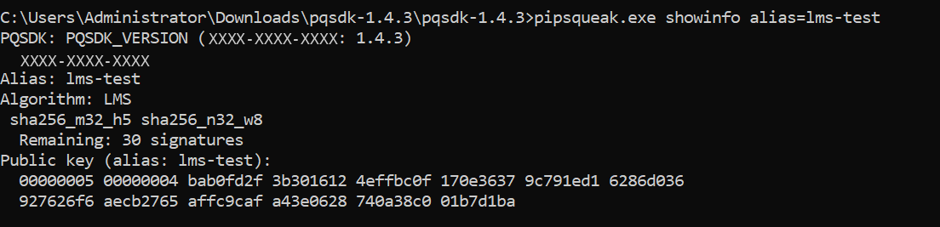
The output displayed:
Remaining: 30 signatures
The key initially had 32 signature positions. After the first signing operation, 31 positions remained. The file-based signing operation consumed one additional position, leaving 30.
The separate verification operation did not consume another signature position.
This demonstrates the stateful nature of an LMS post-quantum digital signature, where each signing operation consumes one signature position, while verification does not consume the signing capacity.
Using the PQSDK Java Application
The remaining signature capacity was also checked using the PQSDK Java application.
java -cp “pqsdk-1.4.3.jar;C:\Program Files\nCipher\nfast\java\classes\nCipherKM.jar” com.entrust.nshield.pqsdk.Pipsqueak showinfo alias=lms-test
The output confirms that the Java application successfully generated the LMS signature, saved it to the specified file, and passed its built-in signature verification check.
How Encryption Consulting Can Help
As organizations prepare for the transition to post-quantum cryptography, securing digital signatures and code-signing processes against future quantum computing threats becomes increasingly important.
Encryption Consulting helps organizations strengthen their cryptographic infrastructure through solutions and services focused on cryptographic security, HSM integration and post-quantum readiness.
CodeSign Secure and LMS Signing
Encryption Consulting’s CodeSign Secure platform helps organizations manage and secure their code-signing processes. As organizations explore post-quantum digital signature algorithms such as LMS, integration with suitable HSM infrastructure is an important consideration.
The LMS post-quantum digital signature workflow demonstrated in this blog illustrates how an LMS private key can be generated and used with an Entrust nShield Connect XC HSM through PQSDK.
HSM Services and Integration
Encryption Consulting’s HSM services can help organizations with:
- HSM deployment, configuration and integration.
- Secure cryptographic key generation and lifecycle management.
- Integration of HSM infrastructure with enterprise applications and signing workflows.
- Assessment of cryptographic environments for post-quantum readiness.
By combining secure HSM infrastructure, controlled key management and appropriate signing solutions, organizations can prepare their code-signing environments for evolving post-quantum cryptographic requirements.
For organizations evaluating LMS-based signing or planning their transition towards post-quantum cryptography, Encryption Consulting can help assess the requirements and identify an appropriate implementation approach.
Conclusion
As quantum computing continues to advance, organisations need to prepare for the potential impact of quantum computers on widely used public-key cryptographic algorithms such as RSA and ECDSA. Cryptographic systems that are secure against today’s conventional computers may become vulnerable to sufficiently powerful quantum computers in the future.
This makes the transition towards post-quantum cryptography an important part of long-term cybersecurity planning. LMS (Leighton-Micali Signature) is a hash-based post-quantum digital signature scheme designed to provide digital signature security against quantum computing threats. In this demonstration, an LMS key was successfully generated using Entrust PQSDK 1.4.3 with an nShield Connect XC HSM. A test message was signed using the generated key, and the resulting signature was successfully verified. The demonstration also showed how to save a signature to a file, verify the saved signature, and inspect the remaining signing capacity.
This exercise demonstrates how an LMS post-quantum digital signature can be generated and verified using Entrust PQSDK and provides a practical starting point for understanding the adoption of post-quantum digital signatures. As part of their broader PQC transition strategy, organisations should evaluate quantum-resistant algorithms, test their integration with existing cryptographic infrastructure, and establish appropriate key and signature-state management practices.
Frequently asked questions
What is an LMS post-quantum digital signature?
An LMS post-quantum digital signature is a signature created with the Leighton-Micali Signature (LMS) scheme, a hash-based algorithm designed to stay secure against attacks from both classical and quantum computers.
Is an LMS post-quantum digital signature stateful or stateless?
An LMS post-quantum digital signature is stateful. The scheme keeps a record of the one-time signature positions that have been used. Each signing operation consumes one position, so proper state management is essential.
What is the difference between LMS and LM-OTS?
LM-OTS (Leighton-Micali One-Time Signature) is the one-time signature mechanism used by LMS. LMS combines LM-OTS with a Merkle tree to support multiple one-time signatures under one public key.
How many signatures can an LMS post-quantum digital signature key produce?
The number of available signatures depends on the Merkle tree height. For example, an LMS tree with height 5 supports 32 signature positions, while a tree with height 10 supports 1,024.
Does verifying an LMS post-quantum digital signature consume a signature position?
No. Verifying an LMS post-quantum digital signature checks it against the corresponding public key and does not consume a signing position. Only signing operations consume signature positions.
Can an LMS post-quantum digital signature be generated with an HSM?
Yes. An LMS post-quantum digital signature can be generated in an HSM-supported environment when the HSM, firmware, Security World configuration and relevant software support the required algorithm and integration.
- LMS Post-Quantum Digital Signature Parameters, Capacity and Key Sizes
- Lab Environment for the LMS Post-Quantum Digital Signature Demo
- PQSDK Installation and Verification
- LMS Post-Quantum Digital Signature Key Generation
- Inspect the Generated LMS Key
- LMS Post-Quantum Digital Signature Signing and Verification
- How Encryption Consulting Can Help
- Conclusion
- Frequently asked questions