- What is certificate lifecycle management?
- Why Certificate Lifecycle Management Matters More Than Ever
- The certificate lifecycle, stage by stage
- The Four Stages of Certificate Lifecycle Maturity
- Choosing a CLM solution
- A 30-60-90 day plan
- Measuring whether it's working
- How CertSecure Manager Helps
- Conclusion
- Frequently asked questions
Certificate lifecycle management is something most IT teams claim to have. However, many organizations still do not know how many digital certificates they use, who owns them, which certificates renew automatically, or what happens when a renewal fails.
The gap between “we renew our certificates” and “we have a mature certificate lifecycle management program” is wider than most organizations realize, and in 2026 that gap is more costly than ever. Public TLS certificates are now capped at 200 days and will fall to 47 days by 2029. Code signing certificate validity has dropped from 39 months to 460 days under CA/Browser Forum Ballot CSC-31, effective March 1, 2026. NIST has finalized its first post-quantum cryptography standards. And the Entrust distrust showed how quickly a certificate authority can lose browser trust and leave customers scrambling.
This guide explains how certificate lifecycle management (CLM) works, why it matters now, and how to build a program that doesn’t depend on someone’s calendar reminder. We will walk through the seven stages of the certificate lifecycle, the failure patterns behind most outages, a four-stage maturity model, and a practical plan to get started.
What is certificate lifecycle management?
A digital certificate is a small file that proves identity: this server really is example.com, this device really belongs to your company, this software really came from your developers. Technically, a certificate binds an identity to a public key and carries details such as the issuer, validity period, and permitted uses. The matching private key is held separately and has to be protected.
Every certificate has a life: it’s requested, issued, installed, used, renewed and eventually retired. Certificate lifecycle management is the discipline of controlling that whole journey so that nothing expires unnoticed, nothing is issued without approval, and nothing stays trusted longer than it should.
It helps to be clear about what CLM is not:
- It’s not a reminder tool. Expiry alerts are the smallest part of the job.
- It’s not only for websites. Internal services, workloads, and devices hold certificates too.
- It’s not a one-time cleanup. Certificates keep appearing as long as teams keep shipping.
You’ll also see the term machine identity management. It’s the wider idea that servers, apps and devices need managed identities just like people do, and certificates are the most common form those identities take.
Why Certificate Lifecycle Management Matters More Than Ever
Let’s start with what happens when a single certificate is forgotten.
Ericsson (2018): In December 2018, an expired certificate in Ericsson software used in mobile networks disrupted mobile services for millions of customers. Ericsson’s initial root cause analysis pointed to an expired certificate in two versions of its core-network software. As per a report, an estimated 32 million O2 customers in the UK lost data service, and SoftBank customers in Japan were affected too. There was no attack. An expired certificate in network software was the trigger.
This incident carries an important lesson: an expired certificate is rarely a cryptographic failure. It is a visibility and ownership failure. The certificate did exactly what it was designed to do. What was missing was a process that knew it existed, knew who owned it, and knew when it had to be replaced.
CLM has been good practice for years. Three things have turned it into a necessity.
1. Certificates are getting much shorter
In April 2025 the CA/Browser Forum passed Ballot SC-081v3, with support from Apple, Google, Mozilla and Microsoft. It reduces the maximum validity of public TLS certificates in steps:
| Date | Max validity | Maximum data reuse period |
|---|---|---|
| Before March 15, 2026 | 398 days | 398 days |
| From March 15, 2026 | 200 days | 200 days |
| From March 15, 2027 | 100 days | 100 days |
| From March 15, 2029 | 47 days | 10 days |
The first step took effect on March 15, 2026. Under this schedule, publicly trusted TLS server certificates issued on or after that date are subject to a maximum validity period of 200 days. Keep in mind that maximum validity and the data reuse period are separate limits. The reuse period governs how long previously validated information may be reused, and it is not the same as the certificate’s validity period.
The math is what makes this hurt. Most teams renew a bit before expiry, so at 47 days you’re realistically renewing every month or so:
| Validity | Renewals per cert per year | For 1,000 certs |
|---|---|---|
| 398 days | ~1 | ~1,000 |
| 200 days | ~2 | ~2,000 |
| 100 days | ~4 | ~4,000 |
| 47 days | ~8 | ~8,000 |
These are illustrative steady-state estimates (1,000 certificates × 365 ÷ validity days), so at 47 days, expect roughly 7,700 to 8,000 renewals a year. The real workload depends on how much manual work each certificate needs and how many endpoints must be updated. Done by hand, with a request, validation, install, and restart every time, that is a lot of chances to miss one.
2. Post-quantum cryptography is arriving
In August 2024, NIST published its first post-quantum cryptography standards: FIPS 203 (ML-KEM), FIPS 204 (ML-DSA), and FIPS 205 (SLH-DSA). ML-KEM handles key establishment, while ML-DSA and SLH-DSA are digital signature algorithms that replace different functions currently performed by RSA and elliptic-curve cryptography. Key exchange is already progressing, with hybrid ML-KEM becoming the default in Chrome and OpenSSH. However, certificate migration has yet to follow the same pace. While public web PKI is still waiting, internal PKI and regulated industries are expected to begin transitioning earlier.
The transition timelines are already taking shape. NIST’s IR 8547, currently in draft, proposes deprecating RSA and ECC after 2030 and disallowing them after 2035. The NSA’s CNSA 2.0 sets earlier deadlines for national security systems, targeting 2030 for software and firmware signing and networking equipment, followed by 2033 for browsers, servers, cloud services, and operating systems. Similarly, the EU’s coordinated roadmap aims to migrate high-risk use cases by the end of 2030. This makes one question particularly important for organizations: Where is RSA currently used in our environment?
If you can’t answer that, migration is guesswork. This is the idea behind crypto-agility: knowing what algorithms your certificates use and being able to change them without a hassle.
To be clear about the limits: CLM gives you visibility into certificates and the algorithms they use, which is a necessary starting point. A full post-quantum migration also means assessing applications, protocols, cryptographic libraries, hardware, key management systems, and interoperability with partners.
3. Your CA can lose trust overnight
In 2024, Google announced Chrome would stop trusting new TLS certificates from Entrust after years of compliance problems, and other browsers followed. Existing Entrust certificates stayed trusted until they expired. Only certificates issued after the cutoff were distrusted (Chrome first announced October 31, 2024, then moved the date to November 11, 2024), so customers had to find every Entrust certificate they had and move renewals and new issuance to another CA. Teams with a central inventory and automated issuance did it in days. Everyone else did it in a panic.
The lesson isn’t about one vendor. CA agility, meaning the ability to switch certificate authorities with minimal disruption, is part of being resilient.
One more change to check in your own environment: under Chrome Root Program Policy v1.6, publicly trusted TLS certificates issued after June 15, 2026 can no longer be used for client authentication, while certificates issued earlier stay valid until they expire. This applies to public CAs only, not private PKI, and individual CAs may set their own dates, so confirm yours. If anything in your stack, such as mutual TLS, uses publicly issued certificates for client authentication, plan an alternative (usually a private CA).
The certificate lifecycle, stage by stage
Think of the lifecycle as a continuous loop. Renewal returns the certificate to the issuance and deployment process, while discovery and monitoring continue throughout.
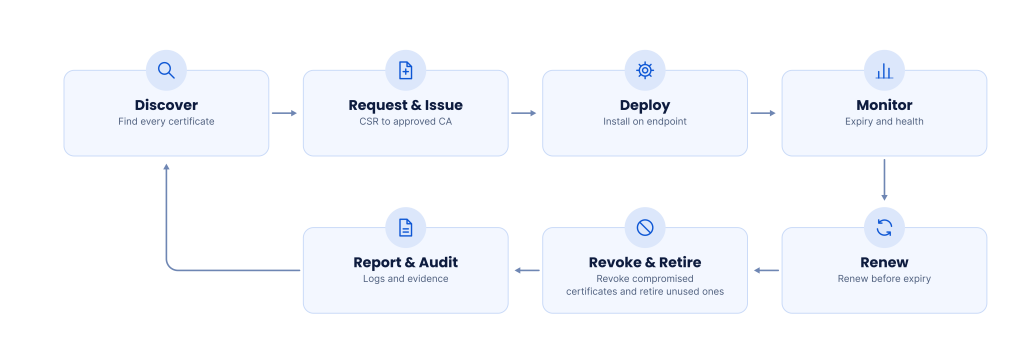
The diagram above shows how the stages connect as a continuous loop. It starts with discovery, where every certificate is found. A request then goes to an approved CA, which issues the certificate, and the certificate is deployed on its endpoint. Monitoring tracks expiry and health, and renewal replaces the certificate before it expires. Revocation and retirement remove compromised or unused certificates, while reporting and audit keep the logs and evidence. Those findings feed back into discovery, so the loop starts again.
The table below goes through each stage in turn: what happens, what usually goes wrong, and what good looks like.
| Stage | What happens | What typically goes wrong | What good looks like |
|---|---|---|---|
| 1. Discovery | Scan networks, clouds, CAs, and code repositories to find certificates. | Certificates are created without being recorded; shadow certificates remain unknown. | A continuously updated inventory records an accountable owner for every certificate. |
| 2. Request | Generate a key pair and CSR, then submit the request to an approved CA. | Wrong CA, unsuitable key parameters, incorrect names, or missing approval trail. | Policy-driven requests use approved CAs, algorithms, names, and approval workflows. |
| 3. Issue | The CA validates the request and issues the certificate. | Incorrect certificate profile, missing extensions, or an incomplete chain. | Issuance is checked against policy; certificate chain and extensions are validated. |
| 4. Deployment | Install the certificate on the intended server, load balancer, application, or device. | A node is missed, the intermediate chain is absent, or the certificate is installed incorrectly. | Deployment is automated where possible and verified on every endpoint. |
| 5. Monitoring | Track expiry, availability, configuration, chain health, and algorithms. | Alerts go to one person, or monitoring misses internal certificates. | Alerts reach responsible teams with escalation paths and health checks. |
| 6. Renewal | Obtain and deploy a replacement before expiry. | Renewal succeeds but deployment fails, endpoints are missed, or CA rate limits intervene. | Renewal and deployment are coordinated, verified and supported by rollback procedures. |
| 7. Revocation & retirement | Revoke compromised certificates and remove unused certificates from active systems and inventory. | Revocation status is not checked, stale certificates remain deployed, or inventory is not updated. | Incident-driven revocation procedures are tested; retired certificates are removed from use and inventory. |
Two stages deserve particular attention: discovery and deployment.
Discovery is the foundation
Everything else assumes you know what exists. If your inventory has 4,000 certificates and reality has 6,000, the missing 2,000 are the ones that will cause your next outage.
Scanning your own environment only finds what has been deployed, though. Certificate Transparency (CT) log monitoring covers the other side. Publicly trusted certificates are recorded in public CT logs, so watching them for your domain names shows you every certificate issued for them, including the ones nobody requested through your process. CAA records in DNS help prevent those in the first place by limiting which CAs are allowed to issue for your domains. Between the two, a rogue or forgotten issuance gets blocked, or at least noticed early.
Here is what a small inventory looks like (fictional data):
| Hostname | Issuing CA | Expires | Owner | Criticality | Renewal |
|---|---|---|---|---|---|
| shop.example.com | Public CA A | 2027-01-12 | Web platform team | High | Automated (ACME) |
| payments-api.example.com | Public CA B | 2026-12-03 | Payments team | High | Automated via CLM |
| hr-portal.internal.example | Private CA | 2027-03-30 | IT operations | Medium | Manual |
| legacy-erp.example.com | Public CA A | 2026-11-18 | Unassigned | High | Manual |
Look at the last row: no owner, manual renewal, high criticality. That is the certificate that causes the outage.
Renewal isn’t finished at issuance. A very common failure is a new certificate that’s issued correctly but never installed everywhere it’s needed. Treat issuance and deployment as one operation.
Protect the private key too. Renewal usually involves generating or handling a private key, and that key matters as much as the certificate. A CLM process should restrict who can access keys, track who owns them, and avoid copying key files around. For high-value keys, such as code signing keys, a hardware security module (HSM) can keep the key inside protected hardware.
Revocation is not deletion. Revoking a certificate marks it as no longer trusted through the CA’s revocation mechanisms, and how quickly that takes effect depends on how each system checks status. Retiring a certificate removes it from active use and updates the inventory. Neither happens instantly everywhere, so plan for both.
Private key protection
A certificate is public, but its matching private key must remain confidential. Generate keys in approved locations, restrict access using least privilege, protect backups, log sensitive operations and rotate keys when required. For high-value keys—especially code-signing and CA keys—an HSM can keep private-key operations inside protected hardware. An HSM does not replace access controls, backup planning or operational governance.
Revocation mechanisms: CRL, OCSP, and OCSP stapling
A certificate revocation list (CRL) is a list published by a Certificate Authority (CA) containing certificates revoked before their expiry. The Online Certificate Status Protocol (OCSP) allows a relying party to check the status of an individual certificate by querying an OCSP responder. OCSP stapling takes this a step further by allowing a TLS server to obtain a signed OCSP response and present it during the handshake, eliminating the need for clients to contact the responder directly. However, revocation practices have evolved significantly. Since 2024, CA/Browser Forum rules have made CRLs mandatory for publicly trusted CAs while making OCSP optional.
Let’s Encrypt went a step further and shut down its OCSP responders on August 6, 2025, citing privacy concerns because OCSP responders can see which websites clients visit. Its certificates no longer include OCSP URLs, meaning there are no OCSP responses to staple. Other CAs may continue supporting OCSP, so organizations should verify the revocation mechanisms supported by each CA rather than make assumptions. Regardless of the mechanism used, revocation is not instantaneous across all environments, as clients may cache certificate status, fail to reach responders, or handle revocation signals differently. Organizations should therefore test how their applications and clients respond to revocation and maintain a documented incident response process.
Not all certificates are the same
Different certificates fail in different ways, and they often belong to different teams.
| Type | Used for | Usually owned by | Main risk |
|---|---|---|---|
| TLS/SSL (public) | Websites, public APIs | Web / infrastructure | Expiry outages; fastest-shrinking lifetimes |
| TLS (internal/private) | Internal apps, service-to-service traffic | Platform / DevOps | Untracked, long-lived private CAs |
| Code signing | Proving software is genuine | Engineering / release | Stolen signing keys that let attackers ship “trusted” malware |
| S/MIME (email) | Signing and encrypting email | Security / messaging | Users losing keys, or certificates expiring mid-use |
| Client / device | Authenticating users and devices (VPN, Wi-Fi, IoT) | IT / OT | Rogue devices, or fleets that can’t be updated remotely |
Any CLM plan should start by asking: who owns each of these? If the honest answer is “nobody” or “it depends”, that’s your first finding.
Code signing certificates deserve extra attention because misuse is silent. In the 3CX supply chain attack in 2023, attackers who had reached the company’s build environment got a malicious desktop application signed with 3CX’s own legitimate certificate. Neither the certificate nor the signature was fraudulent. The lesson applies to every certificate type: valid does not mean governed. Code signing certificate validity also dropped to 460 days under CA/Browser Forum Ballot CSC-31, effective March 1, 2026. This is a separate code signing requirement, not part of the public TLS validity schedule. For a deeper look at this area, read our guide on code signing maturity.
How automation actually works
Most CLM articles say “automate renewals” and stop there. Here’s what that means in practice.
ACME (Automated Certificate Management Environment). The standard behind Let’s Encrypt and now supported by many commercial CAs. A client on your server proves it controls a domain, requests a certificate and installs it, with no humans involved. This is the foundation of public TLS automation. ACME Renewal Information (ARI, defined in RFC 9773) adds a useful piece: the CA can tell the client when to renew instead of the client working it out from a fixed schedule. If the CA has to replace certificates early, for example after a mass revocation, it can move the suggested window up, and clients pick that up on their next check.
EST and SCEP. Protocols for enrolling devices and users with certificates from a private CA. Common for laptops, network gear, and IoT.
Agents and connectors. Small pieces of software, or integrations, that sit next to servers, load balancers and cloud services, and install certificates where they’re needed. This is how a renewed certificate actually reaches the endpoint.
APIs and pipelines. CI/CD tools, infrastructure-as-code, and ticketing systems can request and rotate certificates as part of normal deployments, so security isn’t a separate manual step.
Kubernetes and service meshes. Tools like cert-manager issue short-lived certificates to workloads automatically. In these environments, certificates may live for hours, which is only possible because humans aren’t involved.
A CLM platform ties these together: one place to see everything, set policy, and trigger the right method for each kind of certificate.
What happens when automation fails? Eventually it will: an issuance request is rejected, a deployment target is unreachable, or a renewed certificate is installed without its full chain. Good processes assume this. They alert the right team when a renewal fails, verify the certificate that is actually being served after installation, keep a way to roll back to the previous certificate, and define who escalates and who can issue an emergency replacement.
Three ways it goes wrong
1. The forgotten certificate. A project ends, the team moves on, and a certificate on an old system expires months later. Nobody knows it exists until something stops working.
2. The silent monitoring gap. A 2018 House Oversight Committee report on the 2017 Equifax breach found that a device monitoring network traffic had been inactive for 19 months because of an expired certificate, so Equifax did not see data leaving its systems. The intrusion itself exploited an unpatched software vulnerability, so the certificate did not cause the breach, but it removed a safeguard that might have exposed it sooner. Equifax disputed parts of the report.
3. Weak keys nobody knew about. Old certificates using outdated algorithms or key sizes stay in production because nobody was looking. They show up later as audit findings or in a post-quantum inventory.
In all three cases the cause isn’t technology. It’s the lack of a complete inventory and clear ownership.
The Four Stages of Certificate Lifecycle Maturity
Certificate lifecycle management is not something an organization either has or doesn’t. Most teams sit somewhere between a shared spreadsheet and a fully automated program. The four stages below describe that journey, so you can see where you are and what the next step looks like.
Here are the dimensions that matter:
| Dimension | What It Covers |
|---|---|
| Discovery and Inventory | Whether every certificate is found, recorded and kept current |
| Ownership | Whether each certificate has a named, accountable owner |
| Automation | How much of issuance, renewal and deployment happens without manual work |
| Policy and Governance | Whether rules on CAs, algorithms and validity periods are documented and enforced |
| Key Protection | How private keys are generated, stored and protected |
| Monitoring and Audit | Whether certificate health is tracked and every change is logged |
| CA Agility | Whether certificates can move between CAs without disruption |
| Future Readiness | Whether the program accounts for shorter lifetimes and post-quantum cryptography |
Stage 1: Ad hoc (renewal by memory)
Certificate management here depends on individual people instead of a process:
- Certificates are requested by individual admins and developers, often with no central record.
- Expiry dates live in calendars, inboxes, or someone’s head.
- Nobody can say how many certificates exist, only how many people remember.
- Renewal is reactive, usually triggered by an outage or a browser warning.
- Private keys are generated and stored wherever is convenient, including laptops and shared servers.
- When the person who owns a certificate leaves, the knowledge leaves with them.
The primary risk at Stage 1 is the unknown. A certificate nobody knows about will expire, and nobody will notice until a service fails. Outages like the Ericsson incident come from environments like this.
Stage 2: Defined (a list exists, but it goes stale)
A list and a documented process exist, but both rely on people to keep them current:
- A shared spreadsheet or basic inventory records the main certificates, with owners and expiry dates.
- A renewal process is documented, but it is carried out by hand.
- Some certificates, usually public TLS, are renewed with scripts or ACME clients, while the rest stay manual.
- Basic policies exist, such as approved CAs and minimum key sizes, but they depend on people following them.
- Alerts exist, but they go to individuals instead of teams.
The primary risk at Stage 2 is drift. A spreadsheet is accurate on the day it is written and starts decaying the next morning. As validity periods shorten, the manual effort grows faster than the team can keep up, and the gaps are filled by the certificates nobody added.
Stage 3: Managed (centralized, automated and verified)
A platform takes over discovery, policy, and renewal, and the team works from one source of truth:
- A CLM platform discovers certificates continuously across networks, clouds, CAs and code repositories, and keeps one inventory.
- Every certificate has an owner, a purpose, and a defined renewal method.
- Policies on CAs, algorithms, key sizes, and validity periods are enforced by the platform, not left to convention.
- Renewal and deployment are automated for supported systems, and every renewal is verified after installation.
- Alerts are routed to the responsible teams with escalation paths.
- Every issuance, renewal, and revocation is logged, so audit evidence can be produced on request.
At Stage 3, forgotten certificates stop being a surprise. A certificate nearing expiry triggers a workflow instead of a scramble, and an auditor’s question can be answered from the system instead of a spreadsheet.
Stage 4: Optimized (agile, resilient and future-ready)
The program is built to absorb change, whether that is shorter lifetimes, a CA distrust event, or a new algorithm:
- Discovery, issuance, renewal, deployment, and revocation run end to end across public and private CAs with minimal manual work.
- Multiple CAs are supported, and certificates can move between them without a hassle, which is exactly what the Entrust distrust demanded.
- The algorithms and key sizes in use are inventoried, so a post-quantum migration can be planned instead of guessed.
- Recovery procedures for failed renewals, compromised keys, and CA distrust events are documented and rehearsed.
- Certificate data feeds the wider security picture, including zero-trust, DevOps pipelines and IT service management.
- Metrics such as inventory coverage, renewal success rate and outages avoided guide continuous improvement.
At Stage 4, shorter lifetimes and new cryptographic standards are changes to configure, not projects to dread.
For organizations managing more than a few hundred certificates, Stage 3 is the practical minimum for the shorter lifetimes ahead.
Choosing a CLM solution
Skip the feature checklists with 80 rows. These are the questions that actually separate platforms.
- Discovery quality. Does it find certificates across networks, clouds, CAs, and code, or only the ones you point it at?
- CA flexibility. Can it work with multiple public and private CAs, and let you switch without rebuilding everything?
- Reach. Does it have working integrations for your load balancers, cloud providers, Kubernetes setup, and legacy systems?
- Automation depth. Does it handle renewal and installation end to end?
- Policy and governance. Can you enforce rules on algorithms, validity periods, and approvals?
- Crypto-agility. Can it report on algorithms and key sizes in use to prepare for post-quantum?
- Scale. Will it still be fast with tens of thousands of certificates?
- Access control and audit. Role-based access, full logging, easy reporting.
- Deployment model. SaaS, self-hosted or hybrid, depending on your regulatory needs.
The market includes established enterprise platforms as well as open-source tools like cert-manager and Let’s Encrypt clients for smaller or Kubernetes-heavy setups. None is right for everyone. The best way to decide is a proof of concept in your own environment, with your hardest cases, not a vendor demo on clean data. This is where CertSecure Manager is built to stand out: it is CA-agnostic, so you are not tied to one issuer, it can run as SaaS, on-premises or in an air-gapped setup, and it supports custom connectors for the non-standard systems that standard integrations leave out.
A 30-60-90 day plan
First 30 days: find everything.
- Run discovery across networks, clouds, and CAs.
- Assign an owner to every certificate. Flag the ones with none.
- List which CAs and algorithms are in use.
Days 31 to 60: centralize and set rules.
- Choose a platform or process and onboard your highest-risk certificates first (public-facing, revenue-critical).
- Define policy: approved CAs, key types, maximum validity.
- Route alerts to teams, not individuals.
Days 61 to 90: automate.
- Turn on automated renewal and deployment for the easiest, highest-volume certificates.
- Test failure scenarios: what happens if renewal fails at 3 a.m.?
- Write a runbook for CA distrust or emergency replacement.
Then keep going: move the next tier of certificates in, and start an algorithm inventory for post-quantum planning.
Measuring whether it’s working
Vendor ROI claims vary wildly, so build your own case from numbers you can measure:
- Certificate-related incidents and outages per year, and what each one cost
- Hours spent on renewals, per month
- Percentage of certificates with a known owner
- Percentage of certificates renewed automatically
- Time to replace all certificates from one CA in an emergency
- Time to produce audit evidence
For most teams, the first win is fewer surprises. The second is getting people’s time back.
How CertSecure Manager Helps
CertSecure Manager is Encryption Consulting’s vendor-neutral certificate lifecycle management platform, built to bring public and private certificates under one console. Mapped to the lifecycle stages above, it supports the following:
Discovery and inventory. Continuous discovery of certificates from Microsoft and other public and private CAs, kept in a centralized inventory. A built-in risk profile flags weak keys, weak signature algorithms, and validity-period risk, which gives you a head start on crypto-agility.
Enrollment and approval workflows. Self-service certificate requests with approval workflows, plus enrollment policies that restrict algorithms and minimum key lengths. Sensitive templates can require M of N approvals, while predefined low-risk certificates can be approved instantly.
Automated renewal and deployment. Renewal agents request new certificates as expiry approaches and install them in place on Apache, Nginx, Tomcat, IIS, F5 BIG-IP and Citrix NetScaler, so a renewed certificate actually reaches the endpoint.
Protocols and DevOps. ACME, SCEP, EST, CMP, and REST API support for servers, devices, and IoT, Kubernetes coverage through ACME and cert-manager, and API-driven issuance for CI/CD pipelines.
Multi-CA support. Connectors for 11 certificate authorities, including Microsoft PKI, DigiCert, Entrust, Google Public CA, Let’s Encrypt, AWS Private CA, and HashiCorp Vault, with the ability to switch between CAs.
Monitoring, reporting, and audit. Dashboard KPIs, alerts, and reports that keep an audit trail of certificate activity for compliance reviews, plus ServiceNow and Splunk integrations so certificate events show up in the ticketing and SIEM tools your teams already use.
Flexible deployment. Cloud, on-premises, or hybrid, with self-hosted installs available for air-gapped environments.
Whether you are starting from Stage 1 and need a complete inventory quickly, or you are at Stage 3 and building toward full automation and post-quantum readiness, the goal is the same: a certificate program that runs predictably instead of reactively.
Conclusion
The shift happening in 2026 isn’t about new technology — it’s about volume. Public TLS certificates are expiring more frequently, making human memory, spreadsheets, and calendar reminders increasingly difficult to rely on. With maximum validity dropping to 200 days in 2026 and 47 days by March 2029, organizations will need to manage renewals far more frequently across hundreds or thousands of certificates. The incidents involving Ericsson, Equifax, and Entrust highlight different risks associated with certificate management, monitoring, and trust. The common lesson is that effective certificate lifecycle management requires more than strong cryptography — it requires visibility, clear ownership, and reliable processes.
The path forward starts with discovery: identify certificates across networks, cloud environments, CAs, and code repositories, and assign each one a named owner. Next, centralize the inventory and establish policies for approved CAs, minimum key sizes, and certificate validity periods. Then, automate renewal and deployment, prioritizing high-volume certificates where automation can be introduced safely. Finally, build toward crypto-agility by documenting the algorithms and key sizes currently in use, allowing organizations to prepare for post-quantum cryptography without unnecessary disruption. Reaching Stage 3 — centralized, automated, and verified certificate management — is a practical goal, and a 30-60-90 day roadmap can help teams make measurable progress toward it.
The real question isn’t whether certificate-related problems could contribute to your next outage. It’s whether your team will detect the issue through its monitoring systems or hear about it from customers. The difference lies in preparation: knowing which certificates exist, understanding who is responsible for them, and automating repetitive tasks before they become urgent. As certificate lifetimes continue to shrink, organizations that invest in visibility, ownership, and automation will be better positioned to reduce operational risk and maintain service reliability. Start by finding your certificates. Everything else gets easier after that.
Frequently asked questions
What is certificate lifecycle management in simple terms? It’s keeping track of every digital certificate your organization uses, and making sure each one is issued, installed, renewed and retired properly, ideally without manual work.
What’s the difference between CLM and PKI? PKI is the infrastructure that issues and validates certificates: CAs, policies, keys. CLM is the process and tooling for managing the certificates themselves across their life. You can have PKI without good CLM, and that’s where most outages come from.
Do short-lived certificates make us less secure? The opposite. Shorter lifetimes limit how long a stolen or misissued certificate can be abused. The challenge is operational, not security, and automation solves it.
Is ACME enough on its own? It solves issuance and renewal for many public certificates. It doesn’t give you discovery, ownership, policy, private-CA coverage or audit reporting, which is what a CLM layer adds.
Where should a team start? With discovery. You can’t manage, automate or migrate what you don’t know exists.
What are the limits of CLM?
CLM cannot guarantee that every certificate-related outage will be prevented. It improves visibility and operational control, but outcomes also depend on application configuration, infrastructure integrations, access controls and incident response.
How do CRLs and OCSP differ? A CRL is a published list of revoked certificates, while OCSP provides an online status response for an individual certificate. OCSP stapling lets a server provide a recent signed response to clients during a TLS handshake.
- What is certificate lifecycle management?
- Why Certificate Lifecycle Management Matters More Than Ever
- The certificate lifecycle, stage by stage
- The Four Stages of Certificate Lifecycle Maturity
- Choosing a CLM solution
- A 30-60-90 day plan
- Measuring whether it's working
- How CertSecure Manager Helps
- Conclusion
- Frequently asked questions