
- Key Takeaways
- Why Do Organizations Use Cloud Computing?
- Cloud Deployment Models
- Cloud Computing Architecture
- The Five Essential Characteristics of Cloud Computing
- Cloud Service Models: SaaS, PaaS, IaaS, and FaaS
- Single-Tenant vs Multi-Tenant SaaS
- Benefits of Cloud Computing
- Challenges of Cloud Computing
- Cloud Compliance and Cryptographic Standards
- How Encryption Consulting Helps
- Frequently Asked Questions
- Protect Your Data in the Cloud
Cloud computing is the on-demand delivery of computing resources such as servers, storage, databases, networking, and software over the internet, priced on a pay-as-you-go basis. Instead of buying and maintaining physical infrastructure, organizations rent capacity from a cloud provider and scale it as their needs change.
Cloud computing lets organizations rent computing resources such as servers, storage, and software from a provider over the internet instead of buying and running that hardware themselves. Users pay only for what they consume, scale capacity up or down on demand, and access services from any connected device.
Key Takeaways
- NIST SP 800-145 defines cloud computing through five essential characteristics (on-demand self-service, broad network access, resource pooling, rapid elasticity, measured service), three service models (SaaS, PaaS, IaaS), and four deployment models.
- Public, private, and hybrid are the deployment models most organizations choose between; hybrid keeps sensitive workloads on dedicated infrastructure while elastic workloads run on shared public capacity.
- Cloud security follows a shared responsibility model: the provider secures the infrastructure, and the customer secures data, identities, configurations, and encryption keys.
- PCI DSS v4.0.1, GDPR Article 33, NIS2, and DORA all apply to data in the cloud; every PCI DSS v4.x requirement has been mandatory since March 31, 2025.
- Gartner forecasts worldwide public cloud services spending to grow 21.3 percent in 2026, driven largely by AI and application modernization workloads.
Why Do Organizations Use Cloud Computing?
Organizations use cloud computing because it converts large upfront infrastructure investments into an operating expense that scales with actual usage.
Under the pay-as-you-go model, a company pays only for the compute, storage, and services it consumes. It can provision new capacity in minutes rather than waiting on hardware procurement, and it can release that capacity when demand falls. The three largest public cloud providers are Amazon Web Services (AWS), Microsoft Azure, and Google Cloud Platform (GCP).
The economics keep pulling workloads in. Gartner forecasts worldwide public cloud services spending to grow 21.3 percent in 2026, driven by AI integration, application modernization, and ongoing migration (Gartner, Forecast: Public Cloud Services, Worldwide, 2023-2029, 3Q25 Update).
Cloud Deployment Models
A deployment model describes who owns the cloud infrastructure and who is allowed to use it. NIST SP 800-145 defines four deployment models: public, private, community, and hybrid. Community clouds are rare in practice, so most organizations choose between the other three.
1. Private cloud
A private cloud dedicates infrastructure and services to a single organization, run either in-house or by a trusted third party. Because nothing is shared with other tenants, the organization gets full control over configuration and access, can apply tailored security controls, and can align the environment with strict compliance frameworks. Setup and running costs are higher than in shared models.
2. Public cloud
A public cloud makes resources available to any paying customer over the internet on shared, multi-tenant infrastructure owned by the provider. The provider maintains the hardware and platform software, which removes that burden from customers. Capacity scales up or down on demand under pay-as-you-go pricing, which makes the public cloud the fastest and cheapest model to adopt. Google runs consumer services such as Google Docs, Google Drive, and YouTube on this model.
3. Hybrid cloud
A hybrid cloud connects private and public environments so data and applications can move between them. Sensitive data stays on private infrastructure for control and compliance, while workloads that need burst capacity run on public infrastructure. Hybrid setups also support disaster recovery: backups and failover capacity can sit in the public cloud while primary systems run privately.
Cloud Computing Architecture
Cloud architecture has three layers: a front end where users interact, a back end that runs the workloads, and a delivery network that connects the two.
- Front end: The interface and client through which users reach cloud services. Thin clients are browser-based, lightweight, and suit mobile and remote users. Thick clients are full local applications used for resource-heavy work such as video editing or advanced analytics.
- Back end: The processing engine of the cloud. Servers run application logic on virtualized hardware, storage systems handle block, object, and file data, management software allocates and monitors resources, and middleware connects applications to the servers beneath them.
- Delivery network: The connectivity layer. The internet provides global reach, intranets carry traffic inside private clouds, and interconnects tie environments together in hybrid and multi-cloud setups. Content Delivery Networks (CDNs) cache content at edge locations close to users, virtual private networks (VPNs) encrypt traffic in transit, and software-defined networking (SDN) gives operators centralized, programmable control over network paths.
The Five Essential Characteristics of Cloud Computing
NIST Special Publication 800-145, The NIST Definition of Cloud Computing (September 2011), defines cloud computing through five essential characteristics.
- On-demand self-service: A customer can provision compute, storage, and services when needed, without human interaction with the provider.
- Broad network access: Services are reachable over standard networks from phones, tablets, laptops, and workstations. Available bandwidth directly affects the quality of service.
- Resource pooling: The provider’s physical and virtual resources serve multiple tenants at once, dynamically assigned and reassigned according to demand.
- Rapid elasticity: Capacity scales out and back in quickly, often automatically, so resources appear unlimited to the customer.
- Measured service: Usage of storage, compute, and bandwidth is metered and reported transparently. Metering is what makes pay-as-you-go billing possible.
Cloud Service Models: SaaS, PaaS, IaaS, and FaaS
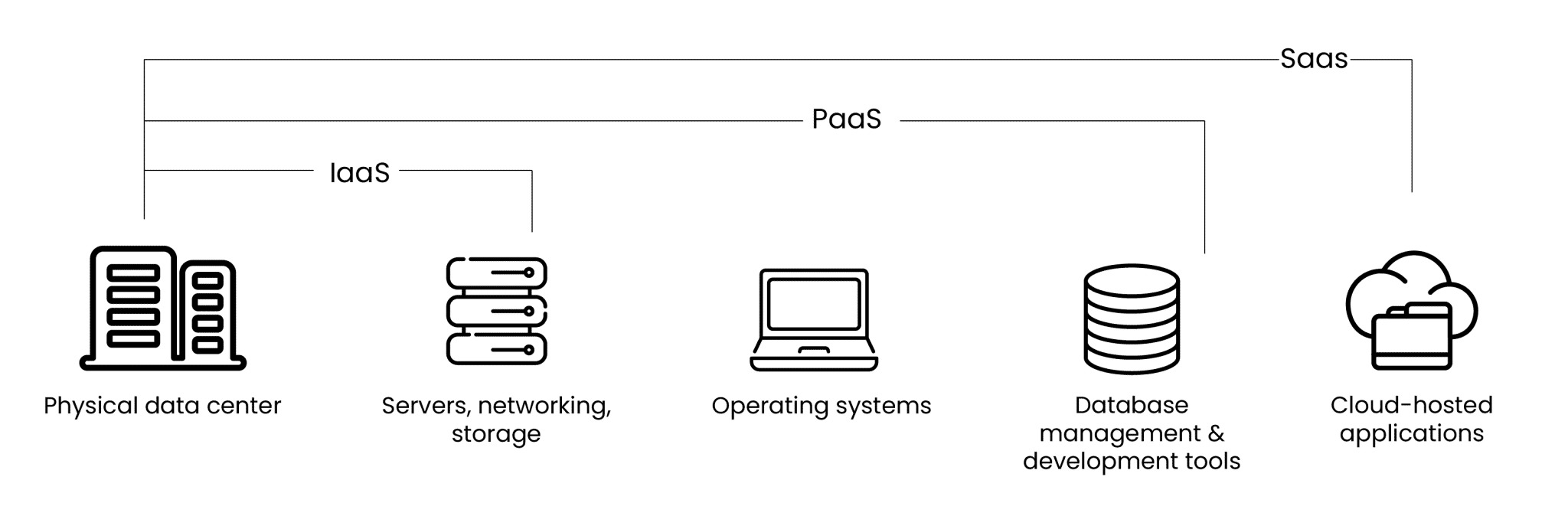
NIST defines three cloud service models: SaaS, PaaS, and IaaS. Serverless computing, usually called Function as a Service (FaaS), has since become a widely used fourth.
1. SaaS (Software as a Service)
SaaS delivers ready-to-use applications over the internet, with no installation, licensing overhead, or maintenance on the customer side. Google Workspace is a typical example: Gmail, Google Docs, and related tools run entirely on cloud infrastructure and are billed per user.
2. PaaS (Platform as a Service)
PaaS gives developers a managed environment for building, deploying, and running applications. The platform supplies the tools, libraries, and APIs, and the provider manages the servers, networking, and storage underneath, so development teams focus on code rather than infrastructure. Heroku is a common example.
3. IaaS (Infrastructure as a Service)
IaaS provides virtual compute, storage, and networking over the internet, replacing physical hardware in the customer data center. System administrators keep control of operating systems and configuration while adjusting resources as requirements change. Amazon EC2, which delivers scalable virtual servers, is a typical example.
4. FaaS (Function as a Service)
FaaS runs code in response to events, with the provider managing all infrastructure. Billing follows a pay-as-you-run model measured on actual execution, and the platform absorbs variable workloads without capacity planning. AWS Lambda is the best-known example.
Single-Tenant vs Multi-Tenant SaaS
SaaS platforms serve customers through either a single-tenant or a multi-tenant architecture, and the choice affects cost, control, and risk.
| Attribute | Single-Tenant | Multi-Tenant |
| Setup | Each customer runs a dedicated, isolated instance of the software and infrastructure. | One shared instance serves many customers, with data separated by logical isolation. |
| Customization | Full customization without affecting anyone else. | Limited, since changes touch a shared system. |
| Isolation and risk | Strong isolation; an incident affects one tenant. | Logical isolation protects data, but a vulnerability can expose multiple tenants. |
| Maintenance | Updates and patches applied per tenant. | The vendor patches once for everyone. |
| Cost | Higher, due to dedicated infrastructure and licenses. | Lower, since resources and maintenance are shared. |
| Scalability | Slower; scaling requires dedicated investment. | High; capacity and integrations scale across the shared platform. |
Benefits of Cloud Computing
The benefits of cloud computing come from shifting infrastructure cost, maintenance, and scaling onto the provider.
- Pay-as-you-go pricing: Costs track actual consumption, with no heavy upfront infrastructure spend.
- Access from anywhere: Authenticated users reach data and applications from any connected device, which keeps remote and distributed teams productive.
- Easier collaboration: Shared cloud storage gives teams one current copy of files and projects to work on together.
- Backup and disaster recovery: Providers replicate data across locations, so organizations can restore quickly after outages, data loss, or attacks.
- Less maintenance overhead: The provider patches and maintains the infrastructure, freeing internal IT teams for higher-value work.
- Elastic scale with global reach: Resources scale automatically with load, and applications can be hosted in regions close to users worldwide.
Challenges of Cloud Computing
Cloud computing shifts risk rather than removing it, and several challenges need active management.
- Shared responsibility confusion: The provider secures the cloud; you secure what you put in it. Data, identities, configurations, and encryption keys remain the customer’s job, and gaps here cause most cloud data exposures.
- Multi-cloud complexity: Using several providers multiplies configurations, governance policies, and permission models, and misconfiguration risk grows with each one.
- Vendor dependency and lock-in: A provider outage is your outage, and moving applications between clouds later is slow and expensive.
- Data security and privacy: Sensitive data sits outside your perimeter. Insecure APIs, weak identity and access management, and insider threats all need controls.
- Interoperability: Moving workloads between clouds requires rework on networking, encryption, and service mappings in the target environment.
- Skills shortage: Cloud architecture, cloud security, and cost management expertise remain hard to hire and retain.
- Network dependency: Every cloud service rides on network bandwidth and availability, so connectivity problems become business problems.
- Compliance: Regulatory obligations and data residency rules follow the data into the cloud and across borders.
Cloud Compliance and Cryptographic Standards
Regulators treat data in the cloud the same as data anywhere else, so encryption, access control, and monitoring obligations follow the workload.
NIST SP 800-53
NIST SP 800-53 Revision 5 (most recently updated as Release 5.2.0 on August 27, 2025) is the US federal catalog of security and privacy controls. Its Access Control (AC) family requires role-based access to cloud resources, the Identification and Authentication (IA) family requires multi-factor authentication (control IA-2), the System and Communications Protection (SC) family requires encryption of data and secure communications, and the Audit and Accountability (AU) family requires detailed activity logging to support anomaly detection and forensics.
The NIST Cybersecurity Framework (CSF) 2.0 complements the catalog: its Identify function covers inventorying cloud assets and assessing their risk, and its Protect function covers encryption and identity and access management.
PCI DSS
PCI DSS v4.0.1 is the current active version of the payment card standard, and all of its requirements have been mandatory since March 31, 2025. Requirement 3 requires stored account data to be protected with strong cryptography, Requirement 4 requires strong cryptography such as TLS 1.2 or higher when cardholder data crosses open, public networks, Requirement 10 requires logging and monitoring of access to systems in the cardholder data environment, and Requirement 12 requires documented responsibilities between customers and third-party service providers, which is where the shared responsibility model becomes a contractual matter.
GDPR
Under GDPR Article 33, an organization using cloud services must be able to detect personal data breaches and notify its supervisory authority within 72 hours of becoming aware of one, and it must keep records that demonstrate compliance.
NIS2 Directive
The NIS2 Directive (EU 2022/2555), which EU member states were required to transpose by October 17, 2024, lists cloud computing service providers among its covered digital infrastructure entities. Article 21 requires risk-management measures including incident handling, so cloud-related security incidents can be detected, reported, and contained.
DORA
The Digital Operational Resilience Act (EU 2022/2554) has applied to EU financial entities since January 17, 2025. Its ICT risk-management framework (Articles 5 to 16) requires periodic risk assessment and documented mitigation for ICT dependencies, including cloud providers, and firms must maintain a register of their ICT third-party arrangements.
How Encryption Consulting Helps
Cloud Data Protection Services from Encryption Consulting help organizations secure data across Microsoft Azure, AWS, and Google Cloud Platform, from encryption assessment to cloud key management design. Our advisors help you choose the right key management model, whether keys stay in your own HSMs, move under a bring-your-own-key arrangement, or remain in the provider’s KMS with added safeguards, and we assess compliance across multi-cloud environments against frameworks such as NIST SP 800-53, PCI DSS, and GDPR. Backed by ISO/IEC 27001:2022 and SOC 2 certified practices.
Frequently Asked Questions
What is cloud computing in simple terms?
Cloud computing means using a provider’s computers over the internet instead of your own. A provider such as AWS, Microsoft Azure, or Google Cloud runs the servers, storage, and software in its data centers, and you rent what you need. You pay for what you use, and you can reach the services from any device with an internet connection.
What are the main cloud service models?
NIST defines three cloud service models. Software as a Service (SaaS) delivers ready-to-use applications such as Google Workspace. Platform as a Service (PaaS) gives developers a managed environment for building and deploying applications, such as Heroku. Infrastructure as a Service (IaaS) provides virtual servers, storage, and networking, such as Amazon EC2. Function as a Service (FaaS), a newer serverless model, runs code in response to events.
What is the difference between public, private, and hybrid cloud?
A public cloud shares provider-owned infrastructure across many customers and is the fastest to adopt. A private cloud dedicates infrastructure to one organization, which improves control and simplifies compliance but costs more to run. A hybrid cloud connects the two, so sensitive workloads stay private while variable workloads scale on public capacity. NIST SP 800-145 also defines a fourth model, the community cloud, shared by organizations with common requirements.
Who is responsible for security in the cloud?
Cloud security follows a shared responsibility model. The provider secures the underlying infrastructure: physical data centers, hardware, and the virtualization layer. The customer secures everything it puts in the cloud: data, identities, access policies, application configuration, and encryption keys. Misconfigured storage and weak access controls on the customer side are among the most common causes of cloud data exposure.
What are the five essential characteristics of cloud computing?
NIST SP 800-145 lists five essential characteristics: on-demand self-service, broad network access, resource pooling, rapid elasticity, and measured service. Together they describe a service a customer can provision without human interaction, reach over standard networks, share with other tenants through pooled resources, scale up or down quickly, and pay for based on metered usage.
Protect Your Data in the Cloud
Ready to bring encryption, key management, and compliance under control across your cloud estate? Explore Cloud Data Protection Services, or talk to an Encryption Consulting advisor.
- Key Takeaways
- Why Do Organizations Use Cloud Computing?
- Cloud Deployment Models
- Cloud Computing Architecture
- The Five Essential Characteristics of Cloud Computing
- Cloud Service Models: SaaS, PaaS, IaaS, and FaaS
- Single-Tenant vs Multi-Tenant SaaS
- Benefits of Cloud Computing
- Challenges of Cloud Computing
- Cloud Compliance and Cryptographic Standards
- How Encryption Consulting Helps
- Frequently Asked Questions
- Protect Your Data in the Cloud