Signing XML files with XMLSec and PKCS#11 means using the open-source xmlsectool command-line utility to apply a digital signature to an XML document while the private key stays inside a Hardware Security Module or token. EC’s PKCS#11 wrapper lets xmlsectool talk to the HSM, so the key never leaves certified hardware.
Global data volume keeps climbing fast enough to make manual trust-verification impractical at scale: IDC’s Global DataSphere Forecast, 2026-2030 (published June 2026) projects the world’s data will surpass 700 zettabytes (ZB) by 2030. To understand it better, one zettabyte is equivalent to a trillion gigabytes (GB). Most of this data is unstructured and needs something that provides it meaning. This is where XML files come into play.
eXtensible Markup Language or XML, is a markup language that establishes rules and organizes any data. It also tells how to store and transport the data over the Internet. XML uses markup symbols or tags, which modern browsers and data processing applications use to process that information.
XML Signing
XML files are used in large numbers, making them an integral part of our web-based applications and technology. But should you trust any XML file? How can you develop confidence in the authenticity of that XML file? You need a digital proof or signature to authenticate and verify its source.
XML signing helps you attach your digital credentials, which will help the receiver fully trust the file’s content. Now, to ease up this process, Encryption Consulting provides you with PKCS#11 Wrapper, which is a software library that provides a Java interface to interact with PKCS#11-compliant devices such as Hardware Security Modules (HSMs), smart cards, or any key vaults.
Along with PKCS#11 Wrapper, we will use the XMLSec tool, a command line tool for signing, verifying, encrypting, and decrypting XML documents.
Ubuntu vs. macOS: Quick Comparison
This guide covers Ubuntu and macOS; a Windows setup is not currently documented for this tool. Here’s how the two supported setups differ at a glance.
| Aspect | Ubuntu | macOS |
|---|---|---|
| Tested OS version | Ubuntu 24.02 | macOS 15.1 Sequoia |
| Wrapper dependencies | liblog4cxx12, curl (apt) | liblog4cxx, curl (Homebrew) |
| Java distribution | Amazon Corretto 17 via apt repo | Amazon Corretto 17 via .pkg installer |
| Shell config for JAVA_HOME | ~/.bashrc | ~/.zshrc |
| XMLSec Tool source | shibboleth.net (xmlsectool-3.0.0-bin.zip) | shibboleth.net (xmlsectool-3.0.0-bin.zip) |
Configuration of PKCS#11 Wrapper on Ubuntu
Prerequisites
Before we look into the process of XML Signing using XMLSec Tool and our PKCS11 Wrapper in Linux (Ubuntu) machine, ensure the following are ready:
- Ubuntu Version: Ubuntu version 22.04 or later (tested environment is Ubuntu 24.02)
- Dependencies: Install liblog4cxx12 and curl.
To install the dependencies, run the following commands
- sudo apt-get install curl
- sudo apt-get install liblog4cxx12
Installing EC’s PKCS#11 Wrapper
Step 1: Go to EC CodeSign Secure’s v3.02’s Signing Tools section and download the PKCS#11 Wrapper for Ubuntu.
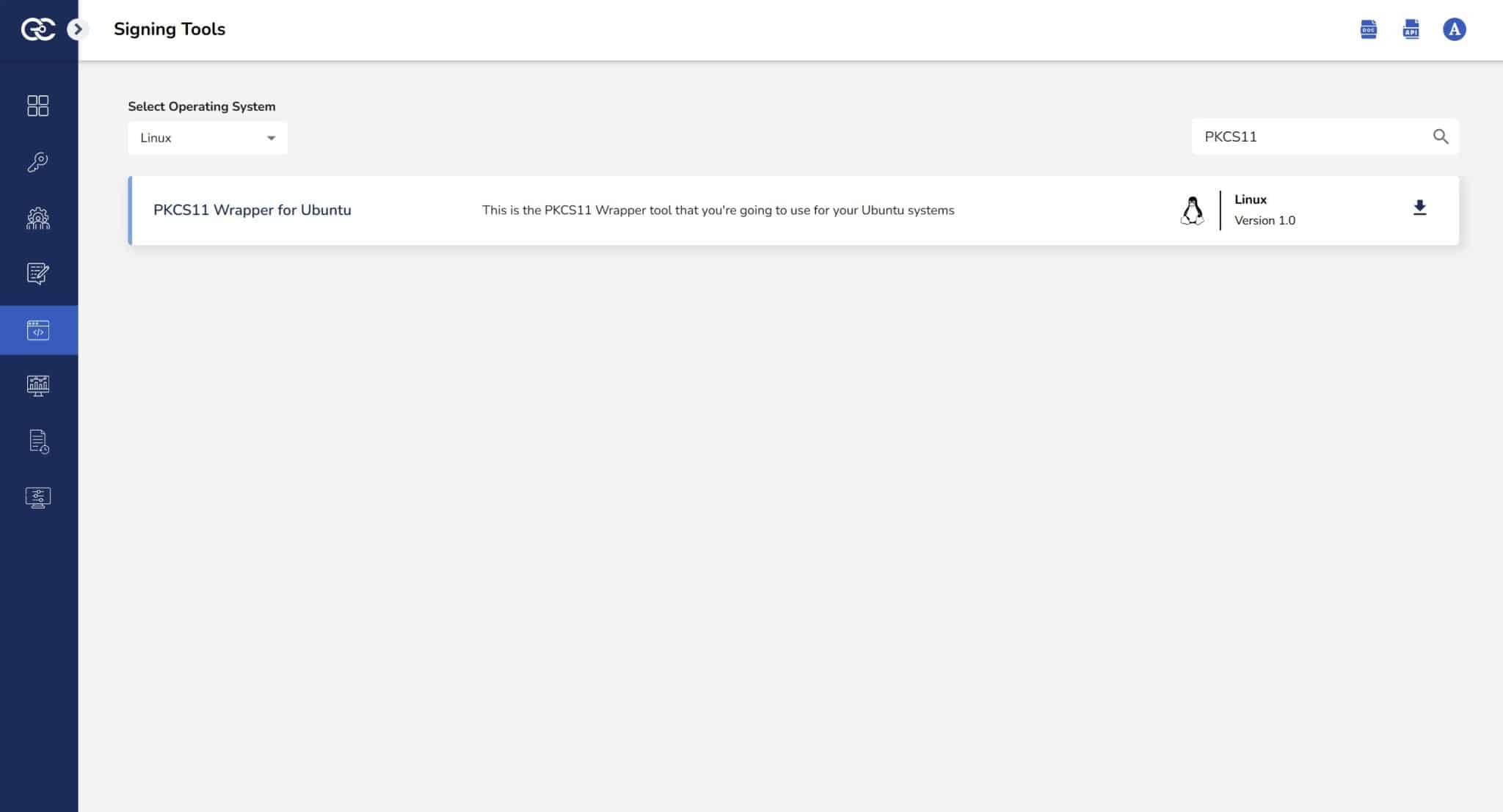
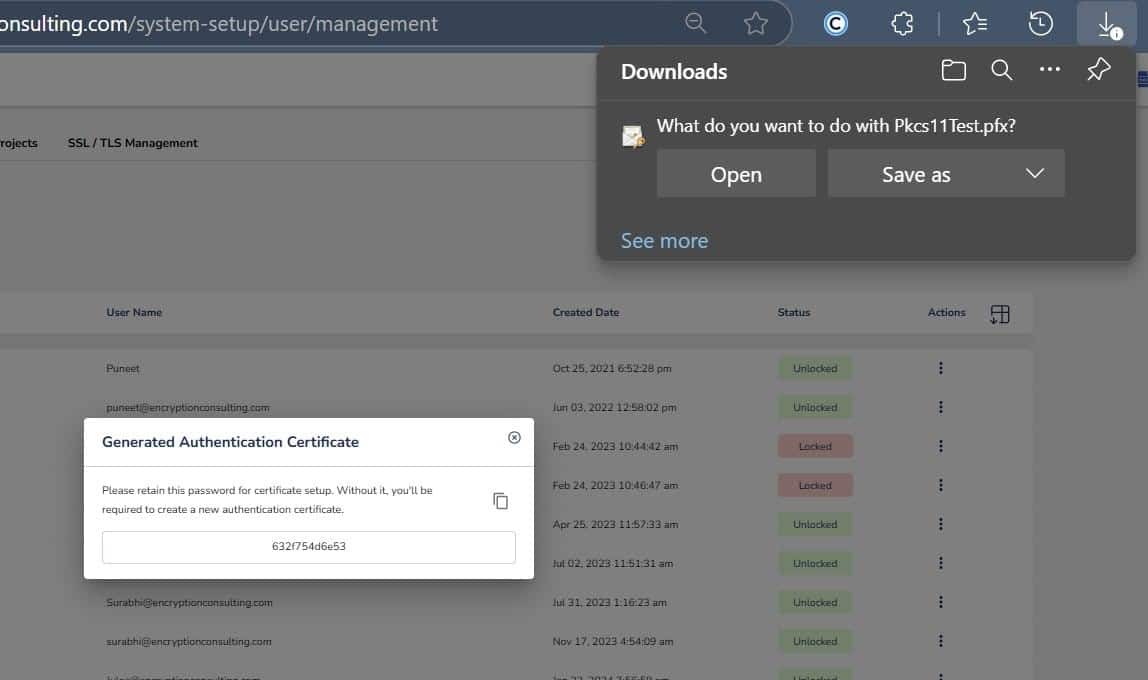
Step 2: After that, generate a P12 Authentication certificate from the System Setup > User > Generate Authentication Certificate dropdown.
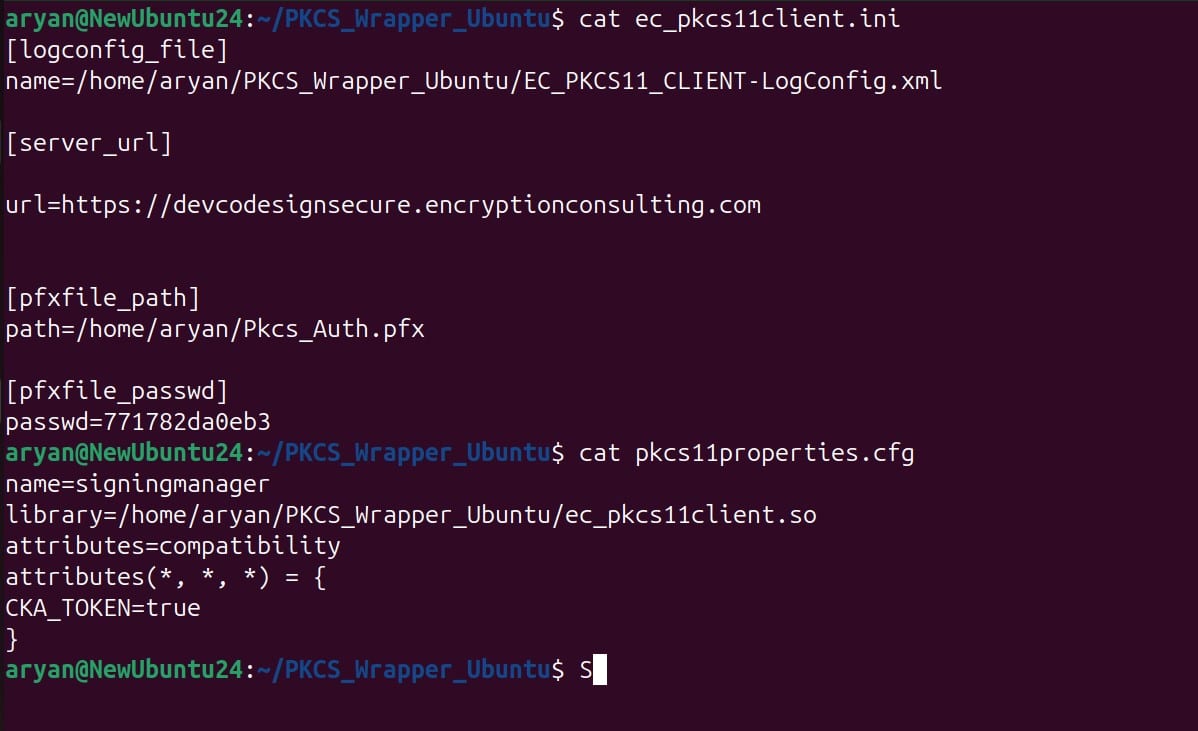
Step 3: Go to your Ubuntu client system and edit the configuration files (ec_PKCS#11client.ini and PKCS#11properties.cfg) downloaded in the PKCS#11 Wrapper.
Installing XMLSec Tool
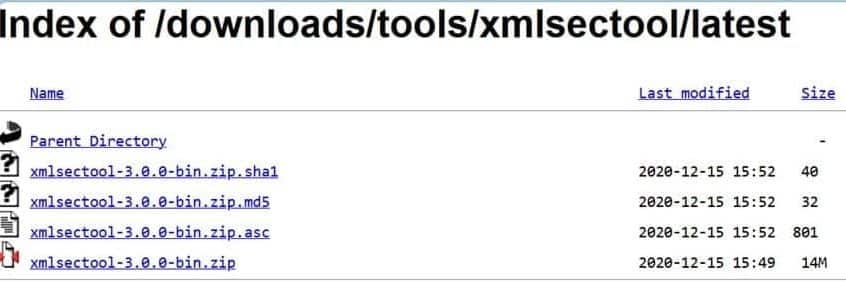
Step 1: Install the latest version of XMLSec Tool (xmlsectool-3.0.0-bin.zip) using this link.
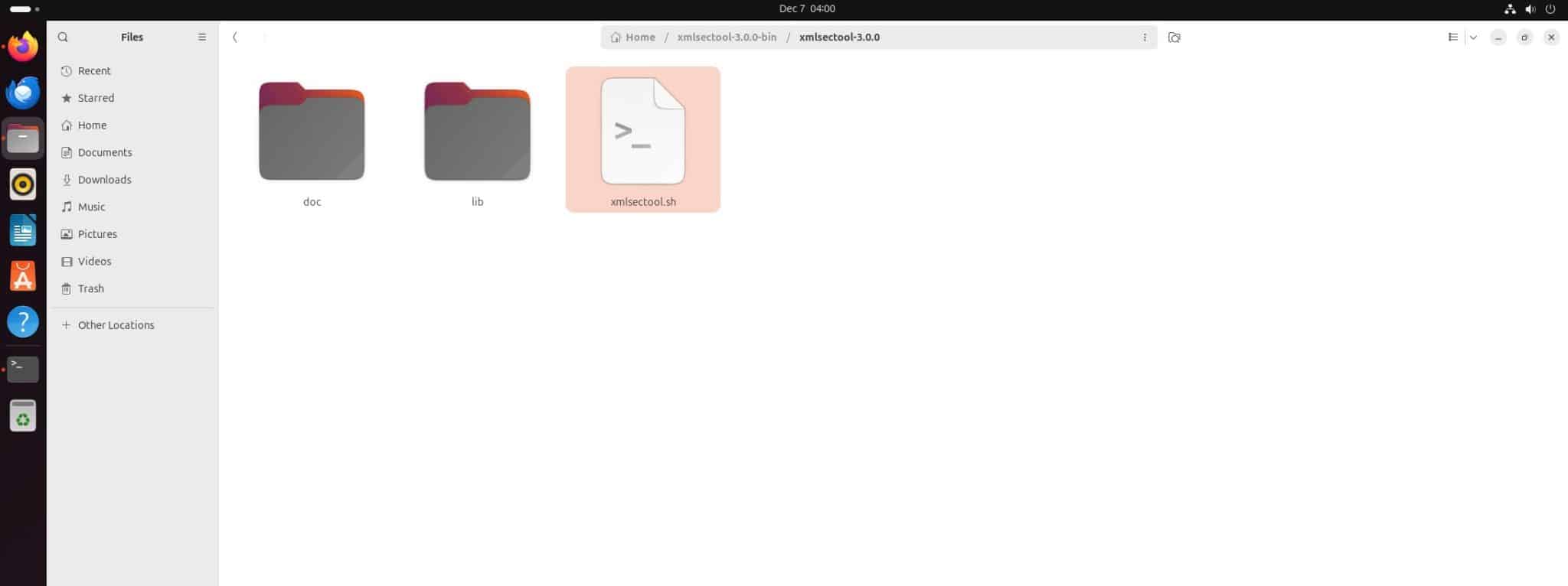
Step 2: You can extract the zip file into a directory of your choice.
Download and install Java on your Ubuntu machine.
Step 1: Download Amazon Corretto 17 Java (You can check other supported Java versions with XMLSec Tool here.)
wget -O – https://apt.corretto.aws/corretto.key | sudo gpg –dearmor -o /usr/share/keyrings/corretto-keyring.gpg && \ echo “deb [signed-by=/usr/share/keyrings/corretto-keyring.gpg] https://apt.corretto.aws stable main” | sudo tee /etc/apt/sources.list.d/corretto.list
Step 2: Install Java Package
sudo apt-get update; sudo apt-get install -y java-17-amazon-corretto-jdk
Step 3: Check whether Java has been installed properly or not
java -version

Add Java to Environment Variable
Step 1: Set Amazon Corretto 17 Java as the active version
update-alternatives –config java
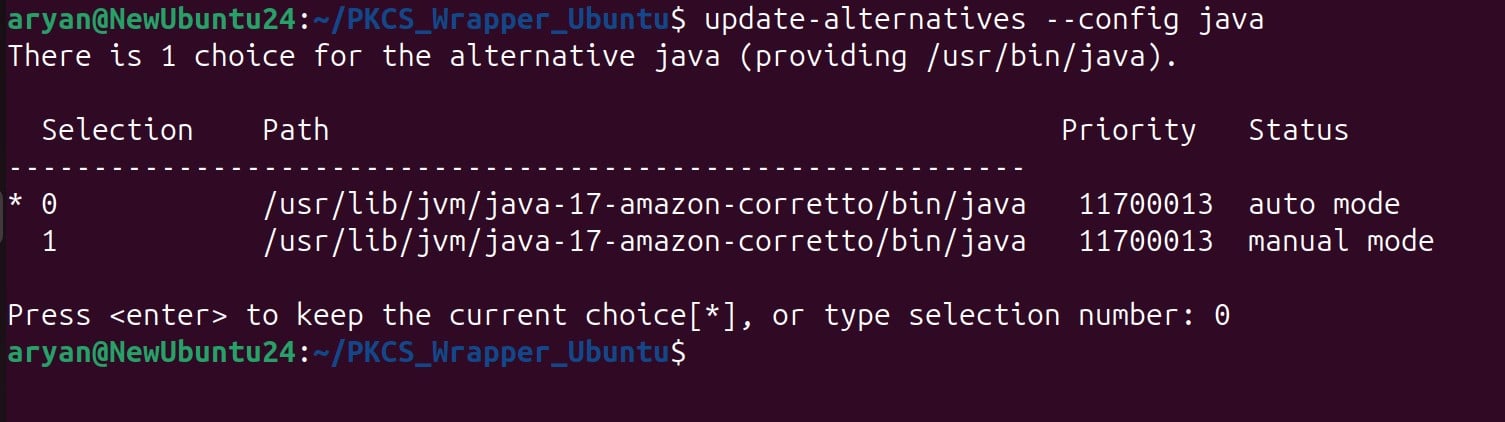
Step 2: Add “JAVA_HOME” variable in the ~/.bashrc file
echo “export JAVA_HOME=/usr/lib/jvm/java-17-amazon-corretto” >> ~/.bashrc

Step 3: Check the ~/.bashrc file
tail -3 ~/.bashrc

Step 4: Reload the Environment variables
source ~/.bashrc

Step 5: Check JAVA_HOME variable value
echo $JAVA_HOME

Signing
Step 1: Change the working directory of the terminal to that folder which contains your “ec_pkcs11client.ini” file.
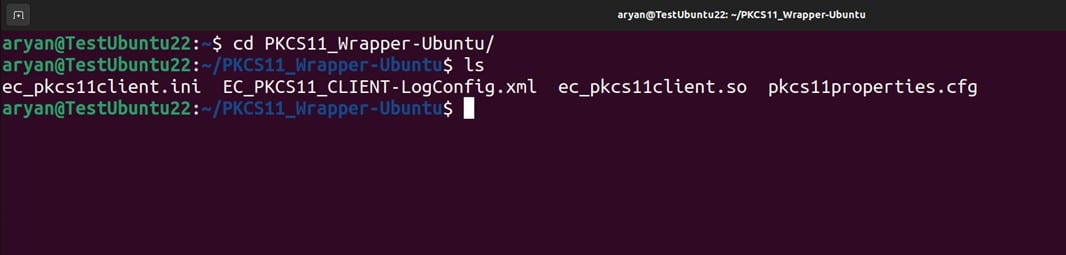
Step 2: Run the signing command from this directory.
<Path of xmlsectool.sh file> –sign –pkcs11Config <Path of pkcs11properties.cfg> –keyAlias <Key alias of the signing certificate> –keyPassword NONE –inFile <Path of XML file> –outFile <Path of the signed XML file>
A sample command is provided below:
../xmlsectool-3.0.0-bin/xmlsectool-3.0.0/xmlsectool.sh –sign –pkcs11Config pkcs11properties.cfg –keyAlias DemoCertificate –keyPassword NONE –inFile ../xmlSample.xml –outFile ../out-xmlSample.xml
Verification
Run the verification command
<Path of xmlsectool.sh file> –verifySignature –pkcs11Config <Path of pkcs11properties.cfg> –keyAlias <Key alias of the signing certificate> –keyPassword NONE –inFile <Path of the signed XML file>
A sample command is provided below:
../xmlsectool-3.0.0-bin/xmlsectool-3.0.0/xmlsectool.sh –verifySignature –pkcs11Config pkcs11properties.cfg –keyAlias DemoCertificate –keyPassword NONE –inFile ../out-xmlSample.xml
A successful run exits with status 0 and no error output. If verification fails, xmlsectool prints a specific error rather than a generic failure, most commonly a key alias mismatch (the alias must correspond to the certificate used to produce the signature, not an arbitrary label), a modified file since signing, or a pkcs11Config pointing at the wrong slot.
Common Errors
| Error | Likely Cause | Fix |
|---|---|---|
| Verification fails on a file that was just signed successfully | keyAlias in the verify command doesn’t match the alias used to sign, or the input file path doesn’t match the sign command’s actual output path | Confirm both commands reference the identical file path and the same certificate alias |
| xmlsectool can’t find the PKCS#11 module | pkcs11properties.cfg points to an incorrect library path for the wrapper | Re-check the config file against the wrapper’s installed location for your OS |
| JAVA_HOME not recognized | Shell profile wasn’t reloaded after editing (bashrc/zshrc) | Run source ~/.bashrc (Ubuntu) or source ~/.zshrc (macOS) before retrying |
Configuration of PKCS#11 Wrapper on MacOS
Prerequisites
Before we look into the process of XML Signing using XMLSec Tool and our PKCS#11 Wrapper in MacOS machine, ensure the following are ready:
- MacOS Version: MacOS version 13 (Ventura) or later (tested environment is MacOS 15.1 Sequoia)
- Dependencies: Install liblog4cxx and curl.
To install the dependencies, run the following commands
- brew install log4cxx
- brew install curl
Installing EC’s PKCS#11 Wrapper
Step 1: Go to EC CodeSign Secure’s v3.02’s Signing Tools section and download the PKCS#11 Wrapper for Mac.
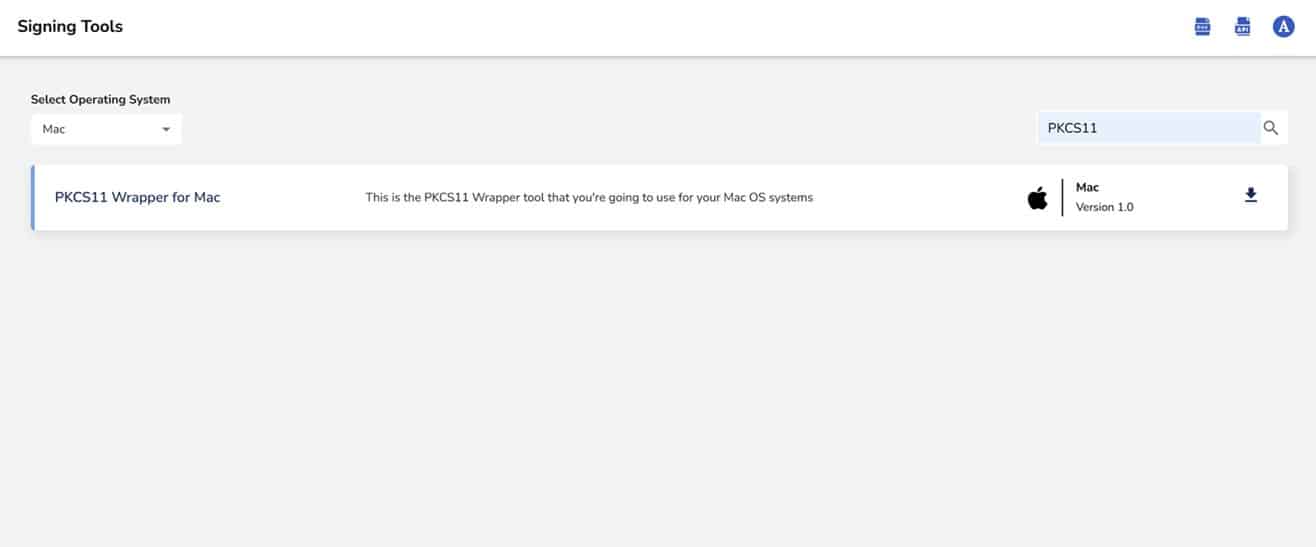
Step 2: After that, generate a P12 Authentication certificate from the System Setup > User > Generate Authentication Certificate dropdown.
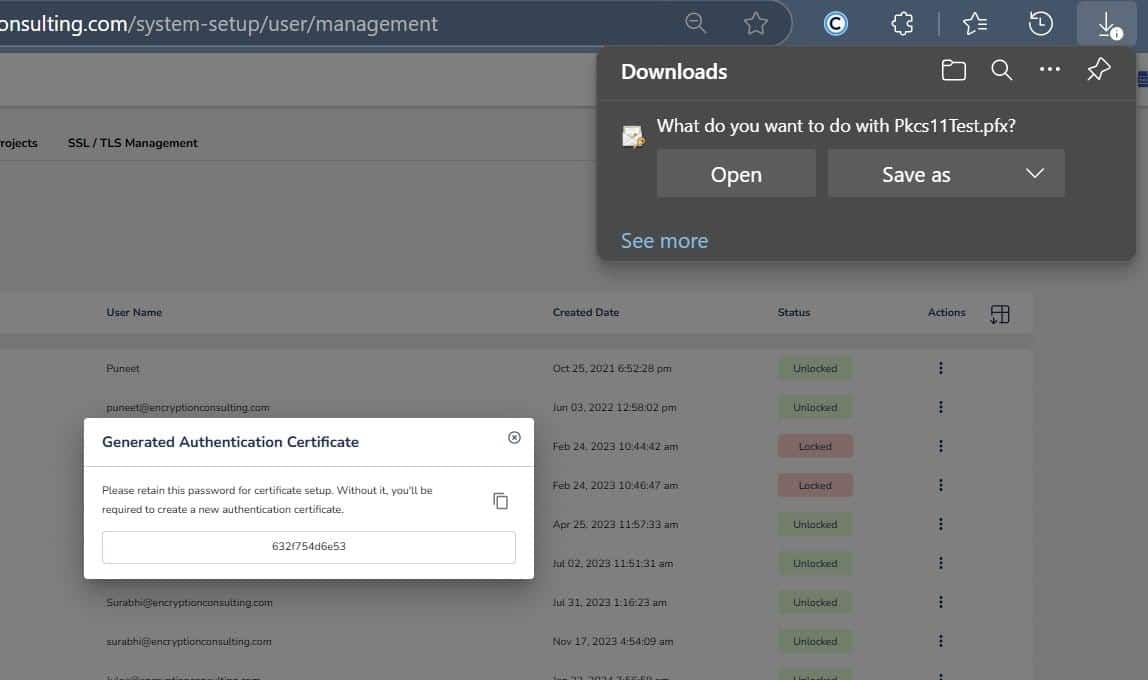
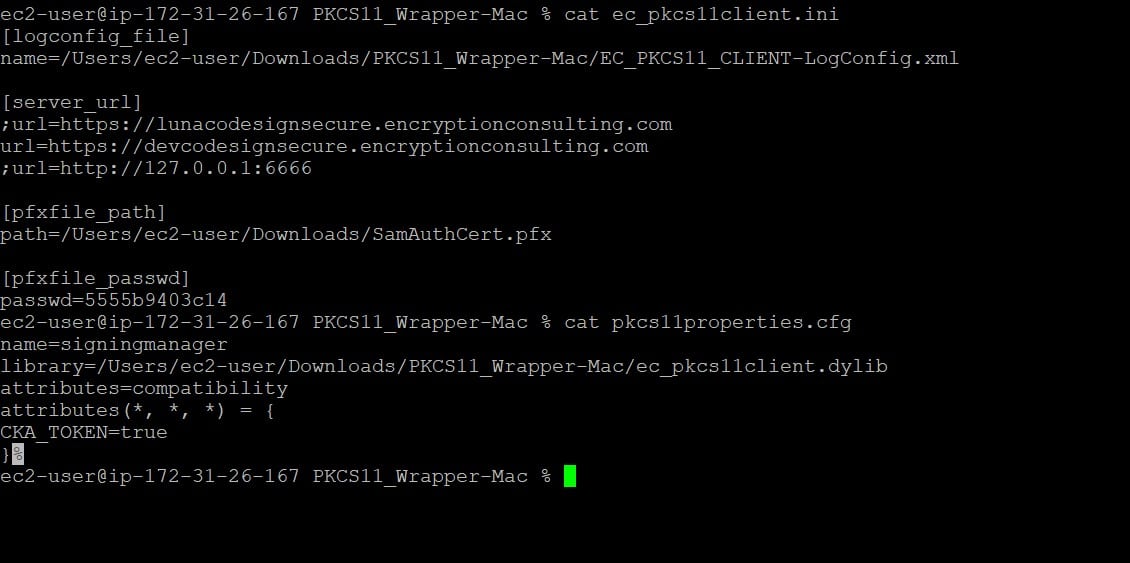
Step 3: Go to your MacOS client system and edit the configuration files (ec_PKCS#11client.ini and PKCS#11properties.cfg) downloaded in the PKCS#11 Wrapper.
Installing XMLSec Tool
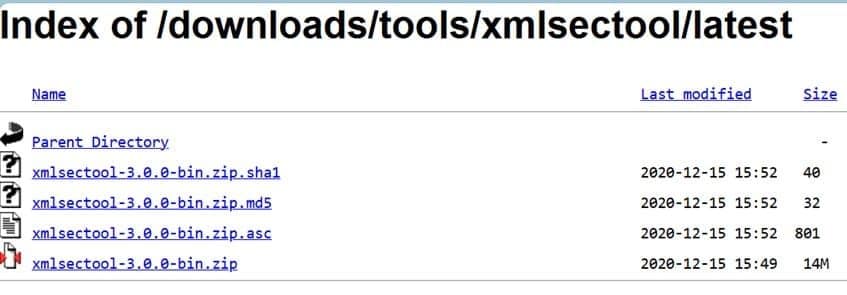
Step 1: Download the latest version of XMLSec Tool (xmlsectool-3.0.0-bin.zip) using this link.
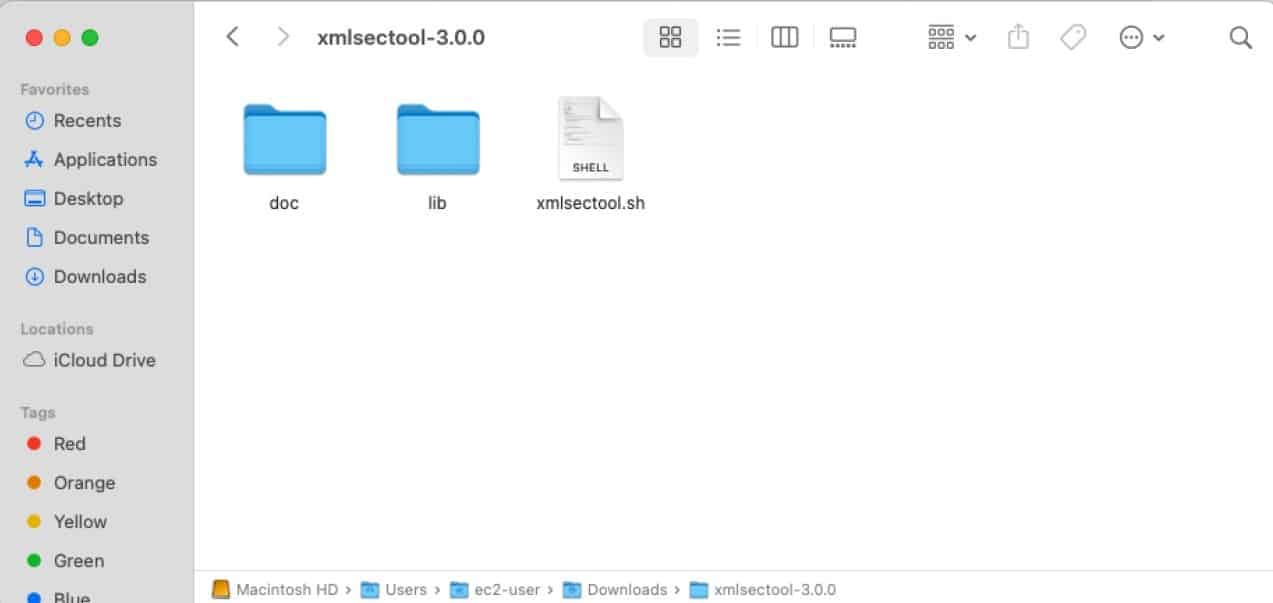
You will need this shell file to perform the XML signing
Download and install Java in your MacOS machine.
Step 1: Download Amazon Corretto 17 Java ( You can check other supported Java versions with XMLSec Tool here ).
You can use this link to download the .pkg file for MacOS environment
Step 2: Install Java Package
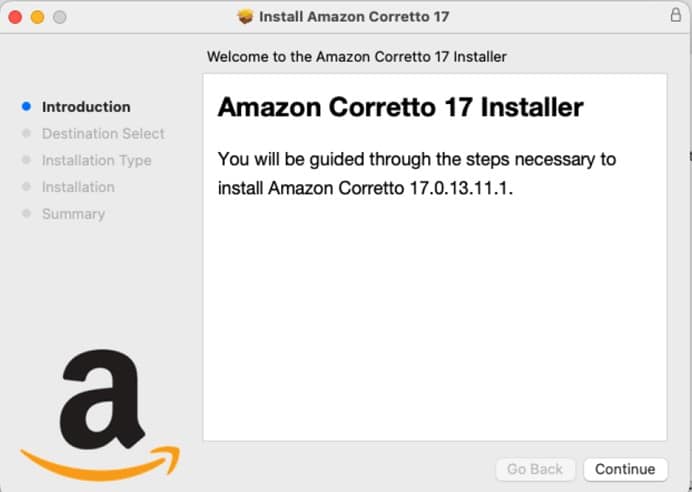
Begin the installation using the downloaded file.
Step 3: Check whether Java has been installed properly or not
java -version

Add Java to Environment Variable
Step 1: Get complete installation path of Amazon Corretto 17 Java
/usr/libexec/java_home –verbose

Step 2: Add “JAVA_HOME” variable in the ~/.zshrc file
echo ‘export JAVA_HOME=”/Library/Java/JavaVirtualMachines/amazon-corretto-17.jdk/Contents/Home”‘ >> ~/.zshrc

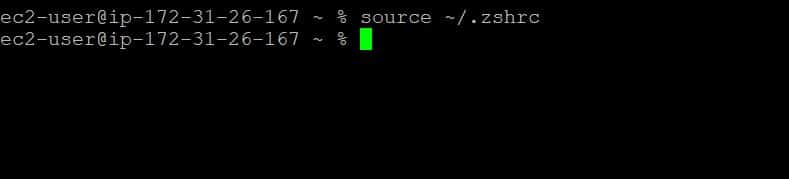
Step 3: Reload the Environment variables
source ~/.zshrc
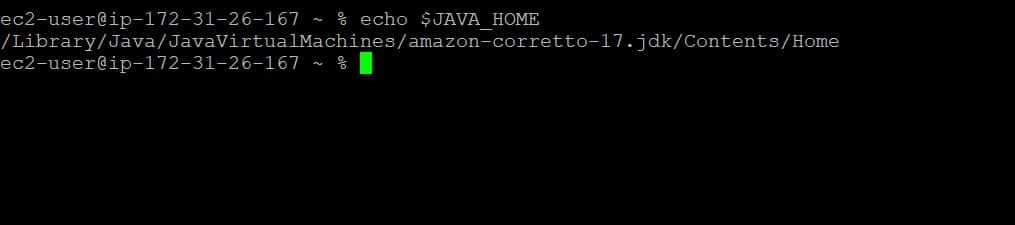
Step 4: Check JAVA_HOME variable value
echo $JAVA_HOME
Signing
Step 1: Change the working directory of the terminal to that folder which contains your “ec_pkcs11client.ini” file.
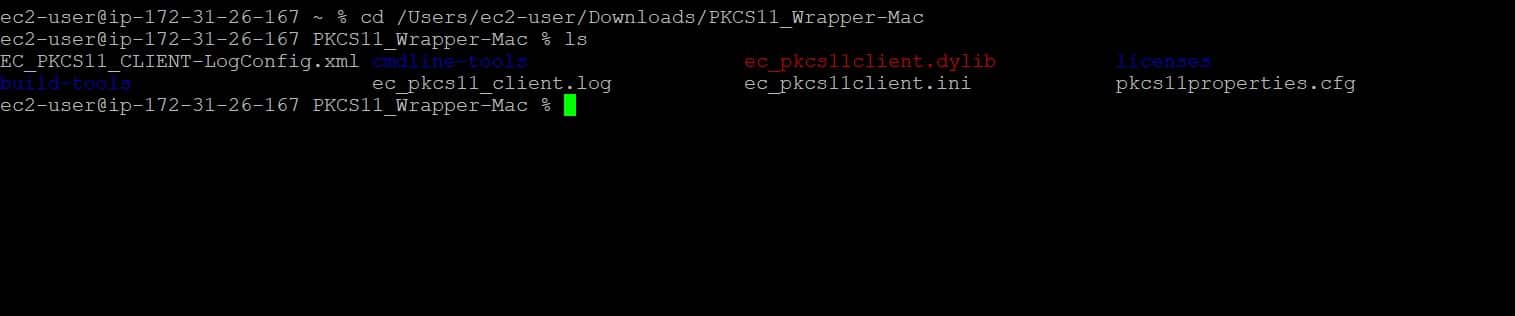
Step 2: Run the signing command from this directory.
<Path of xmlsectool.sh file> –sign –pkcs11Config <Path of pkcs11properties.cfg> –keyAlias <Key alias of the signing certificate> –keyPassword NONE –inFile <Path of XML file> –outFile <Path of the signed XML file>
A sample command is provided below:
../xmlsectool-3.0.0/xmlsectool.sh –sign –pkcs11Config pkcs11properties.cfg –keyAlias DemoCertificate –keyPassword NONE –inFile ../xmlSample.xml –outFile ../SignedSample.xml
Verification
Run the verification command
<Path of xmlsectool.sh file> –verifySignature –pkcs11Config <Path of pkcs11properties.cfg> –keyAlias <Key alias of the signing certificate> –keyPassword NONE –inFile <Path of the signed XML file>
A sample command is provided below:
../xmlsectool-3.0.0/xmlsectool.sh –verifySignature –pkcs11Config pkcs11properties.cfg –keyAlias DemoCertificate –keyPassword NONE –inFile ../SignedSample.xml
CI/CD Use and Cleanup
For repeated signing in a pipeline, invoke the same sign command as a build stage, then immediately run the verify command against its own output before publishing the artifact, so a corrupted or incomplete signature is caught before it reaches production. Because the private key never leaves the HSM, there’s no local key file to clean up after signing; the only teardown step is removing the P12 authentication certificate from any temporary build agent once the pipeline run completes, since that certificate authenticates the client to CodeSign Secure rather than to the XML signature itself.
Conclusion
With unstructured data on the rise, XML document signing is the need of the hour. The seamless integration of our PKCS#11 Wrapper and XMLSec tool offers a flexible and efficient solution for XML document signing.
Using Encryption Consulting’s CodeSign Secure solution, you can build and increase your customer trust. It provides features like client-side hashing, role-based access, and application management to secure your data. It allows you to integrate various DevOps CI/CD pipelines for hands-free, automated code signing. That role-based, HSM-backed protection matters more every year: GitGuardian’s 2026 State of Secrets Sprawl report found 28.65 million new hardcoded secrets exposed on public GitHub in 2025 alone, a 34% year-over-year increase, and the median time for a team to remediate a leaked secret is 94 days, according to Verizon’s 2025 Data Breach Investigations Report, a long enough window that keeping signing keys off disk entirely is worth the extra setup step.
Frequently Asked Questions
What is XMLSec (xmlsectool), and what does it do?
XMLSec (xmlsectool) is an open-source command-line tool for signing, verifying, encrypting, and decrypting XML documents. It’s maintained by the Shibboleth project and works with EC’s PKCS#11 wrapper to delegate the actual signing operation to a Hardware Security Module.
Why sign an XML file with PKCS#11 instead of a local keystore?
A local keystore stores the private key on disk, where it’s vulnerable if the file system is compromised. PKCS#11 lets xmlsectool delegate signing to a Hardware Security Module or token, so the key is generated, stored, and used entirely in hardware and never exported.
Which platforms does EC’s PKCS#11 wrapper for XML signing support?
This guide documents Ubuntu and macOS. A Windows setup is not currently documented for XMLSec signing with this wrapper, unlike EC’s OpenSSL and Jarsigner PKCS#11 guides, which cover Windows as well.
Which Java version does xmlsectool require?
This guide uses Amazon Corretto 17 on both Ubuntu and macOS. Other Java distributions and versions are supported too; check the Shibboleth wiki’s Java Distributions page for the current compatibility list before deviating from Corretto 17.
What’s the exact xmlsectool command for signing an XML file?
The core command is xmlsectool.sh --sign --pkcs11Config pkcs11properties.cfg --keyAlias <key alias> --keyPassword NONE --inFile <input.xml> --outFile <output.xml>, run from the folder containing your wrapper’s config file. It’s identical on Ubuntu and macOS.
How do I verify a signed XML file?
Run xmlsectool.sh --verifySignature --pkcs11Config pkcs11properties.cfg --keyAlias <key alias> --keyPassword NONE --inFile <signed.xml>. This checks the signature against the file’s contents using the same PKCS#11 configuration used to sign it.
Is a Windows setup available for XMLSec + PKCS#11 signing?
Not in this guide. If your workflow requires Windows, EC’s PKCS#11 wrapper does support Windows for other tools, such as OpenSSL and Jarsigner, but XMLSec-specific Windows steps aren’t currently documented here.
Which CodeSign Secure version currently ships this PKCS#11 wrapper?
CodeSign Secure v3.02, which also added native LMS and ML-DSA post-quantum signing, GPG2 integration, and Debian/RPM package signing alongside its existing PKCS#11-based tool support.
How much data does the world actually generate, and why does that matter for XML signing?
IDC’s Global DataSphere Forecast, 2026-2030, published June 2026, projects the world’s data will surpass 700 zettabytes by 2030. As more of that data moves through XML-based formats and integrations, verifying authenticity and integrity at scale becomes impractical without automated, hardware-backed signing rather than manual trust checks.
- XML Signing
- Ubuntu vs. macOS: Quick Comparison
- Configuration of PKCS#11 Wrapper on Ubuntu
- Common Errors
- Configuration of PKCS#11 Wrapper on MacOS
- CI/CD Use and Cleanup
- Conclusion
- Frequently Asked Questions
- What is XMLSec (xmlsectool), and what does it do?
- Why sign an XML file with PKCS#11 instead of a local keystore?
- Which platforms does EC's PKCS#11 wrapper for XML signing support?
- Which Java version does xmlsectool require?
- What's the exact xmlsectool command for signing an XML file?
- How do I verify a signed XML file?
- Is a Windows setup available for XMLSec + PKCS#11 signing?
- Which CodeSign Secure version currently ships this PKCS#11 wrapper?
- How much data does the world actually generate, and why does that matter for XML signing?