

- Key takeaways
- What is Certighost (CVE-2026-54121)?
- The impact of Certighost
- How does the Certighost attack work?
- How to check if you are exposed to Certighost
- How to fix Certighost
- How to check if Certighost was exploited in your environment before you patched
- What to do if you find a Certighost certificate
- How to prevent Certighost-style attacks
- Certighost checklist
- Certighost patch details and commands
- How Encryption Consulting can help you
- Frequently asked questions
Before Microsoft’s July 2026 security update, a vulnerability known as Certighost (CVE-2026-54121) could allow an attacker with a standard domain user account to impersonate a domain controller. The vulnerability affects Enterprise certification authorities (CAs) in Active Directory Certificate Services (AD CS) that have not been patched. The attacker could trick such a CA into issuing a trusted sign-in certificate in a domain controller’s name because the CA did not properly check the request. With that certificate, the attacker could authenticate to Kerberos as the domain controller, gain highly privileged access, retrieve sensitive domain credentials, and ultimately compromise the entire Active Directory domain.
Installing the security update addresses the vulnerability, but it does not determine whether the vulnerability was exploited before patching. Certificates issued before the update remain valid and can still be used for unauthorized authentication unless you identify and revoke them. Detecting such activity can be difficult, because AD CS auditing (CA event logging) is not enabled by default.
That is why “we patched” does not settle the matter. This blog explains how the attack works, how to confirm your certificate authorities are no longer exposed, and how to find out whether a certificate was already issued to someone who should not have it.
Key takeaways
- Certighost is a vulnerability in Active Directory Certificate Services (AD CS). Microsoft rates it Critical, and its CVSS 3.1 base score is 8.8 (High).
- An attacker needs no administrator rights, because a standard domain user account is enough to start the attack if the CA is unpatched. A successful attack lets the attacker sign in as a domain controller, which can lead to full domain control.
- The fix is to install the July 14, 2026 Windows security update on every Enterprise CA.
- Patching stops new attacks, but it does not undo a certificate that was issued earlier, so you still need to review past requests.
- Template hardening and strong certificate mapping remain best practice, but they do not protect against Certighost, because the vulnerability is in the CA’s code, not its configuration.
Certighost at a glance
| Item | Detail |
|---|---|
| CVE | CVE-2026-54121 |
| Affected component | Enterprise Active Directory Certificate Authority (AD CA) |
| Impact | Elevation of privilege. A standard domain user can obtain a certificate that authenticates as a domain controller, potentially leading to full domain compromise. |
| Severity | Microsoft severity rating: Critical. CVSS 3.1 base score: 8.8 (High). |
| Attacker needs | A standard domain user account and network access: no admin rights and no user interaction. |
| Affected versions | Windows Server 2012 through 2025 |
| Patched | July 14, 2026 |
| Public exploit code | Since July 24, 2026 |
| Exploitation status | Microsoft had reported no confirmed threat-actor use as of July 31, 2026, and the CVE was not in the CISA KEV catalog as of October 8, 2026. |
Sources: Microsoft Security Update Guide, Microsoft Defender XDR blog.
What is Certighost (CVE-2026-54121)?
Certighost (CVE-2026-54121) is an “elevation of privilege” vulnerability in Active Directory Certificate Services (AD CS). Microsoft fixed it in the July 14, 2026 security updates. Before that fix, the attack worked like this:
- An attacker gains access to a standard, low-privileged Active Directory domain user account.
- The attacker sends the Certificate Authority a certificate request that points it to a server the attacker controls, and that server supplies a domain controller’s identity.
- The CA issues a certificate carrying that identity, so the attacker now holds a certificate for a domain controller even though their own account has no domain controller privileges.
- The attacker uses the certificate to authenticate to Kerberos as the domain controller, which can give them access to sensitive domain credentials and let them perform privileged operations.
The attacker’s original account never gains any extra permissions. Instead, the vulnerability lets the attacker impersonate a highly privileged identity, which is why it is classified as an elevation-of-privilege vulnerability.
The researchers behind the public disclosure reported the issue to Microsoft on May 14, 2026. Microsoft released the fix on July 14, and the researchers published their technical disclosure and working exploit code ten days later.
The impact of Certighost
A successful Certighost attack gives the attacker a valid certificate for a domain controller, and with it the ability to act as that domain controller. The points below explain what that leads to and why patching alone does not close the risk.
It can lead to full domain compromise. The attacker does not take over the domain controller itself. Instead, they use the certificate to request a Kerberos ticket (PKINIT) as the domain controller’s computer account. Domain controllers have directory replication rights, so with that ticket the attacker can ask a real domain controller to replicate account data to them (DCSync). That data can include password hashes for users, administrators, and service accounts, and the krbtgt key used to sign every Kerberos ticket. With those, an attacker could sign in as almost any account and forge tickets, which is what makes full domain compromise possible.
The certificate is signed by your own CA. The certificate itself is not forged, but the identity information used to obtain it is manipulated. The vulnerability lets the CA issue a trusted certificate containing a domain controller’s identity without properly validating the information provided during enrollment. Because your CA signed it, the certificate is trusted everywhere your CA is trusted, and a logon with it looks like routine domain controller activity.
The patch does not revoke certificates already issued. Applying the security update prevents new exploitation of the vulnerability, but it does not automatically revoke certificates issued before patching. Such a certificate may remain usable for authentication until it expires or is revoked. That is why organizations need to review previously issued certificates even after installing the patch.
Security event logs may be unavailable. Microsoft notes that AD CS auditing is not enabled by default, and without it the CA has no security event logs for the period that matters. The CA database still records every certificate request it processed, so a review is still possible, as described in the section on checking for exploitation below.
Existing AD CS hardening does not cover it. Earlier AD CS vulnerabilities, known as ESC1 to ESC16, are usually caused by insecure certificate template permissions or by overly permissive CA settings. Certighost is different: it exploits a vulnerability in how the CA validates identity information during certificate enrollment. Securing certificate templates alone therefore does not address it. Whether a CA is actually exposed depends on two things: its patch level, and whether the affected fallback lookup (EDITF_ENABLECHASECLIENTDC) is enabled.
How does the Certighost attack work?
The chase fallback and the cdc and rmd attributes
When an Enterprise CA processes a certificate request, it validates the requester’s identity and authorization against Active Directory and the applicable certificate template. For templates that build the subject from Active Directory, such as the built-in computer template, the CA then reads the requester’s account data (such as its SID and DNS name) and places that identity in the certificate.
AD CS has a fallback for when that lookup cannot be completed, for example in some cross-domain enrollments. In that case, the CA runs a second lookup against a different directory server, which the researchers call the chase.
Two attributes in the certificate request steer the chase. The cdc attribute specifies the directory server the CA should contact during the fallback lookup, and rmd identifies the principal whose information the CA needs to retrieve. Both values can be supplied as request attributes during enrollment. The vulnerability lies in the CA’s failure to validate the specified directory server before trusting the information it returns. In summary:
| Attribute | Meaning | What the CA does with it |
|---|---|---|
cdc (client DC) | The directory server to contact | Connects to that host over SMB and LDAP |
rmd (remote domain) | The principal to look up | Searches for that principal on the cdc host |
Both values are written by whoever submits the request. The CA only acts on them when the EDITF_ENABLECHASECLIENTDC setting is on, and Microsoft notes the chase happens only for templates that require a DNS name, such as the built-in template for computers.
Where does the trust break?
The vulnerable CA followed cdc and connected to the directory server specified in the certificate request, without properly verifying that the server was a legitimate Active Directory domain controller. As a result, an attacker-controlled server could supply manipulated identity information that the CA would then use during certificate issuance. This is a failure in how the CA validates the source of identity information, not simply a failure to validate the certificate request itself.
The CA then treated the server’s reply as genuine directory data. It uses the Active Directory attributes it retrieves to build the certificate’s identity and associated account mapping, depending on the certificate template and enrollment configuration. Two of those attributes matter here:
objectSid, the security identifier that Active Directory uses to map a certificate to an accountdNSHostName, the DNS name of the machine the certificate represents
An attacker who controls the cdc host controls both values and can return the ones that belong to a domain controller. Because the CA builds the certificate’s identity and account mapping from these values, the manipulated directory response causes the CA to associate the issued certificate with the domain controller’s identity. Whoever holds that certificate can then authenticate as the domain controller.
Who sends the certificate request?
The attacker needs no CA administrator rights, because requesting a certificate and administering a CA are separate permissions. Certificate enrollment is designed for ordinary domain accounts, so these permissions are held by different principals:
| Action | Who can do it | Needed for this attack? |
|---|---|---|
| Send a request to the CA | Authenticated Users, by default | Yes |
| Enroll in a certificate template | Accounts or computers with Read and Enroll permissions on that template | Yes |
| Review, issue, deny, or revoke certificates by hand | Certificate managers | No |
| Maintain the CA service and its configuration | CA administrators | No |
The attacker does not request a user certificate. In the researchers’ lab, the standard domain user account is used to create a computer account. The published proof of concept then uses that computer account to sign in to the CA and request a certificate using the default Machine template. By default, domain computers have permission to request certificates using this template.
The Machine template matters because it requires a DNS name, which is the condition that triggers the chase. No administrator has to approve the request: when the requester can enroll, and the template does not require manager approval, an Enterprise CA issues the certificate automatically.
The Certighost attack, step by step
- The attacker gains access to a low-privileged Active Directory domain user account. By default, Active Directory allows authenticated users to create up to 10 computer accounts unless this permission has been restricted. The attacker uses this to create a computer account they control, which gives them a valid domain computer identity for the rest of the attack.
- The attacker runs LDAP and LSA services on a machine they control. When the CA connects, those services pass the CA’s authentication challenge to a real domain controller, so the machine is accepted as a valid member of the domain.
- Authenticating as the new computer account, the attacker submits a certificate request for the Machine template with
cdcset to their own machine andrmdset to the domain controller they want to impersonate. - The CA connects to the attacker’s machine and asks about the principal named in
rmd. - The attacker’s machine replies with the target domain controller’s
objectSidanddNSHostName. - The CA issues a certificate that carries those values.
- The attacker presents the certificate to Kerberos (PKINIT), receives a ticket as the domain controller, and uses its replication rights to copy account secrets, including the
krbtgtkey. This last step is known as DCSync.
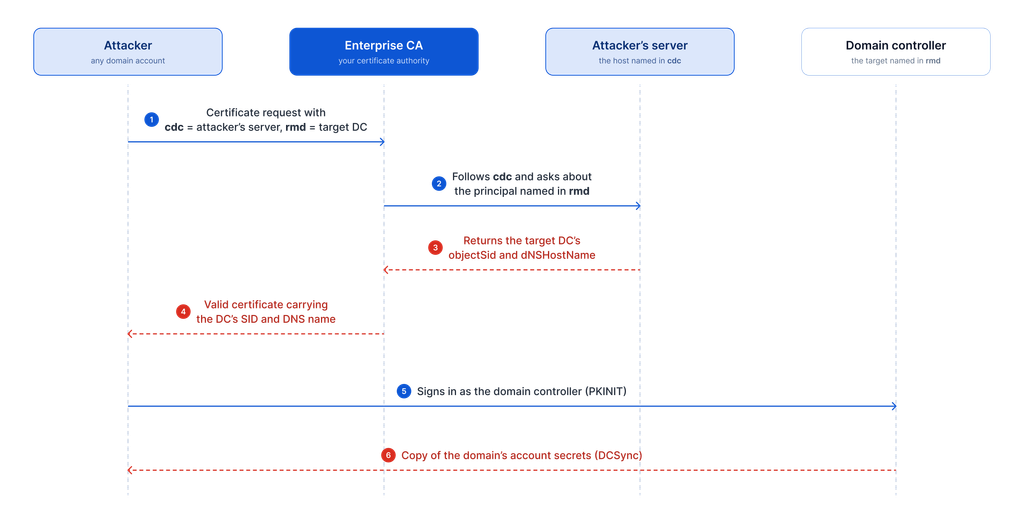
The public proof of concept runs the whole sequence from one script.
Strong certificate mapping remains a best practice and should stay enforced, but on its own it does not stop this attack. Strong mapping ties a certificate to one account through its SID. In this attack, the CA itself writes the domain controller’s real SID into the certificate, so the certificate is correctly mapped to the domain controller and passes the strong mapping check. Only the July 2026 update, or turning off the fallback lookup, closes the gap.
What the July 2026 update changed
The update adds the missing check. Before the CA follows cdc, it now validates the value against Active Directory:
- Empty values, names longer than 260 characters, and raw IP addresses are rejected.
- Characters that could alter the directory query are rejected.
- The name must match exactly one computer account that Active Directory marks as a domain controller.
- After the lookup, the SID of the object that was found is compared with the expected identity.
If any check fails, the request is refused, and no certificate is issued. The full analysis is in the researchers’ disclosure.
How to check if you are exposed to Certighost
To find out, ask these three questions about every Enterprise CA you run.
1. Is the CA on the July 2026 security update or later? Work from a full list of CAs taken from the directory, because a forgotten issuing CA is the usual gap.
2. Is the fallback lookup enabled on the CA? The setting is called EDITF_ENABLECHASECLIENTDC. Public sources disagree on whether it is on by default, so check each CA.
3. Can ordinary users create computer accounts in the domain? The default allowance is 10 per user, so if it was never changed, an attacker can take the first step of the attack.
The first two answers tell you where each CA stands:
| July 2026 update | Fallback lookup | Status |
|---|---|---|
| Installed | Enabled | Protected. This is the intended end state. |
| Installed | Disabled | Protected, with the fallback also switched off |
| Not installed | Enabled | Exploitable today |
| Not installed | Disabled | Not exploitable today, but one setting change away from it |
How to fix Certighost
- Install the update on every Enterprise CA. Use the July 14, 2026 security update or any later one. Exploit code has been public since July 24, so this should not wait for the next routine patch cycle.
- Restart each CA and confirm the update is in place.
- Use the stopgap if you cannot patch yet. Switching off the fallback lookup closes the vulnerability with one setting. Test it first, because certificate enrollment across domains or forests may depend on it. The researchers validated it only in a lab, and the setting can be turned back on later.
- Turn on CA auditing. It will not recover past activity, but it will make the next attempt visible.
The update number for each Windows Server version and the exact commands are in the patch details and commands section below.
How to check if Certighost was exploited in your environment before you patched
Most advisories stop at patching and leave this question open.
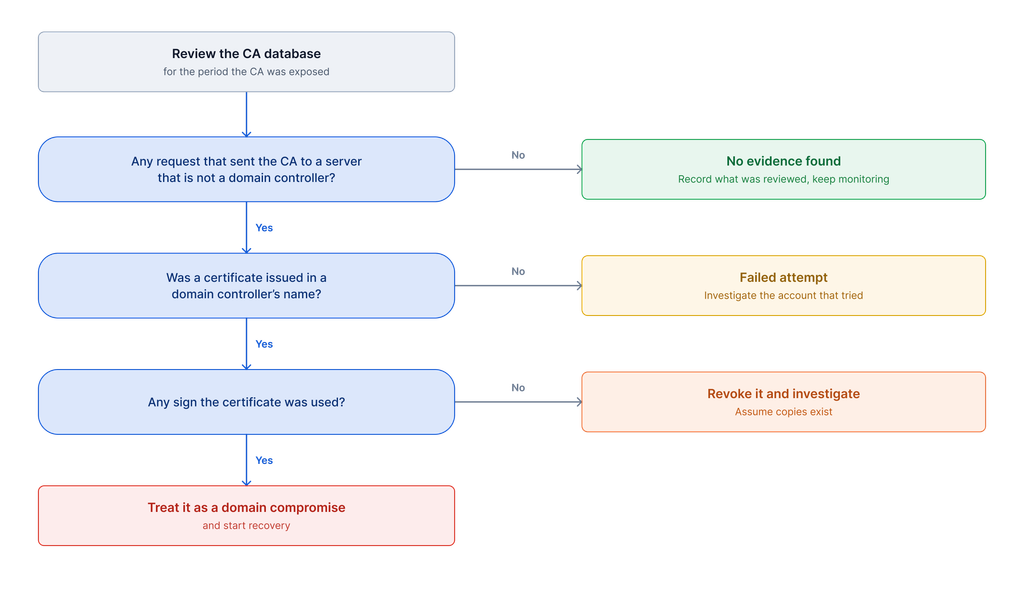
The CA keeps its own database, with a row for every certificate request it has processed. That record exists even when auditing was off, which makes it the best place to start.
A review has three parts:
- Search the CA database for requests that sent the CA to a server that is not one of your domain controllers. Such a request is the fingerprint of this attack.
- Check whether the certificate was used. If a suspicious certificate exists, domain controller logs can show whether it was used to sign in and whether directory data was copied afterward.
- Record the result for each CA. There are three possible outcomes: no evidence found, a failed attempt, or a certificate issued. Note what evidence was available and what was missing, because “we found nothing” and “we had nothing to look at” are different results.
You do not need to build the detection from scratch. Microsoft Defender for Identity includes a named alert for Certighost, and Nextron has published open detection rules for each stage of the attack.
What to do if you find a Certighost certificate
A malicious certificate in a domain controller’s name is a security incident, and you should handle it in the following order.
- Preserve the evidence. Export the CA database, the certificate, and the CA and domain controller logs before changing anything.
- Revoke the certificate and publish an updated revocation list.
- Reset the credentials of the domain controller it impersonated. Microsoft notes the attacker can recover that domain controller’s password hash through the certificate, and revocation does not invalidate the hash.
- Check whether directory data was copied. If it was, assume every credential in the domain is exposed.
- Start recovery if needed. Recovery includes resetting the Kerberos signing key twice, at least 10 hours apart, as described in Microsoft’s guidance.
Revocation alone is not enough, because it takes the certificate out of use but does nothing about secrets that have already left the directory.
How to prevent Certighost-style attacks
Each control below would have blocked the published attack or made it visible.
| Control | Why it helps |
|---|---|
| Remove the default computer account allowance | Ordinary users can no longer create the computer account the attack starts from. |
| Limit the CA’s outbound network access to domain controllers | The CA cannot be sent to an attacker’s server. |
| Keep CA auditing on and monitored | Certificate requests and issued certificates are recorded and reviewed. |
| Alert on domain controller names in certificates | A certificate in a domain controller’s name, requested by anything else, raises an alarm. |
| Patch CAs with the same urgency as domain controllers | A CA can issue a credential for any identity, so a delay here carries the same risk. |
Our AD CS template hardening playbook covers the configuration side of AD CS security.
Certighost checklist
In the next 48 hours
- ☐ List every Enterprise CA with its update level and fallback setting.
- ☐ Patch any CA that is below the July 2026 update.
- ☐ Switch off the fallback on any CA that cannot be patched yet.
In the first week
- ☐ Turn on CA auditing and send the events to your security monitoring.
- ☐ Review each CA database and record the result.
- ☐ Remove the default computer account allowance.
Within 30 days
- ☐ Limit CA outbound network access to domain controllers.
- ☐ Add alerts for CA setting changes and for domain controller names in certificates.
If the review finds something you cannot explain, or you want an independent check of your CAs, our PKI services team can help.
Certighost patch details and commands
The steps above say what to do, and this section has the specifics you need to carry them out. You can hand it to whoever manages your CAs without sending them to several different sources.
It covers three things, in the order you will need them:
- Which update fixes each Windows Server version, and how to confirm it is installed
- How to check and switch off the fallback lookup
- How to turn on CA auditing
Which update fixes Certighost on each Windows Server version
Find the row for each CA’s Windows Server version. The CA is patched if its build number is at or above the fixed build.
| Windows Server version | July 2026 update | Fixed build |
|---|---|---|
| 2025 | KB5099536 | 26100.33158 |
| 2022 | KB5099540 | 20348.5386 |
| 2019 | KB5099538 | 17763.9020 |
| 2016 | KB5099535 | 14393.9339 |
| 2012 R2 | KB5099444 (Monthly Rollup) | 9600.23291 |
| 2012 | KB5099445 (Monthly Rollup) | 9200.26226 |
Go by the build number and not the KB number, because later cumulative updates include the fix and the July KB will not appear on a CA that has a newer update installed.
How to check and switch off the fallback lookup
This answers the second exposure question. Run the command below on each CA and look for EDITF_ENABLECHASECLIENTDC in the output. If it is listed, the fallback is on.
certutil -getreg policy\EditFlags
If a CA cannot be patched yet, the commands below switch the fallback off. The change takes effect only after the CA service restarts.
certutil -setreg policy\EditFlags -EDITF_ENABLECHASECLIENTDC
Restart-Service CertSvc -Force
How to turn on CA auditing
Auditing needs two settings, and both must be in place: the first tells Windows to record certificate events, and the second tells the CA which events to send. The commands below come from Microsoft’s guidance.
auditpol /set /subcategory:"Certification Services" /success:enable /failure:enable
certutil -setreg CA\AuditFilter 127
Restart-Service CertSvc -Force
Once this is on, every certificate request and every issued certificate is logged, which is the record you would need to investigate a future attempt.
How Encryption Consulting can help you
Patching Certighost is quick, but everything around it takes longer: finding every CA, confirming its state, reviewing months of certificate requests, and deciding what the results mean. That work needs AD CS experience, and it usually lands on a team that is already busy. Encryption Consulting’s PKI team can take it on with you.
- Certighost exposure assessment. We build a full list of your Enterprise CAs from the directory and check each one for its update level, the fallback setting, and the computer account allowance. You get a clear status for every CA, including the ones nobody remembered.
- Compromise review. We search each CA database for requests that sent the CA to a server that is not a domain controller, check any matches against domain controller logs, and record a result for each CA. The report also says where evidence is missing, so your answer holds up when someone asks how you know.
- Incident support. If a malicious certificate turns up, we work through the response with you: preserving evidence, revoking the certificate, resetting the affected domain controller’s credentials, and planning the Kerberos key reset and recovery.
- Hardening and monitoring. We help put the controls in this post in place, from removing the default computer account allowance to CA auditing and alerts on CA setting changes. We also review your templates and CA configuration against the ESC1 to ESC16 vulnerabilities, because Certighost is unlikely to be the last AD CS vulnerability.
- Ongoing PKI support. Our PKI Support Services and PKI-as-a-Service give you experienced PKI engineers for patching, CA maintenance, and the next advisory. CertSecure Manager, our certificate lifecycle management platform, keeps an inventory of the certificates your CAs issue, which makes unexpected certificates easier to find and revoke.
If you want an independent check of your CAs after Certighost, or help with anything the review turns up, contact our PKI services team.
Frequently asked questions
What is Certighost?
Certighost is the name for CVE-2026-54121, an elevation of privilege vulnerability in Active Directory Certificate Services. It lets a low-privileged domain user obtain a CA-signed certificate that authenticates as a domain controller, which can lead to full domain compromise. Microsoft patched it on July 14, 2026.
How serious is Certighost?
Microsoft’s severity rating is Critical, and its CVSS 3.1 base score is 8.8 (High). An attacker needs only a valid domain account and network access, and a successful attack can give them the credential data for every account in the domain. Any unpatched Enterprise CA should be treated as urgent.
Which Windows Server versions are affected by Certighost?
Windows Server 2012 through 2025 are affected, including Server Core installations. Microsoft released fixes for all of them in the July 14, 2026 security updates, and later cumulative updates include the fix. The update number for each version is listed in the patch details section above.
Does installing the patch fix certificates issued before it?
No. The update changes how the CA handles new requests. A certificate issued before the update stays valid until it expires or is revoked, so you also need to review the certificates issued while the CA was exposed.
Is Certighost being exploited in the wild?
As of July 31, 2026, Microsoft said it had not observed confirmed threat-actor exploitation, only activity consistent with security testing. The CVE was not in the CISA Known Exploited Vulnerabilities catalog as of October 8, 2026. Working exploit code has been public since July 24, 2026.
Can Certighost be mitigated without patching?
Yes, temporarily. Switching off the fallback lookup on the CA and restarting the service closes the vulnerability. This may affect certificate enrollment across domains or forests, and the setting can be turned back on later, so the security update remains the real fix.
How do I know if Certighost was used against my organization?
Search the CA database for requests that sent the CA to a server that is not one of your domain controllers. If a certificate was issued that way, check domain controller logs to see whether it was used. Record what evidence was available for each CA.
Do template hardening and strong certificate mapping protect against Certighost?
No. Template hardening fixes configuration mistakes, and strong certificate mapping ties a certificate to one account. Certighost is a defect in the CA’s own code, and the CA writes the domain controller’s identifier into the certificate itself. Only installing the update or turning off the fallback closes it.
- Key takeaways
- What is Certighost (CVE-2026-54121)?
- The impact of Certighost
- How does the Certighost attack work?
- How to check if you are exposed to Certighost
- How to fix Certighost
- How to check if Certighost was exploited in your environment before you patched
- What to do if you find a Certighost certificate
- How to prevent Certighost-style attacks
- Certighost checklist
- Certighost patch details and commands
- How Encryption Consulting can help you
- Frequently asked questions
- What is Certighost?
- How serious is Certighost?
- Which Windows Server versions are affected by Certighost?
- Does installing the patch fix certificates issued before it?
- Is Certighost being exploited in the wild?
- Can Certighost be mitigated without patching?
- How do I know if Certighost was used against my organization?
- Do template hardening and strong certificate mapping protect against Certighost?