
- Key Takeaways
- Who Should Care About AD CS Template Hardening
- The Business Cost of Getting Certificate Management Wrong
- Prerequisites Before Hardening AD CS Templates
- Certificate Template Anatomy: The Eight Properties That Define Your Risk Posture
- Most Common Enterprise Use Cases
- ESC1 Through ESC16: The Complete Attack Taxonomy
- What Microsoft, CISA, and NSA Wants You to Fix
- The 15-Point Template Hardening Checklist
- Certificate Lifecycle: Governance from Enrollment to Revocation
- Auditing Strategy: The Event IDs That Matter
- Tooling That Exposes Your AD CS Blind Spots
- The Operational Reality: Why On-Premises AD CS Is Losing Ground
- Secure Your PKI: How Encryption Consulting Can Help
- Conclusion
- Frequently Asked Questions
Quick answer: AD CS template hardening is the process of securing Active Directory Certificate Services certificate templates against the ESC1-ESC16 escalation paths documented by SpecterOps and mandated by CISA advisory AA23-278A. A single misconfigured template can move an unprivileged domain account to Enterprise Admin in under 60 seconds without tripping traditional endpoint detection. This playbook walks through the complete ESC1-ESC16 attack taxonomy, a 15-point hardening checklist with exact certutil commands, the CISA and NIST compliance mapping PKI teams are held to, and a decision table for choosing between hardened on-premises AD CS, managed PKI, or a hybrid of the two.
Microsoft Active Directory Certificate Services (AD CS) has served as the backbone of enterprise PKI for over two decades. It enables organizations to issue digital certificates for user authentication, computer identity, code signing, encryption, smart card logon, and secure communications, all tightly integrated with Active Directory.
But that deep integration is a double-edged sword. Certificate templates, the policy objects that govern what certificates get issued, to whom, and with what privileges, are stored as AD objects themselves. A single misconfigured template can hand an attacker a path from an unprivileged domain user to Enterprise Admin in minutes, without triggering traditional endpoint detection.
The SpecterOps Certified Pre-Owned whitepaper (2021) was the watershed moment, documenting eight escalation paths (ESC1-ESC8) that turned certificate template misconfigurations into domain compromise vectors. Since then, the taxonomy has expanded to ESC16, while Microsoft, CISA (AA23-278A), NSA, and Five Eyes partner agencies (September 2024 Joint Advisory) have responded with enforcement deadlines, patching mandates, and formal Tier 0 classification of CA infrastructure. This playbook delivers the technical depth that PKI administrators, security architects, and governance teams need. For foundational concepts, see Encryption Consulting’s guides on What is PKI?, Certificate Authorities, and X.509 Certificates.
Key Takeaways
- AD CS certificate templates are stored as Active Directory objects. A single misconfigured template can move an attacker from an unprivileged domain account to Enterprise Admin. In the ESC1 case, security researchers have documented the full path in under 60 seconds.
- Most environments publish 30 or more certificate templates but actually use 5 to 8 of them. Unpublishing the rest closes ESC1 through ESC3 and ESC15 exposure with no impact on legitimate enrollment.
- The CA/Browser Forum’s phased TLS certificate lifetime reduction under Ballot SC-081v3 (April 2025), 200 days as of March 2026, 100 days in March 2027, and 47 days by March 2029, makes manual AD CS template and CA hygiene unsustainable without automation.
- Template hardening closes the AD CS-specific attack paths. It does not by itself give you visibility into the rest of your cryptographic estate, so it needs to sit inside a broader cryptographic posture management practice supported by CBOM Secure.
Who Should Care About AD CS Template Hardening
AD CS template hardening is a cross-functional responsibility. Every role below has a direct stake in closing the ESC attack surface before it appears in a red-team report or an incident.
| Role | Why It Matters | Action Item |
|---|---|---|
| PKI Admins | Own template configuration, CA registry settings, and the 15-point checklist implementation | Run certutil -catemplates to baseline published templates; enable full CA audit logging (auditfilter 127); schedule quarterly Locksmith 2 scans |
| Security Architects | Own the ESC risk posture, Tier 0 CA classification per CISA AA23-278A, and NIST SP 800-53 SC-17 compliance mapping | Classify all CAs as Tier 0 assets; map every published template against the ESC taxonomy; require manager approval on high-value templates |
| Active Directory Teams | Own template and CA AD object ACLs; Write/WriteDACL/GenericAll on a template AD object is the ESC4/ESC5 attack condition | Audit all PKI AD object ACLs; remove non-Tier-0 Write/WriteDACL/WriteOwner/GenericAll rights; review inherited ACEs from parent containers |
| Compliance Teams | Must demonstrate CISA AA23-278A mandates are met and NIST SP 800-53 SC-12/SC-17 controls are enforced; CA audit logs must be forwarded to SIEM | Include AD CS template audit in quarterly compliance scope; require quarterly Locksmith scan results as audit evidence |
| CISOs | Own the risk register entry for AD CS as a Tier 0 attack surface; a single ESC1 template is a domain compromise vector that bypasses endpoint detection entirely | Require AD CS assessment in every red-team engagement; fund CLM tooling via CertSecure Manager; include AD CS risk in board-level reporting |
The Business Cost of Getting Certificate Management Wrong
AD CS template misconfigurations rarely announce themselves. They tend to surface as an outage, an audit finding, or an incident report. Recent industry research puts numbers on that risk:
- More than 70% of organizations experienced at least one certificate-related outage in the past year, according to CyberArk’s 2025 State of Machine Identity Security Report.
- Of organizations that suffered a machine identity-related security incident, 43% said attackers used it to access sensitive data or networks, per the same 2025 CyberArk research.
- 91% of organizations say they are deploying more digital certificates than ever, up from 74% in 2023, according to Keyfactor’s 2024 PKI and Digital Trust Report (Vanson Bourne survey of 1,200 IT and security leaders, published September 2024).
- 45% of enterprises experienced service downtime due to certificate-related incidents in the past year, and certificate expiration ranked among CISOs’ top three certificate-management concerns (56.6%), according to DigiCert’s Trust Pulse Survey (published July 2, 2025).
Certificate sprawl and unmanaged templates feed each other. The more templates and certificates an environment accumulates without a governance process, the more likely one of them quietly satisfies the conditions for ESC1 through ESC16.
Prerequisites Before Hardening AD CS Templates
Complete all prerequisites before implementing checklist items. Skipping any one of these is the most common cause of hardening-related enrollment failures and missed ESC coverage.
| Prerequisite | Command / Verification | Validation Check | Common Error if Missing | Owner |
|---|---|---|---|---|
| All CAs patched for CVE-2024-49019 and CVE-2022-26923 | Check Windows Update history or WSUS for KB listed in Microsoft security advisories for each CVE | Confirm patch applied on every CA in the hierarchy; verify with certutil -getconfig to confirm CA version | ESC15 remains exploitable via Schema V1 templates even after all other checklist items are implemented | PKI Admin / Windows Patching Team |
| Baseline inventory of all published templates | certutil -catemplates | Output lists every template currently published on the CA; save as the pre-hardening baseline for rollback reference | Removing templates without a baseline causes unknown enrollment breakage; no rollback reference if legitimate consumers are disrupted | PKI Admin |
| Full CA audit logging enabled | certutil -setreg ca\auditfilter 127 then net stop certsvc && net start certsvc | certutil -getreg ca\auditfilter should return 127 after restart | Without full audit logging, ESC4/ESC5 template modifications and ESC7 approve-denied-request attacks are invisible in CA event logs | PKI Admin |
| Pre-hardening ESC vulnerability scan | Run Locksmith 2: Invoke-Locksmith -Mode 5 or PSPKIAudit: Get-AuditCertificateTemplate | Review output for all ESC1-ESC16 findings; document each finding before any changes so post-hardening re-scan confirms full remediation | Hardening without a pre-scan means you cannot confirm what was fixed and what remains | PKI Admin / Security Architect |
| CA configuration and template AD object backup | certutil -backupDB <BackupDir> for CA database; export template AD objects via ADSI Edit or PowerShell LDAP export | Confirm backup is accessible from a location independent of the CA server; test restore in lab before production changes | Template ACL or property changes that break enrollment cannot be rolled back without an AD object-level backup | PKI Admin |
| Windows Server 2016 or later on all CAs | winver or Get-ComputerInfo | Select-Object OsName,OsVersion | Confirm all CAs meet minimum OS version; Server 2012 R2 does not support SID extension (KB5014754 requirement) | KB5014754 strong certificate mapping enforcement is not available on Server 2012 R2; ESC9/ESC10 remediation is incomplete without it | PKI Admin / Infrastructure Team |
Certificate Template Anatomy: The Eight Properties That Define Your Risk Posture
Every AD CS template is a pKICertificateTemplate object stored under CN=Certificate Templates,CN=Public Key Services,CN=Services,CN=Configuration in Active Directory. The X.509 certificate profile is defined by RFC 5280, while the certificate policy and certification practices statement framework follows RFC 3647. Microsoft ships three schema versions:
- Version 1: legacy templates with limited editability and no autoenrollment. Most dangerous because Schema V1 templates are vulnerable to ESC15 (CVE-2024-49019, EKU override via CSR).
- Version 2: full configuration, autoenrollment, and all standard security controls.
- Version 3: adds Suite B / CNG cryptographic algorithm support (ECDSA P-256/P-384/P-521), aligned with NIST SP 800-57 key management recommendations.
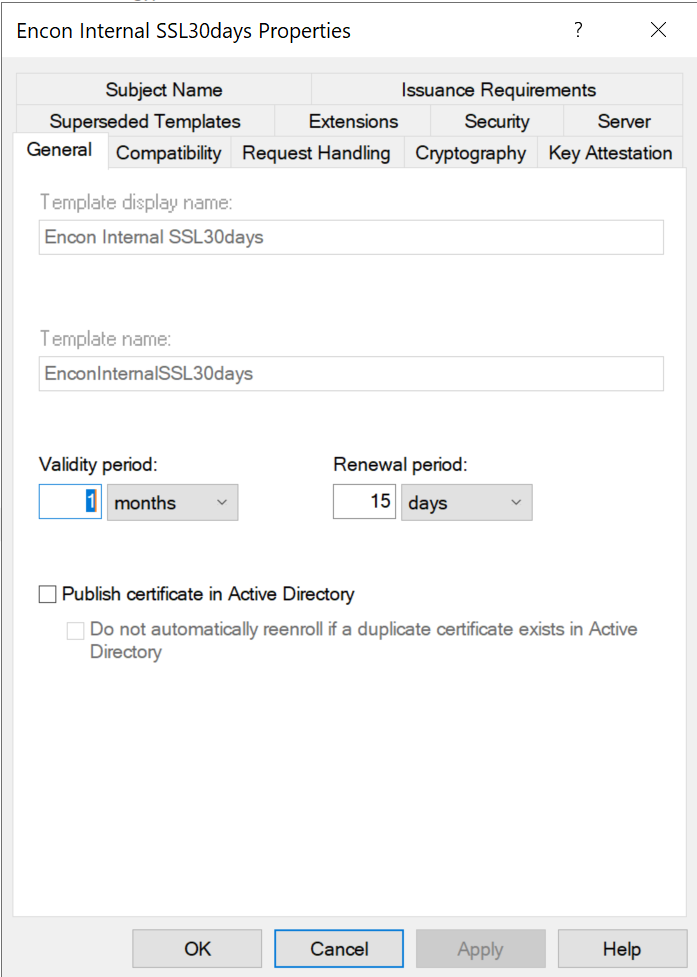
Template Property Tabs and Their Security Implications
| Property Tab | What It Controls | Most Common Security Mistake |
|---|---|---|
| General | Display name, template name (CN), validity period, renewal window, AD publication | Overly long validity periods (1-2 year defaults); publishing certificates to userCertificate attribute unnecessarily |
| Compatibility | Minimum CA and recipient OS versions, gating available cryptographic features | Leaving legacy OS compatibility enabled, preventing use of stronger algorithms |
| Request Handling | Purpose (Signature / Encryption / Both), private key exportability, CSP/KSP, minimum key size | Exportable private keys on high-value templates; allowing weak CSPs |
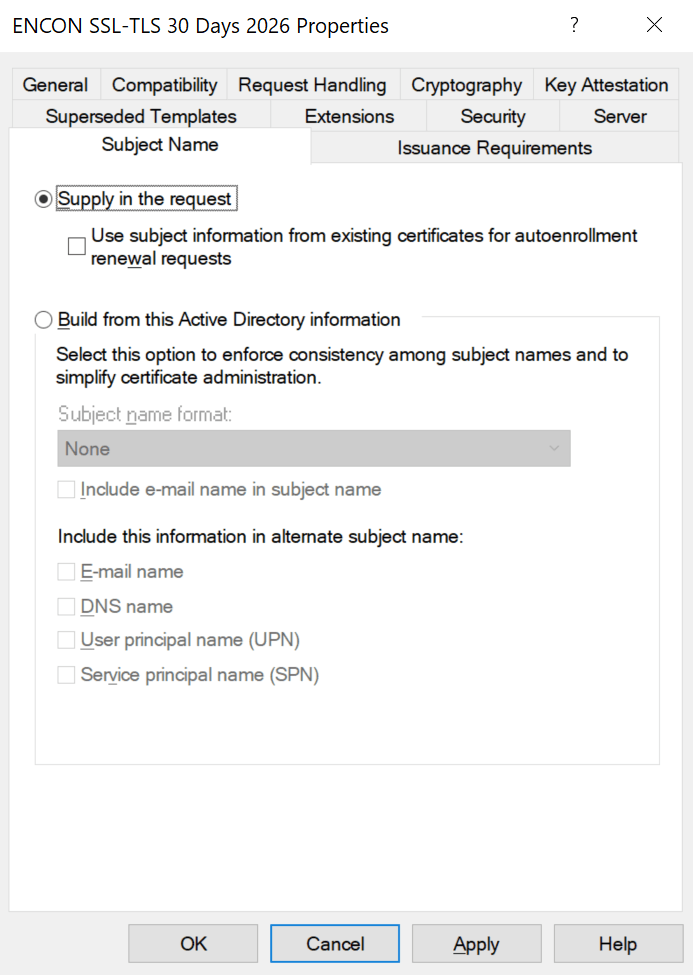
| Subject Name | Build from AD attributes vs. enrollee-supplied values (CT_FLAG_ENROLLEE_SUPPLIES_SUBJECT) | Leaving enrollee-supplied SAN enabled — root cause of ESC1 |
| Extensions | Extended Key Usages (EKUs) per RFC 5280 §4.2.1.12 | AnyPurpose EKU, missing EKU (acts as SubCA), or overly broad authentication EKUs |
| Cryptography | Algorithm (RSA/ECDSA), key size, hash per NIST SP 800-57 | SHA-1 still present; 1024-bit RSA keys still accepted |
| Issuance Requirement | Manager approval, authorized enrollment agent signatures | No approval on sensitive templates (WebServer, CodeSigning, EnrollmentAgent) |
| Security / ACLs | Who can Read, Write, Enroll, Autoenroll, Full Control the template object | Authenticated Users or Domain Users granted Enroll on sensitive templates |
Understanding Subject Types and Key Usage Categories
Every default template belongs to a subject type and key usage category. For deeper context, see What is an X.509 Certificate? and RFC 5280.
Subject Types
- User: certificates for human identities, including authentication, email signing/encryption, EFS, code signing, and smart card logon. Includes Administrator, User, SmartcardUser, EnrollmentAgent, CodeSigning, EFS Recovery Agent, Exchange User/Signature.
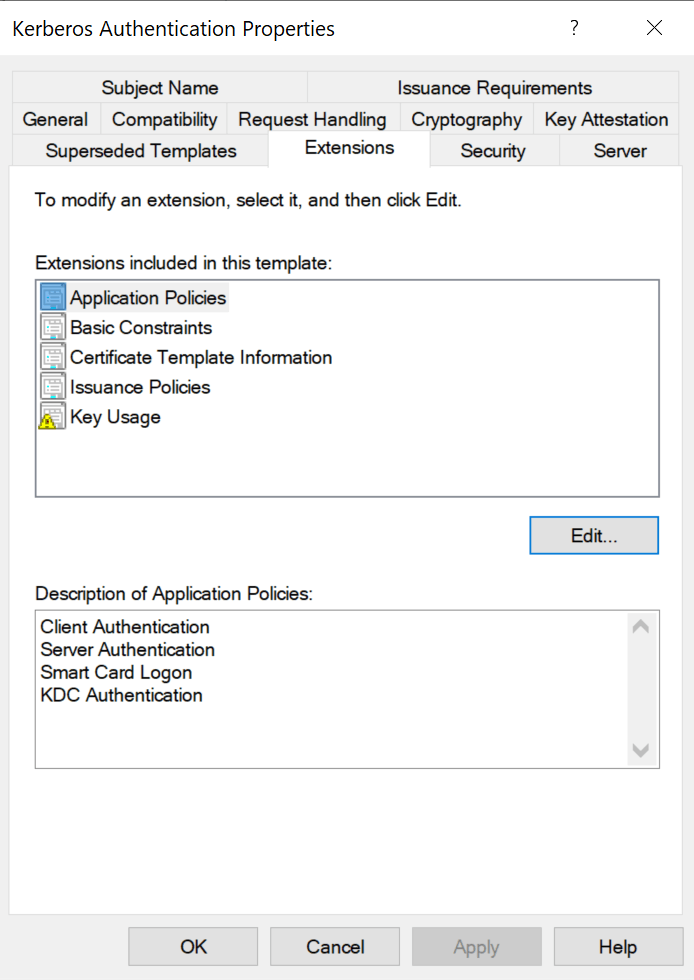
- Computer: certificates for machine identities, including server/client authentication, IPsec, and Kerberos (RFC 4556 PKINIT). Includes Computer, WebServer, DomainController, KerberosAuthentication, WorkstationAuthentication, RAS and IAS Server.
- Certificate Authority (CA): certificates that identify CAs within the PKI hierarchy, including Root CA, Subordinate CA, and Cross-Certification Authority.
- DirEmailRep: Directory Email Replication for securing AD replication traffic.
- Key Recovery Agent: certificates enabling authorized recovery of archived private keys, essential for key management governance.
Key Usage Categories
- Signature Only: digital signatures for integrity and authenticity per RFC 5280 §4.2.1.3 (CodeSigning, TrustListSigning, EnrollmentAgent, OCSP Response Signing, CA templates).
- Encryption Only: key encipherment for confidentiality (BasicEFS, CEPEncryption, EFSRecovery, ExchangeUser, KeyRecoveryAgent).
- Signature + Encryption: both operations (Administrator, Computer, User, DomainController, WebServer, SmartcardLogon, KerberosAuthentication, IPSec).
Best practice: Never modify default templates directly. Duplicate, disable the original, and harden the copy. See Microsoft’s AD CS hardening guide.
Default Templates: Risk Profiles You Must Know
| Template | Default Enrollment | Dangerous Properties | Attack Vectors | Risk |
|---|---|---|---|---|
| User (V1) | Domain Users | Client Auth EKU, V1 schema | ESC3, ESC15 | HIGH |
| Computer (V1) | Domain Computers | Client Auth EKU, V1 schema | ESC3, ESC8 | HIGH |
| Web Server (V1) | Domain Admins (often broadened) | ENROLLEE_SUPPLIES_SUBJECT | ESC1, ESC15 | CRITICAL |
| SubCA (V1) | Domain Admins | No EKU (SubCA behavior) | ESC7 | CRITICAL |
| Enrollment Agent | Often broadened | Cert Request Agent EKU | ESC3 chain | HIGH |
Most Common Enterprise Use Cases
Before diving into attack paths, it helps to understand the legitimate enterprise use cases that drive template design. For a broader overview, see Encryption Consulting’s PKI Services:
- Web Server / TLS: The WebServer template issues certificates for internal HTTPS endpoints, governed by RFC 8446 (TLS 1.3) and RFC 6125. It legitimately requires enrollee-supplied SANs, making it the primary ESC1/ESC15 target when enrollment permissions are broadened. Publicly-trusted web certificates must also comply with CA/Browser Forum Baseline Requirements.
- User Authentication (802.1X / VPN): The User template provides EAP-TLS certificates for wireless authentication and VPN. Its broad enrollment to Domain Users makes it an ESC3/ESC15 vector.
- Kerberos Authentication: Domain Controllers use this template for PKINIT-based Kerberos authentication (RFC 4556), LDAPS, and DC-to-DC replication. Compromise enables domain persistence.
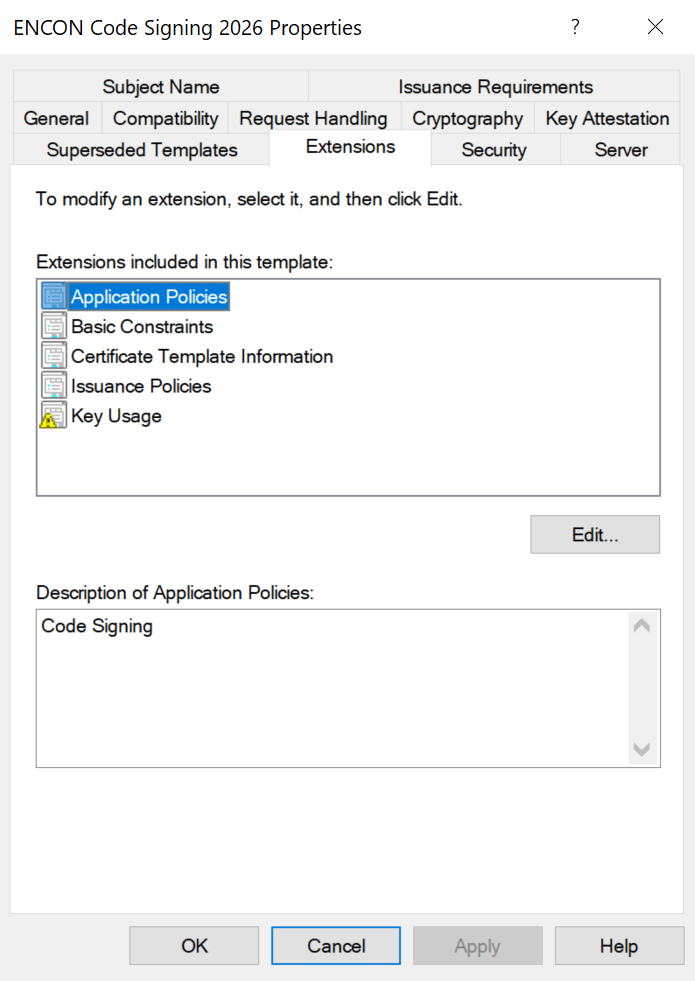
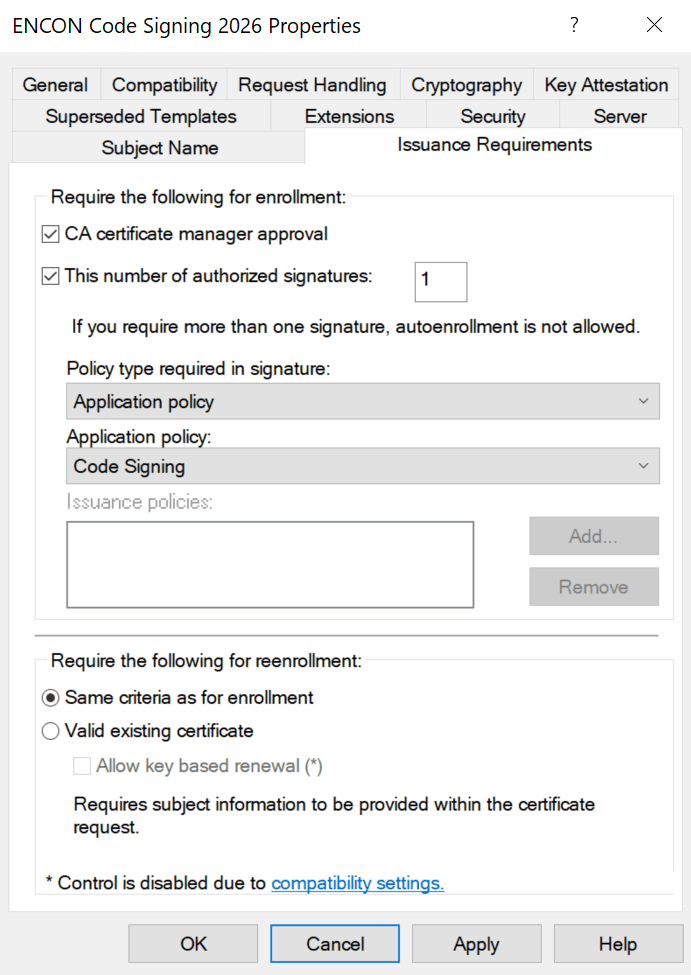
- Code Signing: Developers sign internal scripts and applications. See What is Code Signing? Private keys should never be exportable, and issuance should require manager approval.
- Encryption (EFS / S/MIME): BasicEFS and Exchange User templates protect file and email encryption. Key archival should be enabled for business continuity per NIST SP 800-57 key management guidance.
ESC1 Through ESC16: The Complete Attack Taxonomy
Attack paths fall into five categories. The full research is documented in the Certified Pre-Owned whitepaper (PDF), with ongoing updates via BloodHound AD CS attack paths and MITRE ATT&CK T1649:
Template Misconfiguration Attacks
ESC1 — Enrollee-Supplied SAN (The #1 Path)
ESC1 requires: (1) CT_FLAG_ENROLLEE_SUPPLIES_SUBJECT enabled, (2) Client Authentication EKU, (3) low-privileged enrollment, (4) no manager approval. The attacker specifies [email protected] in the SAN and authenticates via RFC 4556. Total time to Enterprise Admin: under 60 seconds.
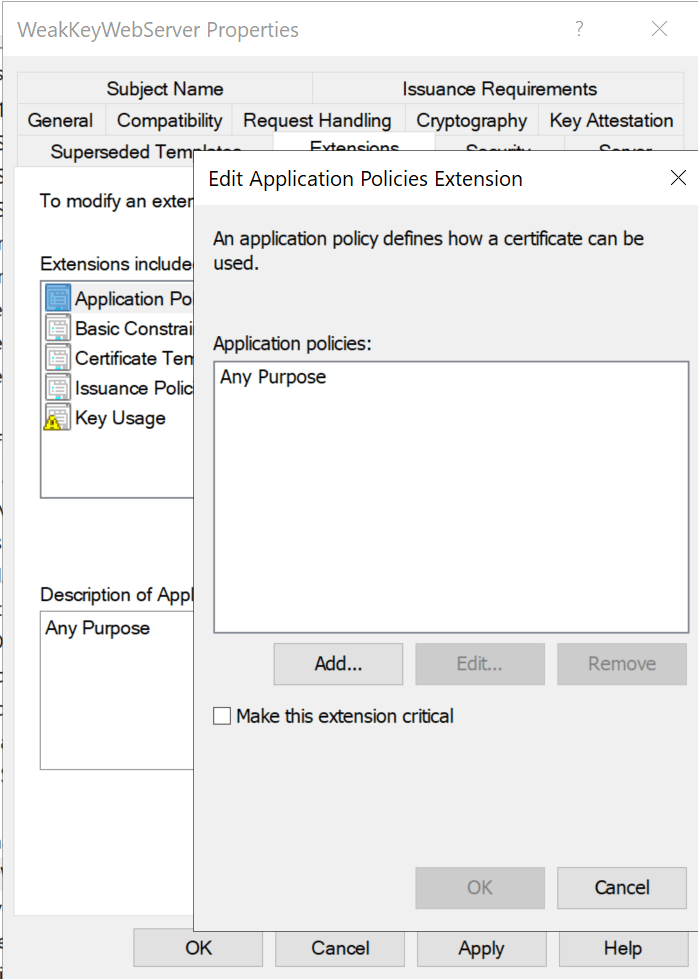
ESC2 — AnyPurpose or Missing EKU
Templates with AnyPurpose EKU (OID 2.5.29.37.0) serve any function. Templates with no EKU act as subordinate CA certificates per RFC 5280 §4.2.1.12, able to sign arbitrary new certificates.
ESC3 — Enrollment Agent Abuse
ESC3 chains two templates: first enroll for a Certificate Request Agent certificate, then use it to request certificates on behalf of privileged users via Schema V1 target templates, bypassing normal enrollment restrictions.
ESC15 (CVE-2024-49019 — “EKUwu”)
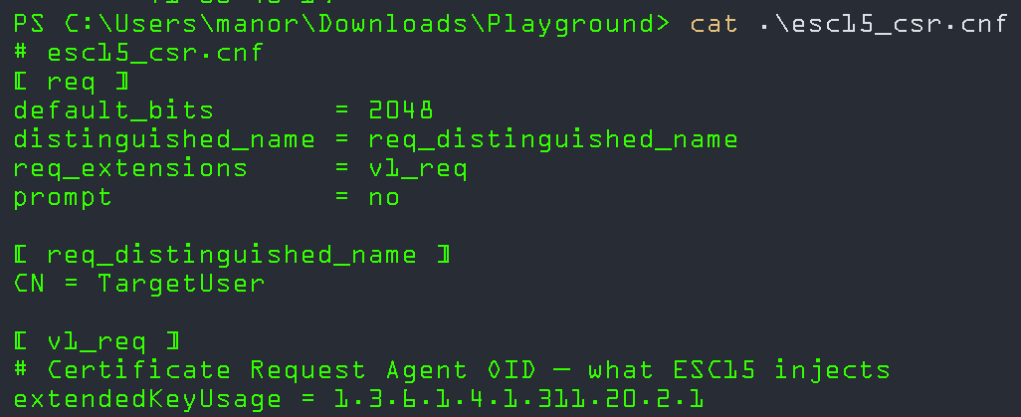
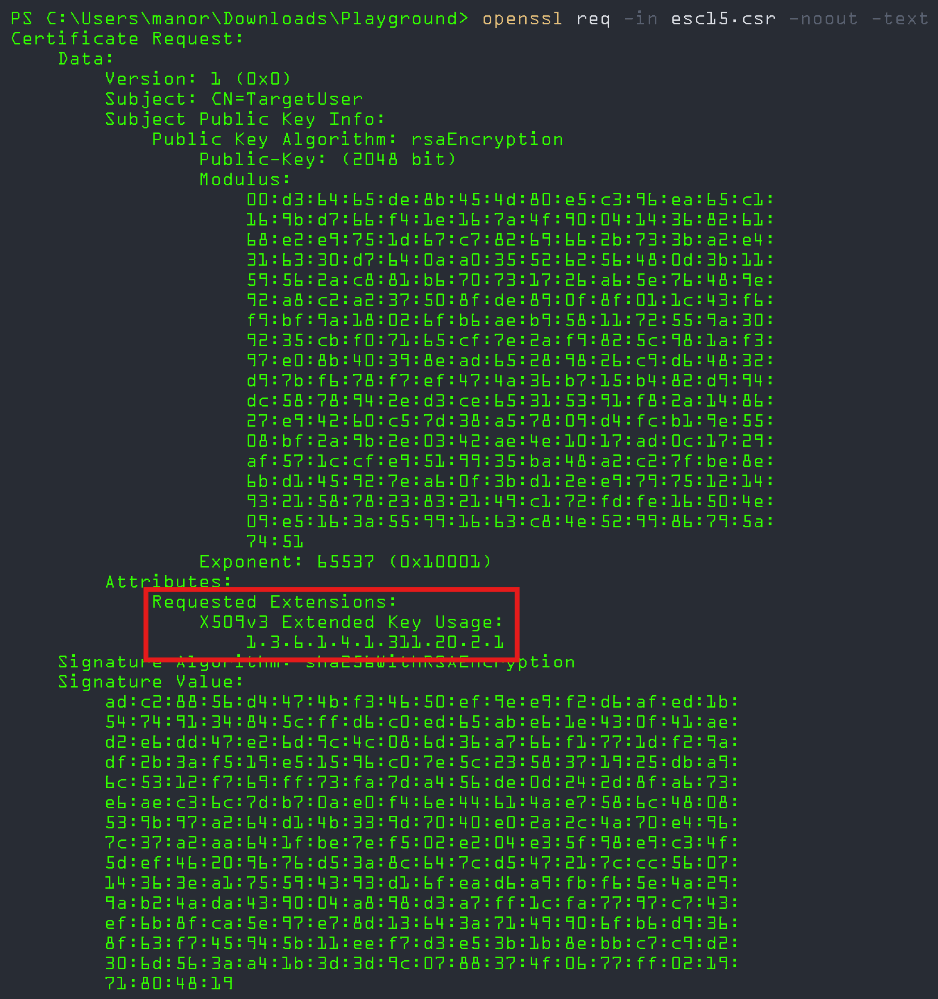
Discovered by TrustedSec (October 2024), CVE-2024-49019 exploits Schema V1 templates where msPKI-Certificate-Application-Policy in the CSR overrides the template’s pKIExtendedKeyUsage. The WebServer template is the primary target. Remediation: Patch all CAs and migrate V1 templates to V2+. See IX509ExtensionMSApplicationPolicies.
Access Control Failures
ESC4 — Template Object ACL Abuse
Low-privileged users with Write, WriteDACL, WriteOwner, or GenericAll on a template AD object can modify it into an ESC1-equivalent, request a privileged certificate, then restore settings, leaving minimal forensic trace.

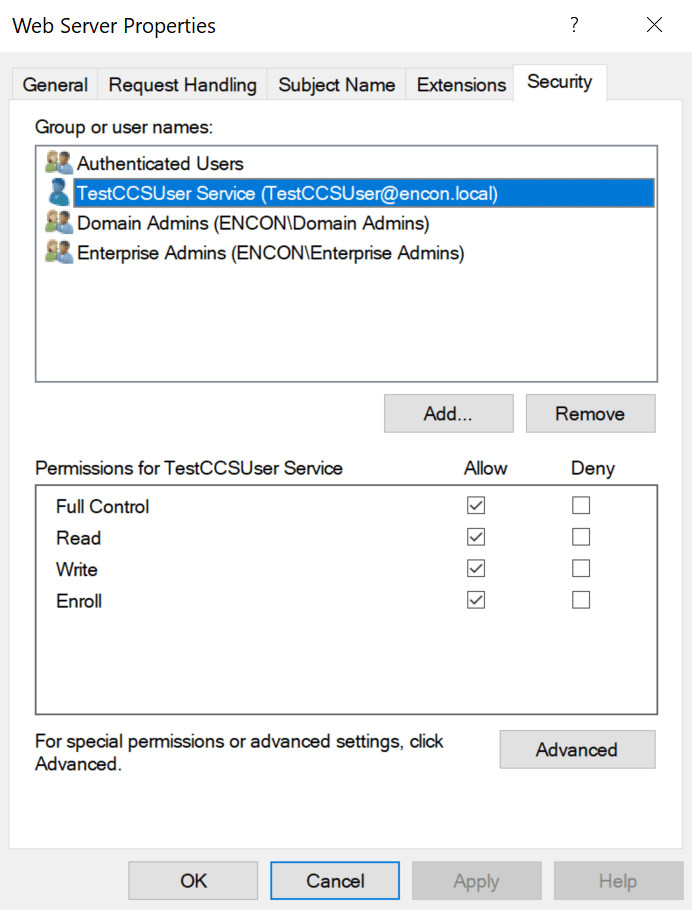
ESC5 — PKI Object ACL Abuse
Extends ESC4 to all PKI AD objects: NTAuthCertificates, Enrollment Services, CA computer objects, and parent containers with inheritable ACEs. See Microsoft’s AD CS hardening guidance.
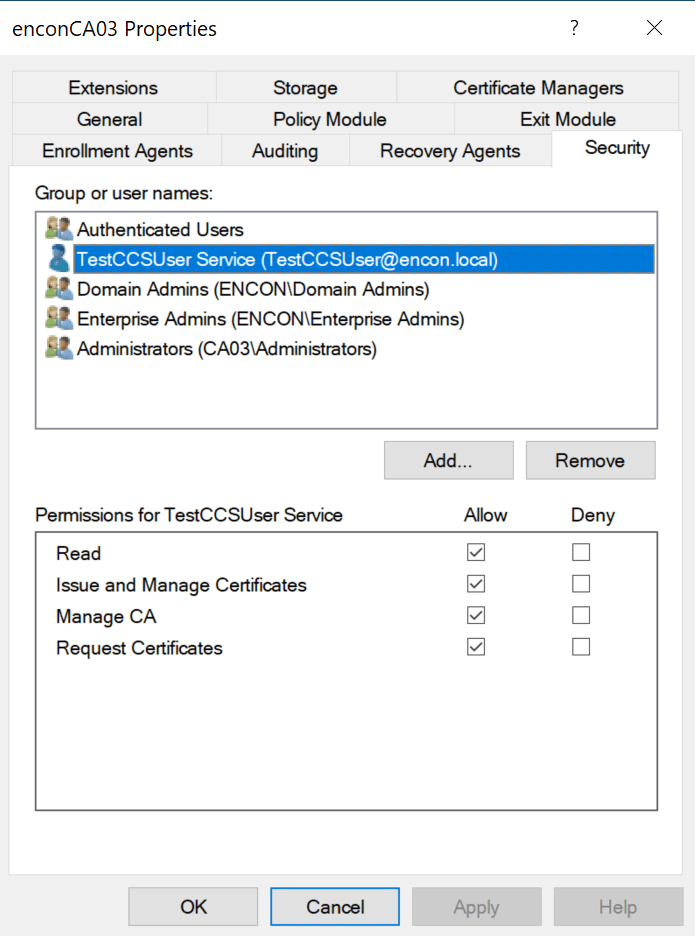
ESC7 — Vulnerable CA Access Control
Low-privileged users with ManageCA or ManageCertificates can enable the SubCA template, submit a request with arbitrary SAN (denied), then approve the failed request to obtain a SubCA certificate capable of signing anything.
CA Configuration Issues
ESC6 — EDITF_ATTRIBUTESUBJECTALTNAME2
If the CA has EDITF_ATTRIBUTESUBJECTALTNAME2 enabled, any enrollee can specify an arbitrary SAN regardless of template settings. Disable on every CA:
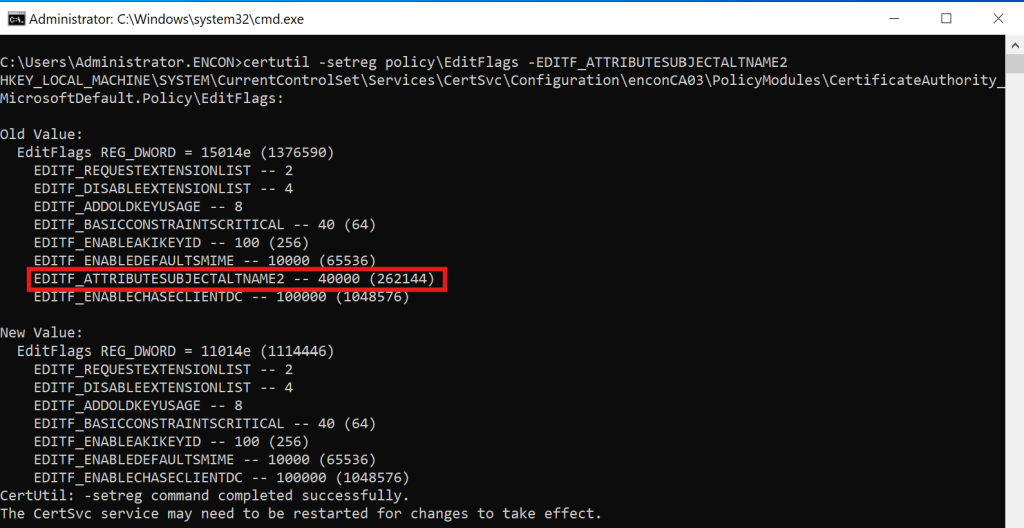
certutil -setreg policy\EditFlags -EDITF_ATTRIBUTESUBJECTALTNAME2
net stop certsvc && net start certsvc
ESC12 — CA Private Key on External Device
Targets CAs with private keys on external HSMs where credentials are stored in plaintext in the registry. Emphasizes the need for FIPS 140-2/140-3 Level 3 certified HSM deployments with proper credential management.
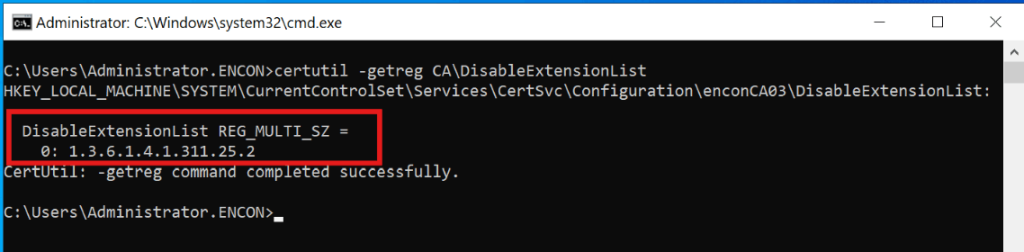
ESC16 — Global SID Extension Disabled
The SID security extension OID (1.3.6.1.4.1.311.25.2) is globally disabled in the CA’s DisableExtensionList. Without it, the KDC cannot perform strong certificate mapping per KB5014754. The SID extension should never be in DisableExtensionList on any production CA.
Certificate Mapping Weaknesses
ESC9 — No Security Extension (Template-Level)
Templates with CT_FLAG_NO_SECURITY_EXTENSION (0x80000) prevent SID embedding, forcing weak UPN-based mapping. Exploitable when combined with the ability to modify one’s own UPN.
ESC10 — Weak Registry-Level Mapping
When StrongCertificateBindingEnforcement remains at 0 or 1. As of September 2025, this key is permanently unsupported per KB5014754. Full Enforcement is the only option.
ESC13 — Issuance Policy Group Link
Exploits msDS-OIDToGroupLink attributes linking issuance policy OIDs to privileged universal groups. See the detailed ADCS ESC13 Abuse Technique.
ESC14 — Weak Explicit Certificate Mappings
Targets weak mappings in altSecurityIdentities (X509RFC822, X509IssuerSubject). Only strong mappings survive post-KB5014754 (X509IssuerSerialNumber, X509SKI, X509SHA1PublicKey).
Network Relay Attacks
ESC8 — NTLM Relay to HTTP Enrollment
Relays coerced NTLM authentication (via CVE-2021-36942) to AD CS web enrollment endpoints lacking HTTPS and EPA. The attacker obtains a DC certificate enabling DCSync. See CA/Browser Forum Network Security Requirements for web enrollment hardening principles.
ESC11 — NTLM Relay to RPC Enrollment
Targets the ICertPassage RPC interface. Remediation:
certutil -setreg CA\InterfaceFlags +IF_ENFORCEENCRYPTICERTREQUEST
net stop certsvc && net start certsvc
What Microsoft, CISA, and NSA Wants You to Fix
KB5014754: Strong Certificate Mapping Is Permanent
Microsoft’s response to CVE-2022-26923 introduced the SID security extension (OID 1.3.6.1.4.1.311.25.2). Full enforcement timeline per KB5014754:
- May 2022: Compatibility mode — SID extension added, weak mapping still accepted
- April 2023: Disabled mode removed
- February 2025: Full Enforcement activated by default
- September 2025: StrongCertificateBindingEnforcement key permanently unsupported
Impact: Only X509IssuerSerialNumber, X509SKI, and X509SHA1PublicKey mappings survive. For guidance on updating certificate mappings, see Encryption Consulting’s Microsoft’s Strong Certificate Mapping Enforcement blog.
Windows Server 2025 AD CS enhancements of note:
- CRL Partitioning: Splits monolithic CRLs into serial-number-range partitions for large deployments (see powerful enhancements to ADCS in 2025)
- 16KB+ Extension Limit: Enables PQC-ready metadata (see Encryption Consulting’s Post-Quantum Cryptography guide)
- Enhanced Audit Events: 4886-4889 now include SAN values, template name, client OS, CSP, and auth type (Microsoft audit documentation)
- Security Defaults: LDAP encryption mandatory, Credential Guard enabled, NTLM deprecation, RC4 deprecated in Kerberos
Government and Industry Advisories
- CISA/NSA AA23-278A (October 2023): Names AD CS misconfigurations as a top-ten cybersecurity finding. Mandates Tier 0 CA classification.
- Five Eyes Joint Advisory (September 2024): Co-authored by ASD, CISA, NSA, CCCS, NCSC-NZ, NCSC-UK. Highlights ESC1 and ESC8 by name.
- MITRE ATT&CK T1649: Detection/mitigation framework for certificate theft and forgery (M1047, M1042, M1041).
- CISA Known Exploited Vulnerabilities Catalog: CVE-2022-26923 and CVE-2024-49019 listed with mandatory remediation deadlines.
- NIST SP 800-57 (Key Management) and SP 800-152 (Federal CKMS Profile): Cryptographic governance framework.
- NIST SP 800-53 Rev. 5: SC-12 (Cryptographic Key Establishment), SC-17 (PKI Certificates), IA-5 (Authenticator Management) directly apply to AD CS governance.
- NIST SP 800-207 (Zero Trust Architecture): Certificate-based identity is foundational to zero trust. See also Encryption Consulting’s Zero Trust guide.
The 15-Point Template Hardening Checklist
Implement these controls immediately. Each maps to specific ESC vectors and aligns with CISA AA23-278A, NIST SP 800-53 SC-12/SC-17, and Microsoft’s AD CS hardening guidance:
- Unpublish all unused default templates: most environments use 5-8 but leave 32+ published. [Reduces: ESC1-ESC3, ESC15]
- To see what’s currently published:
certutil -catemplates
- Remove templates from the CA’s published list:
certutil -setcatemplates -<TemplateName1>,<TemplateName2>
- To see what’s currently published:
- Disable CT_FLAG_ENROLLEE_SUPPLIES_SUBJECT everywhere not operationally required: enable manager approval as compensating control. [Reduces: ESC1]
- This is a per-template flag stored in AD (msPKI-Certificate-Name-Flag). To inspect the current value:
certutil -dstemplate <TemplateName>
- If bit 1 is set, clear it via ADSI Edit or:
certutil -dstemplate <TemplateName> msPKI-Certificate-Name-Flag -1
- This is a per-template flag stored in AD (msPKI-Certificate-Name-Flag). To inspect the current value:
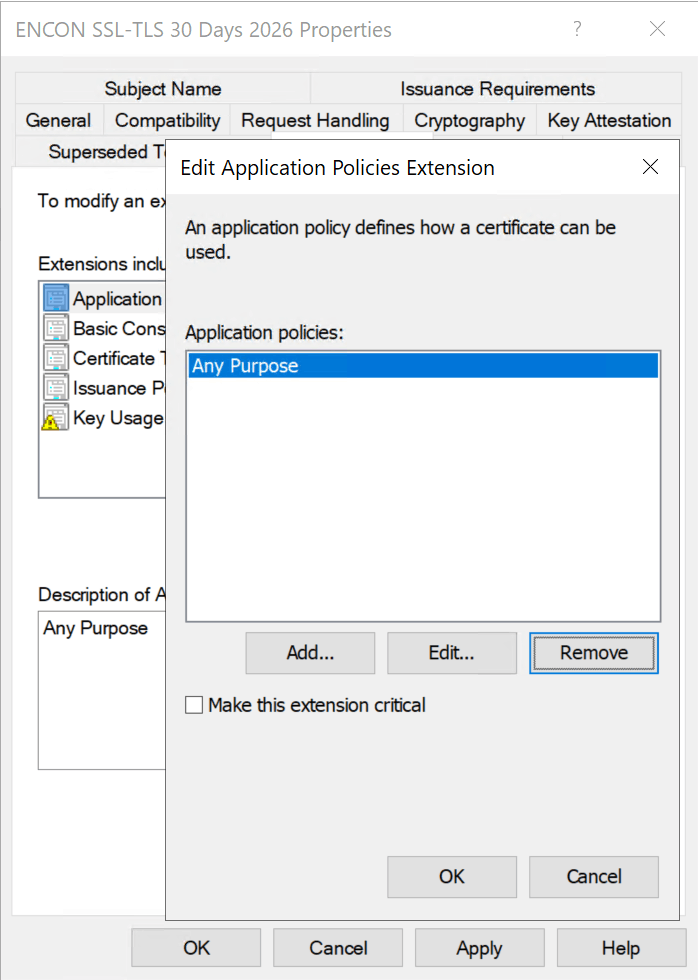
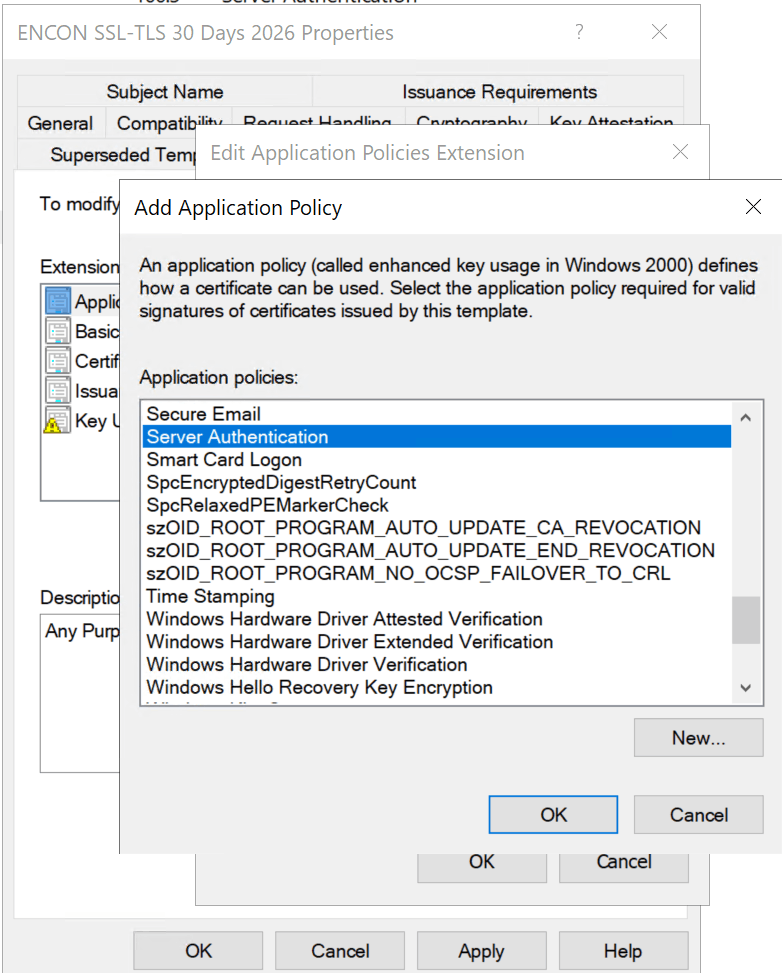
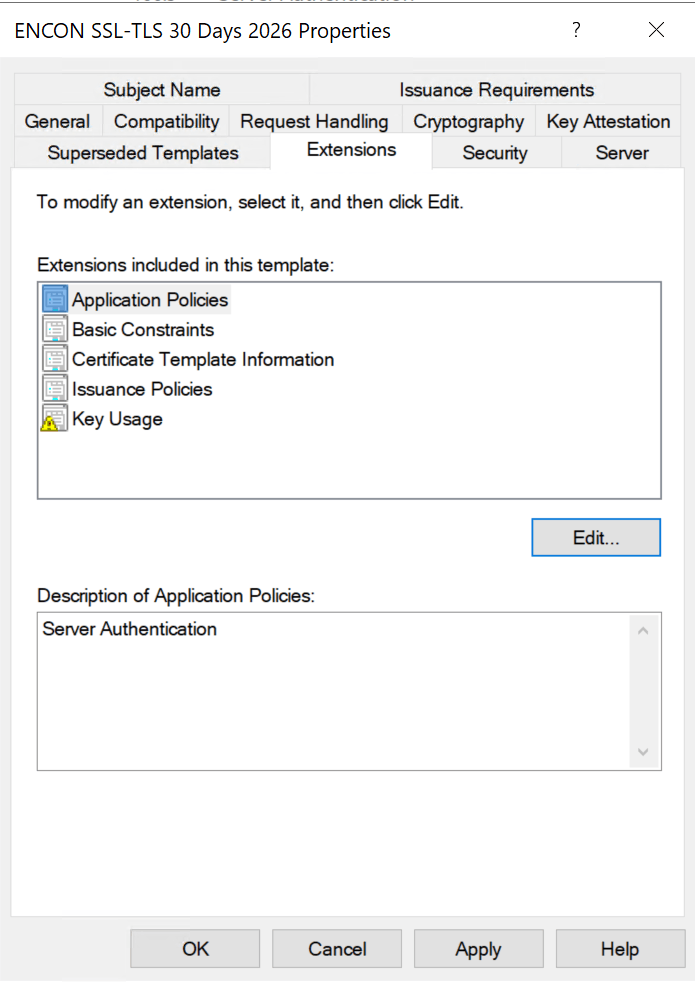
- Remove AnyPurpose EKU and eliminate templates with no EKU: unless serving as subordinate CAs, a missing EKU behaves as SubCA behavior per RFC 5280 §4.2.1.12. [Reduces: ESC2]
- EKU is msPKI-Certificate-Application-Policy and pKIExtendedKeyUsage on the template AD object. Inspect with:
certutil -dstemplate <TemplateName>
- Remove OID 2.5.29.37.0 (anyExtendedKeyUsage) and set specific EKU OIDs.
- EKU is msPKI-Certificate-Application-Policy and pKIExtendedKeyUsage on the template AD object. Inspect with:
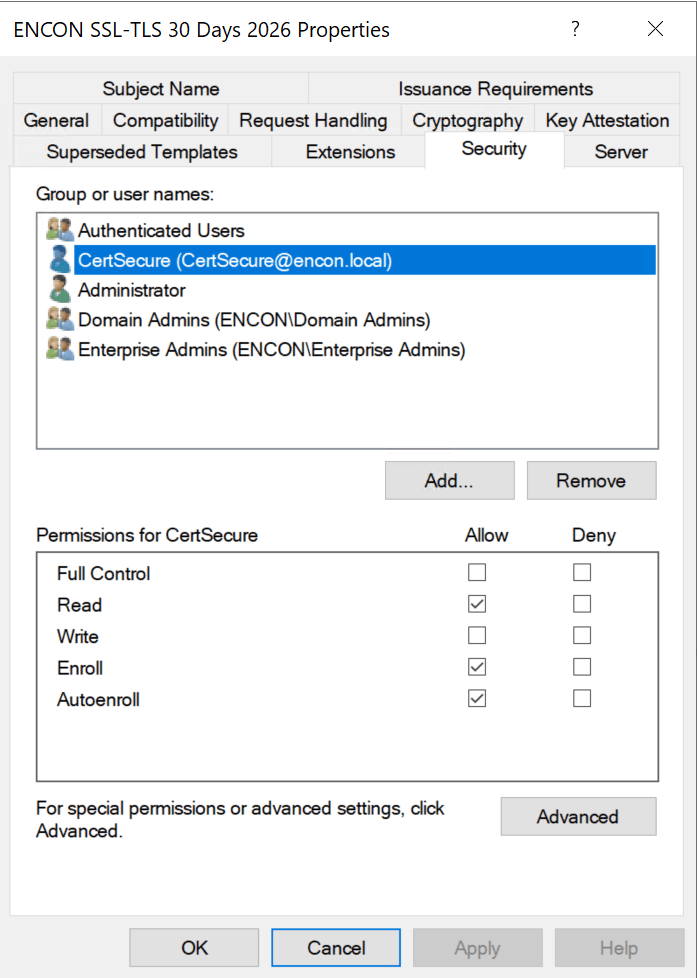
- Restrict Enroll/Autoenroll to specific named security groups: never grant it to Authenticated Users, Domain Users, or Domain Computers on sensitive templates. [Reduces: ESC1-ESC3, ESC15]
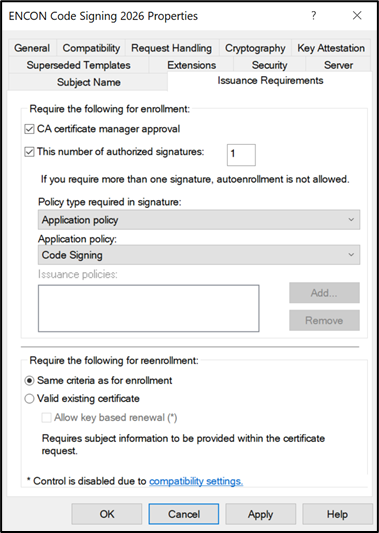
- Enable manager approval and authorized signatures: required on WebServer, CodeSigning, SmartCardLogon, and EnrollmentAgent templates. [Reduces: ESC1, ESC3]
- Set minimum key sizes and disable SHA-1: use 2048-bit RSA (4096-bit for CA keys) or ECDSA P-384, per the NIST SP 800-57 deprecation schedule. [Aligns: NIST, CA/B Forum BR]
- Minimum key size is msPKI-Minimal-Key-Size on the template. Inspect with:
certutil -dstemplate <TemplateName>
- To set SHA-256 minimum on the CA itself:
certutil -setreg ca\csp\CNGHashAlgorithm SHA256
net stop certsvc && net start certsvc
- Verify:
certutil -getreg ca\csp\CNGHashAlgorithm
- Minimum key size is msPKI-Minimal-Key-Size on the template. Inspect with:
- Disable EDITF_ATTRIBUTESUBJECTALTNAME2 on every CA: [Reduces: ESC6]
certutil -setreg policy\EditFlags -EDITF_ATTRIBUTESUBJECTALTNAME2
net stop certsvc && net start certsvc
- Enforce RPC encryption: [Reduces: ESC11]
certutil -setreg CA\InterfaceFlags +IF_ENFORCEENCRYPTICERTREQUEST
net stop certsvc && net start certsvc
- Harden or remove HTTP web enrollment: enforce HTTPS and EPA, and disable NTLM. [Reduces: ESC8]
- To disable remote RPC-based requests:
certutil -setreg CA\InterfaceFlags +IF_NOREMOTEICERTREQUEST
- For HTTP/CES specifically, uninstall the web enrollment role or reconfigure IIS.
- To disable remote RPC-based requests:
- Lock template and CA DACLs to Tier 0 accounts only: audit all PKI AD objects regularly. [Reduces: ESC4, ESC5, ESC7]
- View the CA’s security descriptor:
certutil -getreg CA\Security
- View the CA’s security descriptor:
- Remove CT_FLAG_NO_SECURITY_EXTENSION from all templates: ensure the SID extension is stamped per KB5014754. [Reduces: ESC9]
- This is msPKI-Enrollment-Flag bit 0x80000 on the template. Inspect:
certutil -dstemplate <TemplateName>
- To confirm SID extension is being stamped (KB5014754), check the CA’s registry:
certutil -getreg policy\EditFlags
- This is msPKI-Enrollment-Flag bit 0x80000 on the template. Inspect:
- Patch for ESC15 (CVE-2024-49019): migrate Schema V1 templates to V2+ by duplicating them. [Reduces: ESC15]
- To check a template’s schema version (look for msPKI-Template-Schema-Version):
certutil -dstemplate <TemplateName>
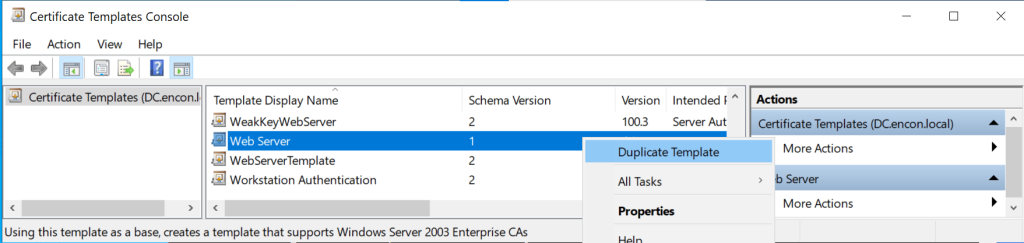
- V1 templates must be duplicated to V2+ through certtmpl.msc. Unpublish the original V1 after migration.
- To check a template’s schema version (look for msPKI-Template-Schema-Version):
- Audit every msDS-OIDToGroupLink and altSecurityIdentities attribute: remove unauthorized links and weak mappings. [Reduces: ESC13, ESC14]
- Disable private key export on all templates not requiring portability: [Reduces: certificate theft]
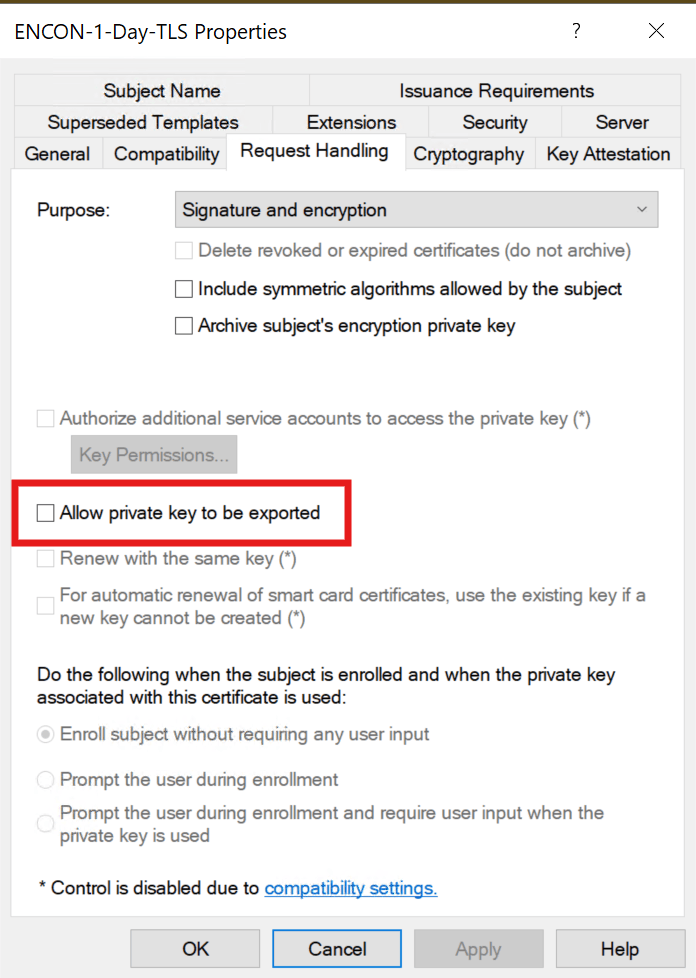
- This is msPKI-Private-Key-Flag on the template — clear bit 0x10 (CT_FLAG_EXPORTABLE_KEY). Via GUI: open certtmpl.msc, right-click template, Properties, Request Handling tab, uncheck “Allow private key to be exported”.
- This is msPKI-Private-Key-Flag on the template — clear bit 0x10 (CT_FLAG_EXPORTABLE_KEY). Via GUI: open certtmpl.msc, right-click template, Properties, Request Handling tab, uncheck “Allow private key to be exported”.
- Enable role separation and never co-locate AD CS on a DC: protect CA keys with FIPS 140-3 Level 3 HSMs.
certutil -setreg ca\RoleSeparationEnabled 1
net stop certsvc && net start certsvc
- To verify the current CSP:
certutil -getreg ca\csp
- To verify the current CSP:
Certificate Lifecycle: Governance from Enrollment to Revocation
Template hardening alone is insufficient without certificate lifecycle management governance across the entire certificate lifespan. The lifecycle framework aligns with NIST SP 800-57 §8 (Key Management Lifecycle) and RFC 3647 (Certificate Policy / CPS Framework):
Enrollment Controls
Define authorization workflows per NIST SP 800-53 IA-5 (Authenticator Management). Use Group Policy autoenrollment for standard certificates; require manual request and approval for high-value templates. For modern enrollment protocols, consider EST (RFC 7030), CMP (RFC 4210), or ACME (RFC 8555).
Issuance Validation
The CA should validate requesters, subject information, and SANs. Open-source policy modules like TameMyCerts enforce rules at issuance time. For enterprise-grade lifecycle automation, see CertSecure Manager.
Revocation and Status Checking
Maintain CRL distribution points and OCSP responders (RFC 6960) for real-time validity checking. Monitor revocation failures (Event IDs 4870-4873). For OCSP Stapling and Certificate Lifespans, see Encryption Consulting’s guide.
Validity Periods and Renewal
Publicly-trusted TLS certificate validity is on a phased reduction under CA/Browser Forum Ballot SC-081v3: the cap dropped from 398 days to 200 days on March 15, 2026, falls to 100 days on March 15, 2027, and reaches 47 days on March 15, 2029. That schedule governs publicly-trusted certificates; AD CS-issued internal certificates are governed by your own CP/CPS, but the same automation discipline applies well before internal teams are forced into it. Internal recommendations for AD CS-issued certificates: 1 year user, 2 years computer, 5 years issuing CA, 10-20 years offline root. Align with NIST SP 800-57 Part 1 cryptoperiod guidance.
Key Archival and Recovery
Enable key archival on encryption templates for business continuity. Designate Key Recovery Agents with strict controls per NIST SP 800-152 (Federal CKMS Profile).
Auditing Strategy: The Event IDs That Matter
Auditing is the most neglected aspect of AD CS operations. Enable full CA auditing per Microsoft’s Audit Certification Services documentation:
- Set CA audit filter:
certutil -setreg ca\auditfilter 127(all seven categories) - Enable Group Policy subcategory: Advanced Audit Policy, Object Access, Audit Certification Services, Success and Failure
Critical Event IDs
| Event ID | Description | What to Watch For |
|---|---|---|
| 4886 | Certificate request received | Unusual requester/template combos; unexpected source IPs |
| 4887 | Certificate approved and issued | SAN/requester mismatch; privileged identities in SAN field |
| 4888 | Certificate request denied | Repeated denials may indicate ESC7 deny-then-approve attacks |
| 4890 | CA manager settings changed | Unauthorized CA config changes (ESC6, ESC7) |
| 4899/4900 | Template modified / security updated | Template property or ACL changes (ESC4, ESC5 detection) |
| 4768 | Kerberos TGT request | PreAuthType=16 = certificate-based auth (RFC 4556 PKINIT); correlate with 4887 |
Forward all CA events to your SIEM. Correlate with MITRE ATT&CK T1649 detection guidance and Microsoft Defender for Identity AD CS alerts.
Tooling That Exposes Your AD CS Blind Spots
Offensive (Authorized Testing)
- Certify 2.0 (SpecterOps): C# standard supporting ESC1-ESC16.
find /vulnerableenumerates all exploitable misconfigurations. - Certipy (Oliver Lyak): Python-based, Linux-friendly. BloodHound-compatible JSON output, NTLM relay for ESC8.
Defensive
- Locksmith 2 (Trimarc Security): Best-in-class PowerShell auditing for ESC1-ESC16. Generates remediation scripts per finding.
- PSPKIAudit (SpecterOps): PowerShell toolkit for ESC1-ESC8, with Get-CertRequest for incident response.
- BloodHound 5.4+: Full AD CS node/edge integration (ADCSESC1, ADCSESC3, ADCSESC6a/b, ADCSESC9a/b, ADCSESC10a/b, ADCSESC13, GoldenCert).
- Microsoft Defender for Identity: AD CS sensor with real-time posture assessments for ESC1-ESC8, ESC11, ESC15.
- TameMyCerts: Open-source CA policy module blocking malformed requests at issuance time. Validates subject names, restricts SANs, enforces key sizes.
- CertSecure Manager (Encryption Consulting): Enterprise certificate lifecycle management platform providing automated discovery, enrollment, renewal, and revocation across multi-CA environments.
The Operational Reality: Why On-Premises AD CS Is Losing Ground
AD CS was built for Windows-centric, on-premises environments. For a detailed analysis of the limitations, read our blog on Navigating Risks in Active Directory Certificate Services.
Non-Windows Devices and BYOD
Auto-enrollment works exclusively via Group Policy. macOS, Linux, iOS, Android, and ChromeOS lack native support. NDES/SCEP (RFC 5272 / CMC) is the typical workaround, but introduces security concerns. Modern alternatives include EST (RFC 7030) and ACME (RFC 8555), neither natively supported by AD CS.
Remote and Hybrid Workforce
Certificate enrollment via RPC/DCOM requires DC and CA connectivity. Remote workers face renewal failures when VPN itself requires a valid certificate. Zero trust architectures (NIST SP 800-207) demand certificate-based identity regardless of network location.
Cost and Expertise Burden
Total cost of ownership includes CA hardware, HSMs (FIPS 140-3 certified), Windows Server licensing, offline root facilities, specialized PKI staff, CRL/AIA infrastructure, and patch testing. As of 2026, 62% of organizations report lacking sufficient PKI expertise.
Decision Table: Hardened On-Premises AD CS vs. Managed PKI vs. Hybrid
Use this table to frame the build-versus-buy-versus-blend conversation before your next budget cycle:
| Criterion | Hardened On-Premises AD CS | Managed PKI (PKI-as-a-Service) | Hybrid |
|---|---|---|---|
| Best fit | Domain-joined Windows workloads | BYOD, multi-OS, cloud, IoT | Enterprises running both |
| Enrollment protocols | Kerberos/PKINIT, limited SCEP via NDES | Native ACME, EST, SCEP, CMP | Both, routed by workload type |
| Ready for the 47-day cert schedule | Requires custom automation build-out | Automated issuance and renewal built in | Automated for the PKIaaS-routed workloads |
| HSM/key protection | Manual integration; FIPS 140-3 optional | HSM-backed by default | Depends on which CA issues the certificate |
| Non-Windows/remote support | Weak, needs workarounds | Native | Strong via the PKIaaS leg |
| Typical TCO driver | Hardware, HSMs, specialized PKI staff | Subscription; less in-house PKI expertise needed | Both, but lower incremental cost |
| Governance/audit burden | High, entirely on your team | Shared with the provider | Split by workload |
For most enterprises already invested in AD CS, the practical path is the hybrid row: keep a hardened, audited AD CS deployment for domain-joined Windows workloads, and add a managed PKI layer for everything AD CS was never designed to do well.
The Pragmatic Hybrid Approach
The optimal strategy: hardened AD CS for domain-integrated workloads paired with a modern managed PKI platform for BYOD, multi-OS, cloud workloads, IoT/OT, and remote workforce. See Encryption Consulting’s PKI Design and Implementation for hybrid architectures.
Secure Your PKI: How Encryption Consulting Can Help
AD CS template security requires continuous governance, monitoring, and expertise. Encryption Consulting delivers specialized PKI knowledge across assessment, implementation, and managed services:
PKI Assessment Services
Our comprehensive PKI Health Assessment examines every aspect of your AD CS deployment through the ESC1-ESC16 taxonomy, CISA/NSA mandates, NIST SP 800-53 controls, and Microsoft best practices:
- Certificate Template Audit: Systematic review of ADCS Certificate Template configurations and usage posture for exploitable misconfigurations.
- CA Infrastructure Review: Hierarchy design, HSM configuration (FIPS 140-3 compliance), role separation, audit logging, CRL/AIA health.
- Attack Path Analysis: Mapping every exploitable path per the Certified Pre-Owned framework and MITRE ATT&CK T1649.
- Governance Gap Analysis: Assessment against NIST SP 800-57, SP 800-152, RFC 3647 (CP/CPS), and CA/Browser Forum Baseline Requirements.
- Remediation Roadmap: Prioritized, actionable recommendations with implementation guidance and rollback plans.
PKI as a Service (PKIaaS)
Reduce operational complexity while strengthening security with our Managed PKI:
- Cloud-Managed CA: Fully managed with HSM-backed key protection, built-in redundancy, SLA-backed availability.
- Multi-Protocol Enrollment: Native SCEP (RFC 5272), EST (RFC 7030), ACME (RFC 8555), CMP (RFC 4210) support for every device/OS/architecture.
- Automated Lifecycle Management: Via CertSecure Manager, discovery, enrollment, renewal, and revocation across your entire enterprise.
- Cross-Platform Support: Windows, macOS, Linux, iOS, Android, ChromeOS, IoT, cloud workloads, single management plane.
- Compliance-Ready Reporting: Aligned with NIST SP 800-53, SP 800-171, SOC 2, PCI DSS, and HIPAA.
Beyond Templates: Cryptographic Posture and Post-Quantum Readiness
Template hardening closes the AD CS-specific attack paths in this playbook, but AD CS is only one source of cryptographic risk in most enterprises. The certificates, keys, and algorithms it issues need to be visible alongside everything else in your cryptographic estate, especially as the industry moves toward post-quantum algorithms. NIST finalized FIPS 203 (ML-KEM), FIPS 204 (ML-DSA), and FIPS 205 (SLH-DSA) in August 2024. Related resources:
- Modernizing ADCS: Why PKI Needs Unified Cryptographic Posture Management — extending AD CS governance into a continuous posture management practice instead of a one-time hardening pass.
- What Is Cryptographic Posture Management? — the Education Center primer on the practice this playbook feeds into.
- CBOM Secure — discovers and inventories the cryptography AD CS and the rest of your environment relies on, so template fixes do not happen in a blind spot.
- PQC Readiness Assessment and PQC Center of Excellence — for NIST FIPS 203/204/205-aligned migration planning as AD CS-issued RSA and ECDSA certificates require migration to post-quantum algorithms.
- Post-Quantum Cryptography Migration Guide (9 Phases) — where AD CS’s RSA and ECDSA-issued certificates fit into a broader migration toward ML-KEM and ML-DSA.
- The Cryptographic Blind Spot — why cryptographic assets that never show up in a CMDB, including AD CS-issued certificates on unmanaged endpoints, are the ones attackers find first.
- PQC Migration in 2026 — a practical look at what to move first as quantum-safe algorithm deadlines approach, directly relevant to AD CS-issued RSA and ECDSA certificates.
Your domain’s integrity depends on certificate infrastructure security. Contact Encryption Consulting today to schedule a PKI Health Assessment.
Conclusion
Certificate template misconfigurations remain the single most underestimated attack surface in enterprise Active Directory environments. The ESC taxonomy continues to grow, red-team tooling automates exploitation faster than most blue teams can audit, and regulatory enforcement from Microsoft, CISA, and Five Eyes partners has eliminated the grace period.
The defenses outlined in this playbook are not aspirational; they are the operational baseline. Organizations that treat their CA infrastructure with the same rigor as their domain controllers will close the gap. Those that delay will find attackers have already mapped what they left exposed.
If your team needs a starting point, Encryption Consulting’s PKI Health Check can identify what this playbook describes, before an adversary does. And for the post-quantum transition ahead, begin with the PQC Readiness assessment to ensure your AD CS hierarchy is positioned for the algorithm transitions that NIST FIPS 203, 204, and 205 (finalized August 2024) will require.
This playbook is reviewed on a quarterly cadence given the active ESC taxonomy expansion, CISA advisory update schedule, and Microsoft KB enforcement timeline, and immediately whenever a new ESC path is publicly documented or a CISA KEV entry is added for an AD CS-related CVE.
Frequently Asked Questions
What is the main takeaway from AD CS Template Hardening: ESC1-ESC16 Defense Playbook?
AD CS certificate templates are Active Directory objects, and a single misconfiguration can give an attacker a path from an unprivileged domain account to Enterprise Admin in under 60 seconds without triggering traditional endpoint detection. The 15-point checklist in this playbook closes each ESC path with specific certutil commands, ACL controls, and configuration changes. Template hardening is not a one-time activity; it requires continuous auditing because templates drift as environments change.
Why does AD CS template hardening matter for enterprise PKI teams?
CISA and NSA named AD CS misconfigurations a top-ten cybersecurity finding in advisory AA23-278A (October 2023) and mandated Tier 0 classification of CA infrastructure. The Five Eyes Joint Advisory (September 2024) named ESC1 and ESC8 by name. More than 70% of organizations experienced at least one certificate-related outage in the past year (CyberArk 2025 State of Machine Identity Security Report). PKI teams that do not actively govern certificate templates are operating with a known, documented attack surface that red-team tooling can enumerate and exploit automatically.
What risks increase if AD CS template hardening is handled manually without automation?
Manual template management increases the risk of: template drift where hardened configurations revert or new templates are created without security review; missed ESC15 (CVE-2024-49019) patching on Schema V1 templates across multi-CA environments; failure to detect ESC4/ESC5 ACL abuse because template AD object permissions are not continuously monitored; and inability to maintain the audit cadence required for CISA AA23-278A and NIST SP 800-53 SC-17 compliance as environments scale.
Which teams should own AD CS template hardening?
PKI admins own template configuration, CA registry settings, and the 15-point checklist implementation. Security architects own the ESC risk posture and Tier 0 CA classification. Active Directory teams own template and CA AD object ACLs. Platform and endpoint teams own enrollment policy and autoenrollment GPO scope. Compliance teams own audit log requirements and evidence for CISA AA23-278A and NIST SP 800-53 SC-17. CISOs own the risk register entry for AD CS as a Tier 0 attack surface.
How does AD CS template hardening connect to certificate lifecycle management?
Template hardening defines the security boundaries at issuance. Certificate lifecycle management (CLM) enforces them continuously after issuance. Without CLM, even perfectly hardened templates can result in certificate sprawl, expired certificates causing outages, and orphaned certificates with weak algorithms remaining trusted. CertSecure Manager provides automated discovery, enrollment, renewal, and revocation across multi-CA environments, ensuring that what template hardening prevents at issuance is not reintroduced through operational drift.
How should organizations measure success in AD CS template hardening?
Key metrics: number of published certificate templates versus templates actually used (target: published list equals active use list, no unused templates published); percentage of templates with CT_FLAG_ENROLLEE_SUPPLIES_SUBJECT enabled without manager approval (target: zero); percentage of CA and template AD objects with non-Tier-0 Write/WriteDACL/GenericAll permissions (target: zero); time since last authorized Locksmith or PSPKIAudit scan (target: under 90 days); and number of ESC-pattern findings in the most recent audit (target: zero).
What should be audited or monitored regularly for AD CS template hardening?
Monitor continuously via SIEM: Event ID 4887 (certificate issued) for SAN/requester mismatches; Event ID 4899/4900 (template modified/security updated) for ESC4/ESC5 detection; Event ID 4890 (CA manager settings changed) for ESC6/ESC7; Event ID 4768 PreAuthType=16 for certificate-based Kerberos authentication. Audit quarterly with Locksmith 2 or PSPKIAudit against the full ESC1-ESC16 checklist; verify CA registry settings for EDITF_ATTRIBUTESUBJECTALTNAME2 and IF_ENFORCEENCRYPTICERTREQUEST.
How does AD CS template hardening affect cloud, hybrid, or multi-CA PKI environments?
In multi-CA environments, every issuing CA must be individually audited and hardened. Template misconfigurations on a secondary or departmental CA are just as exploitable as on the primary CA. In hybrid environments where AD CS coexists with cloud-native CAs, CBOM Secure provides cryptographic discovery across all CA sources. ESC16 (global SID extension disabled) and ESC10 (weak registry mapping) must be verified on every CA in the hierarchy.
What prerequisites are required before implementing AD CS template hardening?
Prerequisites: Windows Server 2016 or later on all CAs; all CAs patched for CVE-2024-49019 (ESC15) and CVE-2022-26923 (Certifried); a complete baseline inventory via certutil -catemplates; full CA audit logging enabled (certutil -setreg ca\auditfilter 127); Locksmith 2 or PSPKIAudit for pre-hardening vulnerability assessment; and backup of all CA configuration and template AD objects before making changes. The prerequisites table above maps each to a validation check and common error.
What common errors should administrators watch for when hardening AD CS templates?
The most common errors: removing CT_FLAG_ENROLLEE_SUPPLIES_SUBJECT from the WebServer template without migrating existing consumers, breaking web server certificate renewal; disabling EDITF_ATTRIBUTESUBJECTALTNAME2 without restarting the CA service (certutil changes require net stop/start certsvc to take effect); migrating a V1 template to V2 by duplication without unpublishing the original V1 template; and tightening template ACLs without documenting which service accounts have Enroll rights, causing enrollment failures for automated systems.
- Key Takeaways
- Who Should Care About AD CS Template Hardening
- The Business Cost of Getting Certificate Management Wrong
- Prerequisites Before Hardening AD CS Templates
- Certificate Template Anatomy: The Eight Properties That Define Your Risk Posture
- Most Common Enterprise Use Cases
- ESC1 Through ESC16: The Complete Attack Taxonomy
- What Microsoft, CISA, and NSA Wants You to Fix
- The 15-Point Template Hardening Checklist
- Certificate Lifecycle: Governance from Enrollment to Revocation
- Auditing Strategy: The Event IDs That Matter
- Tooling That Exposes Your AD CS Blind Spots
- The Operational Reality: Why On-Premises AD CS Is Losing Ground
- Secure Your PKI: How Encryption Consulting Can Help
- Conclusion
- Frequently Asked Questions