
- Executive Summary
- Understanding Strong Certificate Mapping Enforcement
- Impact on Different Environments
- Identifying and Remediating At-Risk Certificates
- Strong Certificate Mapping Remediation Checklist
- Why Strong Mapping Still Matters After the Deadline
- Strong Certificate Mapping vs. Other AD CS Hardening Controls
- Glossary of Key Terms in Strong Certificate Mapping
- If You Are Still Relying on Legacy Registry Workarounds
- CertSecure Manager: Your Compliance Partner in a Changing Cryptographic Landscape
- Conclusion
- Frequently Asked Questions
Microsoft’s strong certificate mapping enforcement stopped being a future deadline on September 9, 2025. The registry-key workaround that let domain controllers fall back to weak certificate mappings is gone for good, and any certificate that cannot be strongly bound to an Active Directory account now fails authentication outright. If your environment has not verified this yet, the risk today is not a warning in an event log. It’s a live outage.
What Is Strong Certificate Mapping? Strong certificate mapping is the practice of binding a digital certificate to exactly one Active Directory account using a strong identifier, most often the SID extension (OID 1.3.6.1.4.1.311.25.2), instead of a spoofable field like Subject Name. Microsoft has required it since KB5014754, and enforcement has been mandatory, with no opt-out, since September 9, 2025.
Key takeaways
- Full Enforcement Mode has been the default since the February 2025 Windows security updates, and the Compatibility Mode override was permanently removed on September 9, 2025 — there is no supported way back to weak mappings.
- Certificates need the SID extension (OID 1.3.6.1.4.1.311.25.2) or an equivalent strong mapping type to authenticate against AD; everything else is now rejected, not just logged.
- User logins, VPN access, Wi-Fi 802.1X, smart cards, and MDM-issued (Intune SCEP/PKCS) certificates are all affected.
- Certificate-related outages are already common industry-wide, so unpatched mapping gaps compound a known operational risk rather than introduce a new one.
- CertSecure Manager helps audit certificate templates, track SID-extension coverage, and automate reissuance so this enforcement doesn’t turn into unplanned downtime.
Executive Summary
This article covers what changed under Microsoft’s strong certificate mapping enforcement, why the September 2025 deadline removed the last supported workaround, which environments and certificate types are affected, and how to audit and remediate non-compliant certificate templates. It also compares strong mapping to other AD CS hardening controls like ESC1–ESC16, provides a practical remediation checklist, and closes with a glossary of key terms and answers to the enterprise PKI questions teams ask most often about this enforcement.
Understanding Strong Certificate Mapping Enforcement
Microsoft’s KB5014754 update changed how Active Directory Domain Controllers (DCs) verify certificate-based authentication. It requires certificates to carry a Security Identifier (SID) extension, or another strong mapping type, so a certificate can be tied to exactly one AD account instead of being matched on spoofable fields like the Subject Name. As of the February 2025 Windows security updates, Full Enforcement Mode is the default, and as of the September 9, 2025 update, the temporary Compatibility Mode override has been permanently removed. There is no supported registry setting left to restore weak-mapping authentication.
Microsoft first introduced strong certificate mapping in the May 2022 KB5014754 update to close vulnerabilities (CVE-2022-34691, CVE-2022-26931, and CVE-2022-26923) in AD certificate-based authentication that let attackers spoof identities and escalate privileges. From May 2022 until February 2025, domain controllers ran in Compatibility Mode: authentication with weakly mapped certificates still succeeded, but DCs logged a warning event so administrators could find and fix the gaps. That grace period is over. Full Enforcement Mode now rejects any authentication attempt that cannot be strongly mapped, and the September 2025 update removed the last supported way to delay that.
This enforcement touches user logins, VPN access, MDM-enrolled devices, and certificates issued through Microsoft NDES or offline templates. If your organization has not already confirmed every certificate template and issuance path produces strongly mapped certificates, this is no longer a compliance item on a future roadmap — it’s an active production risk.
Key Changes in Strong Certificate Mapping Enforcement
- SID Extension Requirement
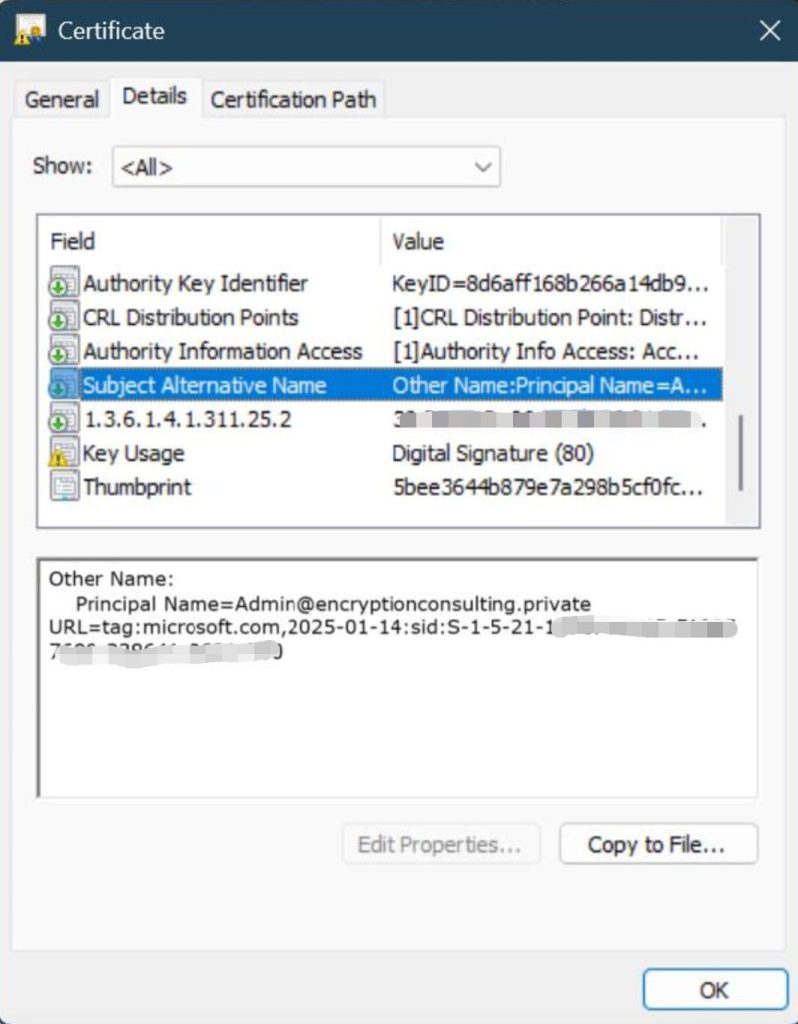
- Certificates must include a non-critical extension with Object Identifier (OID) 1.3.6.1.4.1.311.25.2.
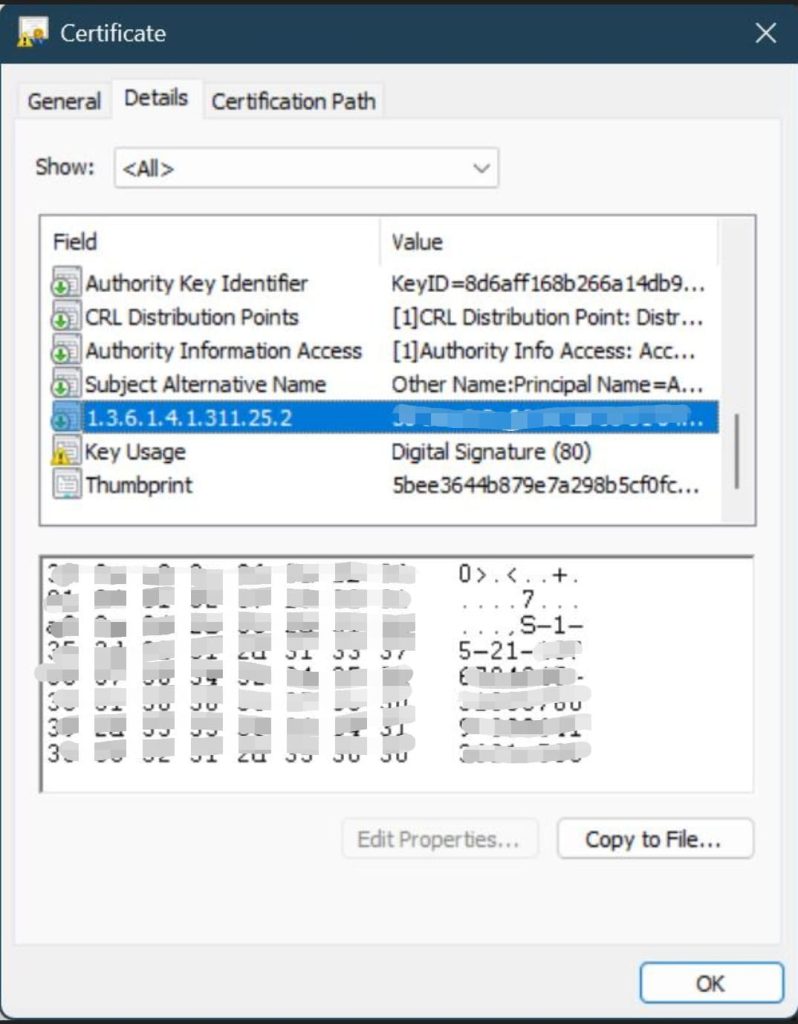
This extension embeds the Security Identifier (SID) of the principal (user or device) so Active Directory can map the certificate to exactly one account.
- Domain Controller Behavior
- DCs enforce SID-based certificate mappings and reject non-compliant authentication attempts outright, with no fallback.
- Event logs record authentication failures caused by missing or incorrect SID extensions, which is now the primary signal for tracking remaining gaps.
- Enforcement Timeline (Completed)
- Compatibility Mode (retired): Weak certificate mappings were allowed from May 2022 to February 2025, with warning events logged for review.
- Full Enforcement Mode (default since February 2025): Authentication requests using weak mappings are denied by default.
- Final removal (September 9, 2025): The Compatibility Mode registry override was permanently removed. Strong, SID-based mapping is now mandatory with no supported opt-out.
Key Affected Areas
Organizations relying on certificate-based authentication should have already assessed these areas; if not, treat this as an incident-prevention checklist rather than a planning exercise:
- User Logins and Wi-Fi Authentication — certificates used for user and device authentication must include the correct SID extension.
- VPN Access (e.g., Always On VPN) — certificates used for VPN authentication must comply with the strong mapping standard.
- MDM-Enrolled Devices (Microsoft Intune PKCS/SCEP) — certificates issued via Intune’s PKCS or SCEP connectors need SID extension updates to remain valid.
- Certificates Issued via Offline Templates or Microsoft NDES — organizations issuing certificates through offline templates or the Network Device Enrollment Service must confirm their configurations produce compliant certificates.
Impact on Different Environments
- On-Premises Active Directory Environments
- If patches since May 2022 (KB5014754) have been applied consistently, most certificates issued afterward should already carry the SID extension.
- Organizations still need to verify their Certificate Authority (CA) templates include OID 1.3.6.1.4.1.311.25.2 for every certificate issued today, not just historically.
- Hybrid Environments (On-Prem AD + Intune or Microsoft Entra Sync)
- Organizations using Microsoft Intune for certificate issuance must confirm their PKCS certificate connector is configured for SID-based mappings.
- On the Intune Certificate Connector server:
Set-ItemProperty -Path "HKLM:\SOFTWARE\Microsoft\MicrosoftIntune\PFXCertificateConnector" -Name EnableSidSecurityExtension -Value 1 -Force - For SCEP certificates, confirm the Subject Alternative Name (SAN) settings in Intune include the on-prem Security Identifier:
URI={{OnPremisesSecurityIdentifier}}
- Cloud-Only Environments (Microsoft Entra ID with Certificate Authentication)
- Organizations using cloud-only authentication with digital certificates need to review their authentication flows against the same strong-mapping requirement.
- Reissuing non-compliant certificates may still be necessary if the authentication backend does not support SID extensions.
Identifying and Remediating At-Risk Certificates
Strong vs. Weak Certificate Mappings
Microsoft supports six mapping types for associating certificates with Active Directory users through the altSecurityIdentities attribute. Three are strong and accepted under enforcement; three are weak and now rejected.
| Mapping Type | Format | Strength (Post-September 2025) |
|---|---|---|
| X509IssuerSerialNumber | X509:<I>IssuerName<SR>1234567890 | Strong — accepted |
| X509SKI | X509:<SKI>123456789abcdef | Strong — accepted |
| X509SHA1PublicKey | X509:<SHA1-PUKEY>123456789abcdef | Strong — accepted |
| X509IssuerSubject | X509:<I>IssuerName<S>SubjectName | Weak — rejected |
| X509SubjectOnly | X509:<S>SubjectName | Weak — rejected |
| X509RFC822 | X509:<RFC822>[email protected] | Weak — rejected |
Any certificate or explicit mapping still using one of the three weak formats will fail authentication under current enforcement. Migrating the remaining weak mappings to a strong format is no longer optional cleanup work.
Auditing Certificate Templates
Review every active certificate template to find any missing the 1.3.6.1.4.1.311.25.2 extension. Use the following command to check template details:
certutil -template | findstr "OID=1.3.6.1.4.1.311.25.2"
Templates without this OID need updating to comply with current enforcement, and any certificates already issued from them should be flagged for reissuance.
Monitoring Event Logs for Compliance Issues
Regularly monitor domain controller logs for authentication failures related to certificate mapping. Key Event IDs to monitor include:
| Event ID | Description |
|---|---|
| 39 | Certificate authentication failed due to missing SID |
| 40 | Weak certificate mapping detected |
| 41 | Certificate mapping rejected in Full Enforcement Mode |
Filter for these with PowerShell:
Get-EventLog -LogName Security | Where-Object { $_.EventID -in @(39,40,41) }
Under current enforcement, these events represent authentication that is actively failing for end users right now, not a future risk to plan around.
Strong Certificate Mapping Remediation Checklist
Use this checklist to confirm your environment is fully compliant with strong certificate mapping enforcement, not just patched against it:
- Confirm every domain controller is patched to at least the September 2025 security update — Full Enforcement Mode is not optional beyond this point.
- Run
certutil -template | findstr "OID=1.3.6.1.4.1.311.25.2"against every active certificate template. - Flag and reissue any certificate issued from a template missing the SID extension.
- Audit
altSecurityIdentitiesmappings for any of the three weak mapping types (X509IssuerSubject, X509SubjectOnly, X509RFC822). - Verify the Intune PKCS certificate connector has
EnableSidSecurityExtensionset to 1 on every connector server. - Confirm SCEP profiles include the on-premises SID in the Subject Alternative Name.
- Set up alerting on Event IDs 39, 40, and 41 so mapping failures surface before help-desk tickets do.
- Document any template intentionally excluded from SID issuance, and confirm why.
- Extend the same audit to NDES-issued and offline-template certificates, not just online CA templates.
- Re-run the full template audit quarterly, since new templates or Group Policy changes can reintroduce the gap.
Why Strong Mapping Still Matters After the Deadline
The September 2025 deadline passing doesn’t make certificate mapping a solved problem. It shifts the consequence of an unaddressed gap from a logged warning to an outright authentication failure, and certificate-related failures are already one of the most common operational incidents PKI teams deal with.
- CyberArk’s 2025 State of Machine Identity Security Report, based on a survey of more than 1,200 security leaders, found that 72% of organizations experienced at least one certificate-related outage in 2024, and 50% reported a security incident or breach tied to a compromised machine identity (CyberArk, 2025).
- Keyfactor’s Digital Trust Digest: The Automation Edition, conducted with Wakefield Research and published September 30, 2025, found that 86% of companies suffered at least one certificate-related outage in the prior year, with 10% experiencing an outage every week (Keyfactor, 2025).
- Across engagements, Encryption Consulting’s PKI assessment teams continue to find AD CS environments with certificate templates that predate KB5014754 and were never updated to enforce the SID extension, which is exactly the gap that now causes hard authentication failures instead of logged warnings.
None of these figures are specific to strong certificate mapping alone, but they describe the same underlying failure mode: certificates and their trust relationships going unmonitored until something breaks in production. Strong mapping enforcement adds one more way a stale certificate template can cause exactly that kind of outage.
Strong Certificate Mapping vs. Other AD CS Hardening Controls
Strong certificate mapping is one of several AD CS hardening controls most enterprise PKI teams need to run at the same time. Here’s how it compares to the other controls it’s most often confused with, and when each one applies:
| Control | What it addresses | Enforcement status (Aug 2026) | Primary remediation |
|---|---|---|---|
| Strong certificate mapping (KB5014754) | Certificate-to-account spoofing via weak SAN/Subject mapping | Mandatory; Compatibility Mode permanently removed Sept 9, 2025 | Add SID extension (OID 1.3.6.1.4.1.311.25.2) to templates; reissue non-compliant certificates |
| ESC1–ESC16 template misconfigurations | Privilege escalation via overly permissive certificate templates (e.g., enrollee-suppliable SAN) | No forced Microsoft patch deadline; requires manual template audit | Template hardening, restricting enrollment rights, disabling enrollee-suppliable subject |
| CA/B Forum certificate validity reduction | Exposure window for compromised keys in publicly trusted TLS certificates | Current maximum is 200 days (Ballot SC-081v3, effective March 2026); dropping to 100 days in March 2027 and 47 days by March 2029 | Automated issuance and renewal (CertSecure Manager) |
| NDES/SCEP hardening | Device-enrollment certificates issued without strong identity binding | Ongoing; tied to the same KB5014754 SID requirement for AD-joined scenarios | Update Intune connector settings; enforce SID extension on device templates |
Strong certificate mapping and ESC1–ESC16 template hardening frequently need to be fixed in the same pass, since a template missing the SID extension is often the same template with other permissive settings worth reviewing. For a deeper look at fixing template-level misconfigurations, see EC’s guide to AD CS template hardening.
Glossary of Key Terms in Strong Certificate Mapping
These are the terms that come up most often when auditing or discussing strong certificate mapping enforcement:
| Term | Definition |
|---|---|
| Strong Certificate Mapping | Binding a certificate to exactly one Active Directory account using a strong identifier (most commonly the SID extension) rather than a spoofable field like Subject Name. |
| SID Extension (OID 1.3.6.1.4.1.311.25.2) | A non-critical certificate extension that embeds a user or device’s Security Identifier, letting Active Directory map the certificate to one specific account. |
| KB5014754 | The Microsoft security update, first released May 2022, that introduced strong certificate mapping requirements for AD CS-issued certificates and defined the enforcement timeline. |
| Full Enforcement Mode | The domain controller behavior, default since February 2025, that rejects any certificate-based authentication attempt lacking a strong mapping. |
| Compatibility Mode | The retired transitional mode (May 2022–February 2025) that allowed weakly mapped certificates to authenticate while logging a warning event; permanently removed September 9, 2025. |
| altSecurityIdentities | The Active Directory user attribute that stores explicit certificate-to-account mapping strings, in either strong or weak formats. |
| NDES | Network Device Enrollment Service — the AD CS role service that issues certificates to devices that can’t request them directly from a CA, most often through SCEP. |
| SCEP | Simple Certificate Enrollment Protocol — a certificate enrollment protocol commonly used by MDM platforms like Microsoft Intune to issue device certificates. |
| Certificate-Based Authentication | An authentication method that verifies identity using a digital certificate instead of, or alongside, a password. |
| Weak Certificate Mapping | Any of the three retired mapping formats (X509IssuerSubject, X509SubjectOnly, X509RFC822) that Active Directory rejects under current enforcement. |
If You Are Still Relying on Legacy Registry Workarounds
Some organizations delayed remediation by keeping domain controllers in Compatibility Mode using the StrongCertificateBindingEnforcement registry key. That option no longer exists. As of the September 9, 2025 Windows security update, the registry key is ignored entirely, and domain controllers run in Full Enforcement Mode regardless of its value.
To confirm your current state:
Get-ItemProperty -Path "HKLM:\SYSTEM\CurrentControlSet\Services\Kdc" -Name "StrongCertificateBindingEnforcement"

If this key is absent or set to any value on a domain controller patched with the September 2025 update or later, the domain controller is in Full Enforcement Mode regardless. There is no supported step to re-enable Compatibility Mode. The only path forward is remediating non-compliant certificates and templates directly.
Enterprise Certificate Authority (CA) Considerations
Enterprise Certificate Authorities (CAs) issuing from online templates should now be producing certificates with the 1.3.6.1.4.1.311.25.2 extension automatically. If certain templates need to be excluded from receiving this extension for a specific technical reason, administrators can use:
certutil -dstemplate user msPKI-Enrollment-Flag +0x00080000
Use this exclusion deliberately and document why, since any certificate issued from an excluded template will fail authentication under current enforcement.
CertSecure Manager: Your Compliance Partner in a Changing Cryptographic Landscape
CertSecure Manager helps organizations stay ahead of cryptographic policy transitions like this one. As compliance standards evolve, whether through NIST recommendations, PCI DSS updates, or new industry mandates, CertSecure Manager helps businesses remain compliant without disruption.
How CertSecure Manager Keeps You Ahead
- Proactive Compliance Adaptation — CertSecure Manager continuously updates its compliance framework to align with evolving regulations like HIPAA, PCI DSS, GDPR, and NIST 800-131A.
- Automated Discovery and Reissuance — CertSecure Manager discovers certificate templates missing the SID extension and automates reissuance so remediation doesn’t depend on manual template-by-template review.
- Real-Time Monitoring and Policy Enforcement — organizations receive alerts on expiring or non-compliant certificates before they cause an authentication failure or outage.
- Seamless Integration with New Standards — whether it’s post-quantum cryptography adoption, TLS certificate validity reductions, or emerging AD CS hardening requirements, CertSecure Manager is built to integrate with new standards without a rebuild.
With CertSecure Manager, your organization reduces the risk of authentication failures and service disruptions from non-compliant certificates, and gains a platform for long-term certificate lifecycle management beyond this one enforcement change. Because certificate and cryptographic risk rarely stops at AD CS, pairing certificate lifecycle visibility with a full cryptographic bill of materials (CBOM) through CBOM Secure gives PKI teams a single inventory of every certificate, key, and algorithm at risk, whether the driver is AD CS enforcement today or the broader move toward post-quantum cryptography migration.
Encryption Consulting’s PKI Assessment Service provides a comprehensive evaluation of your PKI infrastructure, identifying security gaps like unremediated certificate templates and preparing a customized roadmap to close them, whether you’re catching up on strong certificate mapping or preparing for the next PKI hardening deadline.
Conclusion
Microsoft’s strong certificate mapping enforcement is no longer a change to prepare for. It has been fully in effect since September 9, 2025, with no supported way to delay it further. Organizations that haven’t confirmed every certificate template and issuance path produces strongly mapped certificates should treat this as an active remediation task, not a compliance checkbox for later.
For expert guidance and automated certificate lifecycle management, contact Encryption Consulting to explore how CertSecure Manager can support your organization’s compliance efforts.
Additional References:
- KB5014754 – Microsoft Support
- Microsoft Tech Community – Intune Implementation
- The Machine Identity Guide for PKI Teams
- Post-Quantum Cryptography Migration Guide
Frequently Asked Questions
Is strong certificate mapping enforcement still optional in any Windows environment?
No. As of the September 9, 2025 Windows security update, the Compatibility Mode registry override was permanently removed. Every domain controller patched to that update or later runs in Full Enforcement Mode regardless of registry settings, so weak certificate mappings are rejected across all supported Windows Server versions running AD CS.
How do I know if my certificates already have the SID extension?
Run certutil -template | findstr "OID=1.3.6.1.4.1.311.25.2" against your certificate templates, or inspect an issued certificate’s extensions directly. Any template missing this OID is issuing certificates that will fail authentication under current enforcement, and any certificates already issued from it need to be reissued from an updated template.
What happens if a certificate fails strong mapping today?
Authentication is denied outright, and the domain controller logs Event ID 39, 40, or 41 depending on the specific failure. Unlike the Compatibility Mode period, there is no fallback that allows the login, VPN connection, or device enrollment to succeed while only logging a warning.
Does strong certificate mapping affect cloud-only Microsoft Entra ID environments?
The KB5014754 enforcement specifically governs on-premises Active Directory Domain Controllers. Cloud-only Microsoft Entra ID environments using certificate-based authentication should still confirm their own authentication backend supports strong mapping equivalents, since the underlying spoofing risk that KB5014754 addresses is not unique to on-premises AD.
Is strong certificate mapping the same as AD CS template hardening (ESC1–ESC16)?
No, though they overlap. Strong certificate mapping specifically requires a SID extension so a certificate maps to one AD account. ESC1–ESC16 covers a broader set of certificate template misconfigurations, such as overly permissive enrollment rights, that can allow privilege escalation independent of how the certificate is mapped. See EC’s guide to AD CS template hardening for the broader control set.
Who within an organization should own strong certificate mapping compliance?
Strong certificate mapping compliance typically sits with the PKI or identity and access management team that manages AD CS, since remediation touches certificate templates, CA configuration, and domain controller settings. In hybrid environments, the Intune/endpoint management team also needs a stake, since SCEP and PKCS certificate profiles are configured outside AD CS itself.
How does strong certificate mapping fit into a broader certificate lifecycle management (CLM) strategy?
Strong certificate mapping is a compliance requirement a CLM platform should track alongside expiration, renewal, and revocation. A CLM tool like CertSecure Manager can flag templates missing the SID extension and automate reissuance, turning a one-time remediation project into an ongoing control rather than a manual audit repeated from scratch.
How often should organizations audit certificate templates for SID extension compliance?
At minimum, quarterly, and immediately after any change to certificate templates, Group Policy, or CA configuration. New or cloned templates can silently omit the SID extension, so a one-time audit after the September 2025 deadline is not sufficient on its own.
What is the most common mistake organizations make when remediating strong certificate mapping gaps?
Assuming that patching domain controllers automatically fixes already-issued certificates. The Windows security updates changed how DCs validate mappings going forward; certificates issued from a non-compliant template before the fix still lack the SID extension and still need to be reissued.
Does strong certificate mapping enforcement affect multi-CA or hybrid PKI environments differently?
Yes. Organizations running multiple issuing CAs, or a mix of on-premises AD CS and cloud-issued certificates, need to audit each CA and issuance path separately, since a template fix on one CA does not carry over to certificates issued by another CA or through a different enrollment method like NDES or Intune.
- Executive Summary
- Understanding Strong Certificate Mapping Enforcement
- Impact on Different Environments
- Identifying and Remediating At-Risk Certificates
- Strong Certificate Mapping Remediation Checklist
- Why Strong Mapping Still Matters After the Deadline
- Strong Certificate Mapping vs. Other AD CS Hardening Controls
- Glossary of Key Terms in Strong Certificate Mapping
- If You Are Still Relying on Legacy Registry Workarounds
- CertSecure Manager: Your Compliance Partner in a Changing Cryptographic Landscape
- Conclusion
- Frequently Asked Questions
- Is strong certificate mapping enforcement still optional in any Windows environment?
- How do I know if my certificates already have the SID extension?
- What happens if a certificate fails strong mapping today?
- Does strong certificate mapping affect cloud-only Microsoft Entra ID environments?
- Is strong certificate mapping the same as AD CS template hardening (ESC1–ESC16)?
- Who within an organization should own strong certificate mapping compliance?
- How does strong certificate mapping fit into a broader certificate lifecycle management (CLM) strategy?
- How often should organizations audit certificate templates for SID extension compliance?
- What is the most common mistake organizations make when remediating strong certificate mapping gaps?
- Does strong certificate mapping enforcement affect multi-CA or hybrid PKI environments differently?