- Executive Summary
- Key Takeaways
- Quick Checklist: Is Your Certificate Lifecycle Under Control?
- Understanding SSL Certificates
- Why Certificate Management Matters Now
- Prerequisites Before Implementation
- Prerequisite-to-Action Table
- Certificate Renewal in CertSecure Manager
- Certificate Reissue
- Certificate Revocation with CertSecure Manager
- Before/After Operational Workflow
- Rollback Guidance and Common Errors
- The Role of Certificate Authorities (CAs)
- Owner/Action Matrix by Team
- Multi-Cloud and Hybrid PKI Considerations
- Best Practices for Effective Certificate Management
- Success Metrics to Track After Implementation
- What to Do Next
- How Encryption Consulting Can Help
- Conclusion
- Frequently Asked Questions
Quick Answer: SSL certificate lifecycle management is the process of tracking, renewing, reissuing, and revoking TLS/SSL certificates before they expire or fail validation, using automated discovery and workflow tools rather than manual tracking. With public certificate validity dropping to 200 days in March 2026 and 47 days by March 2029, manual processes can no longer keep pace with renewal frequency. This guide walks through how CertSecure Manager handles renewal, reissue, and revocation, and what PKI, security, platform, and compliance teams need to do before, during, and after implementation.
Executive Summary
SSL certificate lifecycle management, tracking, renewing, reissuing, and revoking every TLS certificate before it expires or fails validation, is no longer optional busywork: DigiCert’s July 2025 Trust Pulse Survey found 45% of enterprises had certificate-related downtime in the past year, with 37.5% traced to an expired certificate, and the CA/Browser Forum’s ballot is already phasing maximum public TLS certificate validity down to 200 days as of March 2026, on the way to 47-day TLS certificates by March 2029, requiring renewal roughly eight times a year instead of once. Certificate discovery is the starting point for surviving that cadence, since a team cannot automate the renewal of a certificate it has not found, and CertSecure Manager runs that automation, discovery, and audit-ready reporting from one console. That same discovery foundation also supports crypto agility and feeds directly into PQC readiness and CBOM planning.
Jump to: Quick Checklist | Prerequisites | Renewal | Reissue | Revocation | Before/After Workflow | Rollback & Common Errors | Success Metrics | How EC Can Help | FAQ
Key Takeaways
- Nearly half of enterprises (45%) experienced certificate-related downtime in the past year, and 37.5% traced outages specifically to expired certificates, per DigiCert’s July 2025 Trust Pulse Survey.
- Public TLS certificate validity drops to 200 days in March 2026, 100 days in March 2027, and 47 days by March 2029 under the CA/Browser Forum’s phased reduction.
- CertSecure Manager automates renewal, reissue, and revocation from a single inventory view, removing the manual tracking that causes most expiration-related outages.
- PKI, security, platform, and compliance teams each own a distinct part of the lifecycle; unclear ownership is the most common root cause of missed renewals.
- Teams should track renewal lead time, certificates under automated management, and manual-ticket volume as success metrics after rollout.
Quick Checklist: Is Your Certificate Lifecycle Under Control?
Run through this before the deep dive below. Any box you cannot check maps directly to a section further down this guide.
- You have a current, discovery-based inventory of every certificate across public, internal, and cloud-native CAs.
- Every certificate has a named owner, not a shared distribution list.
- Renewal, reissue, and revocation all run through CertSecure Manager or an equivalent automated workflow, not manual CSR generation.
- A tested rollback plan exists for a failed renewal or deployment before you need it in production.
- Revocation status changes propagate to OCSP or CRL responses and downstream systems, and you can confirm it.
- Your plan accounts for the March 2027 (100-day) and March 2029 (47-day) CA/B Forum milestones, not just the current 200-day maximum.
Understanding SSL Certificates
Before walking through renewal, reissue, and revocation, it helps to be precise about what an SSL/TLS certificate actually does and why its lifecycle needs active management rather than a “set it and forget it” approach.
What Is an SSL Certificate?
An SSL certificate is a digital document that verifies the identity of a website or server and enables encrypted data transmission over the internet. A Certificate Authority (CA) issues the certificate after validating that the requester controls the domain or organization named in it. When a browser connects to a site with a valid certificate, it establishes an encrypted session, shown by the padlock icon and the “https” prefix, so that data such as login credentials and payment details stays confidential in transit.
Why Certificate Management Matters Now
Every SSL certificate carries a fixed validity period, and that period is shrinking fast. As certificates approach expiration, active lifecycle management is what prevents an expired certificate from taking down a customer-facing service. Two current data points make the urgency concrete.
The Cost of Manual Certificate Management
DigiCert’s Trust Pulse Survey, published July 2, 2025, found that 45% of enterprises experienced service downtime from certificate-related incidents in the past year, and 37.5% attributed outages specifically to expired certificates, one of the most preventable causes of disruption in enterprise environments. Nearly 60% of organizations manage between 1,000 and 10,000 certificates, yet more than half said they lack confidence in their ability to track expiration dates across that inventory. (Source: DigiCert Trust Pulse Survey, July 2025)
The 47-Day Certificate Timeline
The CA/Browser Forum ballot endorsed by Sectigo and passed in April 2025 reduces the maximum public TLS certificate validity from the current 398 days on a phased schedule: 200 days starting March 15, 2026, 100 days starting March 15, 2027, and 47 days starting March 15, 2029. Each step also shortens the Domain Control Validation (DCV) reuse period, down to just 10 days once the 47-day stage takes effect. (Source: Sectigo / CA/Browser Forum, April 2025)
At a 47-day validity period, a team renewing certificates by hand would need to process the same certificate roughly eight times a year instead of once. That math is the real argument for automation, not a hypothetical one. For a deeper look at what this timeline means operationally, see our guide on 47-day TLS certificate readiness.
Prerequisites Before Implementation
Before rolling out automated renewal, reissue, or revocation workflows in CertSecure Manager, confirm the following are in place. Skipping these is the most common cause of a stalled or partial rollout.
- Certificate discovery completed: a current inventory of all certificates across public and internal CAs, including those issued outside IT’s direct visibility. Use CBOM Secure if a full inventory does not already exist.
- CA account access: API credentials or account access for every CA in use (public CAs, internal Microsoft CA, or cloud-native CAs).
- Domain and DNS control: access needed to complete Domain Control Validation (DCV) for automated renewals, particularly DNS-01 or HTTP-01 challenge methods.
- Defined certificate owners: a named owner for each certificate or certificate group, not just a shared distribution list.
- Server and load balancer access: credentials or agents in place to push renewed certificates to the endpoints that use them.
- Change management alignment: a rollback plan and a maintenance window agreed with the teams that own affected applications.
Prerequisite-to-Action Table
The table below maps each prerequisite to the specific action a team needs to complete before certificate automation goes live.
| Prerequisite | Action Required | Owning Team |
|---|---|---|
| Certificate inventory | Run discovery scan across public, private, and internal CAs | PKI / Security |
| CA API access | Provision API keys or service accounts for each CA | PKI |
| DNS/domain control | Delegate DCV automation access (DNS-01 or HTTP-01) | Platform / Network |
| Certificate ownership | Assign a named owner per certificate or app group | Compliance / Governance |
| Deployment access | Configure agents or credentials for target servers/load balancers | Platform |
| Rollback plan | Document fallback steps and maintenance window | Security / Platform |
Certificate Renewal in CertSecure Manager
Certificate renewal replaces an expiring certificate with a new one carrying the same identity details, before the old certificate lapses. In CertSecure Manager, this is a guided workflow rather than a manual CSR-and-upload process repeated per server.
How to Renew a Certificate with CertSecure Manager
Follow these steps to renew an SSL certificate before it expires:
-
Log in to CertSecure Manager
Access your CertSecure Manager account using your credentials.
-
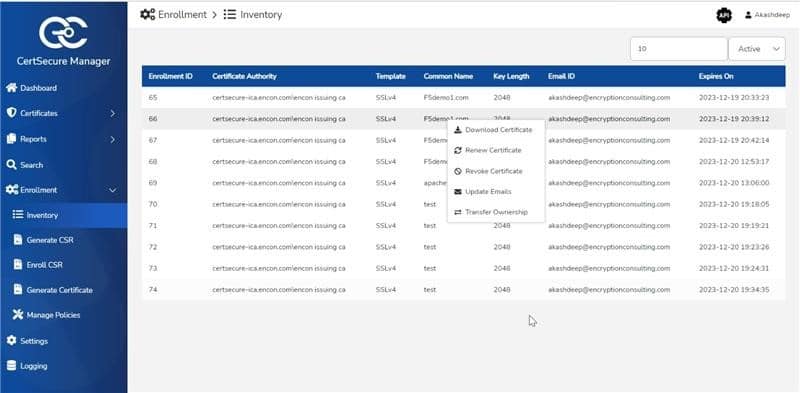
Identify certificates approaching expiration
Open the certificate inventory view to see every managed certificate and its expiration date in one place.
-
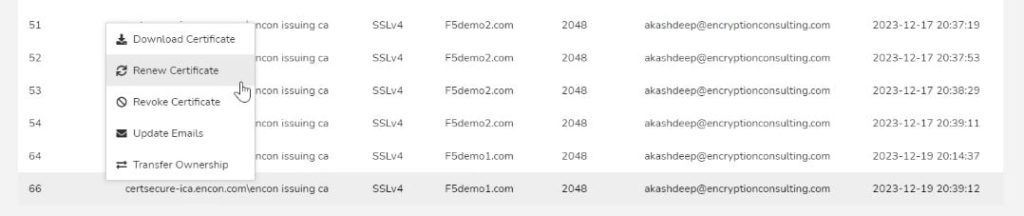
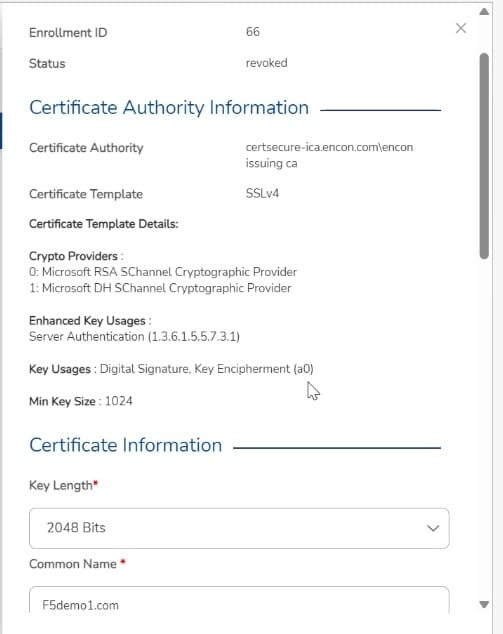
Initiate the renewal request
Start the renewal directly from the inventory view. The request carries forward the same identity details as the original certificate and is signed using the existing certificate’s private key.
-
Complete validation
Depending on the CA and certificate type, CertSecure Manager guides you through domain or organization validation to confirm continued control over the identity in the certificate.
-
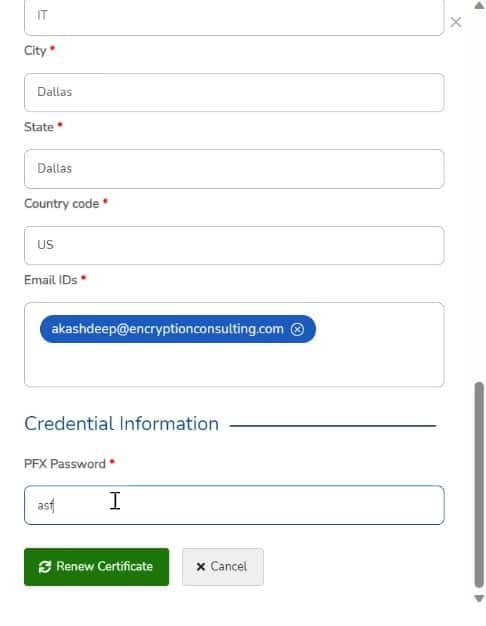
Deploy the renewed certificate
Once validation clears, CertSecure Manager generates the renewed certificate and pushes it to the server or endpoint, replacing the expiring one before the cutover deadline.
Advantages of Renewing with CertSecure Manager
-
Efficiency
Automated renewal removes the repetitive CSR-generation and manual upload work that manual processes require at every renewal cycle, which matters more as cycles shorten from 200 days to 47.
-
Automation
Renewal reminders and policy-based auto-renewal reduce reliance on someone remembering an expiration date on a spreadsheet.
-
Visibility
A single inventory view of every certificate and its expiration date supports both day-to-day operations and audit evidence requests.
Certificate Reissue
Certificate reissue generates a new certificate with updated identity details while keeping the original validity window. Teams reissue a certificate when the domain name, organization name, Subject Alternative Names, or other identifying fields change mid-cycle.
How to Reissue a Certificate
-
Request the reissue
Administrators submit a reissue request with the updated identity information to the issuing CA.
-
Complete validation
As with renewal, the CA may require validation confirming control over the domain or organization tied to the updated details.
-
Receive the reissued certificate
Once validated, the CA issues the updated certificate. The original certificate’s private key signs the reissue request.
-
Install and update references
The new certificate replaces the old one on the server. Update any configuration files, load balancer rules, or automation scripts that reference the previous certificate by thumbprint or serial number.
Certificate Revocation with CertSecure Manager
Certificate revocation invalidates a certificate before its natural expiration, typically because a private key is compromised, an organization changed, or a certificate was mis-issued. Delayed revocation is a direct security exposure, so this workflow needs to be fast and auditable.
How to Revoke a Certificate with CertSecure Manager
-
Log in to CertSecure Manager
Access your CertSecure Manager dashboard. If you are not yet a CertSecure Manager user, you can request a demo to see the workflow directly.
-
Open certificate management
Navigate to the certificate management section to see the full list of certificates under management.
-
Select the certificate to revoke
Search or filter to locate the specific certificate that needs to be revoked.
-
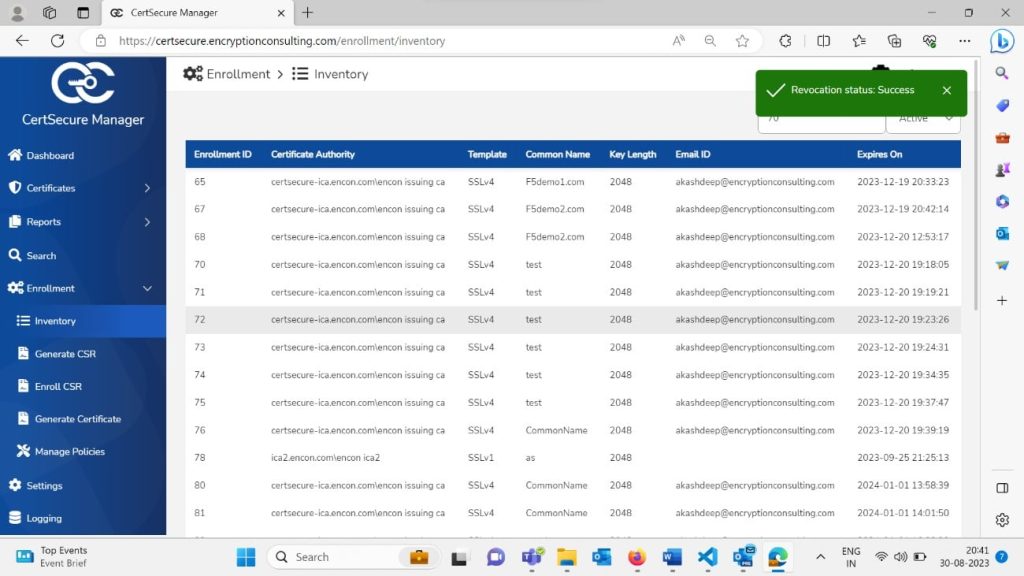
Initiate revocation
Open the certificate’s detail page and start the revocation process from there.
-
Confirm the revocation reason and authenticate
CertSecure Manager will prompt for a revocation reason code and any required authentication before finalizing the request.
-
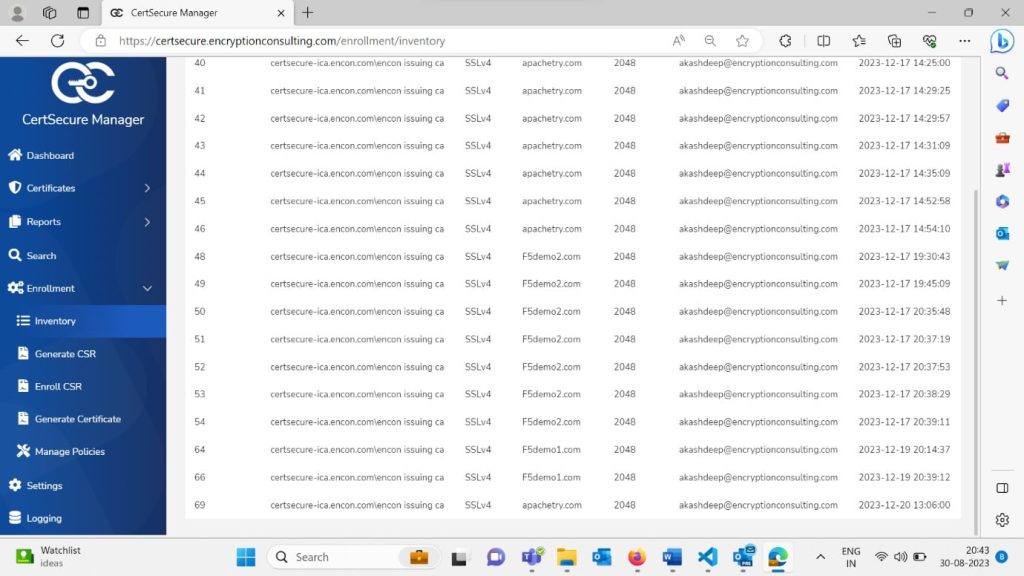
Monitor revocation status
Track the revocation in real time from the dashboard until it completes and propagates.
-
Confirm downstream systems are updated
CertSecure Manager updates relevant systems and applications to reflect the revoked status, preventing continued use of the compromised or invalid certificate.
Whether you are managing a single certificate or a large portfolio, the same revocation workflow applies, which keeps the process consistent and auditable regardless of scale.
Before/After Operational Workflow
The table below contrasts manual certificate operations with an automated CertSecure Manager workflow across the same three actions.
| Task | Manual Process (Before) | CertSecure Manager (After) |
|---|---|---|
| Tracking expirations | Spreadsheets or calendar reminders per owner | Centralized inventory with automated alerts |
| Renewal | Manual CSR generation and upload per server | Policy-based renewal initiated from inventory |
| Validation | Manually completing CA-specific DCV steps | Guided validation within the platform |
| Reissue | Re-running the full request process from scratch | Reissue request tied to existing certificate record |
| Revocation | Contacting the CA directly, often under time pressure | Revocation initiated and tracked in-platform |
| Audit evidence | Manual compilation before each audit cycle | Exportable, current inventory on demand |
Rollback Guidance and Common Errors
Automated certificate operations can fail, and teams should plan for that before going live, not after a production incident.
Rollback Guidance
- Keep the previous valid certificate and private key archived until the new certificate is confirmed working in production.
- Stage renewals against a non-production endpoint first when a certificate protects a high-traffic or regulated service.
- Maintain a documented manual fallback (the pre-automation renewal steps) in case the automation path fails during a change freeze.
Common Errors to Watch For
- Failed DCV due to DNS propagation delay: build buffer time into renewal scheduling rather than triggering renewal at the last valid day.
- Certificate deployed but service not reloaded: confirm the target service (web server, load balancer, API gateway) reloads or restarts to pick up the new certificate.
- Orphaned references after reissue: configuration files or scripts pinned to an old certificate thumbprint will silently keep using it unless updated.
- Revocation without downstream propagation check: confirm OCSP or CRL responses reflect the revoked status before considering the incident closed.
The Role of Certificate Authorities (CAs)
Certificate Authorities are the trusted entities responsible for validating certificate applicants, issuing certificates, and supporting their ongoing management. Across renewal, reissue, and revocation, CAs are involved in three specific ways:
-
Validation
Both renewal and reissue can require validation to confirm the requester’s continued control over the domain or organization.
-
Issuance
The CA issues the new certificate once validation is complete, for both renewal and reissue.
-
Revocation status
When a certificate is revoked, the CA updates its Certificate Revocation List (CRL) or responds to OCSP queries with the current revocation status.
Owner/Action Matrix by Team
Certificate lifecycle management crosses team boundaries. The matrix below clarifies who owns what, which is the single biggest gap this guide sees in practice.
| Team | Primary Responsibility | Key Risk If Skipped |
|---|---|---|
| PKI Team | CA relationships, certificate policy, issuance templates | Inconsistent certificate types and validity periods |
| Security Team | Revocation decisions, incident response for compromised keys | Delayed revocation extends exposure window |
| Platform/Infrastructure Team | Deployment automation, server and load balancer configuration | Renewed certificate issued but never deployed |
| Compliance Team | Audit evidence, certificate ownership records, policy adherence | Gaps in DORA/PCI DSS certificate inventory evidence |
Multi-Cloud and Hybrid PKI Considerations
Most enterprises run certificates across a mix of public CAs, an internal Microsoft CA, and cloud-native certificate services (AWS Certificate Manager, Azure Key Vault, Google Certificate Authority Service). A hybrid PKI estate needs one addition to the workflow above: a unified inventory that spans every CA source, not a separate tracking system per cloud. CertSecure Manager connects to public CAs and internal CAs from a single console so renewal, reissue, and revocation policies stay consistent regardless of which CA issued the certificate. Without that consolidation, the most common failure mode is a certificate renewed correctly in one cloud environment while its counterpart in another environment silently expires.
Best Practices for Effective Certificate Management
Teams responsible for certificate administration should apply the following practices to keep websites and applications secure and available:
-
Proactive monitoring
Track certificate expiration dates continuously, not just when a renewal ticket is filed.
-
Automated renewal
Use automated tools to handle renewal at the frequency the 47-day schedule will require, rather than relying on manual initiation.
-
Inventory management
Maintain a single, current inventory of every certificate and its owner across all CAs in use.
-
Documented procedures
Write down renewal, reissue, and revocation procedures so execution is consistent regardless of who is on call.
-
Stay current on CA/B Forum changes
Certificate policy changes on a defined schedule; teams that track it in advance avoid last-minute scrambles.
Success Metrics to Track After Implementation
Measure the following after rolling out automated certificate lifecycle management to confirm it is actually reducing risk and manual effort:
- Certificates under automated management as a percentage of total inventory
- Average renewal lead time before expiration (target: comfortably ahead of DCV reuse windows as they shorten)
- Certificate-related outage count, quarter over quarter
- Manual ticket volume for certificate requests, renewals, and revocations
- Mean time to revoke for compromised or mis-issued certificates
Organizations deploying CertSecure Manager have reported measurable reductions in manual renewal effort as certificate volume scales; ask your Encryption Consulting contact for current deployment benchmarks specific to your environment and certificate count.
What to Do Next
The realistic next step depends on which team is reading this:
- PKI teams: run a certificate discovery pass across public, internal, and cloud-native CAs to build or confirm your current inventory, and assign a named owner to every certificate or certificate group.
- Security teams: confirm revocation and rollback plans are tested, not just documented, and that OCSP/CRL propagation is verified after every revocation.
- Platform teams: pilot automated renewal on a non-critical certificate group before extending it to production-critical services, and confirm deploy hooks reload the target service correctly.
- Compliance teams: set a review cadence tied to CA/Browser Forum milestones (March 2026, March 2027, March 2029) rather than an arbitrary internal date, and confirm current reporting would hold up as audit evidence today.
How Encryption Consulting Can Help
Most of the renewal, reissue, and revocation risk covered in this guide comes down to the same root cause: nobody has a live, discovery-based inventory of where every certificate lives, who owns it, and when it needs attention. CertSecure Manager closes that gap by combining continuous certificate discovery with the guided renewal, reissue, and revocation workflows this guide walks through, so certificate lifecycle management stops depending on a person remembering a date and starts running on policy instead. It is designed to simplify the full scope of certificate lifecycle management, not just renewal in isolation.
From timely renewals to seamless reissues and fast, auditable revocation, CertSecure Manager gives cybersecurity teams a single, consistent workflow across public, private, and cloud-native CAs.
Certificate lifecycle management does not stop at renewal, reissue, and revocation. It connects directly to the broader work of cryptographic discovery and inventory and to an organization’s post-quantum readiness program. A certificate you cannot see is a certificate you cannot renew, reissue, revoke, or migrate when algorithms change, which is why teams building a PQC readiness plan typically start from the same certificate inventory this guide describes. For a deeper look at turning that inventory into an operational capability, see how a Cryptographic Bill of Materials turns inventory into intelligence. Encryption Consulting is ISO/IEC 27001:2022 and SOC 2 certified; if you want to see how automated discovery, renewal, and revocation would hold up against your own certificate estate, a walkthrough of CertSecure Manager is the fastest way to find out.
Conclusion
The integrity and availability of SSL certificates is an operational requirement, not just a security best practice. As validity periods compress from 398 days toward 47, the renewal, reissue, and revocation processes that once ran on manual tracking and calendar reminders need to run on automated, auditable workflows instead. Getting the prerequisites, ownership matrix, and rollback plan right before implementation is what separates a smooth transition from a preventable outage.
Frequently Asked Questions
What is the main takeaway from SSL Certificate Lifecycle Mastery with CertSecure Manager?
The main takeaway is that manual certificate tracking cannot keep pace with shrinking validity periods. CertSecure Manager automates renewal, reissue, and revocation from a single inventory, which is the practical response to a 47-day certificate lifecycle by 2029.
Why does this matter for enterprise certificate lifecycle management?
Certificate-related downtime already affects nearly half of enterprises, and 37.5% of outages trace directly to expired certificates. As validity periods shorten, the number of renewal events per year multiplies, making manual management a growing operational risk rather than a static one.
What teams are responsible for acting on this guidance?
PKI teams own CA relationships and issuance policy, security teams own revocation decisions and incident response, platform teams own deployment automation, and compliance teams own audit evidence and ownership records. All four need defined roles for the lifecycle to work end to end.
What risks increase if this topic is handled manually?
Manual handling increases the risk of missed expirations, inconsistent validation steps across CAs, delayed revocation of compromised certificates, and incomplete audit evidence for regulations like DORA and PCI DSS that require documented, current certificate inventories.
How does automation reduce certificate outage risk?
Automation removes dependence on someone remembering an expiration date. Policy-based renewal, centralized inventory visibility, and automated deployment to servers and load balancers close the gaps where manual processes typically fail, particularly under the higher renewal frequency the 47-day schedule requires.
What metrics should teams track after implementation?
Track the percentage of certificates under automated management, average renewal lead time before expiration, certificate-related outage count per quarter, manual ticket volume, and mean time to revoke for compromised certificates.
How does this connect to 47-day TLS certificate readiness?
The CA/Browser Forum’s phased reduction to 47-day maximum validity by March 2029 means every certificate on your estate will need to renew roughly eight times a year. Automated lifecycle management is the operational prerequisite for meeting that cadence without manual scaling of renewal staff.
How should this be handled in multi-cloud or hybrid PKI environments?
Hybrid and multi-cloud environments need a single inventory view spanning every CA source, public, internal, and cloud-native, rather than separate tracking per environment. CertSecure Manager consolidates renewal, reissue, and revocation policy across all of them from one console.
What prerequisites are needed before implementation?
Complete certificate discovery, CA API access, DNS or domain control for validation, named certificate owners, deployment access to target servers or load balancers, and a documented rollback plan before turning on automated workflows.
What screenshots or configuration examples should be included?
Teams evaluating or deploying CertSecure Manager should document the inventory dashboard view, the renewal request form, the validation step, the revocation initiation screen, and the revocation status monitor, the same views referenced throughout this guide, so internal runbooks match the actual product interface.
- Executive Summary
- Key Takeaways
- Quick Checklist: Is Your Certificate Lifecycle Under Control?
- Understanding SSL Certificates
- Why Certificate Management Matters Now
- Prerequisites Before Implementation
- Prerequisite-to-Action Table
- Certificate Renewal in CertSecure Manager
- Certificate Reissue
- Certificate Revocation with CertSecure Manager
- Before/After Operational Workflow
- Rollback Guidance and Common Errors
- The Role of Certificate Authorities (CAs)
- Owner/Action Matrix by Team
- Multi-Cloud and Hybrid PKI Considerations
- Best Practices for Effective Certificate Management
- Success Metrics to Track After Implementation
- What to Do Next
- How Encryption Consulting Can Help
- Conclusion
- Frequently Asked Questions