Over the past 20 years, certutil.exe and certreq.exe have been two of the most dependable Windows toolkits. These tools have proved essential for handling cryptographic keys and certificates, especially in server contexts where security is critical. It’s no secret that the fundamental use of these tools exposes a wide range of powerful capabilities.
Beyond their commonly used features, however, lies a deeper set of advanced capabilities and lesser-known switches designed for administrators who need fine-grained control over certificate requests and issuance. In this guide, we will walk through these often-overlooked features and uncover the hidden switches that unlock the full potential of these tools.
Certutil.exe
Certutil.exe is a powerful command-line tool built into Windows that is used for managing, troubleshooting, and validating Public Key Infrastructure (PKI) components. Widely used by PKI administrators, security engineers, and system administrators, it supports a broad range of certificate-related operations, including managing and inspecting certificate stores, verifying certificate chains and key pairs, checking revocation status via Certificate Revocation List (CRL) and Online Certificate Status Protocol (OCSP), encoding and decoding files, hashing files, configuring Certificate Authority (CA) registry settings, interacting with Active Directory PKI containers, converting certificates between different formats, and troubleshooting certificate enrollment or trust issues. Because of its extensive functionality and flexibility, certutil.exe has become one of the most essential tools for working with Microsoft PKI environments.
To visit the official documentation, follow the link: certutil documentation
Exploring Certutil
Beyond certificate operations, certutil.exe can be used to back up and restore CA components, display configuration information for CAs, and set up Certificate Services.
One behavior worth understanding is that when certutil is run without any parameters on a Certification Authority (CA) server, it displays information about the local CA configuration. On a non-CA machine, it defaults to the equivalent of certutil -dump. Understanding this difference is important when analyzing certutil output during troubleshooting or log review.
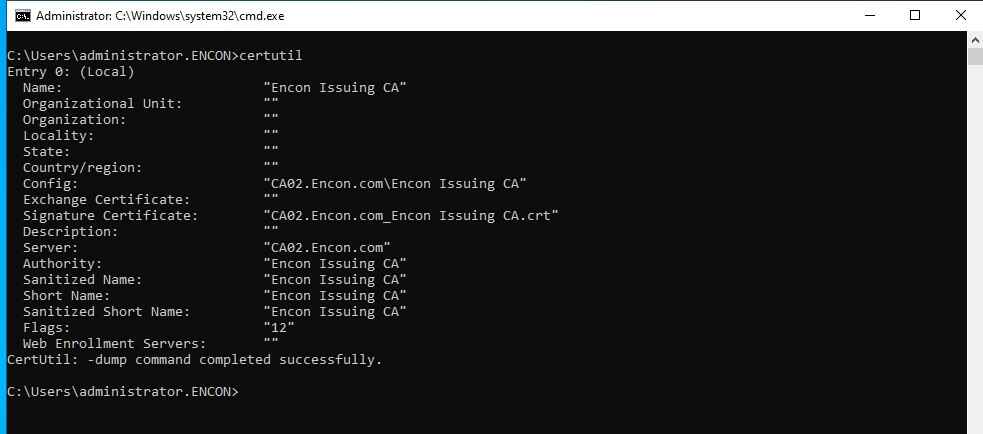
The certutil provides a wide range of switches, which can be explored using certutil -? or certutil <command> -?. Adding the -v flag enables verbose output (certutil -v -?), which expands the help view to include additional commands and more detailed usage information.
Well, you might be thinking about what major difference “-v” switch could make, so here is the output of a string compared between certutil -? and certutil -v -?
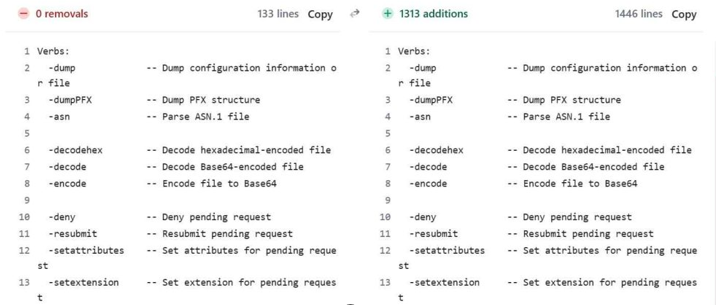
The left side shows the output of the command “certutil -?”, while the right side shows the output of the command “certutil -v -?”. The difference is immediately noticeable. The verbose output is significantly longer, expanding well beyond the concise list returned by certutil -?. While the default help focuses on commonly used commands with brief descriptions, adding the -v switch significantly expands the output to include additional commands and more detailed information. This clearly illustrates how much functionality within certutil.exe remains hidden unless verbose help is explicitly requested.
Exploring hidden switches of Certutil
The most complete way to explore everything certutil offers is with the following flag combination:
certutil -v -uSAGE
This combines verbose output (-v) with the extended usage view (-uSAGE), producing the most detailed help output with full syntax and additional commands not shown in standard help.
If you only need the list of hidden switch names without full syntax detail, the following command provides a quicker subset:
certutil -uSAGE
It is worth noting that both flags are case-sensitive and must be typed exactly as shown. Additionally, the hidden switches across both certutil and certreq are undocumented for a reason, as they may behave differently across Windows versions and fall outside the scope of standard Microsoft support. For this reason, it is always advisable to test them in a non-production environment before deploying them in any live or critical system.
Let’s analyze the difference between the two in detail. On the left, we have the standard certutil -? output, while on the right we have the certutil -uSAGE output. The comparison clearly highlights additional hidden switches, which are not visible in the default help. These extra options are highlighted in green in the -uSAGE view for better identification.
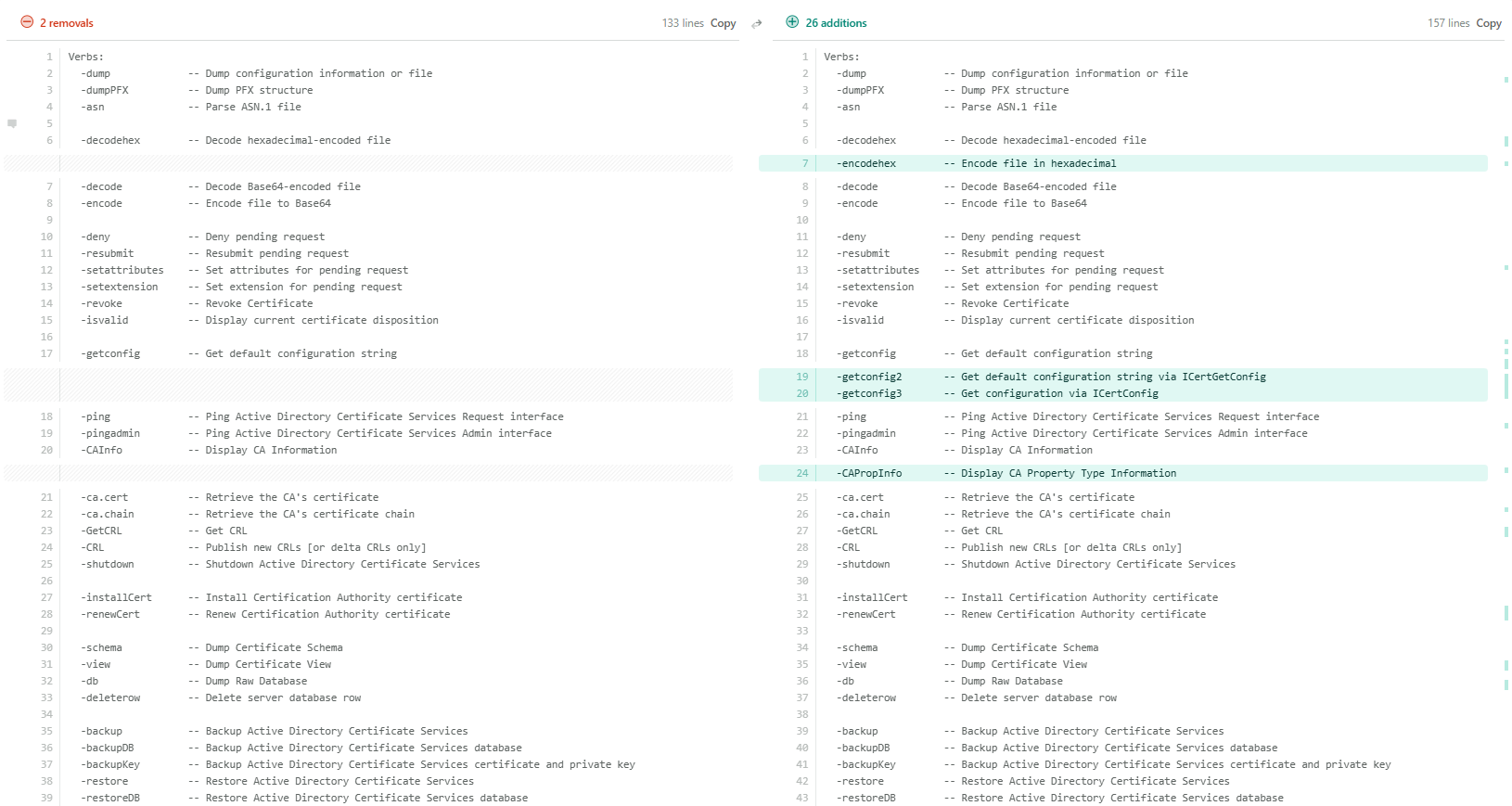
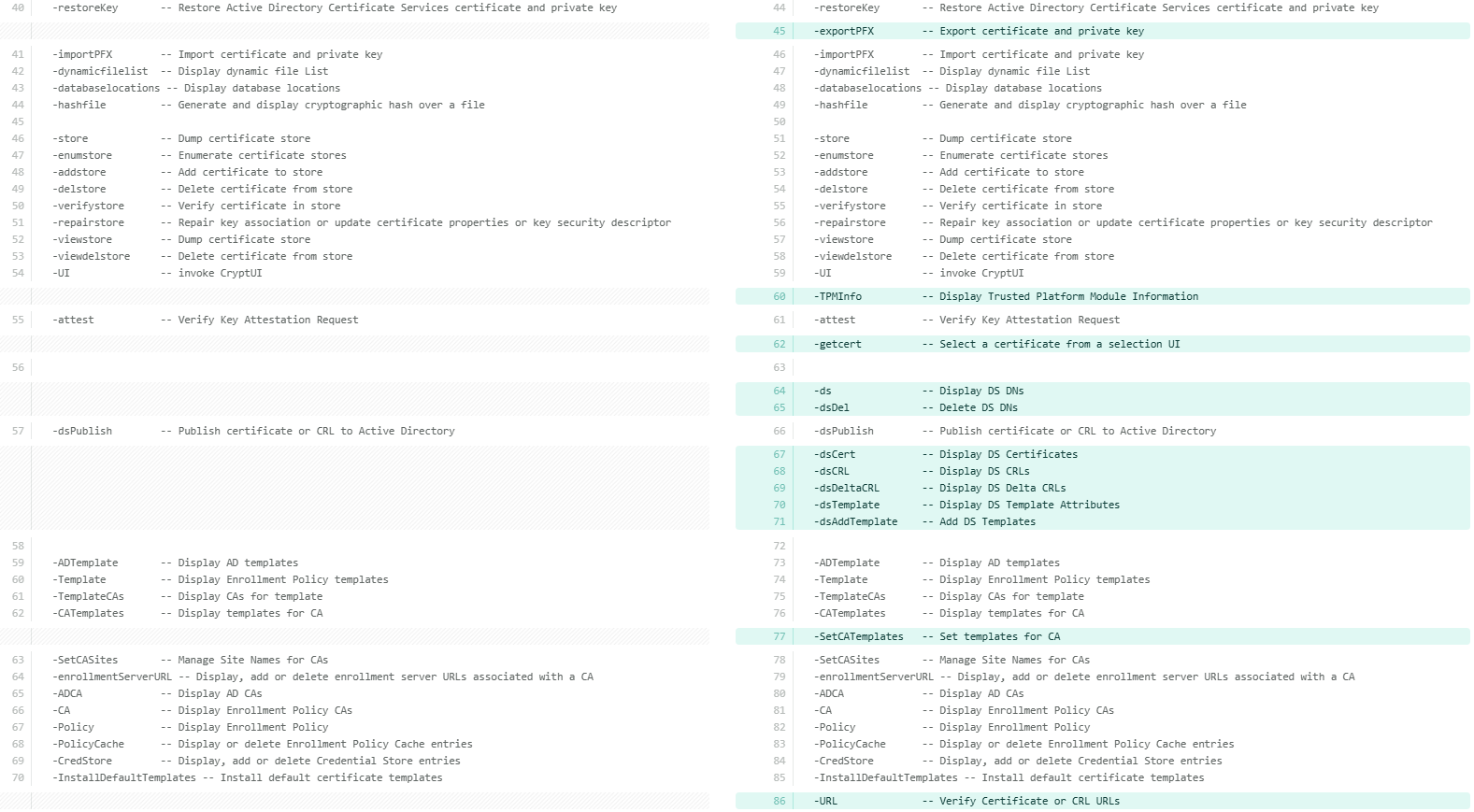
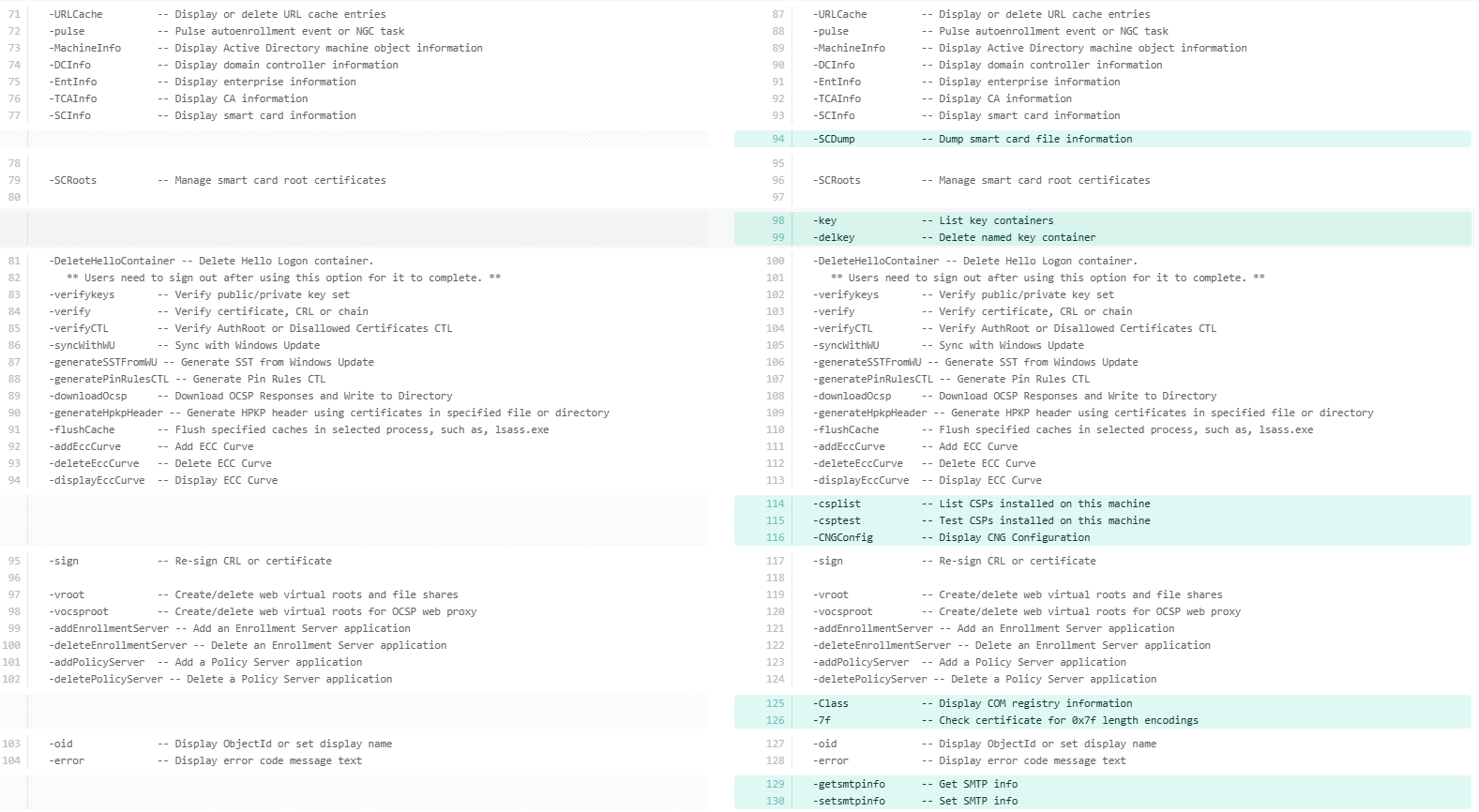
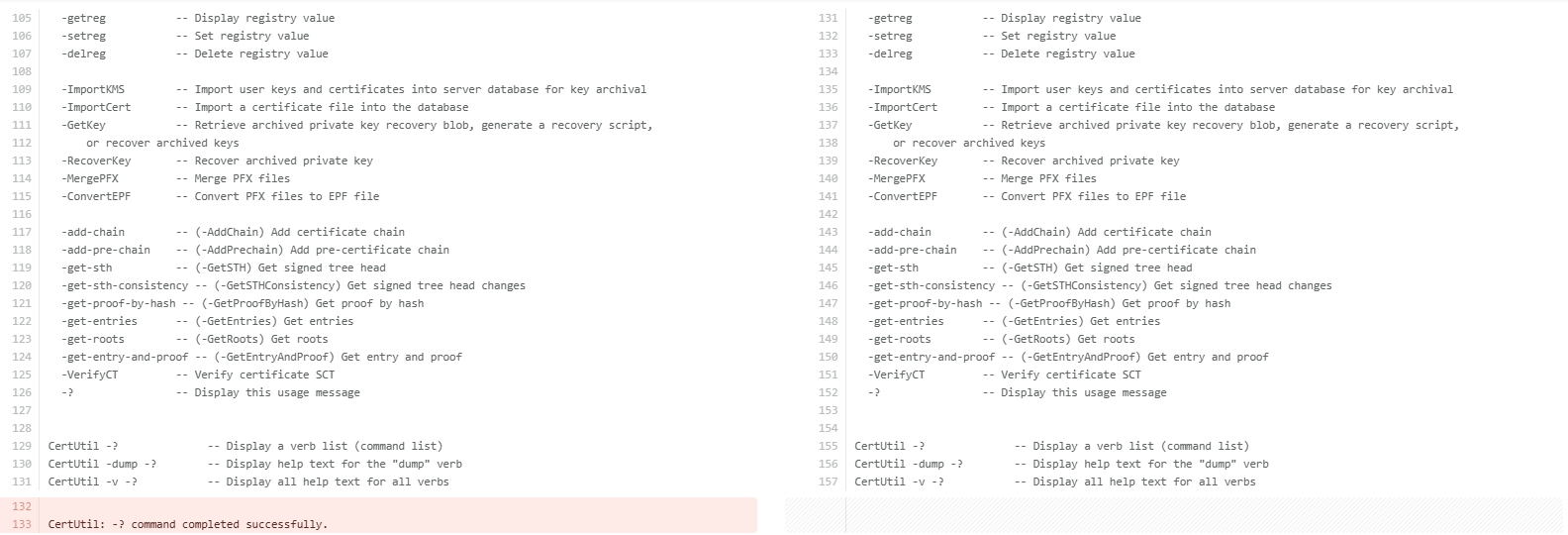
Now that the differences are clearly visible, let’s understand each additional command available under certutil -uSAGE in detail. The following table breaks down each hidden switch and its purpose for better clarity.
| Parameter | Description |
|---|---|
| -encodehex | Encodes a file in hexadecimal format. |
| -getconfig2 | Gets the default CA configuration string via ICertGetConfig interface. |
| -getconfig3 | Gets CA configuration via the ICertConfig interface. |
| -CAPropInfo | Displays CA Property Type information, such as the data types and flags of every property the CA exposes. Used for advanced CA scripting. |
| -exportPFX | Exports a certificate and its private key to a PFX file. |
| -TPMInfo | Displays Trusted Platform Module (TPM) information. Shows TPM version, manufacturer, and capabilities, useful when deploying TPM-backed keys. Used for TPM-backed key and Virtual Smart Card (VSC) validation. |
| -getcert | Opens a certificate selection UI to pick a certificate interactively. The full syntax is certUtil [Options] -getcert [ObjectId | ERA | KRA [CommonName]] . |
| -ds | Displays Active Directory Distinguished Names (DNs) for PKI containers (AIA, CDP, etc.). Helps understand where PKI objects are stored in AD. |
| -dsDel | Deletes a specific entry from an Active Directory PKI container. Use with extreme caution as it removes AD objects permanently. |
| -dsCert | Displays certificates stored in Active Directory PKI containers. |
| -dsCRL | Displays CRLs (Certificate Revocation Lists) stored in Active Directory. |
| -dsDeltaCRL | Displays Delta CRLs stored in Active Directory. Used when a CA publishes incremental revocation lists. |
| -dsTemplate | Displays certificate template attributes from Active Directory. Add -v before it to fully expand enrollment flags, private key flags, issuance policies, and EKU OIDs. Used for template auditing and security review. |
| -dsAddTemplate | Adds certificate templates to Active Directory. Used during CA setup or when publishing new templates. |
| -SetCATemplates | Sets or restricts the list of templates a CA is allowed to issue. |
| -URL | Verifies certificate and CRL (Certificate Revocation List) URLs to ensure they are reachable and return valid data. Helps troubleshoot chain, CRL, and OCSP reachability issues. |
| -SCDump | Dumps smart card file information. Used for smart card login and provisioning issues. |
| -key | Lists all cryptographic key containers on the machine. Shows both CryptoAPI (legacy) and CNG key containers. |
| -delkey | Deletes a specific cryptographic key container from the machine (permanently). |
| -csplist | Lists all Cryptographic Service Providers (CSPs) and Key Storage Providers (KSPs) installed on the machine. Useful for verifying HSM/smart card provider availability. |
| -csptest | Tests a CSP/KSP by loading it and checking cryptographic operations. Commonly used for HSM and smart card troubleshooting. |
| -CNGConfig | Displays CNG (Cryptography Next Generation) configuration, such as registered algorithms, providers, and CNG settings. |
| -Class | Displays COM registry information for certificate-related COM classes. |
| -7f | Checks a certificate for 0x7f length encodings. |
| -getsmtpinfo | Displays SMTP(email) notification settings configured on the CA. |
| -setsmtpinfo | Configures SMTP notification settings on the CA such as set up email alerts for CA events like certificate issuance, expiration, or failures. |
Note: These commands operate at a sensitive administrative level. Improper use of switches like -dsDel, -delkey, or -SetCATemplates can impact certificate services, break trust chains, or remove critical PKI objects from Active Directory. Always verify the target and understand the impact before running them in a production environment.
That said, let’s take a closer look at some of the most commonly used hidden switches, the ones that PKI administrators will find most useful in day-to-day operations and troubleshooting.
-
-csplist and -csptest:
These two work best together. Run -csplist first to see every CSP and KSP registered on the machine, then use -csptest to load and verify a specific provider. This is the fastest way to diagnose HSM or smart card issues: if the provider does not appear in -csplist, the driver is not registered; if it appears but -csptest fails, the issue is permissions, PIN, or library path. Each switch can also be expanded individually for more detail:
certutil -v -csplist -?
certutil -v -csptest -?
-
-dstemplate with -v:
Adding -v before -dstemplate makes a significant difference. Without it, you get template names. With it, you get the full expansion, including enrollment flags, private key flags, issuance policies, and EKU OIDs. This is the command to run when auditing templates for security misconfigurations:
certutil -v -dstemplate
certutil -v -dstemplate WebServer
Another thing worth knowing is that every hidden switch, just like public ones, can be expanded individually. This works for any switch in the -uSAGE list:
certutil -URL -?
certutil -v -SCDump -?
Taken together, these switches give PKI administrators a level of visibility and control that simply is not available through the MMC console or standard certutil help. The more familiar you are with them, the faster you will be able to diagnose and resolve issues in your PKI environment.
Certreq.exe
Certreq.exe is a powerful command-line tool built into Windows for managing the full certificate enrollment lifecycle. While certutil.exe handles certificate inspection and CA administration, certreq.exe focuses on the request side: generating, submitting, retrieving, and installing certificates from a CA.
To visit the official documentation, follow the link: certreq documentation
Exploring Certreq
At its core, certreq.exe is the bridge between a certificate requester and a CA. It handles every stage of the enrollment workflow from a single command-line interface, making it especially valuable in server environments where GUI-based enrollment is unavailable or impractical.
Here is what certreq can do and how each capability fits into real-world PKI operations:
-
Request a certificate from a CA: Using an INF policy file,
certreq generates a Certificate Signing Request (CSR) and private key pair.
The INF file defines the subject, key algorithm, key size, intended usage,
and any requested extensions, giving administrators precise control over
what gets requested.
certreq -new request.inf request.csr
-
Submit a request to a CA: Once a CSR is ready, certreq
submits it directly to an enterprise CA over RPC/DCOM or to an external CA
via a file. The -config flag specifies which CA to target when multiple CAs
exist in the environment.
certreq -submit -config "ServerName\CAName" request.csr issued.cer -
Retrieve a pending certificate: When a CA requires manager
approval, the certificate is not issued immediately. certreq can poll the CA
and retrieve the issued certificate once it has been approved, using the
request ID returned at submission time.
certreq -retrieve -config "ServerName\CAName" <RequestID> issued.cer -
Accept and install the issued certificate: After retrieval,
certreq installs the certificate into the appropriate Windows certificate
store and links it to its private key, completing the enrollment process.
certreq -accept issued.cer
- Create a cross-certification or qualified subordination request: For organizations building PKI hierarchies, certreq can construct cross-certification requests from an existing CA certificate. This is used when establishing trust between two independent PKI hierarchies or when creating a qualified subordinate CA with constrained name spaces and policy constraints.
- Sign a cross-certification or qualified subordination request: certreq can also sign a pending cross-certification request using an existing CA certificate, completing the trust establishment between PKI hierarchies without needing the MMC CA console.
Certreq command parameters
| Parameter | Description |
|---|---|
| -submit | Submits a request to a certificate authority |
| -retrieve <requestid> | Retrieves a response to a previous request from a certificate authority |
| -new | Creates a new request from an .inf file |
| -accept | Accepts and installs a response to a certificate request |
| -policy | Sets the policy for a request |
| -sign | Signs a cross-certification or qualified subordination request |
| -enroll | Enrolls for or renews a certificate |
| -? | Displays a list of certreq syntax, options, and descriptions |
| <parameter> -? | Displays help for the parameter specified |
| -v -? | Displays a verbose list of the certreq syntax, options, and descriptions |
Among these, -submit and -retrieve are the most frequently used switches to submit a certificate request and retrieve the issued certificates from Certificate Authority via the command line.
Exploring hidden switches of Certreq
Just like certutil, certreq has its own set of hidden switches, revealed using the same case-sensitive -uSAGE parameter:
certreq.exe -uSAGE
The screenshots below compare the certreq -? output on the left with the standard certreq -uSAGE output on the right. The additional hidden switches are visible only on the right.
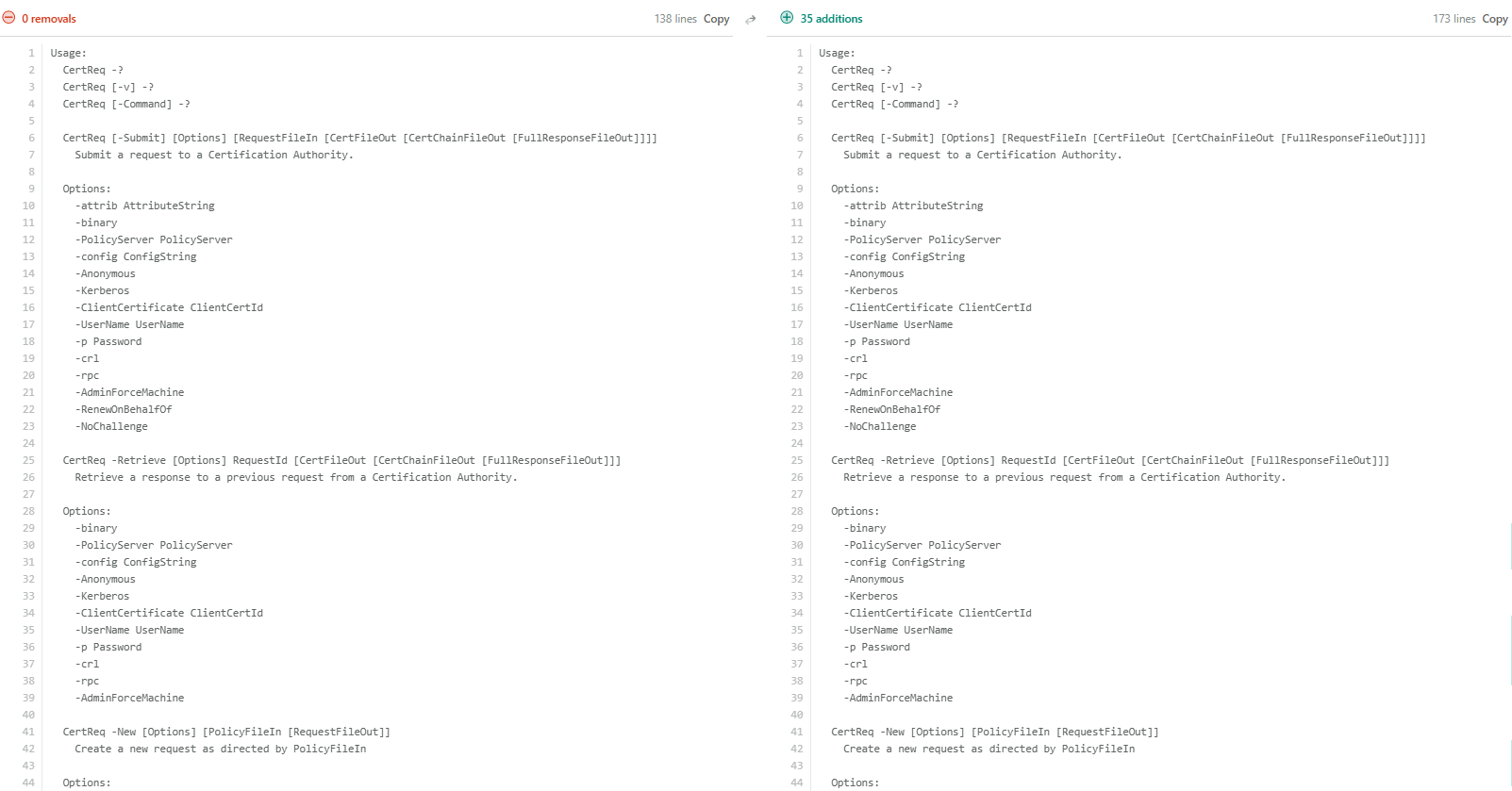
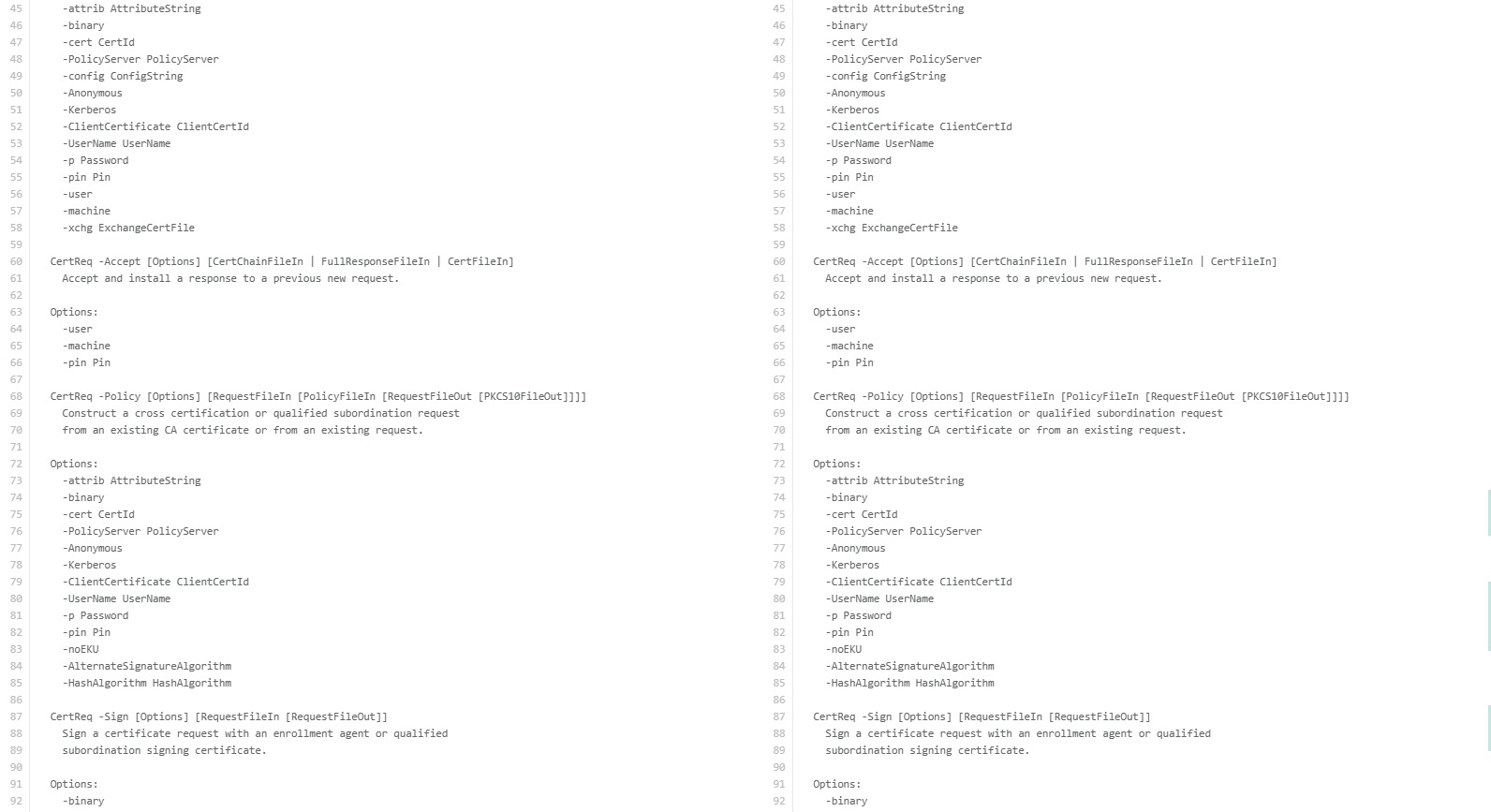
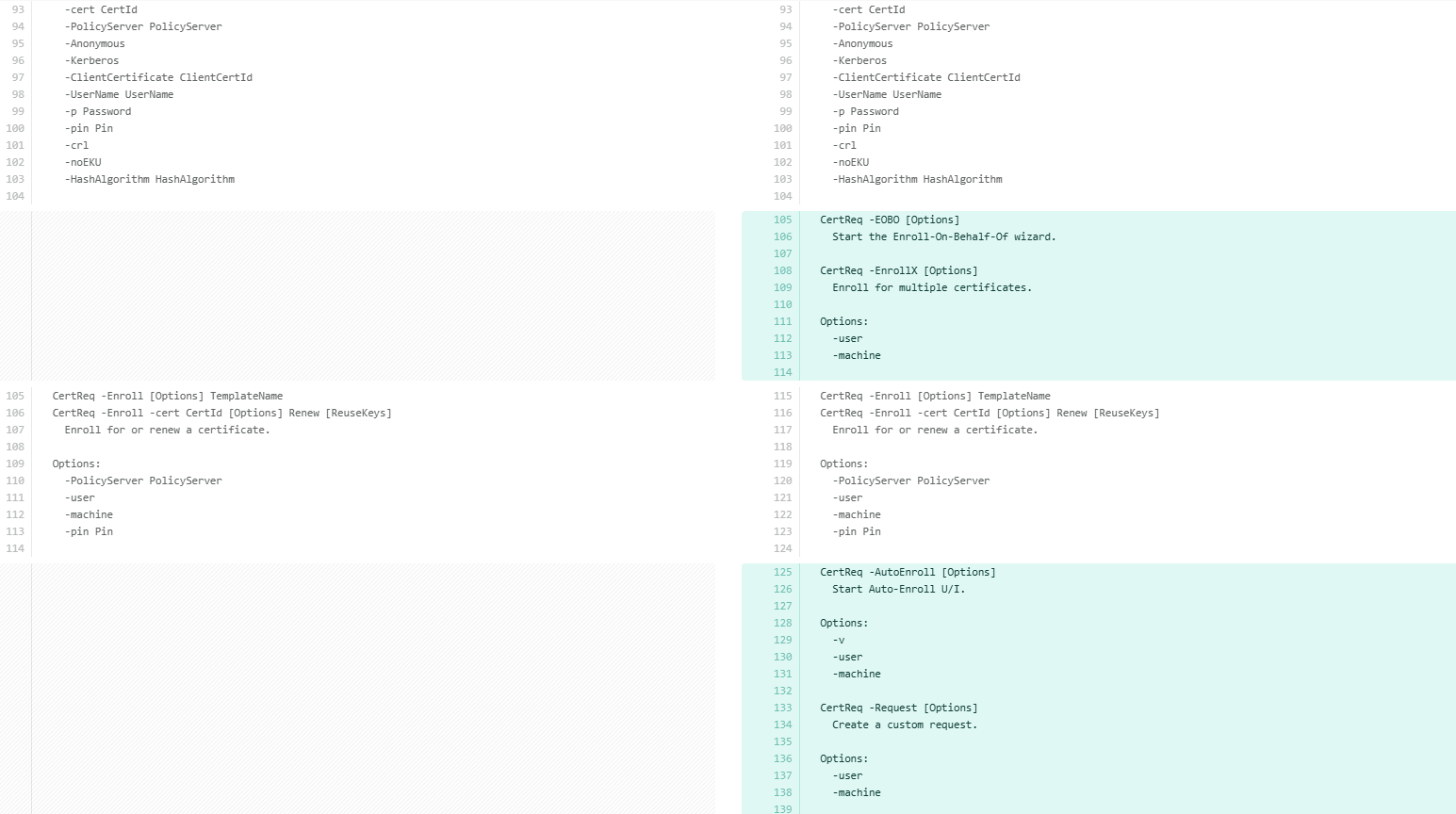
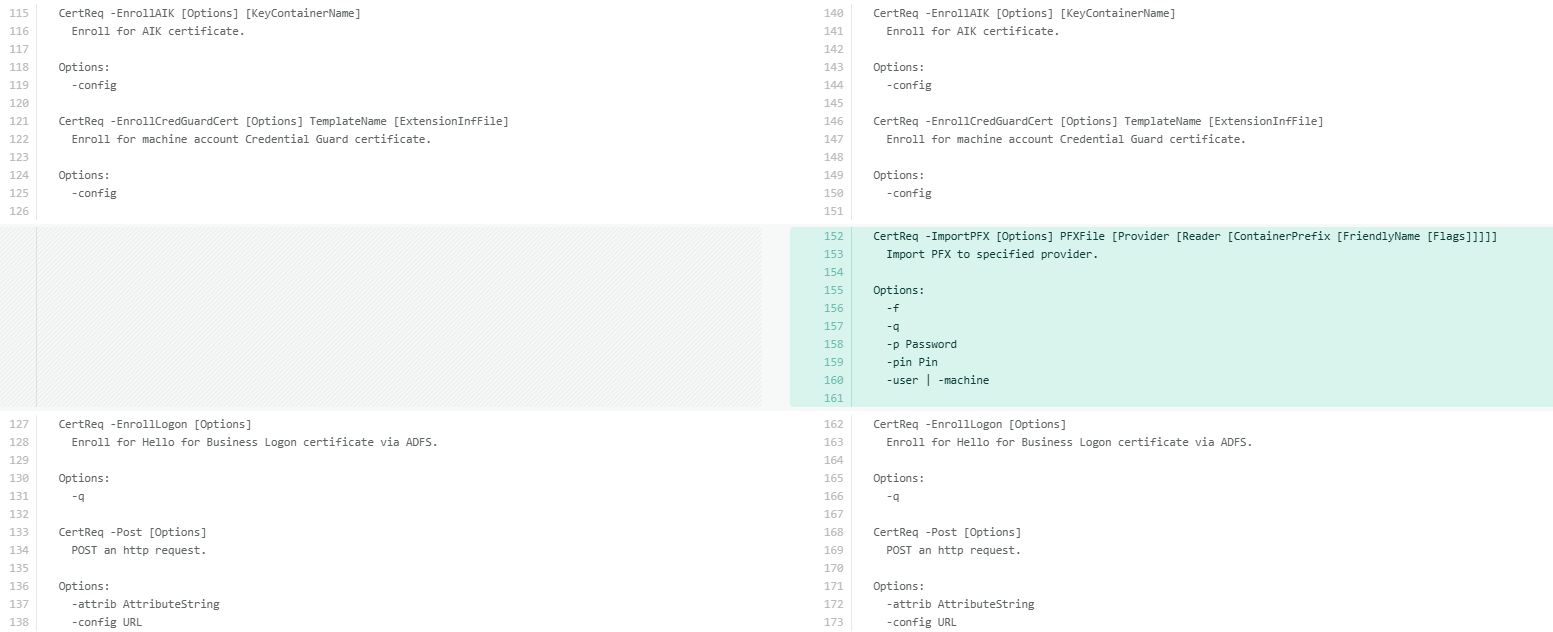
With the differences established, let’s examine each additional command available under certreq -uSAGE in detail. The following table breaks down each hidden switch and its purpose for better clarity.
| Hidden Switch | What It Does |
|---|---|
| -EOBO | Starts the Enroll-On-Behalf-Of wizard. Allows an enrollment agent to request certificates on behalf of another user. Requires an enrollment agent certificate to be configured. |
| -EnrollX | Enrolls for multiple certificates in a single operation. Accepts -Accept user and -machine flags to control the target certificate store. |
| -AutoEnroll | Starts the Auto-Enroll UI. Supports -v, -user, and -machine flags. |
| -Request | Creates a custom certificate request with extended control over request content. Supports -user and -machine context flags. |
| -ImportPFX | Imports a PFX file directly to a specified cryptographic provider, including hardware providers like HSMs and smart cards. |
Each of these can be expanded individually for full syntax:
certreq -ImportPFX -?
certreq -AutoEnroll -?
certreq -EOBO -?
Of these, -ImportPFX deserves a closer look, particularly because of how it differs from its counterparts in certutil.
-ImportPFX in certreq vs -importPFX in certutil
Of all the hidden switches, certreq -importPFX and certutil -importPFX are particularly interesting to examine. Although both work with PFX files, they serve different purposes and behave quite differently in practice.
The key difference is in how they target the destination. certutil -importPFX operates against named Windows certificate stores and offers a rich modifier list, including AT_SIGNATURE, AT_KEYEXCHANGE, NoExport, NoChain, NoRoot, Protect, ProtectHigh, Pkcs8, VSM, and more, giving fine-grained control over exactly how the certificate and key are imported.
certutil [options] -importPFX [CertificateStoreName] PFXFile [Modifiers]
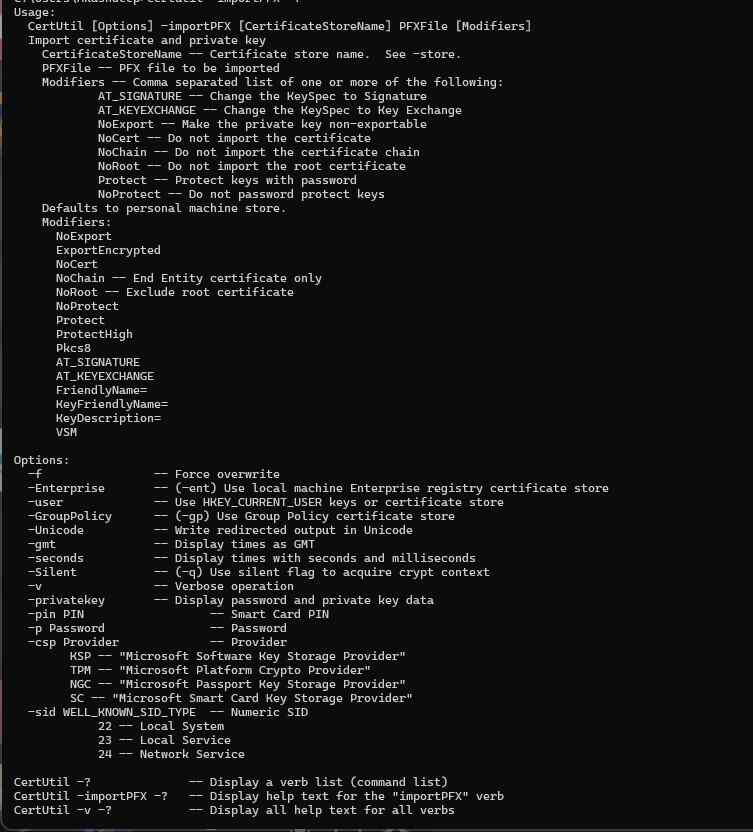
certreq -ImportPFX, on the other hand, targets a specific cryptographic provider directly by name, including hardware providers like HSMs and smart card readers. Its syntax is positional rather than modifier-based:
certreq -ImportPFX PFXFile [Provider [Reader [ContainerPrefix [FriendlyName [Flags]]]]]
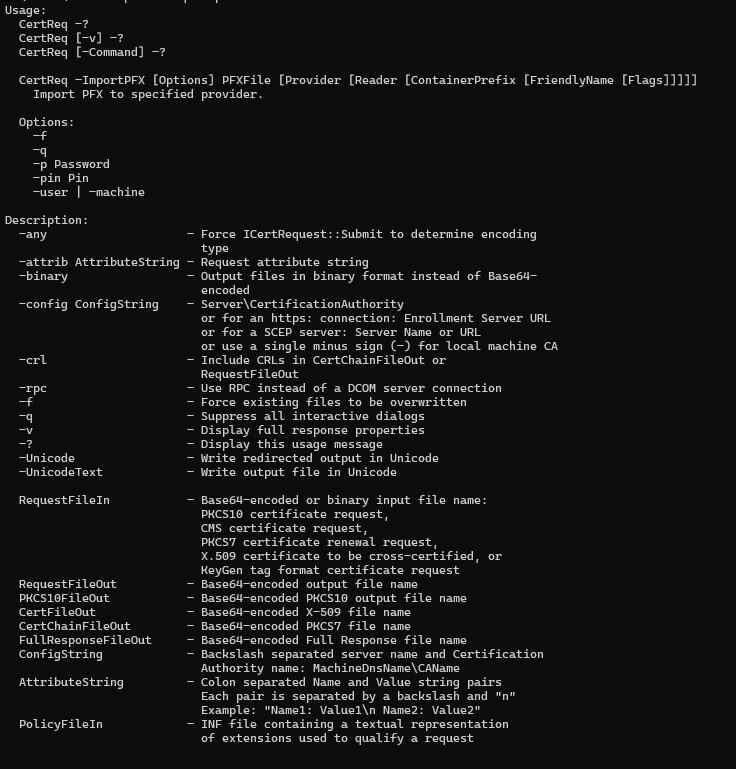
Note: The -importPFX option in certutil is a fully documented and supported switch. In contrast, -ImportPFX in certreq is not listed in standard help output and is considered an undocumented or lesser-known capability. Use the latter with caution and always validate behavior in non-production environments.
In practice, use certutil -importPFX for standard Windows certificate store imports where modifier control matters. Use certreq -ImportPFX when importing directly into a named hardware provider, an HSM KSP, or a specific smart card reader.
How can Encryption Consulting help?
Encryption Consulting provides specialized services tailored to identify vulnerabilities and mitigate risks by providing PKI Services. Our strategic guidance aligns PKI solutions with organizational objectives, enhancing efficiency and minimizing costs. By partnering with Encryption Consulting, organizations can unlock the full potential of PKI solutions, realizing tangible financial benefits while maintaining strong security measures.
Encryption Consulting’s PKIaaS provides a flexible and secure PKI solution tailored to your specific needs, offering benefits such as customizable options, high assurance standards, and a low-risk managed approach. PKIaaS automates key and certificate management tasks, reducing operational overhead and minimizing the risk of human error. Additionally, it enhances network visibility by requiring certificates for access. It will take care of building the PKI infrastructure to lead and manage the PKI environment (cloud/ hybrid or On-Prem) of your organization.
CertSecure Manager has a comprehensive suite of lifecycle management features. From discovery and inventory to issuance, deployment, renewal, revocation, and reporting. CertSecure provides an all-encompassing solution. Intelligent report generation, alerting, automation, automatic deployment onto servers, and certificate enrollment add layers of sophistication, making it a versatile and intelligent asset.
Conclusion
Certutil and Certreq are powerful tools for managing certificates in Windows environments. Even though their fundamental functions are widely recognized, delving into their sophisticated features and hidden switches reveals a wealth of advanced capabilities.
These tools offer a level of visibility and control over certificate management that goes well beyond what the MMC console provides. Server administrators who invest time in understanding certutil and certreq's full capabilities, particularly the hidden switches exposed through -uSAGE, will find themselves diagnosing and resolving PKI issues significantly faster. If managing and securing your certificate infrastructure requires deeper expertise, Encryption Consulting's PKI team is here to help.