

- What is a CRL and Delta CRL?
- Quick Answer: How Do You Disable Delta CRL?
- Executive Summary
- Who Should Care About Disabling Delta CRL
- Why This Matters: Data and Deadlines
- Prerequisites
- Steps to Disable Delta CRL
- Validation Checks After Disabling Delta CRL
- Common Errors and Troubleshooting
- Rollback Steps
- Delta CRL Change Reference Table
- Certificate Lifecycle Management and PKI Modernization
- Measuring Success and Ongoing Audits
- Conclusion
- Frequently Asked Questions
What is a CRL and Delta CRL?
A list of digital certificates that have had their issuing certificate authority (CA) revoke them before their actual or assigned expiration date is known as a certificate revocation list (CRL).
A Delta CRL is a supplemental CRL that is optional and only includes the updates made since the last Base CRL update. The standard CRL we’ve been discussing is called “Base” about a delta CRL if one is present.
Quick Answer: How Do You Disable Delta CRL?
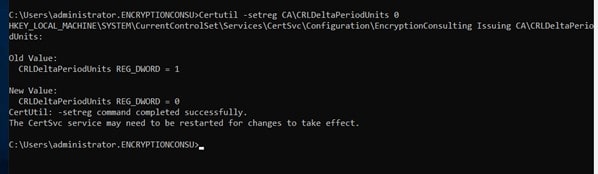
You disable Delta CRL on a Microsoft Active Directory Certificate Services (AD CS) CA by setting the Delta CRL validity period to zero, either with Certutil -setreg CA\CRLDeltaPeriodUnits 0 at an administrative command prompt or by unchecking “Publish Delta CRLs” in the Certification Authority console, then restarting the CA service and republishing CRLs.
Last updated: August 2026 · Last verified: August 2026 · Recommended refresh cadence: quarterly, since CA/Browser Forum validity requirements and Microsoft AD CS guidance change on a similar schedule.
Executive Summary
- Two supported methods: disable Delta CRL publishing via an administrative command prompt (
Certutil) or via the Certification Authority GUI console; both require a CA service restart and a fresh CRL publish to take effect. - Delta CRLs are optional by design: they only carry the changes since the last Base CRL, so disabling them falls back to Base-CRL-only revocation checking.
- Validation matters as much as the change itself: confirm the new CRL publishes cleanly and that clients relying on cached Delta CRL data aren’t left checking a stale revocation source.
- Revocation infrastructure is a common outage source: nearly half of enterprises reported a certificate-related outage in the past year, which is why CRL configuration changes need a documented rollback path.
Who Should Care About Disabling Delta CRL
Changing how a CA publishes revocation data touches more than the CA itself. Here’s what each role should own.
PKI Administrators
Run the command-prompt or GUI procedure, restart the ADCS service, republish CRLs, and confirm the new CRL is reachable at every configured CDP.
Security Architects
Decide whether Base-CRL-only revocation checking still meets the organization’s revocation freshness requirements before Delta CRLs are turned off fleet-wide.
Platform Teams
Verify downstream clients and load balancers that cache CRL responses pick up the new Base CRL correctly once Delta CRLs stop publishing.
Compliance Teams
Confirm the change is documented in the Certificate Policy/CPS and that revocation-checking evidence still satisfies the applicable audit framework after the switch.
CISOs
Own the residual-risk decision on revocation freshness versus CA/CRL publishing overhead, and confirm a rollback plan exists before the change reaches production.
Why This Matters: Data and Deadlines
According to DigiCert’s Trust Pulse survey (published July 2, 2025), nearly half of enterprises experienced a certificate-related outage in the past year, and 18.5% of affected organizations reported losses over $250,000. Revocation infrastructure, including CRL publishing configuration, is exactly the kind of low-visibility setting that turns a routine change into an unplanned outage when it isn’t validated and documented.
The CA/Browser Forum’s Ballot SC-081v3 (approved April 11, 2025) shortens maximum TLS certificate validity to 200 days starting March 15, 2026, 100 days starting March 15, 2027, and 47 days starting March 15, 2029. Shorter validity periods mean certificates churn through issuance and revocation faster, which puts more load and more scrutiny on however a CA publishes revocation data, Base CRL alone or Base plus Delta.
On the algorithm side, NIST finalized its first three post-quantum standards, FIPS 203 (ML-KEM), FIPS 204 (ML-DSA), and FIPS 205 (SLH-DSA), on August 13, 2024. As PKI teams plan crypto-agility and PQC migrations, revocation infrastructure configuration like this one is worth auditing now rather than during a larger migration project.
Prerequisites
- Administrative access to the issuing CA server (local Administrator or delegated CA Administrator rights in Active Directory Certificate Services).
- An elevated (Run as Administrator) command prompt, or console access to the Certification Authority MMC snap-in via Server Manager > Tools > Certification Authority.
- A maintenance window: the ADCS service (
certsvc) must be restarted for the change to take effect, which briefly interrupts certificate issuance and OCSP/CRL responses from that CA. - Confirmation of every CRL Distribution Point (CDP) location, LDAP, HTTP, or both, so the newly published Base CRL can be checked at each one after the change.
- A rollback plan and a recent backup of the CA database/configuration, in case Delta CRLs need to be re-enabled.
Steps to Disable Delta CRL
Delta CRL can be disabled either by running certain commands on an administrative command prompt or by using GUI, which is discussed below:
By Command Prompt:
-
Set Delta CRL Validity to zero by running this command on an administrative command prompt: Certutil -setreg CA\CRLDeltaPeriodUnits 0
-
Run net stop certsvc and net start certsvc to restart the ADCS Service.

-
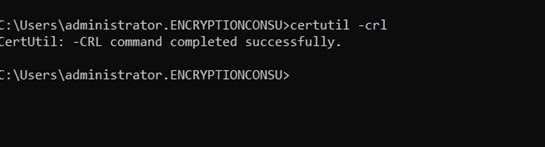
Run certutil -crl to publish new CRLs.
By using GUI:
-
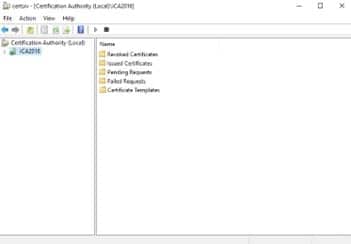
Open Certificate Authority (CA) Console. To do so, open Server Manager -> Tools -> Certification Authority.
-
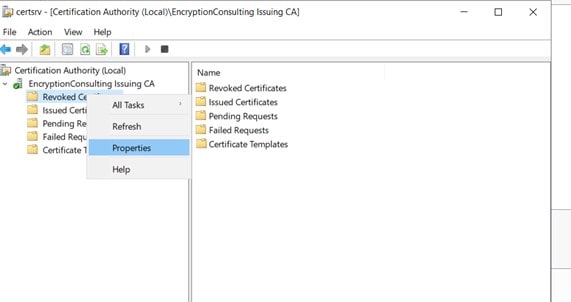
Right-click on Revoked Certificates and open properties.
-
On the properties page, uncheck “Publish Delta CRLs.”
- Click on Apply and OK.
-
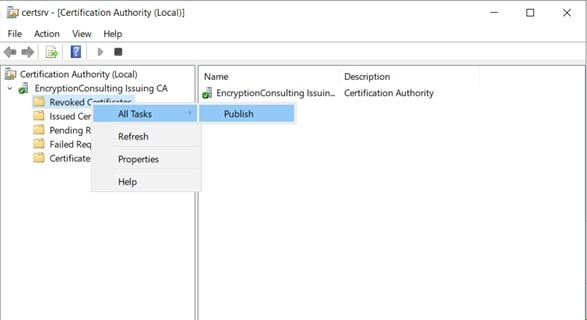
To Publish new CRLs, Right click on Revoked Certificates -> All tasks -> Publish.
-
Click on New CRL to publish.

Validation Checks After Disabling Delta CRL
- Run
certutil -CRLagain and confirm it completes without error and reports a new “This Update” / “Next Update” timestamp on the Base CRL. - Check each configured CDP (LDAP and HTTP) and confirm only the Base CRL is present or being served, with no stale Delta CRL left behind.
- Open the CA’s Revoked Certificates properties again and confirm “Publish Delta CRLs” stays unchecked after the service restart.
- Test revocation checking from a client against a known-revoked certificate and confirm it still correctly reports “revoked” using Base-CRL-only data.
- Review the CertificationAuthority event log (Event Viewer) for successful CRL publish events and the absence of new errors after the restart.
Common Errors and Troubleshooting
| Error / Symptom | Likely Cause | Fix |
|---|---|---|
| “Access is denied” running Certutil | Command prompt was not run as Administrator, or the account lacks CA Administrator rights | Re-open the command prompt with “Run as Administrator” or grant the account CA Administrator permissions |
| certsvc fails to restart | A pending CA database operation or a locked CA configuration | Check the CertificationAuthority event log for the specific error, resolve the underlying issue, then retry net start certsvc |
| New CRL not visible at the HTTP CDP | IIS/web server caching, or the publish step didn’t reach that specific CDP | Clear the web cache, confirm the CDP extension URL matches the publish location, and republish with certutil -crl |
| Clients still show revocation-check delays | A client-side or proxy cache still holding the old Delta CRL until its original NextUpdate time | Clear the client/proxy revocation cache or wait for the cached Delta CRL to expire naturally |
| “Publish Delta CRLs” re-enables itself | Group Policy or a CA template pushing CRLDeltaPeriodUnits back to a non-zero value | Check for a competing Group Policy Object or script and update it to match the new setting |
Rollback Steps
- Re-enable Delta CRL validity with
Certutil -setreg CA\CRLDeltaPeriodUnits <value>, using the original validity period documented before the change. - Restart the ADCS service with
net stop certsvcfollowed bynet start certsvc. - Republish CRLs with
certutil -crl, or via the GUI by right-clicking Revoked Certificates > All Tasks > Publish > New CRL. - Confirm the Delta CRL reappears at each configured CDP and that “Publish Delta CRLs” is checked again in the Revoked Certificates properties.
- Re-run the validation checks above against the restored configuration and document the rollback in the change record.
Delta CRL Change Reference Table
| Prerequisite | Command / Configuration | Validation Check | Common Error | Rollback | Owner |
|---|---|---|---|---|---|
| CA Administrator access | Certutil -setreg CA\CRLDeltaPeriodUnits 0 | certutil -CRL completes without error | “Access is denied” | Reset CRLDeltaPeriodUnits to the original value | PKI Administrator |
| Maintenance window scheduled | net stop certsvc / net start certsvc | certsvc restarts cleanly; event log shows no new errors | certsvc fails to restart | Restart service again after resolving the CA database issue | PKI Administrator |
| CDP locations documented | certutil -crl (or GUI: Revoked Certificates > All Tasks > Publish) | Base CRL reachable at every LDAP/HTTP CDP | New CRL not visible at HTTP CDP | Republish and clear web cache | PKI Administrator / Platform Team |
| Client revocation behavior understood | N/A (client/proxy cache) | Test client against a known-revoked certificate | Stale revocation-check delays | Clear client/proxy cache or wait for cached Delta CRL expiry | Platform Team |
| Change documented in CP/CPS | N/A (governance) | Confirm “Publish Delta CRLs” stays unchecked post-restart | Setting re-enabled by Group Policy | Update competing GPO/script, then reapply the change | Compliance Team / CISO |
Certificate Lifecycle Management and PKI Modernization
Revocation configuration like Delta CRL publishing is one small piece of certificate lifecycle management: the CA’s revocation posture has to be tracked and validated the same way issuance and renewal are. CertSecure Manager centralizes certificate automation, including revocation checking and CDP monitoring, so a configuration change like this one doesn’t rely on someone remembering to check it manually every quarter. Teams modernizing their PKI or moving issuance to the cloud should also evaluate PKI-as-a-Service for PKI modernization with revocation infrastructure built in and monitored from day one.
Because CRL and revocation configuration is part of a much larger crypto agility picture, pair this change with a broader inventory: the PQC Center of Excellence offers hands-on post-quantum testing, and a PQC readiness assessment can identify which CAs and certificates need attention next as PQC readiness becomes a requirement. Pair both with CBOM Secure for ongoing certificate discovery and machine identity inventory across every issuing CA.
For more on the surrounding lifecycle, see What Are the Stages in a Certificate Lifecycle? and How to Avoid Certificate Outages.
Measuring Success and Ongoing Audits
Success looks like a Base CRL that publishes cleanly and on schedule at every CDP, zero clients reporting stale revocation-check errors, an updated Certificate Policy/CPS reflecting the change, and a documented, tested rollback path.
Re-audit CRL publishing configuration, CDP reachability, and this reference table on a quarterly cadence, in step with CA/Browser Forum validity-period changes and any Microsoft AD CS guidance updates.
Conclusion
If you need help with your PKI environment, feel free to email us at [email protected].
Frequently Asked Questions
What is the main takeaway from How to disable Delta CRL?
The main takeaway is that disabling Delta CRL is a two-step change, set the Delta CRL validity to zero (command prompt or GUI), then restart the ADCS service and republish CRLs, but the change is only complete once every CDP is validated and a rollback plan is documented.
Why does this matter for enterprise PKI teams?
Enterprise PKI teams often run multiple issuing CAs with different revocation configurations, so an undocumented change to Delta CRL publishing on one CA can leave clients checking inconsistent or stale revocation data across the environment.
What risks increase if this topic is handled manually?
Handling this manually across many CAs increases the risk of some CAs still publishing Delta CRLs while others don’t, missed CDP validation after the change, and no documented rollback path if the change needs to be reversed under pressure.
Which teams should own this change?
PKI administrators run the command-prompt or GUI procedure and validate CDPs; security architects decide whether Base-CRL-only checking meets requirements; platform teams verify downstream client and cache behavior; compliance teams update the CP/CPS; and CISOs own the residual-risk decision.
How does this connect to certificate lifecycle management?
Revocation publishing configuration is a certificate lifecycle management concern because it governs how reliably a certificate’s revoked status reaches every client checking it, the same lifecycle stage that issuance and renewal automation depend on for accurate status data.
How should organizations measure success?
Success looks like a Base CRL publishing cleanly and on schedule at every CDP, zero clients reporting stale revocation-check errors, an updated Certificate Policy/CPS, and a documented, tested rollback path.
What should be audited or monitored regularly?
Organizations should monitor CRL publishing success and CDP reachability continuously, and re-audit the Delta CRL configuration, CP/CPS documentation, and this reference table on a quarterly basis.
How does this topic affect cloud, hybrid, or multi-CA PKI?
In multi-CA or hybrid environments, each issuing CA’s Delta CRL setting needs to be checked and changed individually, since CRL publishing configuration is per-CA, and cloud-hosted or managed PKI deployments should confirm how their provider handles Delta versus Base CRL publishing before assuming the same defaults apply.
What prerequisites are required before implementation?
You need CA Administrator access, an elevated command prompt or Certification Authority console access, a maintenance window since the ADCS service must restart, documented CDP locations to validate afterward, and a rollback plan with a recent CA configuration backup.
What common errors should administrators watch for?
Watch for “Access is denied” from a non-elevated command prompt, certsvc failing to restart, a new CRL not appearing at the HTTP CDP due to caching, clients still showing stale revocation-check delays, and Group Policy silently re-enabling Delta CRL publishing after the change.
- What is a CRL and Delta CRL?
- Quick Answer: How Do You Disable Delta CRL?
- Executive Summary
- Who Should Care About Disabling Delta CRL
- Why This Matters: Data and Deadlines
- Prerequisites
- Steps to Disable Delta CRL
- Validation Checks After Disabling Delta CRL
- Common Errors and Troubleshooting
- Rollback Steps
- Delta CRL Change Reference Table
- Certificate Lifecycle Management and PKI Modernization
- Measuring Success and Ongoing Audits
- Conclusion
- Frequently Asked Questions
- What is the main takeaway from How to disable Delta CRL?
- Why does this matter for enterprise PKI teams?
- What risks increase if this topic is handled manually?
- Which teams should own this change?
- How does this connect to certificate lifecycle management?
- How should organizations measure success?
- What should be audited or monitored regularly?
- How does this topic affect cloud, hybrid, or multi-CA PKI?
- What prerequisites are required before implementation?
- What common errors should administrators watch for?


