

- Executive Summary
- Prerequisites
- CRL Partitioning for Efficient Revocation at Scale
- Removal of 4KB Extension Limit: Unlocking Policy Flexibility
- ADCS Audit Logging Enhancements for Deeper Insight on Security Operations
- New Fields in Event ID 4886 - Certificate Request Received
- New Fields in Event ID 4887 – Certificate Issued
- New Fields in Event IDs 4886 through 4889 – Common Enhancements
- Common Certificate Request Disposition Values (Error Codes)
- Microsoft's Updated ADCS Hardening Guidance
- Operational Considerations for Enterprises
- How Encryption Consulting Can Help
- Ready to Secure and Modernize Your ADCS Environment?
- Conclusion
- Frequently Asked Questions
Microsoft has unveiled substantial updates to Active Directory Certificate Services (ADCS), delivering critical improvements in scalability, performance, auditability, and security. These enhancements mark a significant evolution in enterprise certificate management, especially vital for organizations that rely on ADCS to support identity assurance, secure communications, and protect sensitive data through Public Key Infrastructure (PKI) services.
Our blog explores the major features introduced in recent releases, offering a technical breakdown of their capabilities and implications for enterprise environments.
What Changed in ADCS for 2025? Microsoft’s 2025 Active Directory Certificate Services (ADCS) updates deliver four major changes: CRL Partitioning for scalable revocation, removal of the 4KB certificate extension limit, expanded audit logging (Event IDs 4886-4889) for compliance visibility, and updated Tier-0 hardening guidance for securing Certificate Authorities and certificate templates against modern attack techniques.
Executive Summary
This article walks through Microsoft’s four major 2025 ADCS updates: CRL Partitioning for scalable certificate revocation, removal of the 4KB certificate extension size limit, expanded audit logging across Event IDs 4886-4889, and refreshed Tier-0 hardening guidance for Certificate Authorities and certificate templates. Each section includes the exact commands to enable the change, how to validate it took effect, common error conditions, and the rollback command if you need to revert.
Prerequisites
Confirm the following before applying any of the changes below to a production CA:
- A Windows Server ADCS Certificate Authority already deployed and operational, on a version that supports these 2025 enhancements.
- Domain/Enterprise Admin, or delegated CA Administrator, rights on the CA server to run
certutiland modify registry values. - A lab or staging CA environment to validate CRL Partitioning and the extended extension limit before touching production.
- A current backup of the CA database and registry configuration before making any of the registry changes below.
- Monitoring or SIEM parsers ready to ingest the new Event ID 4886-4889 fields once audit logging is enhanced.
- A documented list of currently published certificate templates and their enrollment permissions, to compare against after applying the hardening guidance.
CRL Partitioning for Efficient Revocation at Scale
Traditionally, managing Certificate Revocation Lists (CRLs) in large-scale environments has been inefficient and bandwidth-heavy. Clients validating a certificate were forced to download the entire CRL, even when only one revoked certificate needed verification. This legacy design posed scalability challenges for environments with high certificate turnover or limited network resources.
The New Approach
Microsoft addresses this with CRL Partitioning, a long-requested feature that introduces smarter, more granular revocation handling:
- Partitioned CRLs: The monolithic CRL can now be divided into multiple partitions based on certificate serial numbers.
- Targeted Downloads: Clients request only the relevant partition of the CRL necessary for validating a certificate.
- Reduced Bandwidth and Latency: Significant improvements in performance for validation operations, particularly in environments with constrained bandwidth or high-frequency validations (e.g., load balancers, VPNs, or large user bases).
CRL Partitioning is backward compatible and designed to coexist with existing mechanisms like Online Certificate Status Protocol (OCSP). Microsoft enables dual publishing, where both the monolithic CRL and its partitions are simultaneously available, ensuring seamless transition and operational continuity.
Step-by-Step Guide to Enable CRL Partitioning
To enable CRL partition refer to the following steps:
-
Run the following command to enable the CRL partitioning flag:
certutil -setreg ca\CRLFlags +0x00400000 -
Set the maximum number of partitions:
This command defines how many CRL partitions you want to maintain (e.g., 10):
certutil -setreg ca\CRLMaxPartitions 10 -
Restart the CA Service:
Run the following commands to apply the changes:
net stop certsvc
net start certsvc
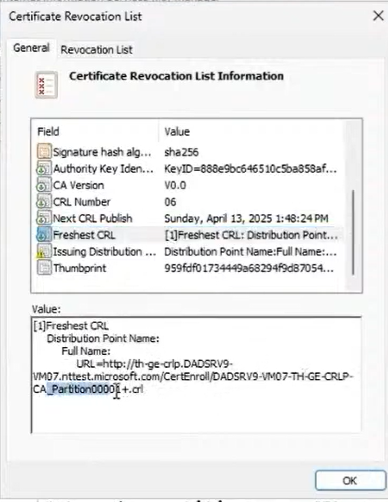
The following image presents the properties of a partitioned CRL, showing the configured CRL distribution point for a specific partition, validating that clients can locate and download the appropriate CRL files.
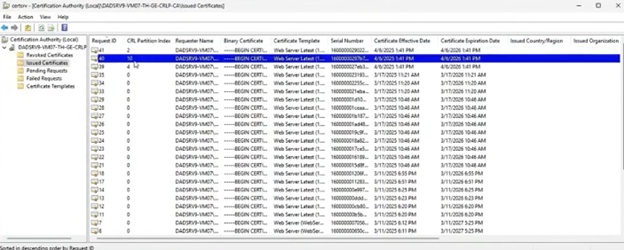
The following image displays the Certification Authority management console, highlighting how issued certificates are now assigned to different CRL partition indexes, confirming the CRL partitioning feature is active.
Validating CRL Partitioning
Confirm partitioning is active before relying on it in production:
- Run
certutil -getreg ca\CRLFlagsand confirm bit0x00400000is set. - Run
certutil -getreg ca\CRLMaxPartitionsand confirm it returns the value you configured. - Open the CA’s CRL Distribution Point properties (as shown above) and confirm partition-specific URLs are listed alongside the monolithic CRL.
- Check the Certification Authority console for newly issued certificates and confirm each shows a populated CRL partition index.
- From a domain-joined client, confirm the client can successfully retrieve the specific CDP partition referenced in a test certificate.
Common Errors and Rollback for CRL Partitioning
Two issues account for most CRL Partitioning problems in the field:
- Clients still downloading the full monolithic CRL after enabling partitioning usually means dual publishing wasn’t confirmed, or older clients that don’t support partitioned CRLs are still in the environment.
- A missing partition index on newly issued certificates typically means the CA service wasn’t restarted after the registry change, or
CRLMaxPartitionswas left at 0.
To roll back CRL Partitioning and return to a single monolithic CRL:
certutil -setreg ca\CRLFlags -0x00400000net stop certsvcnet start certsvc
Removal of 4KB Extension Limit: Unlocking Policy Flexibility
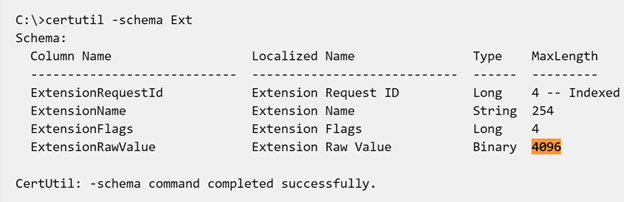
Earlier versions of ADCS imposed a 4KB size limit on certificate extensions, restricting the complexity of certificate metadata and policy information that could be embedded within the certificate.
With the removal of this limitation, organizations can now:
- Define complex certificate policies that reflect nuanced security or business requirements.
- Embed custom extensions, including advanced identity attributes or hardware-specific markers.
- Align with changing standards and future-ready cryptographic schemes, such as those needed for post-quantum cryptography.
This enhancement brings ADCS in line with the capabilities of modern Certificate Authorities and paves the way for increased adoption in hybrid, cloud-native, and IoT-driven infrastructures.
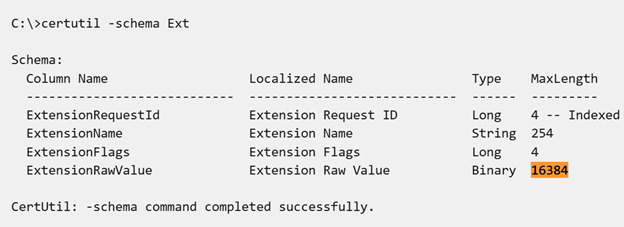
Run the following commands to add 0x1000 to the DBFlags registry key value and then restart ADCS:
certutil -setreg DBFlags +0x1000
net stop certsvc && net start certsvc
Validating the Extended Limit
Now, to verify the limit settings, run the following commands and check the MaxLength property of ExtensionRawValue in the output:
Rollback: Restoring the Default Extension Limit
If a downstream system cannot parse the larger extension size, revert to the original 4KB limit:
certutil -setreg DBFlags -0x1000net stop certsvc && net start certsvc
Reverting does not automatically shrink extensions already issued under the higher limit; existing certificates keep their larger extensions until they’re reissued from an updated (now reverted) template configuration.
ADCS Audit Logging Enhancements for Deeper Insight on Security Operations
Security teams require detailed audit trails for digital certificate operations to support compliance, incident response, and forensic investigations. Recognizing this need, Microsoft has introduced enhanced audit logging in Windows Server 2025 for ADCS.
| Event ID | Event Summary |
| 4886 | Certificate Services received a certificate request. Request ID: %1 Requester: %2 Attributes: %3 |
| 4887 | Certificate Services approved a certificate request and issued a certificate. Request ID: %1 Requester: %2 Attributes: %3 Disposition: %4 SKI: %5 Subject: %6 |
| 4888 | Certificate Services denied a certificate request. Request ID: %1 Requester: %2 Attributes: %3 Disposition: %4 SKI: %5 Subject: %6 |
| 4889 | Certificate Services set the status of a certificate request to pending. Request ID: %1 Requester: %2 Attributes: %3 Disposition: %4 SKI: %5 Subject: %6 |
New Fields in Event ID 4886 – Certificate Request Received
| Field Name | Description |
| Subject (from CSR) | Represents the subject value extracted from the Certificate Signing Request (CSR), if available. |
| SAN (from CSR) | Refers to the Subject Alternative Name (SAN) extension obtained from the CSR, if present. |
| Requested Template | Specifies the certificate template name as provided in the request—either as a version 2 template extension or a version 1 template property/attribute. |
| RequestOSVersion | Indicates the client’s operating system version using the szOID_OS_VERSION attribute. Refer to Section 2.2.2.7.1 of [MS-WCCE] for details. Note: Provided by the client; not used for making security decisions. |
| RequestCSPProvider | Details the Cryptographic Service Provider (CSP) used to generate the key pair, identified via the szOID_ENROLLMENT_CSP_PROVIDER attribute. Refer to Section 2.2.2.7.2 of [MS-WCCE]. Note: Client-provided; not intended for security decision-making. |
| RequestClientInfo | Captures supplementary client details through the szOID_REQUEST_CLIENT_INFO attribute. Refer to Section 2.2.2.7.4 of [MS-WCCE]. Note: Provided by the client; not used for security decisions. |
New Fields in Event ID 4887 – Certificate Issued
| Field | Description |
| Subject Alternative Name | Contains the SAN extension values in the issued certificate, if present. |
| Certificate Template | Indicates the name of the certificate template used during issuance. |
| Serial Number | Shows the unique serial number assigned to the issued certificate. |
New Fields in Event IDs 4886 through 4889 – Common Enhancements
| Field | Description |
| Authentication Service | Specifies the authentication service used in the request. Values may include “NTLM”, “Kerberos”, and “Schannel”, as defined by RPC authentication service constants. |
| Authentication Level | Represents the level of authentication applied in the request. Logged values can be “Default”, “None”, “Connect”, “Call”, “Packet”, “Integrity”, or “Privacy”, based on RPC standards. |
| DCOM or RPC | Indicates whether the request was made using “DCOM” or “RPC”. “RPC” is used for requests via protocols like [MS-ICPR]; otherwise, “DCOM” is recorded. |
These expanded logs significantly boost visibility and enable:
- Anomaly detection, such as spotting suspicious SAN values or unauthorized issuance of high-privilege templates (e.g., Domain Controller certificates)
- Correlation of events across systems for root-cause analysis
- Audit readiness for frameworks like ISO 27001, NIST, PCI DSS, and others
Security teams can now proactively monitor and build baselines for certificate issuance patterns, helping detect insider threats and misconfigurations early.
Common Certificate Request Disposition Values (Error Codes)
The Disposition field logged in Event IDs 4887-4889 uses a small set of numeric values, defined in the Windows SDK’s certsrv.h header, to record the exact outcome of a certificate request. These are the values you’ll see most often when triaging a CA’s request log:
| Disposition Value | Meaning |
|---|---|
| 8 | Request is being processed |
| 9 | Request has been taken under submission (pending) |
| 15 | Certificate is a CA certificate |
| 20 | Certificate was issued |
| 21 | Certificate is revoked |
| 30 | Certificate request failed |
| 31 | Certificate request is denied |
These are also the values certutil -view -restrict accepts when filtering the CA database, making them useful for both live audit-log triage and after-the-fact investigation.
Microsoft’s Updated ADCS Hardening Guidance
Certificate Authorities (CAs) represent Tier 0 assets within an enterprise network, making their protection a top priority. Microsoft’s hardening guidelines for ADCS have been updated to reflect modern threat vectors and attack techniques.
Key Recommendations for Securing Certificate Authorities
-
Protect the CA’s private key with a Hardware Security Module (HSM)
- Use FIPS 140-3 Level 3 compliant HSMs to enforce key isolation (NIST retired FIPS 140-2 validations to Historical status on September 21, 2026)
-
Minimize CA attack surface
- Remove unused certificate templates
- Enforce least privilege for template enrollment
- Disable Supply in Request unless strictly controlled
-
Harden network access
- Enforce HTTPS for web enrollment services
- Apply Extended Protection for Authentication
- Implement mitigations from KB5005413 to reduce NTLM relay risk
-
Audit and rotate credentials
- Regularly review the ACLs on templates and CA objects
- Monitor enrollment activities for anomalies
Even minor missteps such as over-permissive templates or unmonitored role access can lead to privilege escalation or compromise of the CA.
Key Recommendations for Securing Certificate Templates
Restrict Enroll and AutoEnroll Permissions
Overly permissive certificate templates act as one of the easiest ways to move laterally in a domain and exploit. This is because templates that allow ‘any authenticated user or domain user’ to enroll can be misused to gain higher privileges. Therefore, the following points should be implemented:
- Remove broad groups such as “Authenticated Users” or “Domain Users” from Enroll or AutoEnroll permissions.
- Certificate permissions are to be assigned to only a specific set of security groups or specific accounts, such as the IT security team or certain devices.
Publish only the “necessary ones”
Some certificate templates created for old projects or tests tend to pile up over time as they are never used. But every published certificate template acts as a potential attack vector. This is because unused templates may have outdated settings or weak permissions, providing attackers an entry. Therefore, the following practices are recommended:
- The regular auditing of templates to understand the purpose and need of the templates.
- For high-sensitivity templates like Enrollment Agent or Key Recovery Agent, publish them only when needed, then disable them afterward.
- During CA setup, use LoadDefaultTemplates=0 in the CAPolicy.inf file to prevent the default templates from auto-publishing.
Securing the templates with the “Supply in request” option
The “supply in request” option allows users to mention the subject name they want on their certificate. However, it may also allow an attacker to provide any name, resulting in them requesting a certificate for someone like a domain admin or a domain controller and then using it to impersonate the identity. Therefore, to prevent this, the following settings must be implemented:
- Allow this permission only for the high-privilege accounts.
- Enforce additional controlling layers, including the following:
- Manager approval workflows,
- Authorized signatures,
- Tight monitoring and review
- Implement enhanced auditing processes to keep track of who is requesting what, especially in the case of sensitive certificates.
Operational Considerations for Enterprises
Organizations should begin planning now to adopt these enhancements. Key steps include:
- Update monitoring and SIEM tools to parse new audit events and fields
- Review certificate templates and remove or tighten access to sensitive ones
- Plan and test CRL partitioning in lab environments before production rollout
- Implement key storage policies aligned with hardware-backed trust models
- Audit NTLM usage in certificate issuance and authentication to prepare for deprecation
How Encryption Consulting Can Help
Upgrading and hardening ADCS is complex but essential. At Encryption Consulting, we specialize in helping organizations like yours identify and mitigate security risks through tailored PKI Assessments. Our team of experts can provide a customized strategy to protect your PKI architecture from emerging threats, ensuring your data and infrastructure remain secure. Our full range of Public Key Infrastructure (PKI) services helps you safeguard your digital assets and enhance your organization’s overall security posture.
For those seeking a hands-off solution, our PKI as a Service (PKIaaS) delivers all the benefits of PKI without the burden of in-house management. We ensure to provide four parameters:
- Scalability: We will help your PKI infrastructure grow as your business expands.
- Cost Efficiency: We reduce overhead by offloading infrastructure maintenance.
- Security: We ensure your organization stays compliant and secure with up-to-date PKI management.
- Compliance: We ensure your solution meets all regulatory requirements.
With Encryption Consulting’s PKIaaS, you can focus on your core business while we handle the complexities of PKI management.
Let us provide the peace of mind that comes from knowing your digital trust and security needs are in expert hands. Reach out today at [email protected] to explore how we can help your organization stay secure against cyber threats.
Ready to Secure and Modernize Your ADCS Environment?
Let us help you take full advantage of the latest ADCS advancements. Reach out to encryption consulting by dropping an email at [email protected] to explore how we can elevate your certificate infrastructure to meet the demands of today’s zero-trust world.
Conclusion
Microsoft’s 2025 ADCS enhancements are incremental rather than disruptive, but each one changes CA behavior in a way that’s worth testing deliberately rather than enabling directly in production. CRL Partitioning and the extended extension limit both require a registry change and a CA service restart; audit logging and hardening guidance require updated monitoring and a template review. Treat the validation checks and rollback commands above as part of the change, not an afterthought.
Frequently Asked Questions
What is the main takeaway from Microsoft’s 2025 ADCS enhancements for PKI teams?
Four changes matter most: CRL Partitioning for scalable revocation, removal of the 4KB certificate extension limit, expanded audit logging across Event IDs 4886-4889, and updated CA/template hardening guidance. None of them are backward-incompatible, but each requires deliberate testing before a production rollout rather than a same-day enablement.
Why do these ADCS enhancements matter for enterprise PKI security programs?
Certificate Authorities are Tier 0 assets, and each of these changes touches either CA availability (CRL Partitioning), certificate policy flexibility (the extension limit), or the audit trail security teams rely on for compliance and incident response. Falling behind on any of them widens the gap between what the CA can actually do and what the organization can prove it did.
What are the risks of enabling CRL Partitioning or the extended extension limit without lab testing first?
Older clients that don’t support partitioned CRLs can fail certificate validation if dual publishing isn’t configured correctly, and downstream systems that parse certificate extensions may not handle the larger extension size gracefully. Both risks are avoidable with lab testing, which is why they belong in a staging CA before production.
Who should own testing and rollout of these ADCS changes within an organization?
The PKI or Active Directory team that manages the CA owns the registry changes and rollout sequencing, but security operations or SIEM engineering should be involved before the audit logging changes go live, since they own the parsers and alerting rules that need to recognize the new Event ID 4886-4889 fields.
How do these enhancements connect to certificate lifecycle management (CLM)?
A CLM platform sits downstream of the CA, so it needs to keep working through these changes: recognizing certificates from partitioned CRLs during revocation checks, handling certificates with larger extensions during discovery and renewal, and ideally ingesting the expanded audit fields for its own reporting. CertSecure Manager is built to integrate with CA-level changes like these without requiring a rebuild.
How can teams measure whether the CRL Partitioning rollout succeeded?
Confirm the registry values took effect, confirm newly issued certificates carry a populated partition index, and confirm test clients can retrieve their specific partition rather than falling back to the full monolithic CRL. A successful rollout should also show reduced CRL download size and validation latency in network monitoring.
What should be monitored or audited regularly after adopting these changes?
Watch Event IDs 4886-4889 and their Disposition values for unusual issuance or denial patterns, periodically re-audit certificate template enrollment permissions against the documented baseline, and confirm dual CRL publishing is still functioning correctly as new domain controllers or CAs are added.
Do these enhancements behave differently in hybrid or multi-CA environments?
Yes. Each issuing CA needs the registry changes applied and validated independently, since CRL Partitioning and extension-limit settings are per-CA, not domain-wide. In a multi-CA hierarchy, plan a staged rollout, starting with a subordinate CA in a lab, before touching the root or any production issuing CA.
What is the most common mistake organizations make when adopting these ADCS changes?
Enabling CRL Partitioning or the extended extension limit directly in production without first confirming which client operating systems and downstream systems are in use. Both changes are backward compatible by design, but only if dual publishing and extension parsing are verified against the actual client population first.
What should be part of a rollback plan before applying these ADCS registry changes?
A CA database and registry backup taken immediately before the change, the exact reversal command for each setting (documented above for both CRL Partitioning and the extension limit), a staged rollout starting with a single CA, and a monitoring window after the change before removing any legacy fallback.
- Executive Summary
- Prerequisites
- CRL Partitioning for Efficient Revocation at Scale
- Removal of 4KB Extension Limit: Unlocking Policy Flexibility
- ADCS Audit Logging Enhancements for Deeper Insight on Security Operations
- New Fields in Event ID 4886 - Certificate Request Received
- New Fields in Event ID 4887 – Certificate Issued
- New Fields in Event IDs 4886 through 4889 – Common Enhancements
- Common Certificate Request Disposition Values (Error Codes)
- Microsoft's Updated ADCS Hardening Guidance
- Operational Considerations for Enterprises
- How Encryption Consulting Can Help
- Ready to Secure and Modernize Your ADCS Environment?
- Conclusion
- Frequently Asked Questions
- What is the main takeaway from Microsoft's 2025 ADCS enhancements for PKI teams?
- Why do these ADCS enhancements matter for enterprise PKI security programs?
- What are the risks of enabling CRL Partitioning or the extended extension limit without lab testing first?
- Who should own testing and rollout of these ADCS changes within an organization?
- How do these enhancements connect to certificate lifecycle management (CLM)?
- How can teams measure whether the CRL Partitioning rollout succeeded?
- What should be monitored or audited regularly after adopting these changes?
- Do these enhancements behave differently in hybrid or multi-CA environments?
- What is the most common mistake organizations make when adopting these ADCS changes?
- What should be part of a rollback plan before applying these ADCS registry changes?


