

- Key Takeaways
- The Certificate Enrollment Lifecycle
- Manual vs Automatic Enrollment
- Certificate Enrollment Protocols: SCEP, EST, and ACME
- The Comprehensive Lifecycle of Certificate Enrollment
- Methods for Certificate Enrollment
- Certificate Enrollment Protocols
- Comparison of Certificate Enrollment Protocol
- How Encryption Consulting Helps
- Frequently Asked Questions
- Automate Certificate Enrollment at Scale
Certificate enrollment is the process by which an entity requests and obtains a digital certificate from a Certificate Authority, generating a Certificate Signing Request, having it verified, and receiving a signed certificate in return.
Certificate enrollment starts with generating a CSR containing a public key and identity details, submitting it to a CA for verification, then receiving and installing the issued certificate. Enrollment can be manual, for a single server, or automated through protocols like SCEP, EST, or ACME, which are essential for issuing certificates across large numbers of devices without manual effort.
Key Takeaways
- Every enrollment method follows the same core lifecycle. Generate a CSR, submit it to a CA, verify identity, issue the certificate, then install and eventually renew it.
- Manual enrollment does not scale past a handful of certificates. It is workable for a single web server but impractical across large device fleets or short renewal cycles.
- SCEP, EST, and ACME automate enrollment for different environments. SCEP suits network devices, EST suits general PKI clients with mutual authentication, and ACME automates DV certificate issuance at scale.
- ACME is not limited to 90-day certificates. ACME automates issuance and renewal for any validity period a CA supports; Let’s Encrypt’s original 90-day default was a CA policy choice, not a protocol limitation.
- Automated enrollment protocols are becoming closer to mandatory. As certificate validity shortens toward 47 days under CA/Browser Forum Ballot SC-081v3, manual enrollment cannot keep pace regardless of fleet size.
The Certificate Enrollment Lifecycle
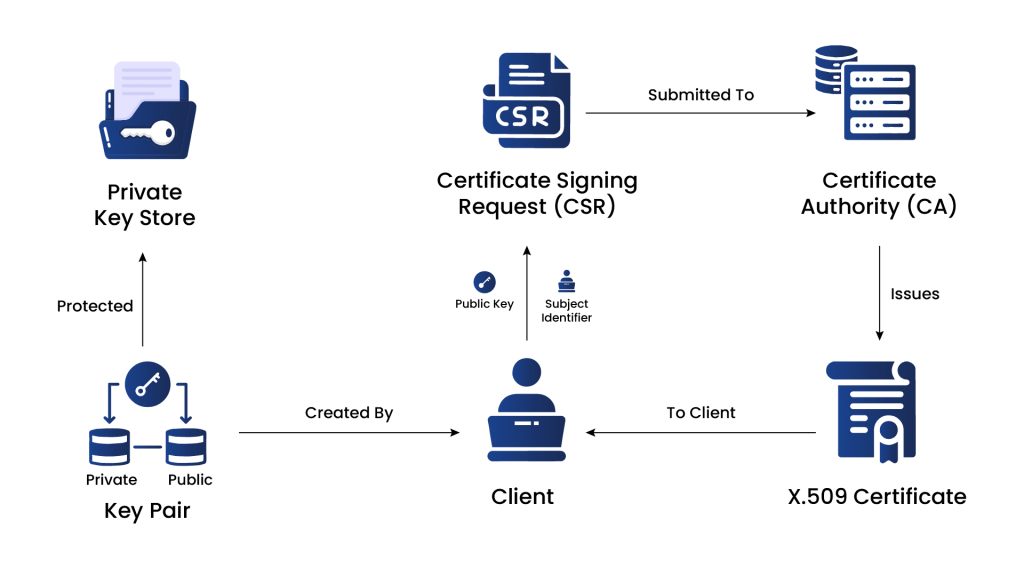
Enrollment moves through seven steps from initial request to eventual renewal.
- Generate a CSR. The entity creates a Certificate Signing Request containing its public key and identity information.
- Submit the CSR to the CA. The CA verifies the entity’s identity using methods appropriate to the certificate type requested.
- Certificate issuance. Once verification passes, the CA issues a certificate containing the public key, identity information, validity period, and its own digital signature.
- Certificate delivery. The CA delivers the certificate back to the entity, commonly through email, a secure portal, or an automated protocol response.
- Certificate installation. The entity installs the certificate on the relevant server or device.
- Certificate use. Other parties verify the certificate’s authenticity through the CA’s signature during secure communication.
- Certificate renewal. Before the validity period ends, the entity repeats a similar enrollment process to obtain a replacement certificate.
Manual vs Automatic Enrollment
The choice between manual and automatic enrollment depends entirely on how many certificates an organization needs to manage.
Manual enrollment has the entity generate a CSR and submit it to the CA directly, which works for a single web server but becomes impractical across many devices or users. Automatic enrollment streamlines this through mechanisms like Active Directory Certificate Services auto-enrollment for Windows domains, Mobile Device Management platforms for phones and tablets, and dedicated protocols built specifically for machine-to-machine enrollment.
Certificate Enrollment Protocols: SCEP, EST, and ACME
Three protocols cover most automated enrollment scenarios, each suited to a different environment.
| Protocol | Best Fit | Key Characteristic |
|---|---|---|
| SCEP | Network devices (routers, switches, firewalls) | Request/response over HTTP with a shared challenge password |
| EST | General PKI clients (RFC 7030) | Mutual TLS authentication; supports ECC and ECDSA |
| ACME | Web servers, RFC 8555 | Fully automated issuance and renewal via domain-ownership challenges |
ACME is best known through Let’s Encrypt, which defaults to 90-day Domain Validated certificates, but the protocol itself is not limited to any particular validity period. Any CA can offer ACME-based issuance for whatever certificate validity it supports, including the shorter windows the industry is moving toward under CA/Browser Forum Ballot SC-081v3.
The Comprehensive Lifecycle of Certificate Enrollment
-
Certificate Signing Request (CSR)
To initiate the certificate enrollment process, the entity generates a Certificate Signing Request (CSR). The CSR includes the public key and information about the entity that needs to be included in the certificate, such as the domain name for SSL/TLS certificates or the email address for S/MIME certificates.
-
Submitting the CSR to the CA
The CSR is submitted to the CA during the enrollment process. The CA verifies the identity of the entity and the information in the CSR. The CA may use various methods to verify the entity’s identity, such as email verification, domain validation, or manual verification of legal documents.
-
Certificate Issuance
Once the CA has completed the verification process and is satisfied that the entity is legitimate, it issues a digital certificate. The certificate contains the entity’s public key, identity information, validity period, and the CA’s digital signature.
-
Certificate Delivery
The issued certificate is delivered back to the entity. Depending on the CA and the certificate type, the delivery may be done through email, a secure portal, or other methods.
-
Certificate Installation
The entity needs to install the issued certificate on the appropriate server or device where it will be used. For example, in SSL/TLS, the certificate is installed on the webserver to secure the website’s connections.
-
Certificate Use
Once installed, the certificate is ready for secure communication protocols. Clients, users, or other entities interacting with the certificate holder can verify the certificate’s authenticity through the CA’s digital signature, ensuring a secure and trustworthy connection.
-
Certificate Renewal
Certificates have a limited validity period (typically 1-2 years). Before expiration, the entity must renew the certificate through a similar enrollment process to continue using it without disruption.
Methods for Certificate Enrollment
There are several methods of certificate enrollment, each catering to different use cases and environments. These methods facilitate obtaining digital certificates from CAs for securing communications and verifying the identity of entities. Here are some common methods of certificate enrollment:
-
Manual Enrollment
Manual enrollment is a traditional method where the entity generates a Certificate Signing Request (CSR) using software or tools provided by the server or device where the certificate will be installed. The entity then manually submits the CSR to the CA for validation and issuance. This method is commonly used for obtaining SSL/TLS certificates for web servers.
-
Automatic Enrollment
Automatic enrollment, also known as auto-enrollment or certificate auto-enrollment, streamlines the certificate issuance process by automating various steps. It is particularly beneficial in large-scale environments with multiple devices or users. There are several automatic enrollment methods.
-
Active Directory Certificate Services (ADCS)
In Microsoft Windows environments, AD CS provides an auto-enrollment feature called “Certificate Services Client – Auto-Enrollment.” It allows devices and users within the Active Directory domain to request and receive certificates automatically based on predefined certificate templates and Group Policy settings.
-
Simple Certificate Enrollment Protocol (SCEP)
SCEP is a protocol commonly used in network device environments, such as routers, switches, and firewalls. It enables these devices to request and obtain digital certificates from a CA automatically. SCEP simplifies certificate enrollment for devices that may not have a traditional user interface.
-
Mobile Device Management (MDM) Enrollment
In the context of mobile devices, MDM solutions often include built-in features for certificate enrollment. MDM platforms can facilitate the enrollment process for securing mobile communication, email, and VPN connections.
-
Online Certificate Enrollment Protocol (OCEP)
OCEP is an internet draft that outlines a standard protocol for certificate enrollment using HTTP-based communication. OCEP simplifies certificate enrollment and promotes interoperability between CAs and enrollment clients.
-
Public Key Infrastructure using X.509 (PKIX)
PKIX is a widely adopted standard that defines the framework for managing digital certificates and their related components. It includes standards for certificate enrollment, revocation, and validation processes. X.509 is the format used for encoding certificates.
Certificate Enrollment Protocols
Certificate enrollment involves using various protocols to facilitate the secure exchange of certificate-related information between the entity requesting the certificate and the Certificate Authority (CA) issuing the certificate. These protocols ensure the enrollment process’s confidentiality, integrity, and authenticity. Here are some common protocols used for certificate enrollment:
-
SCEP
SCEP, stands for Simple Certificate Enrollment Protocol, is an open-source certificate management protocol facilitating easier, scalable, and secure certificate issuance.
- It operates on a request/response model using HTTP and supports RSA-based cryptography.
- The certificate signing request (CSR) must include a ‘challenge password’ shared between the server and the requester, enhancing authentication.
- SCEP does not support online certificate revocation and has limited Certificate Revocation List (CRL) retrieval support.
1.1 Workflow of SCEP Protocol
- Obtain and validate a copy of the CA certificate.
- Generate CSR and send it to CA.
- Poll the SCEP server to verify whether the certificate is signed.
- Re-enroll to obtain new certificates before the existing certificate expires.
- The preferred method is via a CRL distribution point (CDP) query.
- Retrieve the CRL as needed.
The SCEP enrollment and usage generally follow this workflow:
1.2 Understanding the Benefits of the SCEP Protocol
- Getting certificates for public key infrastructure involves exchanging information and approvals with a trusted certification authority service.
- SCEP automates this process, making it easier and faster for IT security teams to get and install device certificates without manual work.
- Devices can easily enroll for certificates using a URL and a shared secret to communicate with the certification authority service.
- Mobile Device Management systems like Microsoft Intune and Apple use SCEP to get certificates for smartphones and other mobile devices quickly.
-
Enrollment Over Secure Transport (EST)
Enrollment over Secure Transport (EST) is a certificate management protocol that automates issuing and provisioning X.509 certificates.
- EST is defined in RFC 7030 and is designed for clients using public key infrastructure (PKI), such as web servers, applications, and endpoint devices.
- The protocol enables PKI clients to request certificates from trusted Certificate Authorities (CAs) and receive them securely over HTTPS without human intervention.
- EST’s main goal is to simplify and secure the certificate enrollment process, reducing the risk of misconfigurations, outages, and security compromises caused by human errors.
- Automated enrollment through EST also frees up time for PKI personnel, allowing them to focus on other essential tasks.
2.1 Workflow of EST Protocol
- EST client initiates a certificate enrollment request to the Certificate Authority (CA) over a secure HTTPS connection.
- The EST client may include additional information, such as certificate attributes and authentication credentials, in the request.
- The CA verifies the client’s identity and authorization to obtain the requested certificate.
- If approved, the CA securely issues the certificate to the EST client over the established HTTPS connection.
- The EST client receives the issued certificate and can use it for secure communication and authentication purposes.
2.2 Understanding the Benefits of EST Protocol
- EST uses TLS to transport messages and certificates.
- Secure CSR authentication in EST links the CSR to a trusted requestor and authenticates it with TLS, preventing unauthorized certificate issuance.
- EST supports advanced cryptographic algorithms such as ECC and ECDSA, enhancing cryptographic agility and efficiency.
- Automated certificate renewal is supported in EST, making the process seamless and efficient.
- EST allows server-side key generation, which benefits resource-constrained environments and devices.
- EST lacks a built-in mechanism for retrieving certificate revocation status but can utilize options like OCSP and OCSP stapling.
-
Automated Certificate Management Environment (ACME)
ACME (Automated Certificate Management Environment) is a communications protocol.
- It automates CSR generation and certificate/key rotation.
- Primarily used by Let’s Encrypt for issuing 90-day Domain Validated certificates and automating renewals.
- Developed by the Internet Security Research Group (ISRG) for Let’s Encrypt and offered as an open-source tool.
- Being adopted by other CAs, PKI vendors, and browsers to support various certificate types like S/MIME and Code-signing.
- Requires CA to access the DNS/HTTPS token for implementation.
- Suited for internal PKI issuance method.
3.1 Workflow of ACME Protocol
- The ACME client registers with the Certificate Authority (CA).
- The client proves domain ownership through challenges (HTTP-based or DNS-based).
- The client creates an order for the desired certificate.
- The CA presents challenges to confirm domain ownership.
- After completing challenges, the CA issues the certificate to the client.
- The client installs the issued certificate on the server or device.
- The client can initiate renewal as the certificate’s validity nears expiration.
- The client can initiate certificate revocation if needed.
3.2 Understanding the Benefits of ACME Protocol
- Eliminates potential configuration errors, leading to error-free certificate management and reduced downtime.
- Enhances security by supporting low-validity DV certificates, improving certificate rotation and overall security posture.
- Enables quick CA and key migration, allowing users to swiftly switch to a different CA in case of a compromise.
- Improves ecosystem quality by providing a uniform protocol for developers, simplifying integration, and promoting consistency.
- Saves time, effort, and costs through automated certificate processes.
- ACME is an open-source protocol freely available for use.
Comparison of Certificate Enrollment Protocol
| Category | EST | SCEP | ACME |
|---|---|---|---|
| Purpose | EST is used for secure certificate enrollment and management. | SCEP serves the same purpose with a focus on client certificates. | ACME automates certificate provisioning and renewal for web servers. |
| Certificate Type | Supports X.509 certificates. | Supports X.509 certificates. | Supports X.509 certificates. |
| Authentication | EST employs mutual authentication between the client and the CA server. | SCEP relies on client certificate-based authentication with the CA server. | ACME uses domain-based authentication with its server. |
| Standardization | EST is standardized in IETF RFC 7030. | SCEP lacks a specific standard but is an industry practice. | ACME follows IETF RFC 8555. |
| Certificate Rotation | EST supports automated certificate renewal and rotation. | SCEP typically requires manual renewal with limited rotation. | ACME automates both the renewal and rotation of certificates. |
| Security | EST offers strong security with mutual authentication and encryption. | SCEP is generally secure but may lack some modern security features. | ACME provides strong security with domain-based authentication and automated certificate renewal. |
How Encryption Consulting Helps
CertSecure Manager automates certificate enrollment end to end, handling CSR generation, submission, and installation across ACME, SCEP, and EST environments so enrollment scales with device count rather than administrator time. Backed by ISO/IEC 27001:2022 and SOC 2 certified practices.
Frequently Asked Questions
What is the difference between certificate enrollment and certificate issuance?
Enrollment is the full process an entity goes through to obtain a certificate, including generating a CSR and completing CA verification. Issuance is the specific step where the CA creates and signs the certificate after verification succeeds; it is one stage within the broader enrollment process.
Which certificate enrollment protocol should I use?
SCEP suits network devices like routers and firewalls that need a lightweight, request-based enrollment method. EST fits general PKI clients that support mutual TLS authentication and modern cryptographic algorithms. ACME is the standard choice for automating web server certificate issuance and renewal at scale.
Is ACME only for free, 90-day certificates?
No. ACME is a protocol, defined in RFC 8555, that automates the enrollment workflow itself. Let’s Encrypt popularized ACME with a 90-day Domain Validated default, but any CA can implement ACME for any certificate type or validity period it supports, including Organization Validated certificates or the shorter validity periods coming under CA/Browser Forum Ballot SC-081v3.
Why does automated enrollment matter more as certificates get shorter?
Manual enrollment requires someone to generate a CSR and submit it by hand every time a certificate needs issuing or renewing. As validity periods shrink toward 47 days by March 2029, that manual effort would need to repeat far more often, which is impractical past a handful of certificates. Automated protocols remove that scaling problem entirely.
Automate Certificate Enrollment at Scale
Automate certificate lifecycles with CertSecure Manager across ACME, SCEP, and EST environments, or talk to an Encryption Consulting advisor about your enrollment strategy.
- Key Takeaways
- The Certificate Enrollment Lifecycle
- Manual vs Automatic Enrollment
- Certificate Enrollment Protocols: SCEP, EST, and ACME
- The Comprehensive Lifecycle of Certificate Enrollment
- Methods for Certificate Enrollment
- Certificate Enrollment Protocols
- Comparison of Certificate Enrollment Protocol
- How Encryption Consulting Helps
- Frequently Asked Questions
- Automate Certificate Enrollment at Scale