

- Executive Summary
- Why DigiCert Matters for Enterprise PKI
- Integration Highlights
- How the CertSecure Manager and DigiCert CA Integration Works
- Supported Features
- Security and Compliance
- Glossary: Key PKI and Certificate Lifecycle Terms
- Practical Checklist Before You Integrate CertSecure Manager with DigiCert CA
- Our Take: Where This Integration Fits in an Enterprise PKI Strategy
- Conclusion
- Frequently Asked Questions
The digital world moves quickly, and managing digital certificates properly is non-negotiable. It is essential for security, compliance, and uninterrupted business operations. CertSecure Manager by Encryption Consulting is a modern Certificate Lifecycle Management (CLM) solution that automates and simplifies certificate issuance, renewal, discovery, and governance across hybrid environments.
This blog walks you through how CertSecure Manager integrates with DigiCert CA, enabling enterprises to centralize control while leveraging the scalability and reliability of DigiCert’s public key infrastructure.
What is the CertSecure Manager and DigiCert CA integration? It connects Encryption Consulting’s CertSecure Manager, a certificate lifecycle management platform, directly to DigiCert’s certificate authority through a secure API-based connector. The integration automates SSL/TLS certificate issuance, renewal, and revocation, enforces consistent policy across endpoints, and gives enterprise PKI teams a single dashboard for every DigiCert-issued certificate.
Executive Summary
- CertSecure Manager, Encryption Consulting’s certificate lifecycle management (CLM) platform, connects to DigiCert CA through a secure API-based connector.
- The integration automates certificate issuance, renewal, and revocation, and enforces consistent issuance policy across every endpoint.
- Teams get a single dashboard for all DigiCert-issued certificates, plus automated deployment and expiration tracking.
- Role-based access control and audit logging keep issuance and approval traceable for compliance reporting.
- The result is fewer manual certificate tasks, fewer outages from expired certificates, and a stronger enterprise PKI posture.
Why DigiCert Matters for Enterprise PKI
DigiCert is a leading global certificate authority known for high-assurance digital certificates, rigorous validation processes, and trusted root infrastructure. Organizations that already rely on DigiCert for public-facing or internal certificates can extend their automation capabilities by integrating it with CertSecure Manager, without moving away from the CA they already trust.
Integration Highlights
The table below summarizes what the integration delivers.
| Capability | What It Delivers |
|---|---|
| Automated Certificate Issuance and Renewal | Issues and renews certificates directly from DigiCert through secure API integrations, without manual CSR handling. |
| Policy Enforcement | Applies consistent issuance policies across every endpoint requesting a DigiCert certificate. |
| Unified Visibility | Centralizes visibility into all DigiCert-issued certificates through the CertSecure Manager dashboard. |
| Smooth Provisioning | Automatically deploys and renews certificates on endpoints and servers. |
| Reporting | Produces certificate inventory, expiration trend, and compliance reports for internal audits and external regulatory requirements. |
How the CertSecure Manager and DigiCert CA Integration Works
The integration follows four stages, from generating API credentials to tracking a certificate through its full lifecycle.
API Credential Setup
Generate an API key from the DigiCert CertCentral console with the permissions the integration needs.
Connector Configuration in CertSecure Manager
- Open the CertSecure Manager UI and download the DigiCert connector installer from Utilities > Connectors > Download.
- Once the connector is configured with the required details, complete the CA integration by going to Administration > CA Management, clicking Add CA, and entering the necessary information.
Certificate Request Workflow
- Users or systems request certificates through CertSecure Manager.
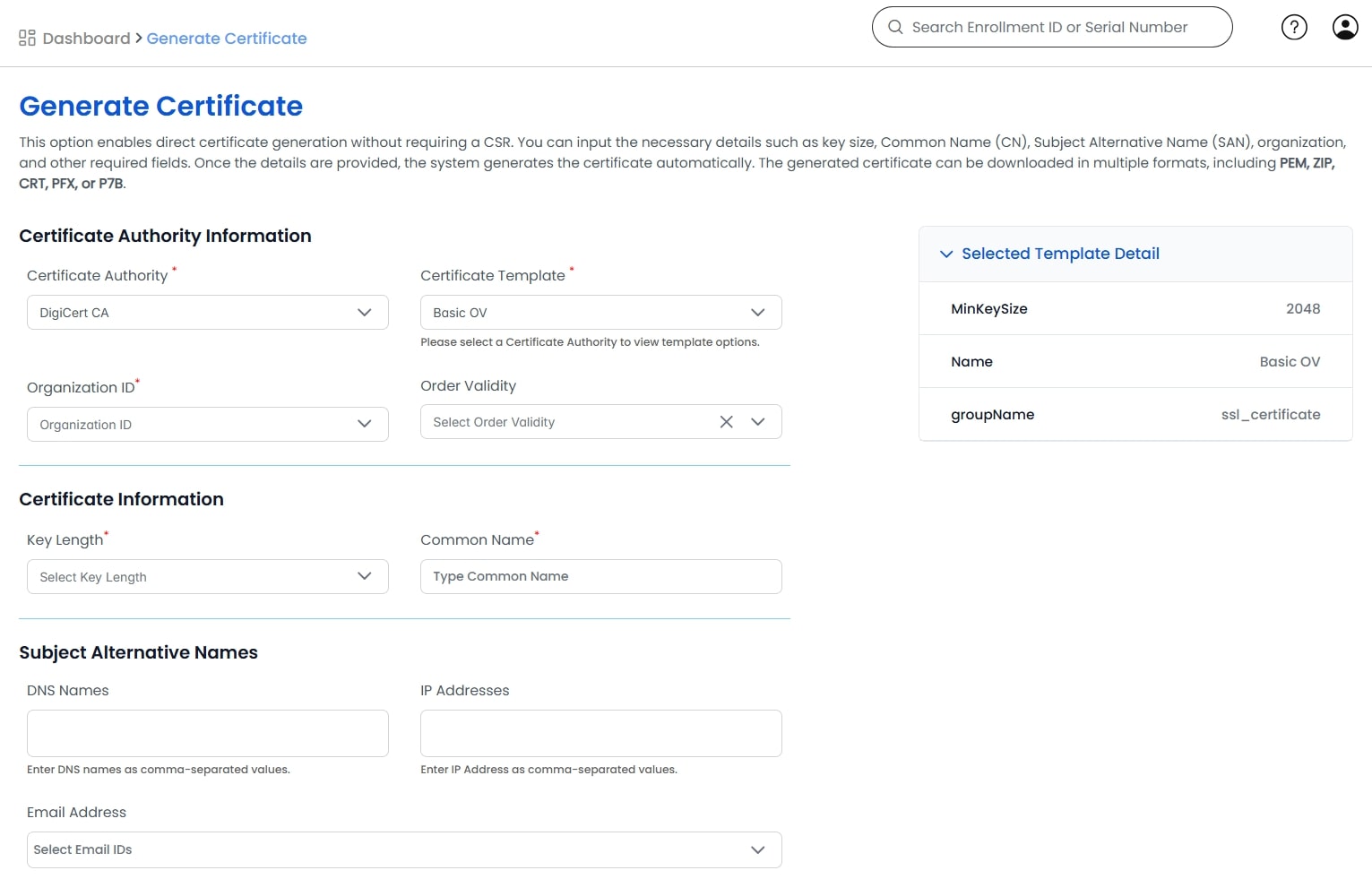
- Requests follow the organization’s defined approval workflows.
- Upon approval, the platform calls DigiCert’s APIs to issue the certificate.
Example: a web operations team requesting a wildcard certificate for a new subdomain submits the request in CertSecure Manager. A security approver signs off, and DigiCert issues the certificate automatically, without anyone touching a CSR file by hand.
Certificate Deployment and Tracking
- Certificates can be deployed automatically to target devices.
- CertSecure Manager tracks certificate metadata, monitors expiration, and automates renewal.
For a detailed guide on DigiCert integration, visit the DigiCert Integration Guide. There, you will find information about prerequisites, API key generation, and integration with CertSecure Manager.
Supported Features
- SSL/TLS Certificate Issuance
- Certificate Renewal and Revocation
- Wildcard and SAN Certificates
- Role-Based Access Control
- Audit Logging and Reporting
- ITSM and CMDB Integration
Security and Compliance
- CertSecure Manager maintains audit logs and provides full traceability of every certificate request, approval, and revocation.
- Role-based permissions ensure only authorized users can request, approve, or revoke certificates.
- This traceability supports internal audits and external compliance requirements, including frameworks such as ISO 27001 and SOC 2.
Glossary: Key PKI and Certificate Lifecycle Terms
A quick reference for the terms used throughout this integration.
| Term | Definition |
|---|---|
| PKI (Public Key Infrastructure) | The certificates, certificate authorities, and policies that issue and manage digital identities used to encrypt traffic and authenticate systems. |
| CA (Certificate Authority) | An entity, such as DigiCert, trusted to validate identity and issue digital certificates. |
| CLM (Certificate Lifecycle Management) | The practice of managing a certificate from request and issuance through renewal, revocation, and expiration. |
| API (Application Programming Interface) | The interface CertSecure Manager uses to request certificate actions from DigiCert programmatically instead of through a manual console. |
| SAN Certificate | A certificate that secures multiple domain names or subdomains through Subject Alternative Names on a single certificate. |
| Wildcard Certificate | A certificate that secures a domain and all of its first-level subdomains, such as *.example.com. |
| RBAC (Role-Based Access Control) | A permission model that restricts who can request, approve, or revoke certificates based on their assigned role. |
| ITSM (IT Service Management) | The processes and tools, such as ticketing and change management, that IT teams use to run day-to-day operations. |
| CMDB (Configuration Management Database) | A repository that tracks IT assets and their relationships, often integrated with certificate inventory for asset-level visibility. |
| Connector | The component that links CertSecure Manager to an external CA, such as DigiCert, so requests and status updates pass between the two systems automatically. |
Practical Checklist Before You Integrate CertSecure Manager with DigiCert CA
- Confirm your DigiCert CertCentral account and generate an API key with only the permissions this integration needs.
- Confirm CertSecure Manager connector prerequisites and download the DigiCert connector installer from Utilities > Connectors.
- Define approval workflows and named approvers before enabling automated issuance.
- Map RBAC roles to certificate request, approval, and revocation actions before go-live.
- Confirm your wildcard and SAN certificate policy so issuance rules match what DigiCert allows.
- Set up audit logging and confirm where compliance reports need to be delivered.
- Test renewal automation in a staging environment before relying on it in production.
- Document a rollback path in case the connector or API integration needs to be paused.
Our Take: Where This Integration Fits in an Enterprise PKI Strategy
- Automate the workflow, but keep human approval on anything customer-facing or high-privilege. Automation should route requests faster, not remove oversight.
- Treat the DigiCert API key like any other credential: least privilege, rotated on a schedule, and owned by a named team.
- Use the unified dashboard as your source of truth for audits, instead of reconciling separate counts from DigiCert and CertSecure Manager.
- Start with one endpoint group or business unit, validate the renewal and reporting behavior, then expand rather than switching every certificate over on day one.
Conclusion
Integrating CertSecure Manager with DigiCert CA brings together robust PKI infrastructure and intelligent certificate automation. This integration helps reduce manual effort, eliminate outages caused by expired certificates, and strengthen compliance across your organization’s digital assets.
For organizations seeking scalable, secure, and automated certificate management, this integration is a key step toward a stronger enterprise PKI posture.
Frequently Asked Questions
What is the main takeaway from Streamlining PKI Operations: Integrating CertSecure Manager with DigiCert CA?
The main takeaway is that connecting CertSecure Manager to DigiCert CA through a secure API-based connector turns certificate issuance, renewal, and revocation into an automated, policy-enforced workflow instead of a manual, ticket-by-ticket process, while keeping DigiCert as the certificate authority of record.
Why does this matter for enterprise PKI teams?
Enterprise PKI teams are usually managing certificates across many endpoints, applications, and business units. This integration matters because it gives those teams one dashboard for every DigiCert-issued certificate, consistent issuance policy, and automated renewal, instead of tracking expirations across spreadsheets or individual CertCentral logins.
What risks increase if this topic is handled manually?
Manual certificate management raises the risk of outages from expired certificates, inconsistent issuance policy across teams, untracked wildcard or SAN certificates, and gaps in the audit trail needed to prove who requested, approved, or revoked a certificate.
Which teams should own this change?
Ownership usually spans the PKI or security engineering team that manages CertSecure Manager and the DigiCert relationship, the IT operations team that deploys certificates to servers and endpoints, and the compliance or audit function that consumes the reporting this integration produces.
How does this connect to certificate lifecycle management?
This integration is certificate lifecycle management in practice: it covers issuance, approval workflows, deployment, expiration tracking, renewal, and revocation for every DigiCert certificate in one platform, instead of treating each stage as a separate manual task.
How should organizations measure success?
Success looks like a measurable drop in certificate-related outages, faster average issuance and renewal times, complete audit logs for every request and approval, and full visibility into every DigiCert-issued certificate from a single dashboard instead of scattered records.
What should be audited or monitored regularly?
Organizations should regularly audit certificate expiration dates and renewal status, role-based permissions for who can request, approve, or revoke certificates, API key validity for the DigiCert connector, and compliance reports covering certificate inventory and issuance history.
How does this topic affect cloud, hybrid, or multi-CA PKI?
In hybrid and multi-CA environments, teams often manage DigiCert alongside other certificate authorities or cloud-native issuers. CertSecure Manager’s connector model lets DigiCert remain one managed CA among several, so policy, visibility, and reporting stay consistent even as the environment grows more hybrid.
What common mistakes should teams avoid?
Common mistakes include generating a DigiCert API key with broader permissions than the integration needs, skipping a staging test of the renewal automation before go-live, leaving approval workflows undefined so requests bypass review, and failing to map RBAC roles before turning on automated issuance.
What should be refreshed quarterly?
Teams should refresh the DigiCert API key rotation schedule, review RBAC role assignments as staff change, re-validate approval workflow owners, and audit the certificate inventory report for orphaned, unused, or soon-to-expire certificates at least once a quarter.
- Executive Summary
- Why DigiCert Matters for Enterprise PKI
- Integration Highlights
- How the CertSecure Manager and DigiCert CA Integration Works
- Supported Features
- Security and Compliance
- Glossary: Key PKI and Certificate Lifecycle Terms
- Practical Checklist Before You Integrate CertSecure Manager with DigiCert CA
- Our Take: Where This Integration Fits in an Enterprise PKI Strategy
- Conclusion
- Frequently Asked Questions
- What is the main takeaway from Streamlining PKI Operations: Integrating CertSecure Manager with DigiCert CA?
- Why does this matter for enterprise PKI teams?
- What risks increase if this topic is handled manually?
- Which teams should own this change?
- How does this connect to certificate lifecycle management?
- How should organizations measure success?
- What should be audited or monitored regularly?
- How does this topic affect cloud, hybrid, or multi-CA PKI?
- What common mistakes should teams avoid?
- What should be refreshed quarterly?


