- Quick Answer: What Is the OCSP Magic Number?
- Key Takeaways
- Who Should Care About the OCSP Magic Number
- OCSP Magic Number Scenario Matrix: Requirement, Validation Method, Failure Mode, and Monitoring Signal
- What Is OCSP?
- What Is the OCSP Magic Number?
- Why Microsoft Introduced It
- Why This Is a Problem
- How the Cache Works and What Windows Is Actually Counting
- How to Detect It
- How to Configure the Magic Number
- How Encryption Consulting Can Help
- Conclusion
- Frequently Asked Questions
Online Certificate Status Protocol (OCSP) is one of the most critical components of a modern Public Key Infrastructure (PKI). It gives clients a fast, real-time method for determining whether a certificate is still trustworthy without downloading an entire Certificate Revocation List (CRL). In most enterprise environments, efficiency matters. Smart card authentication, VPN access, TLS connections, Wi-Fi authentication, and device enrollment workflows all depend on certificate revocation checks happening quickly and reliably behind the scenes.
Buried inside the Windows revocation engine is a lesser-known behavior that can silently change how certificate validation works on a client system. PKI professionals often refer to this threshold as the OCSP Magic Number. Once a Windows client caches more than a certain number of OCSP responses from the same responder, CryptoAPI may stop prioritizing OCSP and begin preferring CRLs instead. By default, that threshold is just 50 cached OCSP responses.
For some environments, this behavior is harmless and even beneficial. For others, especially organizations that deployed OCSP specifically to avoid large CRLs or to support deterministic revocation checking, it can create operational and security problems that are extremely difficult to diagnose. What makes the issue particularly challenging is that the transition happens quietly. The OCSP responder itself remains healthy, no obvious error appears in the Windows event logs, and administrators may have no indication that clients have changed revocation methods at all.
Understanding the OCSP Magic Number requires understanding how Windows handles certificate revocation checking behind the scenes. Once you see how CryptoAPI decides between OCSP and CRLs, many revocation behaviors that appear inconsistent or unpredictable in enterprise Active Directory Certificate Services (AD CS) environments become much easier to explain and troubleshoot. Here is what every PKI administrator needs to know about it.
Quick Answer: What Is the OCSP Magic Number?
The OCSP Magic Number is a Windows CryptoAPI threshold (default: 50) stored in the registry value CryptnetCachedOcspSwitchToCrlCount. When cached OCSP responses from a single responder URL for a given CA exceed this count, CryptoAPI silently switches revocation checking from OCSP to CRL. No event log entry is generated. The OCSP responder appears healthy. Configurable via Group Policy under Certificate Path Validation Settings.
Key Takeaways
- The OCSP Magic Number is a built-in Windows CryptoAPI threshold (default: 50) that governs when certificate revocation checking switches from OCSP to CRL. The switch is completely silent: no Windows event log entry, no OCSP responder error, no client-side alert. The only indicators are network traffic changes that require active monitoring to detect.
- CryptoAPI applies three rules based on the cached response count: if the count is less than or equal to the magic count, OCSP URLs are processed in AIA extension order; if the count is greater than the magic count, CRL URLs are processed in CDP extension order; and if all OCSP URLs fail, CRL fallback occurs regardless of the count. Group Policy configured to prefer CRLs over OCSP is a second, independent trigger that bypasses the count-based logic entirely.
- The count is tracked per user, per OCSP responder URL, and per CA. This means two machines with identical configurations can be at completely different counts depending on their validation history. One may still be querying OCSP while the other has already switched to CRL, with no visible configuration difference between them.
- Setting the registry value CryptnetCachedOcspSwitchToCrlCount to 0 does not disable the fallback. It restores the default threshold of 50. Organizations that need to disable OCSP fetching entirely must use the Options DWORD with the CERT_CHAIN_OPTION_DISABLE_AIA_URL_RETRIEVAL flag (0x2) at the same registry path.
- The count does not persist indefinitely. A machine reboot resets the OCSP cache count, which is why some teams observe revocation checking problems that appear to resolve themselves after a restart. The OCSP queries resume normally until the threshold is crossed again.
Who Should Care About the OCSP Magic Number
The OCSP Magic Number is primarily an AD CS and Windows PKI operations concern, but its security and compliance consequences reach every team that depends on certificate revocation working as documented.
| Role | Why It Matters | Action Item |
|---|---|---|
| PKI Admins | Own the threshold configuration and are responsible for auditing the CryptnetCachedOcspSwitchToCrlCount registry value across the fleet; responsible for identifying peak certificate validation volumes per system type (domain controllers, RADIUS servers, VPN gateways) before setting the threshold; the default of 50 was sized for environments where CRL efficiency matters more than OCSP consistency, which may not match the deployment rationale in many modern enterprise environments | Audit the CryptnetCachedOcspSwitchToCrlCount registry value across all domain controllers, RADIUS servers, and VPN gateways via Group Policy reporting; measure peak OCSP validation volumes per system type before setting the threshold; deploy the configured value via Group Policy under Certificate Path Validation Settings > Revocation tab; confirm the threshold is set above the peak validation volume to prevent unintended switching |
| Security Architects | Own the revocation policy design: determining whether OCSP or CRL should be the authoritative revocation mechanism for each certificate population and whether Microsoft Hotfix 2960124 deterministic responses are required; when clients fall back to CRL after crossing the magic number threshold, the deterministic response protection from Hotfix 2960124 disappears and forged certificates with serial numbers not on the CRL pass validation silently | Document the intended revocation mechanism for each certificate population and include the Magic Number configuration as a required control in the PKI design; assess whether Hotfix 2960124 is deployed and whether its deterministic response protection is a security requirement; include the Magic Number threshold in the PKI Certificate Practice Statement configuration baseline; use CBOM Secure to inventory the full revocation architecture alongside the certificate estate |
| Platform and DevOps Teams | Own monitoring OCSP query volume and CRL download volume per client to detect threshold crossings; OCSP query drops on domain controllers, RADIUS servers, or VPN gateways are the most reliable early-warning signal; in hybrid and cloud environments, CRL distribution point reachability from cloud-hosted clients must be confirmed before the Magic Number fires and CRL fallback begins | Establish baselines for OCSP query volume per high-volume client using network traffic analysis; configure alerts for sustained OCSP query volume drops from domain controllers, RADIUS servers, and VPN gateways; confirm CRL distribution point reachability from all network segments including cloud workloads and remote offices before the Magic Number fires; enable CAPI2 diagnostic logging on representative high-volume clients |
| Compliance Teams | Must demonstrate that certificate revocation checking is functioning as documented in the Certificate Practice Statement; a production environment where clients have silently switched from OCSP to CRL without a documented configuration decision is a compliance gap; regulatory frameworks including PCI DSS 4.0 and NIST SP 800-53 SC-17 require evidence that PKI certificate lifecycle controls, including revocation checking, are operating as specified; the DigiCert Trust Pulse Survey (July 2025) found that 45 percent of enterprises experienced certificate-related downtime in the prior year | Include the Magic Number threshold configuration in the quarterly PKI compliance evidence package; confirm that the CryptnetCachedOcspSwitchToCrlCount Group Policy setting is deployed and consistent across all affected systems; document the rationale for the configured threshold value and include it in the Certificate Practice Statement; include revocation infrastructure monitoring results in quarterly compliance evidence |
| CISOs | A silent switch from deterministic OCSP responses to CRL-based validation is a security posture change that most organizations never detect until it causes an incident; the OCSP Magic Number is the kind of behavior that produces audit findings, unexplained revocation failures, and in environments relying on Hotfix 2960124, a quietly expanded window for forged certificate acceptance | Require the OCSP Magic Number threshold to be explicitly configured and documented as part of the enterprise PKI configuration baseline; mandate quarterly review of OCSP query volume per high-volume system as a PKI health metric; fund CertSecure Manager CLM monitoring as the platform for continuous revocation infrastructure health visibility |
OCSP Magic Number Scenario Matrix: Requirement, Validation Method, Failure Mode, and Monitoring Signal
Use this matrix to identify which scenario applies to your environment, validate that revocation checking is working as intended, understand the failure mode if the Magic Number fires unexpectedly, and identify the monitoring signal that detects the switch before it causes an incident.
| Scenario | Requirement | Validation Method | Failure Mode if Magic Number Fires | Monitoring Signal | Source |
|---|---|---|---|---|---|
| Domain controller processing smart card logons at high volume | CryptnetCachedOcspSwitchToCrlCount set above the peak smart card logon volume per revocation period to prevent CRL fallback | Network traffic capture on the domain controller confirming OCSP requests are sent and responses received; CAPI2 log confirming OCSP is the revocation method used | Domain controller falls back to CRL; if CRL is large or the CRL distribution point is unreachable, smart card logon revocation checks fail or time out; authentication disruptions follow | Sustained drop in OCSP query volume from the domain controller without a corresponding configuration change; spike in CRL download volume from the same client | Microsoft documentation: How Certificate Revocation Works; Group Policy: Certificate Path Validation Settings > Revocation tab |
| RADIUS server validating VPN certificates | CryptnetCachedOcspSwitchToCrlCount set above the peak VPN authentication volume per revocation period; CRL distribution point reachable from the RADIUS server network segment | Network capture on the RADIUS server confirming OCSP requests are sent during VPN authentication; confirm CRL distribution point is also reachable as fallback | RADIUS server falls back to CRL; if the CRL is large or the CDP is unreachable from the RADIUS network segment, VPN authentication revocation checks fail; VPN users cannot authenticate | Drop in OCSP query volume from the RADIUS server; rise in CRL download requests; VPN authentication latency increase as CRL is fetched instead of OCSP | Microsoft documentation; Hotfix 2960124 for deterministic response requirements |
| Environment relying on Hotfix 2960124 deterministic responses | CryptnetCachedOcspSwitchToCrlCount set high enough that clients never cross the threshold, preserving OCSP as the revocation mechanism; Hotfix 2960124 deployed on all Online Responders | Network capture confirming clients are using OCSP, not CRL, for revocation checking on the certificate populations requiring deterministic responses; verify Hotfix 2960124 is installed on Online Responders | Client crosses Magic Number threshold and falls back to CRL; forged certificates with serial numbers not on the CRL pass validation silently; the deterministic response protection disappears without any alert | Any sustained reduction in OCSP query volume from clients validating certificates in populations requiring deterministic checking; absence of OCSP queries is the critical signal | Microsoft Hotfix 2960124; Microsoft documentation on Online Responder default GOOD response behavior |
| Large CRL environment where OCSP was deployed to avoid CRL downloads | CryptnetCachedOcspSwitchToCrlCount set high enough that clients never fall back to the CRL that prompted OCSP deployment; CRL must remain available as fallback even if OCSP is preferred | Confirm that high-volume clients are still using OCSP and not downloading the full CRL; measure CRL download volume per client quarterly against the baseline established when OCSP was deployed | Client crosses threshold and falls back to the large CRL; endpoint timeouts return during CRL download; revocation checks fail on systems with limited bandwidth or unreliable CRL distribution point access | CRL download volume rising on clients that previously showed stable OCSP-only traffic; revocation check timeouts or failures on endpoints that worked correctly before | Microsoft documentation; CA/Browser Forum Ballot SC-081v3 (April 2025) reducing public TLS lifetimes to 47 days by March 2029, increasing revocation check frequency |
| Group Policy explicitly configured to prefer CRL over OCSP | Deliberate policy decision documented in the Certificate Practice Statement; CRL distribution points sized, hosted, and monitored for high-volume CRL download traffic | Group Policy reporting confirming the prefer-CRL policy is applied consistently; network capture confirming clients use CRL, not OCSP, for revocation checking | No Magic Number interaction applies; CRL is used exclusively regardless of OCSP cache count; failure mode is CRL distribution point unavailability or CRL expiry, not the Magic Number | CRL distribution point availability monitoring; CRL publication schedule compliance; CRL size growth over time | Group Policy: Computer Configuration > Windows Settings > Security Settings > Public Key Policies > Certificate Path Validation Settings > Revocation tab |
What Is OCSP?
Online Certificate Status Protocol (OCSP) was first standardized in RFC 2560 in 1999 and later updated to RFC 6960 in June 2013, which remains the current standard. It gives relying parties a way to check whether a specific X.509 certificate has been revoked in real time, without downloading an entire Certificate Revocation List (CRL).
The core difference between the two is straightforward. A Certificate Revocation List (CRL) is a periodically published list of all certificates that have been revoked while still within their validity period. The CRL is issued by the Certificate Authority (CA) and downloaded in full by clients for validation. In large enterprise environments, CRLs can become large (ranging from megabytes to more), which increases bandwidth usage and delays revocation freshness until the next publication cycle.
In contrast, OCSP is a request-based mechanism that performs per-certificate validation. The client sends a targeted request containing the issuer name hash, issuer key hash, and the certificate serial number to an OCSP responder, which returns a digitally signed, time-stamped response indicating one of three statuses: Good, Revoked, or Unknown. OCSP responses are typically small (around ~2 KB), making them significantly more efficient in terms of network usage.
This makes OCSP significantly more efficient than CRL-based revocation, particularly in large PKI deployments where CRL sizes create real network and performance problems. It also enables real-time revocation responses that CRLs simply cannot provide.
What Is the OCSP Magic Number?
When a Windows client performs certificate revocation checking and a certificate contains both an OCSP URL and a CRL URL, CryptoAPI does not simply use OCSP every time. The OCSP URL is published in the Authority Information Access (AIA) extension of the certificate, while the CRL URL is published in the CDP extension. CryptoAPI evaluates both during revocation checking and makes a decision based on how many OCSP responses it has already cached from that responder for that CA.
According to Microsoft’s documentation on “How Certificate Revocation Works”, CryptoAPI calculates the total number of cached OCSP responses from a single OCSP responder URL and compares that count against a predefined threshold known as the magic count. By default, that threshold is set to 50.
CryptoAPI then applies three rules based on that count. If the number is less than or equal to the magic count, the OCSP URLs are processed in the order dictated by the Authority Information Access extension. If the number is greater than the magic count, the CRL URLs are processed in the order dictated by the CRL distribution point extension. And if none of the OCSP URLs in the Authority Information Access extension succeeds, the client falls back to using CRLs.
It is also important to understand that the magic number is not the only condition that can trigger this fallback. Microsoft’s documentation identifies a second trigger: Group Policy configured explicitly to prefer CRLs over OCSP for revocation checking. When that policy is in place, the client falls back to CRL regardless of how many OCSP responses have been cached, effectively bypassing the count-based logic altogether.
The two triggers are independent of each other. The magic number governs the automatic fallback that happens based on cache volume. Group Policy governs the administrative fallback that an organization can enforce deliberately. Both result in the same outcome: OCSP queries stop, and CRL checking takes over.
Why Microsoft Introduced It
The Magic Number is not a bug. Microsoft documented the rationale clearly, and it is a reasonable one in specific scenarios.
Consider a domain controller handling smart card logons. Every authentication event triggers a revocation check. According to Microsoft’s documentation, a typical OCSP response is approximately 2 KB in size.
In a scenario where tens of thousands of users, for example, 50,000 users, authenticate via smart card within a single revocation period, those individual responses would accumulate to roughly 100 MB of cached OCSP response data. A CRL covering those same entries would be approximately 4 MB, based on an estimated 80 bytes per entry. At that scale, downloading the CRL once and reusing it locally is significantly more efficient than making tens of thousands of individual OCSP queries.
The Magic Number gives CryptoAPI a way to make that efficiency determination automatically. Once the cached OCSP response count crosses the threshold, the client switches to CRL without any administrator intervention. For environments with small CRLs and high certificate validation volumes, this is a sensible built-in optimization.
The problem is that it applies universally across all Windows environments, regardless of whether that tradeoff makes sense for a given deployment. And when it fires, it does so without any log entry, alert, or visible indication that the revocation mechanism has changed. That invisibility is what turns a reasonable optimization into a genuine operational and security risk, depending on why your organization deployed OCSP in the first place.
Why This Is a Problem
This is where the Magic Number stops being an optimization and starts being a liability. Your OCSP servers continue to look healthy. They are still receiving queries from clients that have not yet crossed the threshold. Nothing on the server side signals that certain clients have stopped using it entirely. There are two scenarios where this fallback causes a direct security failure or operational disruption.
Scenario 1: Large CRLs
You deployed OCSP precisely because your CRL had grown unwieldy. Endpoints were timing out while trying to download it. Revocation checks were failing. You stood up an OCSP responder, updated your CA configuration, tested everything, and moved on. Then the magic number fires. Windows clients fall back to downloading that same CRL you were trying to get away from. You are back to timeouts and failures, without any indication of what happened or why. Your OCSP infrastructure is running perfectly. It just is not being used.
Scenario 2: Deterministic Responses and the Limits of CRL Fallback
By default, the Microsoft Online Responder returns GOOD for certificate serial numbers that do not appear in the CRL. Microsoft Hotfix 2960124 addresses this by enabling the Online Responder to return deterministic responses that can distinguish between legitimately issued certificates and forged ones. When clients fall back to CRL checking, that protection disappears entirely. A forged certificate carrying a serial number not present on the CRL will pass validation without challenge.
What makes this particularly dangerous is that Windows does not generate a dedicated event indicating that the OCSP cache threshold was crossed and revocation preference changed. There is no event in the Windows event log and no alert on the OCSP responder. The only way to detect the switch is to watch raw network traffic and notice that clients have stopped sending OCSP requests and started pulling the CRL.
The combination of silent switching and a healthy-looking OCSP infrastructure means organizations can operate for extended periods believing their revocation checking is working exactly as designed, when in reality a significant portion of their clients abandoned OCSP weeks ago. The DigiCert Trust Pulse Survey (July 2025) found that 45 percent of enterprises experienced certificate-related downtime in the prior year; silent revocation mechanism switching is a form of that same operational risk, invisible until something downstream fails.
How the Cache Works and What Windows Is Actually Counting
When CryptoAPI fetches and validates an OCSP response, it does not discard it. CryptoAPI stores the response locally in a directory called CryptnetUrlCache. For standard user accounts, this cache lives at:
%USERPROFILE%\AppData\LocalLow\Microsoft\CryptnetUrlCache
For system-level services such as a domain controller processing smart card logons, it is stored at:
%WINDIR%\System32\config\systemprofile\AppData\LocalLow\Microsoft\CryptnetUrlCache
Every time a valid OCSP response is stored here for a given responder URL and CA combination, CryptoAPI increments the count it tracks against the magic number threshold. The counting is not global. It is tracked per user, per OCSP responder URL, and per CA. This means if a single Online Responder serves two issuing CAs, the count is maintained independently for each CA it serves. Crossing the threshold for one CA has no effect on the count for the other.
This per-user, per-CA tracking also explains a behavior that genuinely confuses administrators: two machines performing identical certificate validation workloads can be at completely different counts depending on how long they have been running and how many certificates they have validated. One may still be querying OCSP while the other has already switched to CRL, with no visible configuration difference between them.
The count does not persist indefinitely. This is why some teams observe revocation checking problems that appear to resolve themselves after a restart; once the machine is rebooted, OCSP queries resume normally until the threshold is crossed again. Understanding this cycle is important, but knowing how to catch the switch before it causes damage is what actually protects your environment.
How to Detect It
Since Windows produces no log entry and raises no alert when the magic number fires, detection requires either proactive monitoring or direct inspection.
The most reliable method is network traffic analysis. A client that has crossed the threshold will stop sending requests to your OCSP responder and start making HTTP GET requests to your CRL distribution point instead. If you baseline normal OCSP query volume per client and monitor for unexpected drops, the switch becomes detectable. Watching for a corresponding spike in CRL download traffic from the same client reinforces the signal.
On the client side, you can inspect the current registry configuration directly. The relevant value is:
HKEY_LOCAL_MACHINE\Software\Policies\Microsoft\SystemCertificates\ChainEngine\Config\CryptnetCachedOcspSwitchToCrlCount
If this key does not exist on a given machine, the default threshold is in effect. If it exists, the value tells you what threshold has been configured. Auditing this key across your environment through Group Policy reporting or a configuration management tool gives you a clear picture of whether the magic number has been set appropriately on your clients.
For deeper investigation, CAPI2 diagnostic logging can be enabled on Windows clients to capture detailed certificate chain building and revocation checking activity. While CAPI2 does not log the magic number switch itself, it does log which revocation method was used for each certificate validation. A pattern of CRL-based validations on a client that should be using OCSP is a strong indicator that the threshold has been crossed. Once you have confirmed that, or want to prevent it from happening in the first place, the configuration change is straightforward.
How to Configure the Magic Number
There are two ways to change the magic number threshold: through Group Policy, which is the recommended approach for domain-joined environments, or directly through the registry for individual machines or testing purposes.
1. Via Group Policy
Navigate to the following path in the Group Policy Management Editor:
Computer Configuration > Windows Settings > Security Settings > Public Key Policies > Certificate Path Validation Settings
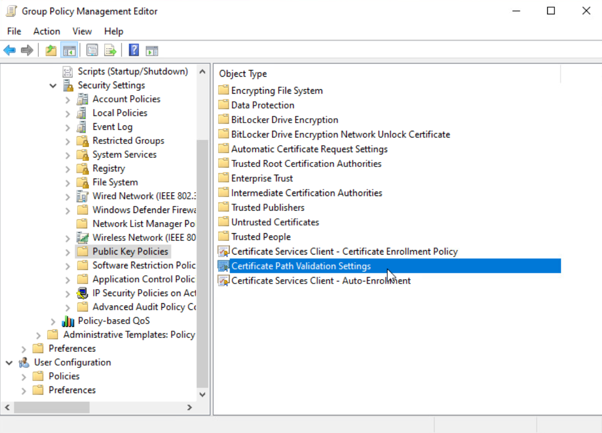
Under the Revocation tab, locate the option labeled “Prefer CRL over OCSP responses if the number of cached OCSP responses corresponding to the same CRL distribution point is greater than.” Set this to a value that reflects your expected certificate validation volume.
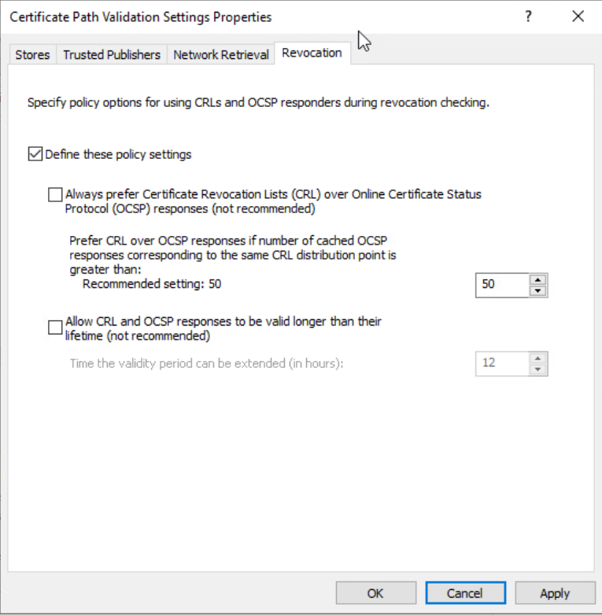
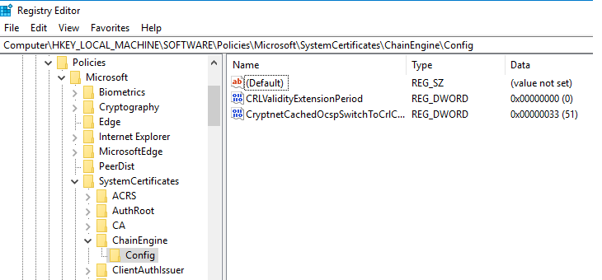
When this policy is applied, Windows creates the following registry value automatically:
HKEY_LOCAL_MACHINE\Software\Policies\Microsoft\SystemCertificates\ChainEngine\Config\CryptnetCachedOcspSwitchToCrlCount
2. Via Registry
If Group Policy is not available, you can create or modify the CryptnetCachedOcspSwitchToCrlCount DWORD value directly at that same registry path. This is suitable for individual machines or lab testing, but Group Policy remains the recommended method for broad deployment.
Two important notes:
There is no way to turn off the count-based fallback through this registry setting alone. Setting CryptnetCachedOcspSwitchToCrlCount to 0 does not disable the fallback; it simply restores the default threshold of 50. Organizations that need to disable OCSP fetching entirely must use the Options DWORD with the CERT_CHAIN_OPTION_DISABLE_AIA_URL_RETRIEVAL flag (0x2) at the same registry path. For most environments, however, setting the threshold high enough that it is never reached under peak validation volumes is the practical approach.
There is also no universally correct value. The right threshold depends entirely on your certificate validation volumes. A RADIUS server validating VPN certificates will have very different requirements than a domain controller processing smart card logons. Audit your environment first, understand your peak validation volumes per system, and set the threshold based on what you actually observe rather than an arbitrary number. That audit requires visibility into your full revocation architecture, and that is where having the right expertise makes the difference.
How Encryption Consulting Can Help
The OCSP Magic Number is the kind of configuration gap that rarely surfaces until something breaks. Most organizations discover it through a revocation failure, a security audit finding, or a network capture that reveals their clients have silently abandoned OCSP. By that point, the window of exposure has already been open for some time. Identifying and correcting it proactively requires knowing it exists, knowing where to look, and understanding how it interacts with the rest of your revocation architecture.
That is exactly the work our team does. At Encryption Consulting, our PKI Services team works with organizations across financial services, healthcare, government, and technology to assess, design, and validate revocation infrastructure that holds up under real-world conditions. We provide both professional services and our automation platform (CertSecure Manager) to ensure your PKI is secure, resilient, and future-ready.
PKI Services
Encryption Consulting’s PKI Services cover the full engagement lifecycle, from initial scoping through deployment and long-term support. Each phase is structured around your environment, your regulatory requirements, and your operational reality.
- Project Planning
We assess your cryptographic environment, review PKI configurations, dependencies, and requirements, and consolidate findings into a structured, customer-approved project plan.
- CP/CPS Development
In the next phase, we develop Certificate Policy (CP) and Certification Practice Statement (CPS) aligned with RFC#3647. These documents are customized to your organization’s regulatory, security, and operational requirements.
- PKI Design and Implementation
We design and deploy resilient PKI infrastructures with offline Root CA, issuing CAs, NDES servers, integration with HSMs, etc., depending upon the customer’s needs. Deliverables include PKI design document, build guides, ceremony scripts, and system configurations. Once deployed, we conduct thorough testing, validation, fine-tuning, and knowledge transfer sessions to empower your team.
- Business Continuity and Disaster Recovery
Following the deployment, we develop and implement business continuity and disaster recovery strategies, conduct failover testing, and document operational workflows for the entire PKI and HSM infrastructure, supported by a comprehensive PKI operations guide.
- Ongoing Support and Maintenance (Optional)
After implementation, we offer a subscription-based yearly support package that provides comprehensive coverage for PKI, CLM, and HSM components. This includes incident response, troubleshooting, system optimization, certificate lifecycle management, CP/CPS updates, key archival, HSM firmware upgrades, audit logging, and patch management.
This approach ensures your PKI infrastructure is not only secure and compliant but also scalable, resilient, and fully aligned with your long-term operational and regulatory goals.
Our Certificate Lifecycle Management Solution: CertSecure Manager
CertSecure Manager by Encryption Consulting is a certificate lifecycle management solution that simplifies and automates the entire lifecycle, allowing you to focus on security rather than renewals.
CertSecure Manager by Encryption Consulting is a certificate lifecycle management solution that centralizes discovery, automation, enrollment, policy enforcement, and integrations across your entire PKI environment. It prevents outages with automated renewals, enhances compliance, and unifies management of public and private CAs through a single, scalable platform. Some of the key features of CertSecure Manager include:
- Automation for Short-Lived Certificates: With ACME and 90-day/47-day TLS certificates becoming the standard, manual renewal is no longer a practical option. CertSecure Manager automates enrolment, renewal, and deployment to ensure certificates never expire unnoticed.
- Seamless DevOps & Cloud Integration: Certificates can be provisioned directly into Web Servers and cloud instances, and they integrate with modern logging tools like Datadog, Splunk, ITSM tools like ServiceNow, and DevOps tools such as Terraform and Ansible.
- Multi-CA Support: Many organizations utilize multiple CAs (internal Microsoft CA, public CAs such as DigiCert and GlobalSign, etc.). CertSecure Manager integrates across these sources, providing a single pane of glass for issuance and lifecycle management.
- Unified Issuance & Renewal Policies: CertSecure Manager enforces your organization’s key sizes, algorithms, and renewal rules consistently across all certificates, not just automating renewals with multiple CAs, but ensuring every certificate meets your security standards every time.
- Proactive Monitoring & Renewal Testing: Continuous monitoring, combined with simulated renewal/expiry testing, ensures you identify risks before certificates impact production systems.
- Centralized Visibility & Compliance: One consolidated dashboard displays all certificates, key lengths, strong and weak algorithms, and their expiry dates. Audit trails and policy enforcement simplify compliance with PCI DSS, HIPAA, and other frameworks.
If you’re still wondering where and how to get started with securing your PKI, Encryption Consulting is here to support you with its PKI Support Services. You can count on us as your trusted partner, and we will guide you through every step with clarity, confidence, and real-world expertise. Reach out to us at [email protected] to get started.
Conclusion
The OCSP Magic Number is one of those Microsoft PKI behaviors that surfaces only during troubleshooting, yet the reason behind it is straightforward. What is not straightforward is diagnosing it. No event log entry. No alert. No indication on the OCSP responder. Just a silent switch that leaves your revocation infrastructure running perfectly while your clients have already moved on. The only way to stay ahead of it is to know your environment well enough to configure it intentionally, before the threshold configures itself for you.
Microsoft built this behavior deliberately. CryptoAPI is designed to dynamically determine whether OCSP or CRLs provide the more efficient revocation mechanism under current cache conditions. The magic count threshold is simply the tipping point used to make that decision. Understanding this behavior is important for anyone managing enterprise PKI environments, especially those involving large-scale authentication systems.
If your organization deployed OCSP specifically to handle large CRLs or to enforce deterministic revocation checking, the Magic Number is not an implementation detail. It is a configuration that must be actively managed. Know your CRL size, know your peak certificate validation volumes on critical systems, and set the threshold deliberately based on your requirements rather than accepting a default that was designed for a different environment than the one you are operating in.
Frequently Asked Questions
What is the main takeaway from The OCSP Magic Number?
The OCSP Magic Number is a Windows CryptoAPI threshold (default: 50) stored in the registry value CryptnetCachedOcspSwitchToCrlCount. When cached OCSP responses from a single responder URL for a given CA exceed this count, CryptoAPI silently switches revocation checking from OCSP to CRL. No Windows event log entry is generated and the OCSP responder appears healthy throughout. Setting the value to 0 restores the default of 50, not disables the fallback. The threshold is configurable via Group Policy under Certificate Path Validation Settings > Revocation tab.
Why does the OCSP Magic Number matter for enterprise PKI teams?
Enterprise PKI teams deploy OCSP for two specific reasons the Magic Number can silently undermine. First, to avoid large CRLs: the Magic Number fallback reintroduces the CRL download problem at exactly the high-volume systems where OCSP traffic is highest. Second, to enforce deterministic revocation checking: when clients fall back to CRL after crossing the threshold, the protection provided by Microsoft Hotfix 2960124 disappears and forged certificates with serial numbers not on the CRL pass validation silently. The DigiCert Trust Pulse Survey (July 2025) found that 45 percent of enterprises experienced certificate-related downtime in the prior year; silent revocation mechanism switching is a form of that operational risk.
What risks increase if the OCSP Magic Number is not actively managed?
Three risk categories increase: undetected CRL fallback (high-volume authentication systems cross the 50-response threshold quickly and begin downloading CRLs without any alert; if CRLs are large or CRL distribution points are unreachable, revocation checks fail silently); loss of deterministic revocation checking (clients that fell back to CRL lose Hotfix 2960124 protection, allowing forged certificates to pass validation if their serial numbers are not on the CRL); and inconsistent revocation behavior across the fleet (two machines with identical configurations can be at completely different OCSP cache counts, making troubleshooting appear non-deterministic).
Which teams should own the OCSP Magic Number configuration?
PKI admins own the threshold configuration: auditing the CryptnetCachedOcspSwitchToCrlCount registry value across the fleet, measuring peak certificate validation volumes per system type, and deploying the correct threshold via Group Policy. Security architects own the revocation policy design: determining whether Hotfix 2960124 deterministic responses are required and whether the Magic Number threshold must be set high enough to never cross. Platform teams own monitoring OCSP query volume and CRL download volume per client to detect threshold crossings. Compliance teams own evidence that revocation checking is functioning as documented in the Certificate Practice Statement.
How does the OCSP Magic Number connect to certificate lifecycle management?
The OCSP Magic Number is a revocation infrastructure configuration gap that a CLM platform surfaces as part of a broader PKI health assessment. CertSecure Manager provides the certificate inventory and infrastructure monitoring layer that correlates OCSP responder query volume with client-side behavior, detects when high-volume authentication systems are likely to cross the magic count threshold, and includes the CryptnetCachedOcspSwitchToCrlCount configuration in the PKI posture baseline. Without CLM coverage, the threshold is discovered only when something breaks.
How should organizations measure success in managing the OCSP Magic Number?
Key metrics: OCSP query volume consistency per high-volume client (domain controllers, RADIUS servers, and VPN gateways should show a stable OCSP query rate that does not drop suddenly without a corresponding configuration change); CryptnetCachedOcspSwitchToCrlCount configuration compliance (the registry value should be set above the expected peak OCSP response count for each system type, verified quarterly via Group Policy reporting); CRL download volume per client (a sudden spike from a client that was previously using OCSP is the secondary confirmation that the threshold was crossed); and zero unexplained revocation method switches (any transition from OCSP to CRL-based validation on a production system should be traceable to a deliberate configuration change).
What should be audited or monitored regularly for OCSP Magic Number management?
Monitor continuously: OCSP query volume per high-volume client using network traffic baselines, watching for sustained drops; CRL download volume per client as a secondary signal, with alerts for sudden spikes from clients previously using OCSP; and OCSP responder health alongside client-side query rates, since a healthy responder with declining query rates from high-volume clients is a strong indicator of threshold crossing. Audit quarterly: verify the CryptnetCachedOcspSwitchToCrlCount registry value across all domain controllers, RADIUS servers, and VPN gateways; re-measure peak certificate validation volumes as the fleet grows; and confirm CAPI2 diagnostic logging is configured on representative high-volume clients.
How does the OCSP Magic Number affect cloud, hybrid, or multi-CA PKI environments?
In hybrid environments, the Magic Number applies independently on each Windows client regardless of where the OCSP responder or CRL distribution point is hosted. Cloud-hosted OCSP responders do not change the counting behavior. What changes is the consequence of the fallback: if the CRL distribution point is hosted on-premises and cloud clients have a high-latency or blocked path to it, the fallback from OCSP to CRL produces download timeouts. In multi-CA environments where a single Online Responder serves multiple issuing CAs, the Magic Number count is tracked independently per CA: crossing the threshold for one CA has no effect on the count for others.
What common mistakes should teams avoid with the OCSP Magic Number?
The most frequent mistakes: not knowing the threshold exists until a revocation failure occurs in production; assuming the OCSP infrastructure is broken because clients stopped sending queries when the OCSP responder is actually healthy and the Magic Number simply fired; setting the threshold via registry without deploying via Group Policy, leaving the value inconsistent across the fleet; setting the threshold to 0 expecting to disable the fallback when it actually restores the default of 50; and not measuring peak certificate validation volumes before setting the threshold.
What should be refreshed quarterly for OCSP Magic Number governance?
Quarterly: re-measure peak certificate validation volumes on domain controllers, RADIUS servers, and VPN gateways as the fleet grows; verify the CryptnetCachedOcspSwitchToCrlCount Group Policy value is deployed consistently across all affected systems; review OCSP responder query logs for sustained volume drops from high-volume clients not caused by deliberate configuration changes; confirm CAPI2 diagnostic logging is active on representative clients; and review the CRL size for all active issuing CAs to confirm that if the Magic Number fires and clients fall back to CRL, the CRL remains within acceptable download size and distribution point availability. For revocation infrastructure alignment with post-quantum certificate migration planning, check current guidance through the PQC Center of Excellence.
- Quick Answer: What Is the OCSP Magic Number?
- Key Takeaways
- Who Should Care About the OCSP Magic Number
- OCSP Magic Number Scenario Matrix: Requirement, Validation Method, Failure Mode, and Monitoring Signal
- What Is OCSP?
- What Is the OCSP Magic Number?
- Why Microsoft Introduced It
- Why This Is a Problem
- How the Cache Works and What Windows Is Actually Counting
- How to Detect It
- How to Configure the Magic Number
- How Encryption Consulting Can Help
- Conclusion
- Frequently Asked Questions