- Key Takeaways
- Why an In-Place Upgrade Is Not Possible
- Why Start Now If RSA Is Allowed Until 2035
- The Target Architecture: Two Hierarchies, One Forest
- Key Design Decisions Before You Build
- What the Migration Requires from You
- Which Workloads Can Move First
- What Changes from Your RSA PKI
- The Migration Path, Phase by Phase
- Common Pitfalls to Avoid
- How Encryption Consulting Can Help
- Conclusion
- FAQ
Most organizations that run Microsoft Active Directory Certificate Services (AD CS) built their Public Key Infrastructure (PKI) on RSA years ago. That RSA hierarchy now issues certificates for servers, users, devices, code signing, and internal applications. In May 2026, Microsoft added the Module-Lattice-Based Digital Signature Algorithm (ML-DSA), standardized in NIST FIPS 204, to AD CS on Windows Server 2025, giving AD CS customers a built-in path to quantum-resistant signatures for their internal PKI.
There is one important constraint. An existing RSA Certificate Authority (CA) cannot be converted to ML-DSA. Microsoft states that ML-DSA CAs must be newly installed and that ML-DSA does not support in-place migration of existing CAs. For existing customers, the migration path is therefore to build a second, fully separate ML-DSA hierarchy, run it alongside the RSA PKI, move workloads in stages, and retire RSA before NIST’s transition deadlines.
This blog explains that migration phase by phase, using commands and screenshots from a working lab in which both hierarchies run in the same Active Directory forest. It is the AD CS-specific version of our Parallel PKI Migration guide. For background on the feature, read What ML-DSA Support Really Means for Your Microsoft PKI, and for the full build procedure, see our Two-Tier AD CS PKI with ML-DSA guide.
Quick answer: An existing RSA certification authority in Microsoft AD CS cannot be upgraded to ML-DSA in place. Instead, build a separate ML-DSA hierarchy in the same Active Directory forest, start with code signing and OCSP response signing, move other workloads at their natural renewal, and retire RSA before NIST IR 8547 disallows it after 2035.
Key Takeaways
Moving AD CS from RSA to ML-DSA involves several important decisions. These are the points every PKI team should know.
- AD CS on Windows Server 2025 supports ML-DSA-44, ML-DSA-65, and ML-DSA-87 for root, subordinate, enterprise, and standalone CAs from the May 2026 security update (KB5087539).
- Existing RSA CAs cannot be upgraded in place. Customers must build a new ML-DSA hierarchy in parallel with their RSA PKI.
- The two hierarchies should stay fully separated: no cross-certification, separate keys, separate revocation paths, and separate certificate templates. They share only the Active Directory forest.
- Not every workload can move yet. Code signing and OCSP signing are good starting points, while encryption-based and some authentication workloads must stay on RSA for now.
- Existing RSA certificates and users are not affected. The RSA PKI keeps running until every workload that needs it has moved or expired.
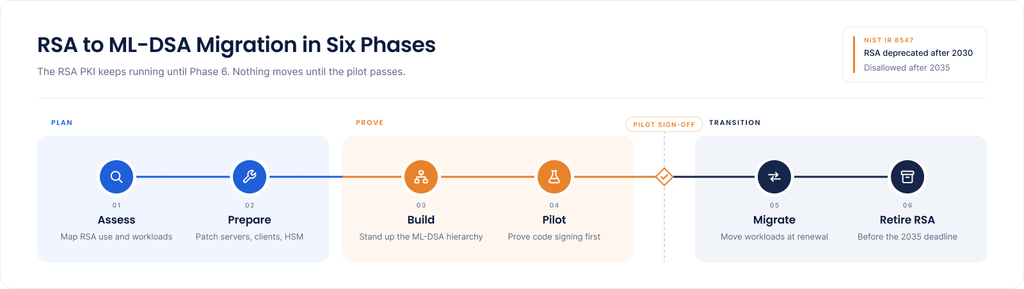
- A phased plan of Assess, Prepare, Build, Pilot, Coexist and Migrate, and Retire RSA lets organizations move safely ahead of NIST IR 8547, which deprecates RSA signatures at every key size, including RSA-3072 and above, after 2030 and disallows them after 2035.
Why an In-Place Upgrade Is Not Possible
A CA’s identity is tied to its key pair and its certificate. Every certificate the RSA CA has issued chains to an RSA root, and every relying party trusts that RSA root. Moving to ML-DSA means introducing a new trust anchor with a new key type, which is a new hierarchy by definition.
Microsoft confirms this in its AD CS documentation: “You must newly install ML-DSA CAs. ML-DSA doesn’t support in-place migration of existing CAs.” Renewing the existing RSA CA, upgrading its operating system, or migrating it to new hardware does not change the algorithm.
The table below summarizes what AD CS supports today:
| Area | Current support in AD CS |
|---|---|
| Algorithms | ML-DSA-44, ML-DSA-65, ML-DSA-87 (pure mode). ML-KEM and composite certificates are planned for a later phase, with no date announced. |
| CA types | Root, subordinate, enterprise, and standalone CAs |
| CA servers | Windows Server 2025 with the 2026-05 security update (KB5087539) or later |
| Clients | Windows 11 24H2 and 25H2 with the 2025-10 non-security update (KB5067036) or later |
| Key storage | CNG Key Storage Providers only. Legacy Cryptographic Service Providers (CSPs) are not supported. |
| Templates | Purpose must be Signature. No key encipherment or key agreement, and no EFS or Secure Email. |
| Enrollment | Certificates MMC snap-in and certreq.exe, with Autoenroll permissions described for code signing and OCSP templates. Network Device Enrollment Service (NDES) enrollment is not currently available. |
Microsoft also notes that “not all third-party applications, devices, or services recognize ML-DSA certificates,” so every workload must be validated before it moves.
The takeaway: For an existing RSA customer, ML-DSA migration is a new PKI deployment combined with a controlled workload transition, not an upgrade.
Why Start Now If RSA Is Allowed Until 2035
RSA signatures remain acceptable for several more years, so it is fair to ask why the work should begin today. Three reasons make the timing matter:
- CA certificates outlive deadlines: Root CA certificates are commonly issued for 20 years, as in our own lab builds. An RSA root created or renewed in 2026 would remain valid until 2046, more than a decade after NIST IR 8547 disallows RSA signatures.
- The migration itself takes years: Clients must be updated, every application must be tested, and certificates move on their natural renewal schedule. Even a well-run program will need a long coexistence period.
- Application support arrives gradually: Having the ML-DSA hierarchy in place lets you test each application as vendors add support, instead of discovering gaps close to the deadline.
The takeaway: Building the ML-DSA hierarchy now carries little risk, because the RSA PKI is not touched. Waiting compresses the same work into a much shorter window.
The Target Architecture: Two Hierarchies, One Forest
The target state keeps the existing RSA PKI running unchanged while a new ML-DSA hierarchy is built beside it in the same Active Directory forest. The diagram below shows this design with the CA and server names from the Encryption Consulting lab (EncryptionConsulting.com), and the same names appear in every screenshot below.
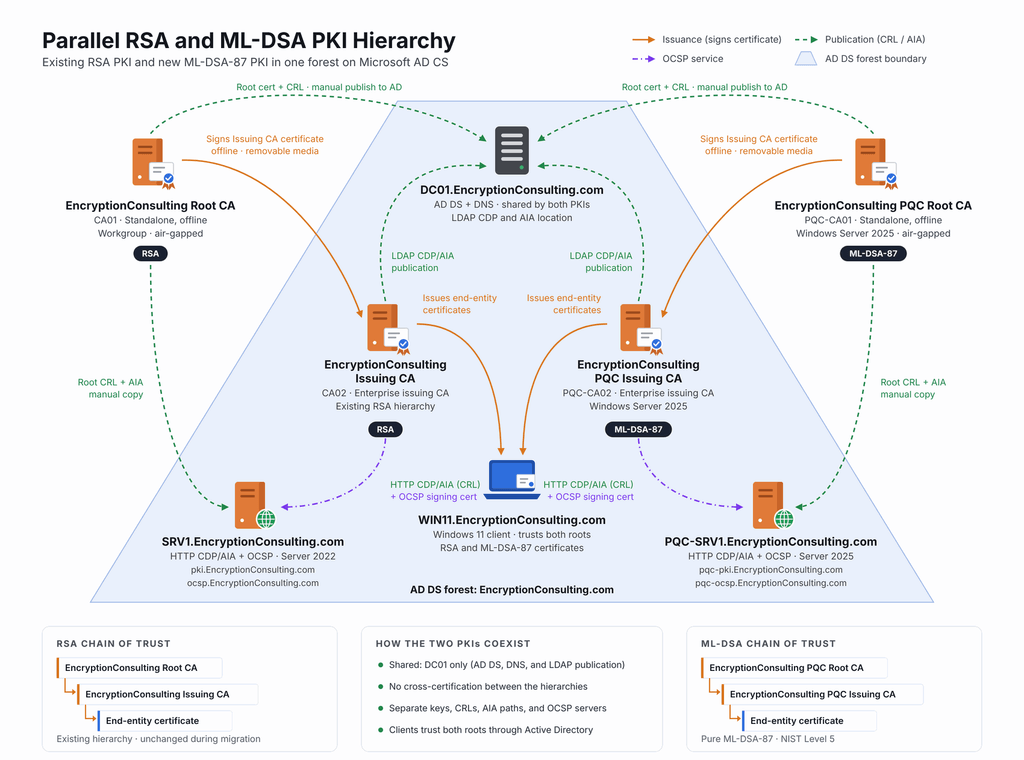
| Component | Existing RSA PKI | New ML-DSA PKI |
|---|---|---|
| Root CA | EncryptionConsulting Root CA on CA01: standalone, offline, RSA | EncryptionConsulting PQC Root CA on PQC-CA01: standalone, ML-DSA-87 |
| Issuing CA | EncryptionConsulting Issuing CA on CA02: enterprise, RSA | EncryptionConsulting PQC Issuing CA on PQC-CA02: enterprise, ML-DSA-87 |
| Revocation | SRV1 (Windows Server 2022): pki and ocsp names for HTTP CDP/AIA and OCSP, plus LDAP on DC01 | PQC-SRV1 (Windows Server 2025): pqc-pki and pqc-ocsp names for HTTP CDP/AIA and OCSP, plus LDAP on DC01 |
| Templates | Existing RSA templates, such as Code Signing | New ML-DSA templates, such as PQC-CodeSigning and OCSP Response Signing – ML-DSA (Key Storage Provider, Purpose: Signature) |
| Clients | All existing clients and devices | Updated systems, such as WIN11 (Windows 11 with KB5067036) and Windows Server 2025 |
| Shared | DC01: AD DS, DNS, and Group Policy for EncryptionConsulting.com | Same |
Four separation rules keep the two hierarchies independent:
- No cross-certification: Each hierarchy has its own root, and neither root signs the other.
- Separate keys: Each CA has its own key, stored in a separate HSM partition in production.
- Separate revocation paths: RSA and ML-DSA CRLs and CA certificates are published to different URLs.
- Separate template sets: ML-DSA templates are published only on the ML-DSA issuing CA, and RSA templates only on the RSA issuing CA.
The takeaway: The only thing the two PKIs share is the Active Directory forest that distributes trust. Everything else stays separate so each hierarchy can be changed or retired without affecting the other.
How the Two PKIs Work Together in One Domain
Because both hierarchies live in the same forest, Active Directory does most of the coordination:
- Trust: Both root certificates are published to Active Directory, so every domain member trusts both hierarchies without manual steps.
- Templates: Certificate templates are stored forest-wide, but each CA issues only its own set. ML-DSA templates, such as PQC-CodeSigning, are published only on the ML-DSA issuing CA, and enrollment is limited to a group of updated systems.
- Enrollment: A workload that holds a certificate from the RSA issuing CA can enroll for its ML-DSA certificate from the ML-DSA issuing CA and keep both while it is tested.
- Revocation: Each certificate points to its own hierarchy’s web server, so RSA certificates are checked against SRV1 and ML-DSA certificates against PQC-SRV1.
- Retirement: When RSA is retired, its templates, CA objects, and root are removed from the same Active Directory that clients read, without touching the ML-DSA hierarchy.
Why two web and OCSP servers? Microsoft requires the ML-DSA Online Responder to run on Windows Server 2025 with KB5087539 or later. An existing RSA web server on an earlier Windows version can keep serving RSA, but it cannot host the ML-DSA OCSP responder. If your web and OCSP server already runs Windows Server 2025, one server can serve both hierarchies, as long as each has its own paths and its own revocation configuration.
Key Design Decisions Before You Build
A few early choices shape the entire ML-DSA hierarchy. Settle the following decisions before you install the first ML-DSA CA.
| Decision | Recommendation | Why it matters |
|---|---|---|
| Where to build | Prove the design in an isolated test forest, then build the parallel PKI in the production forest | Domain controllers and clients in a production forest cannot be fully isolated during early testing |
| Hierarchy | Two-tier: offline standalone root and online enterprise issuing CA | Mirrors the RSA design and Microsoft’s production recommendation |
| Parameter set | ML-DSA-87 for root and issuing CAs; ML-DSA-65 or ML-DSA-87 for end-entity certificates, based on policy | ML-DSA-87 offers the highest security category and matches NSA CNSA 2.0; ML-DSA-65 reduces certificate size |
| Key protection | HSM with ML-DSA available through a CNG Key Storage Provider, in a separate partition | AD CS uses PQC algorithms only through CNG providers |
| Revocation design | New, separate CDP and AIA paths and an ML-DSA OCSP responder | ML-DSA CRLs and certificates are larger, and RSA paths must stay online until RSA is retired |
| Template scope | Clear naming (for example, PQC-CodeSigning) and enrollment limited to a group of updated systems | Prevents unsupported clients from enrolling for ML-DSA certificates |
| Validity periods | Plan RSA CA validity to cover the full coexistence period | The RSA hierarchy must stay valid until its last certificate is no longer needed |
PQC note: ML-DSA objects are much larger than their RSA equivalents. According to FIPS 204, an ML-DSA-87 public key is 2,592 bytes and a signature is 4,627 bytes, compared with 512 bytes each for RSA-4096. In the lab, the ML-DSA issuing CA certificate was 8,476 bytes, the ML-DSA root CA certificate 7,508 bytes, and each ML-DSA-signed OCSP response about 13 KB. Plan for larger certificates, CRLs, OCSP traffic, and TLS handshakes.
What the Migration Requires from You
The migration needs new servers, updated clients, and clear ownership. Plan for the following resources before you approve the project.
| Area | What you need |
|---|---|
| New CA servers | At least two new Windows Server 2025 servers with KB5087539 or later: one offline root CA and one enterprise issuing CA |
| Key protection | An HSM whose firmware exposes ML-DSA through a CNG Key Storage Provider, with a new partition for the ML-DSA keys. Confirm support with your HSM vendor early. |
| Revocation hosting | New CDP, AIA, and OCSP paths, kept separate from RSA. The ML-DSA Online Responder must run on Windows Server 2025 with KB5087539 or later. |
| Domain controllers | Microsoft lists a domain controller on the latest Windows Server release as a prerequisite, with Windows Server 2025 or later recommended. |
| Clients | Windows 11 24H2 or 25H2 with KB5067036 or later on every system that will use or validate ML-DSA certificates |
| Test environment | An isolated test forest to prove the design before production |
| People | A PKI owner, application owners for each workload, and change management for client updates |
| Existing RSA PKI | No changes. It keeps running and issuing until it is retired. |
Which Workloads Can Move First
Not every workload is ready for ML-DSA. The readiness map below reflects Microsoft’s documentation and published test results as of November 2026:
| Readiness | Workloads | Reason |
|---|---|---|
| Move now | Code signing for internal scripts and binaries, OCSP response signing | Documented by Microsoft, and code signing confirmed in independent testing |
| Test first | Web server (TLS), user and computer certificates, internal applications | Supported templates, but independent testing reported IIS HTTPS binding errors and application support varies |
| Stay on RSA for now | EFS, S/MIME, key archival, devices enrolling through NDES or MDM, smart card logon, Remote Desktop, SSTP VPN, non-Windows and legacy clients | Encryption uses are excluded, NDES is not available, smart card logon is not documented as supported, and RDP and VPN failed in independent testing. These workloads need ML-KEM or composite certificate support, which Microsoft lists as planned for a later AD CS phase with no date, or a move to another platform, before RSA can be fully retired. |
Review this map regularly. Microsoft has announced that ML-KEM and composite certificates will arrive in a later AD CS phase, and application support will change over time. For the current state of PQC across Windows, see Windows and Post-Quantum Cryptography: What’s Available in 2026.
The takeaway: Plan for a long coexistence period. The RSA PKI will keep serving encryption and legacy workloads well after the first ML-DSA certificates are issued.
What Changes from Your RSA PKI
Teams familiar with RSA AD CS will notice several differences when building and operating the ML-DSA hierarchy. The table below lists the differences that matter most for migration. For hash and key length settings, see the full comparison in our Two-Tier AD CS PKI with ML-DSA guide.
| Area | RSA PKI today | ML-DSA PKI |
|---|---|---|
| Cryptographic provider | CSP or KSP | CNG Key Storage Provider only |
| Template purpose | Signature and encryption | Signature only |
| Enrollment options | Autoenrollment, MMC, web enrollment, NDES | MMC, certreq.exe, and autoenrollment for code signing and OCSP templates; NDES not available |
| Client support | All Windows versions | Windows 11 24H2 and 25H2 with KB5067036 or later |
The Migration Path, Phase by Phase
The migration runs in six phases, as shown in the diagram below. Each phase ends with an exit gate that must be met before the next phase begins. The pilot is the key decision point: if it fails, fix the ML-DSA build and test again before any workload moves. Each phase below includes the commands and screenshots from the lab so that you can follow the same path in your own environment.
Phase 1: Assess
Start with a complete picture of the existing RSA PKI and the workloads that depend on it.
- Inventory the RSA PKI: Record CAs, published certificate templates, issued certificates, expiry dates, CDP and AIA locations, and HSMs. If the RSA PKI follows our two-tier AD CS design, the inventory maps directly to the root, issuing CA, and web server.
- Map workloads to owners: Identify which application, team, or device uses each template.
- Classify each workload as Move now, Test first, or Stay on RSA, using the readiness map above.
- Define the target design, covering hierarchy, parameter sets, validity periods, revocation paths, and template naming.
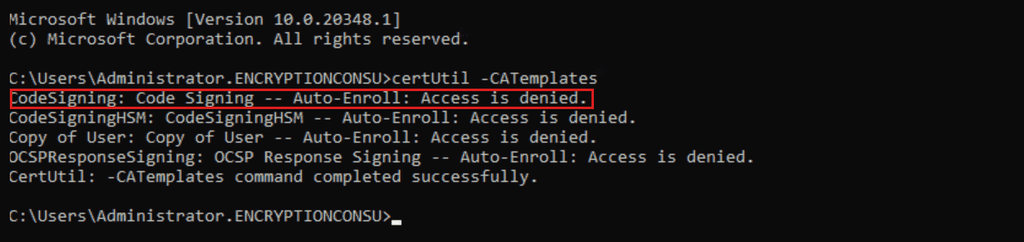
To list the templates published on the RSA issuing CA (CA02 in the lab), run the following in an elevated Command Prompt on that CA:
certutil -CATemplates
In the output below, Code Signing, the first workload to move to ML-DSA, is highlighted. “Auto-Enroll: Access is denied” reflects template permissions for the signed-in account and is not an error.
Exit gate: The inventory is complete, and the target design is approved.
Phase 2: Prepare
Make sure every component that the ML-DSA hierarchy depends on is ready.
- Update CA servers to Windows Server 2025 with KB5087539 or later.
- Update pilot clients to Windows 11 24H2 or 25H2 with KB5067036 or later.
- Confirm HSM readiness: Check that the HSM firmware exposes ML-DSA through a CNG Key Storage Provider.
- Prepare separate revocation paths and DNS names for the ML-DSA CDP, AIA, and OCSP.
- Prove the design in an isolated test forest before touching production.
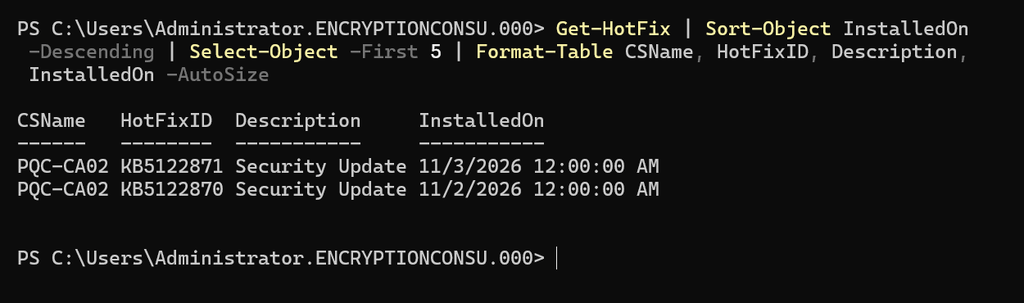
To confirm that a CA server has KB5087539 or a later cumulative update, run the following in an elevated PowerShell window on the new ML-DSA CA server:
Get-HotFix | Sort-Object InstalledOn -Descending | Select-Object -First 5 | Format-Table CSName, HotFixID, Description, InstalledOn -AutoSize
PQC note: ML-DSA support ships in the Windows cumulative update, so the KB number changes every month. Any cumulative update from May 2026 (KB5087539) onward includes it, which is why a later update appears in this list.
The output below shows that PQC-CA02, the new ML-DSA CA server, runs KB5122871, a cumulative update for Windows Server 2025 that is later than KB5087539.
Exit gate: Servers, clients, and HSMs are validated.
Phase 3: Build
Build the ML-DSA hierarchy alongside the RSA PKI without changing the RSA PKI.
- Install the offline ML-DSA root CA and issue the ML-DSA issuing CA certificate.
- Publish the ML-DSA root certificate and CRL to Active Directory so domain members trust both roots.
- Configure CRL, AIA, and OCSP on the separate ML-DSA paths (pqc-pki and pqc-ocsp in the lab).
- Create ML-DSA templates and publish them only on the ML-DSA issuing CA.
The detailed build steps are covered in our Two-Tier AD CS PKI with ML-DSA guide and How to Build an ML-DSA CA Hierarchy in Microsoft AD CS.
To check both hierarchies after the build, run the following on the ML-DSA issuing CA (PQC-CA02):
pkiview.msc
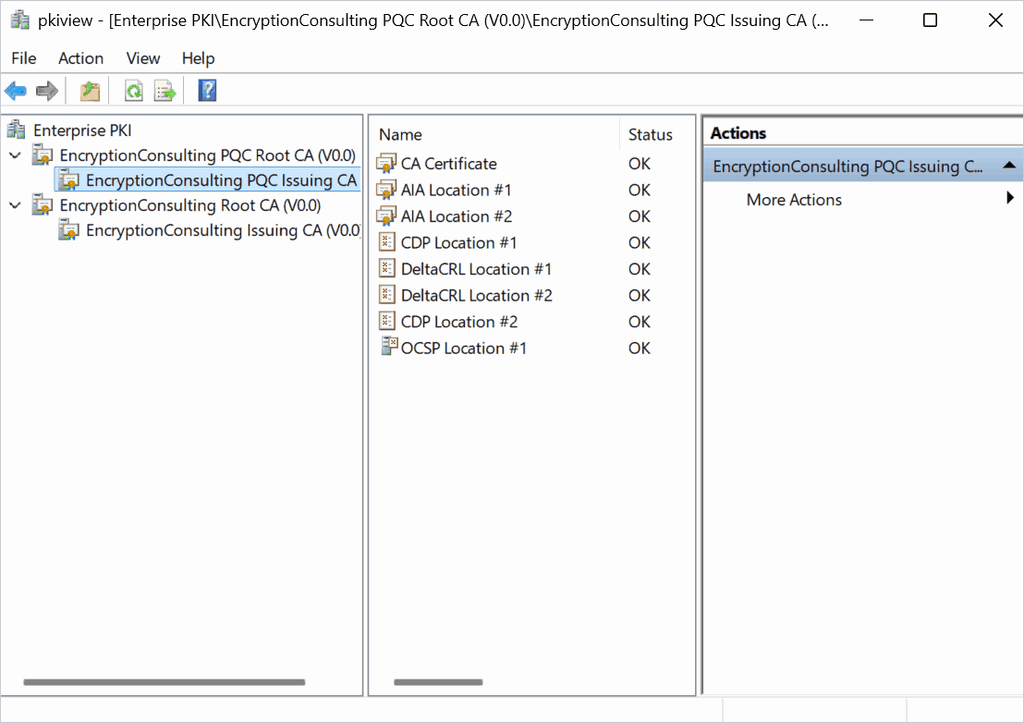
In the PKI Health Tool below, the existing RSA hierarchy and the new ML-DSA hierarchy appear side by side in one forest, and every location of the ML-DSA issuing CA, including OCSP, is reported as OK.
To confirm the ML-DSA Online Responder is working, open the following on the ML-DSA web and OCSP server (PQC-SRV1) and select the server under Array Configuration:
ocsp.msc
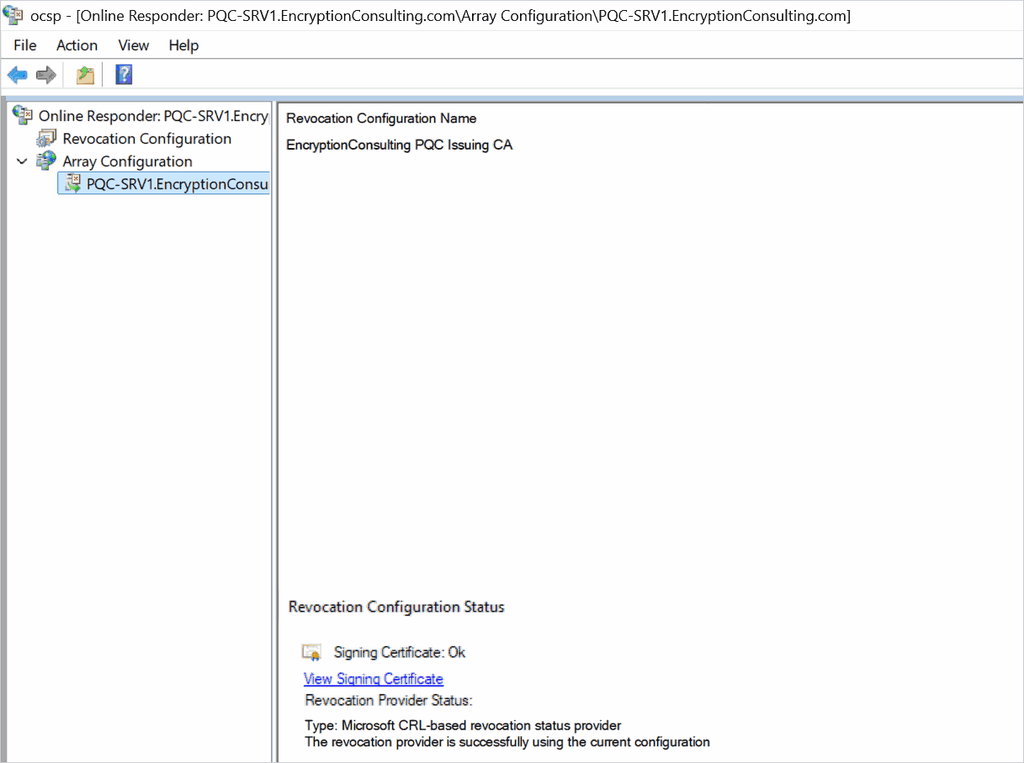
The screenshot below shows Online Responder Management on PQC-SRV1. The revocation configuration for the ML-DSA issuing CA has a valid ML-DSA signing certificate and serves responses from the current CRLs.
PQC note: The ML-DSA Online Responder must run on Windows Server 2025 with KB5087539 or later, and its signing certificate comes from a duplicated OCSP Response Signing template set to the Key Storage Provider and ML-DSA. That is why the lab uses PQC-SRV1 instead of the existing SRV1.
To confirm that a domain client trusts both roots, refresh Group Policy and open the certificate store on the client (WIN11):
gpupdate /force
certmgr.msc
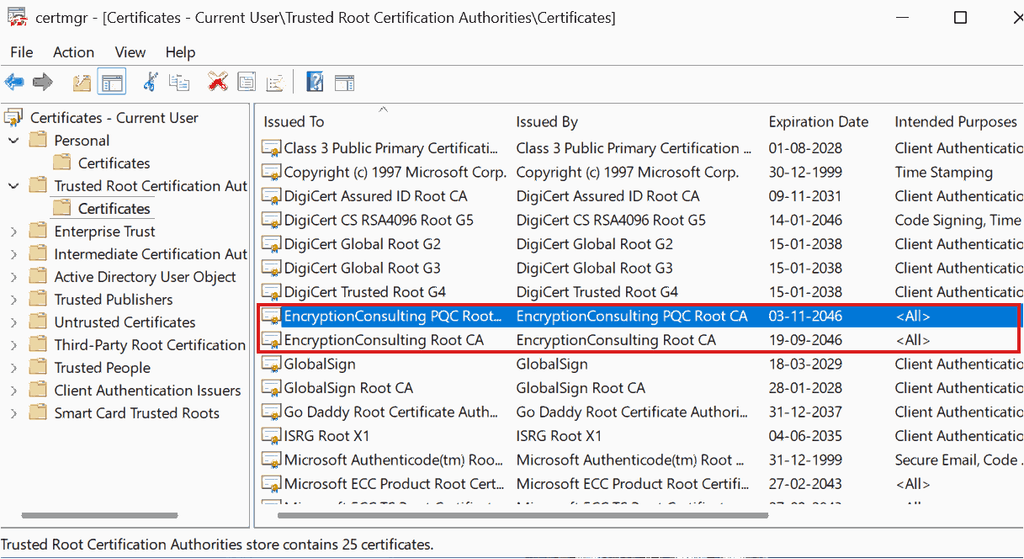
The certificate store below shows that a domain-joined Windows 11 client trusts both the existing EncryptionConsulting Root CA (RSA) and the new EncryptionConsulting PQC Root CA (ML-DSA), distributed through Active Directory.
Troubleshooting tip: If the PKI Health Tool reports the OCSP location as an error even though the responder is working, the CA Exchange certificate may still hold the addresses from before the AIA was changed. Revoke the existing CA Exchange certificate in the Certification Authority console (reason: Superseded), then run the following on the ML-DSA issuing CA and refresh the PKI Health Tool:
certutil -crl
certutil -cainfo xchg
Exit gate: The ML-DSA chain and revocation checks validate successfully on updated clients.
Phase 4: Pilot
Prove the ML-DSA hierarchy with real workloads before wider use.
- Start with code signing and OCSP response signing, which Microsoft documents step by step.
- Validate chain building and revocation with certutil -verify -urlfetch.
- Test TLS, user, and computer certificates with the applications that will use them, and record the results.
- Run a negative test on a client without the required update to confirm that unsupported clients fail as expected.
- Measure the size impact of ML-DSA certificates and CRLs on your network and applications.
To check chain building and revocation for an ML-DSA certificate, enroll a certificate from the PQC-CodeSigning template, export it without the private key, and run the following on an updated client:
certutil -verify -urlfetch C:\test-codesign.cer
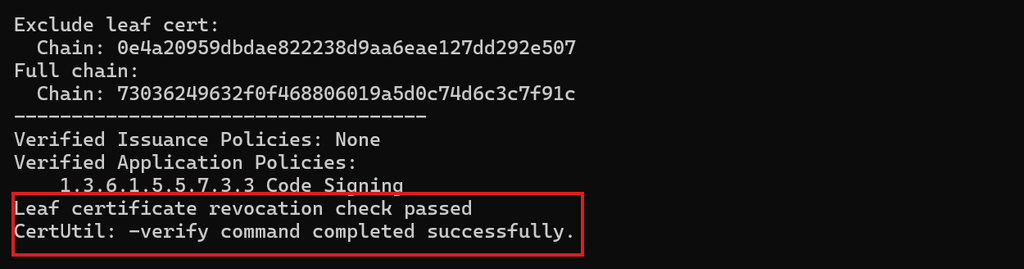
In the output below, certutil builds the full chain to the ML-DSA root, confirms the Code Signing application policy, and reports that the revocation check for the ML-DSA leaf certificate passed.
To sign a test script with the ML-DSA code signing certificate and check the signature, run the following in PowerShell on the same client:
$cert = Get-ChildItem Cert:\CurrentUser\My -CodeSigningCert | Where-Object Issuer -like "*PQC Issuing CA*"
Set-AuthenticodeSignature -FilePath C:\Test\hello.ps1 -Certificate $cert
Get-AuthenticodeSignature C:\Test\hello.ps1 | Format-List Status, SignerCertificate
The output below shows a PowerShell script signed with an ML-DSA code signing certificate. Windows reports the signature as Valid, issued by the EncryptionConsulting PQC Issuing CA.
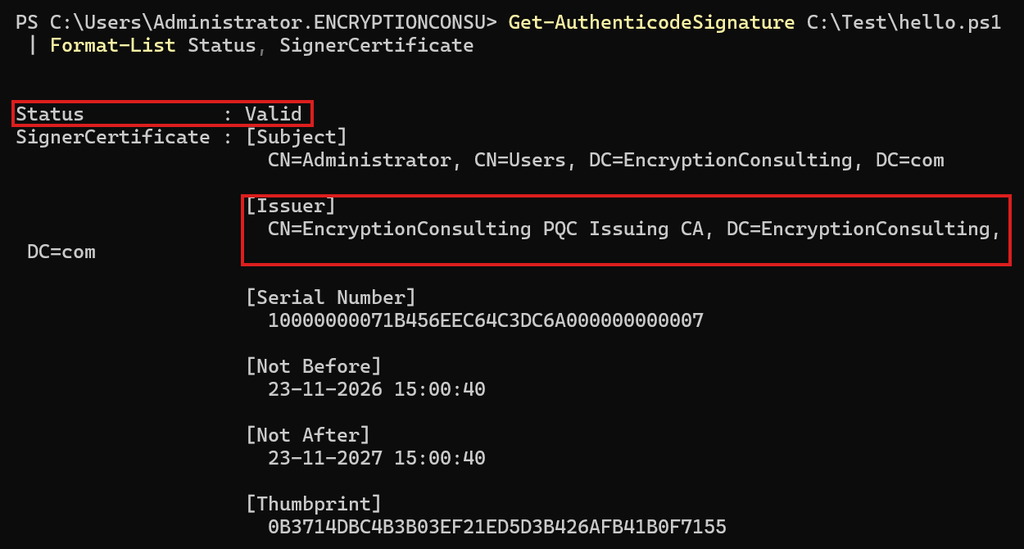
PQC note: In the lab, the built-in Set-AuthenticodeSignature cmdlet signed the script with the ML-DSA certificate without any extra tools, and certutil confirmed the CRL and OCSP checks for the ML-DSA leaf certificate.
Exit gate: The pilot succeeds, and the rollback to RSA has been tested.
Phase 5: Coexist and Migrate
Move workloads one at a time while both hierarchies run.
- Move each workload at its natural renewal by enrolling it from the matching ML-DSA template.
- Limit enrollment to security groups of systems that support ML-DSA.
- Stop issuing each migrated template on the RSA CA once the workload has moved.
- Track progress by comparing issued certificates on both CAs.
- Keep RSA for workloads in the Stay on RSA category.
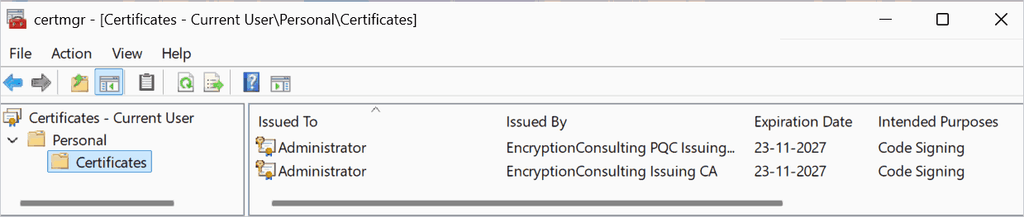
To see both certificates for the same workload, open the user certificate store on the client:
certmgr.msc
The certificate store below shows the same code signing workload holding one certificate from the existing RSA issuing CA and one from the new ML-DSA issuing CA, so that it can switch to ML-DSA at its natural renewal.
Exit gate: All in-scope workloads use ML-DSA certificates.
Phase 6: Retire RSA
Retire the RSA PKI only after its certificates are no longer needed. Microsoft’s guidance on decommissioning a CA without affecting previously issued certificates provides the model:
- Stop issuance by removing the remaining templates from the RSA issuing CA.
- Publish a final, long-lived CRL so existing RSA certificates can still be validated.
- Keep the RSA CDP and AIA paths online until the last RSA certificate expires.
- Decommission the RSA CA and remove its objects from Active Directory. Remove the RSA issuing CA from the NTAuth store only after the last RSA smart card or other authentication certificate has expired or been replaced, or certificate-based logon will fail.
- Remove the RSA root from trust stores only after the last RSA certificate has expired.
Our guide How to Migrate from an Old CA to a New Issuing CA covers the checks to run before stopping the old CA, including keeping its CRL reachable and monitoring for missed certificates after cutover.
Exit gate: RSA is retired before NIST IR 8547 disallows it after 2035, once the workloads that still need RSA for encryption have a supported ML-KEM or composite replacement.
Common Pitfalls to Avoid
Most migration problems come from a few avoidable mistakes. Watch for the following issues during the build and coexistence phases.
- Publishing the same template on both CAs: Clients can then enroll from either CA, which breaks the separation between the hierarchies.
- Assuming patched servers mean patched clients: ML-DSA certificates fail on clients without KB5067036.
- Revoking RSA certificates during retirement: Revocation breaks certificates that should remain valid until they expire.
- Retiring RSA revocation paths too early: Existing RSA certificates fail validation if their CRL and AIA locations disappear.
- Ignoring HSM readiness: An HSM without an ML-DSA-capable CNG provider blocks the build phase.
How Encryption Consulting Can Help
Encryption Consulting helps organizations plan and carry out the move from RSA to ML-DSA on Microsoft PKI.
- PQC Advisory Services: Assess your cryptographic estate, prioritize workloads, and build a post-quantum migration roadmap aligned with NIST timelines.
- PKI Services: Design and deploy the parallel ML-DSA hierarchy, including CP/CPS, templates, revocation, and HSM integration, with expert PKI implementation support.
- CBOM Secure: Discover where RSA is used across your keys, certificates, and applications through automated cryptographic discovery and inventory to support the assessment phase.
Conclusion
Existing AD CS customers cannot switch their RSA CAs to ML-DSA, but they do not need to start over. By building a separate ML-DSA hierarchy in the same forest, piloting it with ready workloads, and moving the rest as support matures, organizations can adopt quantum-resistant signatures without disrupting the RSA PKI that their environment depends on today.
The organizations that start now will have time to test, learn, and migrate at their own pace. Those that wait until the NIST deadlines are close will face the same migration with far less room for error. For a wider view of planning, see PQC Migration in 2026: Building a Roadmap That Survives Contact With Production.
FAQ
Can I upgrade my existing RSA AD CS CA to ML-DSA?
No. Microsoft states that ML-DSA CAs must be newly installed and that ML-DSA does not support in-place migration of existing CAs. You need to build a new ML-DSA hierarchy alongside your RSA PKI.
Which Windows versions support ML-DSA in AD CS?
CA servers need Windows Server 2025 with the 2026-05 security update (KB5087539) or later. Clients need Windows 11 24H2 or 25H2 with the 2025-10 non-security update (KB5067036) or later.
Should the RSA and ML-DSA hierarchies be cross-certified?
No. Keeping the hierarchies fully separate means each can be managed and retired independently. Clients trust both roots through Active Directory during the coexistence period.
Which workloads should move to ML-DSA first?
Code signing and OCSP response signing are the best starting points. TLS, user, and computer certificates should be tested first, while EFS, S/MIME, NDES-based device enrollment, smart card logon, Remote Desktop, and VPN should stay on RSA for now.
Will our existing RSA certificates stop working during the migration?
No. The RSA PKI will keep running unchanged, clients will keep trusting the RSA root, and RSA certificates will remain valid until they expire. Workloads move to ML-DSA one at a time, and only after they pass testing.
Do we need new servers and HSMs?
You need new CA servers running Windows Server 2025, because the existing RSA CAs cannot be converted. Your HSM can stay in use only if its firmware supports ML-DSA through a CNG Key Storage Provider, so check with your vendor during the Prepare phase.
When does RSA need to be retired?
NIST IR 8547 deprecates quantum-vulnerable digital signature algorithms, including RSA at every key size (RSA-3072 and above as well as RSA-2048), after 2030 and disallows them after 2035. Organizations should plan to retire their RSA PKI before 2035, and earlier if sector-specific requirements apply. Read more in NIST IR 8547 Is Final: RSA and ECC Now Have an Expiry Date.
- Key Takeaways
- Why an In-Place Upgrade Is Not Possible
- Why Start Now If RSA Is Allowed Until 2035
- The Target Architecture: Two Hierarchies, One Forest
- Key Design Decisions Before You Build
- What the Migration Requires from You
- Which Workloads Can Move First
- What Changes from Your RSA PKI
- The Migration Path, Phase by Phase
- Common Pitfalls to Avoid
- How Encryption Consulting Can Help
- Conclusion
- FAQ