

Secure Shell (SSH) is a network protocol that lets users and administrators securely access, control, and transfer data to a remote computer over an unsecured network. It uses strong encryption and authentication to protect the connection, and is the standard way to log in to and manage remote servers.
Secure Shell (SSH) is a cryptographic network protocol for securely operating a remote computer over an untrusted network. It creates an encrypted channel between an SSH client and an SSH server, so administrators can log in, run commands, and transfer files without exposing them to eavesdropping or tampering. SSH uses public-key authentication and strong encryption and typically runs on port 22.
Key Takeaways
- SSH (Secure Shell) is a protocol for securely accessing and managing a remote computer over an unsecured network, using encryption and strong authentication.
- It follows a client-server model: the SSH client connects to an SSH server, they authenticate and negotiate keys, and all subsequent traffic is encrypted. SSH uses TCP port 22 by default.
- SSH supports password authentication and, more securely, public key authentication using an SSH key pair (a public key on the server, a private key held by the user).
- Beyond remote login, SSH enables secure file transfer (SFTP and SCP), port forwarding and tunneling, and automated machine-to-machine access.
- SSH keys often grant privileged access and never expire, so unmanaged ‘SSH key sprawl’ is a real security risk. Managing the SSH key lifecycle is as important as the protocol itself.
What Is SSH Used For?
SSH, also called Secure Shell or Secure Socket Shell, is the standard tool for administering remote systems securely. It replaced older protocols such as Telnet and rlogin, which sent data, including passwords, in plaintext. Common uses include:
- Remote login and administration: Securely logging in to servers and network devices to run commands and manage systems.
- Secure file transfer: Moving files with SFTP (SSH File Transfer Protocol) or SCP, both of which run over the encrypted SSH channel.
- Automation and machine-to-machine access: Automated scripts, backups, and configuration management use SSH keys to connect without human interaction.
- Port forwarding and tunneling: SSH can tunnel other protocols through its encrypted channel, acting as a lightweight VPN-like solution.
- Managing infrastructure: Administering mission-critical systems and network components from a distance.
How Does SSH Work?
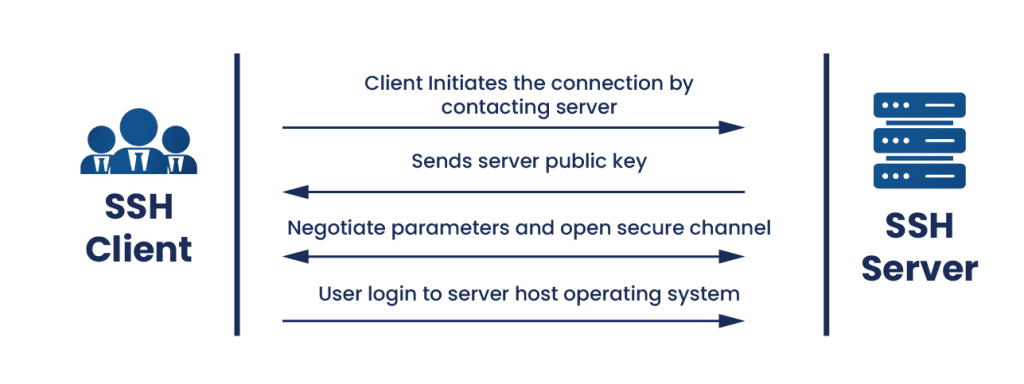
SSH operates on a client-server model. An SSH client initiates a connection to an SSH server (which listens on TCP port 22 by default), and the two establish an encrypted channel before any sensitive data or credentials are exchanged. The process happens in three phases.
- Connection and key exchange: The client connects to the server and the two negotiate a protocol version and cryptographic algorithms. They then perform a key exchange (typically Diffie-Hellman) to agree on a shared symmetric session key, without ever sending that key across the network. The client also verifies the server’s host key to confirm it is connecting to the right machine and not an impostor.
- Authentication: The server verifies the identity of the user, most commonly with a password or, more securely, with public key authentication. In public key authentication, the user proves possession of a private key that matches a public key already stored on the server.
- Encrypted session: Once the channel is established and the user is authenticated, all traffic is encrypted with the negotiated symmetric algorithm (such as AES) and protected against tampering with a hashing algorithm (such as SHA-2). Commands, output, and files pass through this secure channel.
The design combines asymmetric and symmetric cryptography: asymmetric techniques handle the key exchange and authentication, then fast symmetric encryption protects the bulk of the session. This is the same hybrid pattern used by TLS.
SSH Authentication Methods
SSH supports several ways to authenticate a user. The two most common are passwords and public keys.
Password authentication
The user supplies a password, which is transmitted through the already-encrypted channel. It is simple but weaker: passwords can be guessed, reused, or brute-forced, and they do not suit automation.
Public key authentication (SSH keys)
The more secure and widely used method relies on an SSH key pair. The user generates a public key and a private key. The public key is placed on the server (in the authorized keys file), and the private key stays with the user. To authenticate, the user proves they hold the private key without transmitting it. This enables passwordless, automated access and single sign-on, which is why SSH keys are the backbone of secure automation, automated file transfers, and bulk configuration management.
The Hidden Risk: SSH Key Sprawl
SSH keys are powerful, and that is exactly why they are a risk when unmanaged. Unlike certificates, SSH keys typically do not expire, so they accumulate over years. Large organizations often have far more SSH keys than employees, many granting privileged or root access, with no record of who owns them or what they unlock. Orphaned and untracked keys are a serious attack surface: a single leaked private key can hand an attacker persistent, privileged access. This is why managing the full SSH key lifecycle, discovery, rotation, and removal, matters as much as the protocol itself.
Benefits of SSH
- Strong security: Encryption and authentication keep data confidential and connections tamper-resistant, even over untrusted networks.
- Versatility: SSH handles remote terminal access, file transfer, tunneling, and automation in a single protocol.
- Cross-platform: SSH is available on virtually all operating systems, with OpenSSH the most widely used implementation.
- Automation-friendly: Key-based authentication enables secure, unattended machine-to-machine connections.
- Auditing and logging: SSH provides logging that lets administrators monitor access and investigate incidents.
SSH and the Post-Quantum Transition
SSH depends on the asymmetric cryptography used during key exchange and authentication, which is exactly what a future quantum computer could break using Shor’s algorithm. The SSH ecosystem is responding: recent versions of OpenSSH have adopted post-quantum key-exchange methods (combining a classical algorithm with a quantum-resistant one) to protect sessions against harvest-now-decrypt-later attacks, where traffic captured today could be decrypted later. The symmetric encryption that protects the session data itself, such as AES-256, remains secure. Organizations with long-lived SSH infrastructure should factor post-quantum readiness into their planning.
How Encryption Consulting Helps
SSH is only as secure as the keys behind it, and SSH key management is where most organizations are exposed. Encryption Consulting’s SSH Secure provides automated SSH key lifecycle management: discovering every SSH key across your environment, identifying orphaned and non-compliant keys, and enforcing rotation and policy so privileged access cannot accumulate unchecked. More broadly, our Encryption Advisory Services help you assess and strengthen your encryption and key management strategy, aligned to NIST and FIPS guidance and ready for the post-quantum transition. Backed by ISO/IEC 27001:2022 and SOC 2 certified practices.
Frequently Asked Questions
What is SSH in simple terms?
SSH (Secure Shell) is a way to securely connect to and control another computer over a network, even an untrusted one like the internet. It creates an encrypted tunnel between your computer (the client) and the remote machine (the server), so anything you send, such as commands, passwords, or files, cannot be read or altered by anyone intercepting the connection. It is the standard tool administrators use to manage remote servers.
How does SSH work?
SSH works in three phases. First, the client connects to the server and they exchange keys to agree on a shared secret, without sending it over the network, and the client verifies the server’s identity. Second, the server authenticates the user, usually with a password or an SSH key pair. Third, all further communication is encrypted with a symmetric algorithm like AES and protected against tampering with a hash like SHA-2. SSH uses TCP port 22 by default.
What is the difference between password and SSH key authentication?
Password authentication requires the user to type a password, which is sent through the encrypted channel but can be guessed, reused, or brute-forced. SSH key authentication uses a key pair: a public key stored on the server and a private key held by the user. The user proves they hold the private key without sending it. Key authentication is more secure and supports automation, which is why it is preferred for administrative and machine-to-machine access.
What is an SSH key?
An SSH key is part of a cryptographic key pair used for public key authentication in SSH. The pair consists of a public key, which is placed on the servers a user needs to access, and a private key, which the user keeps secret. When connecting, the user proves possession of the private key to gain access, without transmitting it. SSH keys enable passwordless, automated login, but because they often grant privileged access and do not expire, they must be carefully managed.
What port does SSH use?
SSH uses TCP port 22 by default. This is the port an SSH server listens on for incoming connections. Administrators sometimes change the default port to reduce automated scanning and brute-force attempts, but this is a minor obscurity measure rather than a real security control. Strong authentication, particularly key-based authentication, and proper key management provide the actual security.
Is SSH safe against quantum computers?
The symmetric encryption SSH uses to protect session data, such as AES-256, is considered quantum-safe. However, the asymmetric key exchange and authentication that set up an SSH session rely on algorithms a future quantum computer could break. To address this, recent versions of OpenSSH have introduced post-quantum key-exchange methods that combine classical and quantum-resistant algorithms, protecting sessions against harvest-now-decrypt-later attacks where captured traffic is decrypted later.
Get Control of Your SSH Keys
SSH secures the connection, but unmanaged SSH keys quietly become one of the largest sources of privileged access risk in an enterprise. Explore Encryption Consulting’s SSH Secure for automated SSH key lifecycle management, or talk to our Encryption Advisory team about strengthening your key management strategy.