
- Key Takeaways
- Why Browsers Moved First
- Why Is PQC Necessary?
- Browser PQC Support at a Glance
- Enabling PQC Support in Web Browsers
- Verifying PQC Support in Web Browsers
- PQC Migration and Challenges
- What This Means for Your Organization
- How Can Encryption Consulting Help?
- Conclusion
- Frequently Asked Questions
Quick answer: Yes, most major web browsers already support post-quantum cryptography by default: Chrome, Edge, and most current Firefox builds automatically negotiate a hybrid X25519MLKEM768 key exchange, and more than two-thirds of human-generated TLS traffic to Cloudflare’s network now uses it as of April 2026. It matters because this only secures the browser-to-server key exchange leg of a connection, not an organization’s own certificates, code-signing keys, or internal systems, where DigiCert’s 2026 survey found only 7% of organizations have deployed quantum-safe cryptography broadly despite 87% having a plan. The recommended action is to verify your own browser connection at pq.cloudflareresearch.com in under a minute, then start a cryptographic inventory (a CBOM) for your organization, since that is the actual multi-year gap that browser adoption does not close.
Key Takeaways
- Chrome, Edge, and most current Firefox builds now negotiate a hybrid post-quantum key exchange, shown as X25519MLKEM768, automatically for most HTTPS connections. You typically do not need to enable anything.
- As of April 2026, more than two-thirds of human-generated TLS traffic to Cloudflare’s network uses this hybrid ML-KEM exchange, up from roughly half in late October 2025 (Cloudflare Blog).
- You can check your own connection in under a minute at pq.cloudflareresearch.com or through your browser’s developer tools.
- Browser-side PQC only secures the key exchange between your browser and a supporting server. It does nothing for your organization’s own certificates, internal systems, or code signing, and most enterprises are still exposed there: DigiCert’s 2026 Quantum Readiness Outlook found 87% of organizations are planning or testing PQC, but only 7% have deployed it across most of their digital certificates.
- Checking your browser takes five minutes. Migrating an enterprise takes years and starts with a cryptographic inventory (a CBOM), not a browser flag.
Why Browsers Moved First
More than two-thirds of the human-generated TLS traffic Cloudflare sees on its network today is already using a post-quantum key exchange, and most people browsing the web have no idea their browser is doing it.
Modern internet security relies heavily on public-key cryptographic algorithms such as Rivest–Shamir–Adleman (RSA) and Elliptic-Curve Cryptography (ECC). These algorithms protect everything from websites and online banking to software updates and encrypted communication. However, the rapid progress in quantum computing has raised concerns about the long-term security of these traditional cryptographic systems. Cryptographically Relevant Quantum Computers (CRQCs) are quantum computers powerful enough to run algorithms such as Shor’s Algorithm, which can factor large integers and solve discrete logarithm problems exponentially faster than classical computers. Because many public-key cryptographic systems rely on the computational difficulty of these problems, a sufficiently powerful quantum computer could break these widely used encryption algorithms, posing a significant threat to current internet security.
To address this threat, the field of Post-Quantum Cryptography (PQC) emerged. PQC refers to cryptographic algorithms that are designed to remain secure even in the presence of these CRQCs. Unlike traditional cryptography, which relies on mathematical problems that can be broken down by quantum computers, PQC relies on mathematical problems that are believed to remain difficult for both classical and quantum computers to solve, while still being implementable on classical computing systems with certain computational and implementation requirements.
Research into quantum-resistant cryptography has been ongoing for decades, but the effort intensified when the National Institute of Standards and Technology (NIST) launched its PQC Standardization Project in 2016. After several evaluation rounds involving researchers from around the world, NIST selected a set of algorithms for standardization. One of the main algorithms chosen for key encapsulation is CRYSTALS‑Kyber, which was later standardized as Module-Lattice-based Key Encapsulation Mechanism (ML‑KEM) under FIPS 203. In addition to key encapsulation mechanisms, PQC also includes digital signature algorithms for authentication and integrity, such as ML-DSA (CRYSTALS-Dilithium, FIPS 204), SLH-DSA (SPHINCS+, FIPS 205), and FN-DSA (FALCON), which is still moving through NIST’s draft review as FIPS 206 as of mid-2026 and is not yet finalized.
Why Is PQC Necessary?
The adoption of PQC is becoming increasingly important for the overall security infrastructure of organizations, as many critical systems rely on public-key cryptography to protect sensitive data, communications, and digital identities. Public-key cryptographic mechanisms are widely used in applications such as secure communication protocols, software updates, authentication systems, and digital certificates that underpin trust on the internet. If these cryptographic systems become vulnerable, it could compromise the confidentiality, integrity, and authenticity of organizational data and services. As the threat of quantum computing advances, organizations must prepare to replace vulnerable cryptographic mechanisms with quantum-resistant alternatives.
The transition to PQC is particularly important for internet security protocols such as Transport Layer Security (TLS), which web browsers use to establish secure HTTPS connections with websites. Today, TLS relies on widely deployed public-key algorithms such as RSA and ECC for key exchange and authentication. While these algorithms are secure against classical computers, they are vulnerable to quantum attacks that could be performed by sufficiently powerful quantum computers in the future.
One of the major concerns associated with this threat is the harvest now, decrypt later (HNDL) scenario. In this scenario, adversaries may capture and store encrypted internet traffic today with the intention of decrypting it later once quantum computers become widely available. This creates long-term confidentiality risks for sensitive data such as financial transactions, personal communications, intellectual property, and government records.
To address this emerging risk, the industry is gradually integrating post-quantum cryptographic algorithms into existing protocols. Modern web browsers now ship hybrid key exchange mechanisms that combine a traditional method, elliptic-curve Diffie-Hellman (X25519), with a quantum-resistant algorithm, ML-KEM. Hybrid approaches ensure backward compatibility while providing additional protection against potential quantum attacks: the connection stays safe as long as at least one of the two algorithms holds up.
How Much of the Web Is Already Post-Quantum?
The short answer: most of it, at least for the browser-to-server leg of the connection. Cloudflare, one of the largest edge networks on the internet, has been tracking this shift in its own traffic and publishing the numbers:
- In the last week of October 2025, Cloudflare reported that the majority of human-initiated HTTPS traffic on its network had crossed the 50% mark for post-quantum key exchange, largely because Chrome, Edge, and Firefox had all moved to enabling it by default (Cloudflare Blog, October 28, 2025).
- By February 2026, Cloudflare reported that figure had grown to well over 60% of human-generated TLS traffic on its network (Cloudflare Blog, February 23, 2026).
- As of April 30, 2026, Cloudflare puts the figure at more than two-thirds of human-generated TLS traffic to its network (Cloudflare Blog, April 30, 2026).
That is a fast, mostly invisible rollout on the browser side. Enterprise cryptography has not kept the same pace. DigiCert’s second annual Quantum Readiness Outlook, based on a survey of 1,001 IT and cybersecurity decision-makers across the US, UK, and Australia fielded in May 2026, found that 87% of organizations are now planning, testing, or implementing PQC initiatives, but only 7% have deployed quantum-safe or hybrid cryptography across most of their digital certificates, an increase of less than two percentage points from the prior year’s survey (DigiCert, July 23, 2026). In other words, the browsers are ahead of the organizations whose servers, certificates, and internal systems they connect to.
Today, major web browsers such as Mozilla Firefox, Google Chrome, and Microsoft Edge provide support for post-quantum cryptographic mechanisms. Enabling PQC support in these browsers is an important step toward preparing web security for the challenges posed by quantum computing. In this blog, we will look at how to enable and verify PQC support in popular web browsers, where each browser currently stands, and what browser-side PQC does and does not solve for your organization.
Browser PQC Support at a Glance
Before changing any settings, check where your browser already stands. The table below summarizes the current default behavior for the four major browsers as of mid-2026. Because browsers update frequently and Safari’s rollout in particular has been uneven across macOS and iOS versions, always confirm your own connection with the test page linked below rather than relying on version numbers alone.
| Browser | PQC by Default? | Algorithm Negotiated | Manual Step Needed? | How to Confirm |
|---|---|---|---|---|
| Google Chrome | Yes. Automatic since Chrome 131 (Nov 2024); as of Chrome 138, users and admins can no longer disable it. | X25519MLKEM768 (hybrid ML-KEM + X25519) | No | chrome://version, then DevTools Security tab or the Cloudflare test page |
| Microsoft Edge | Yes. Automatic since Edge 131 (Nov 2024); Microsoft removed the enterprise opt-out policy starting with Edge 147. | X25519MLKEM768 | No | edge://version, then DevTools Security tab or the Cloudflare test page |
| Mozilla Firefox | Increasingly yes on current release channels, but some builds and enterprise configurations still ship it off. | X25519MLKEM768 (via the Kyber/ML-KEM hybrid group) | Sometimes. Check about:config → security.tls.enable_kyber before assuming you need to change it. |
about:config, then the Cloudflare test page |
| Safari (WebKit) | Rolling out unevenly across macOS and iOS builds as of mid-2026; no user-facing toggle. | Not consistently documented publicly at time of writing | No manual flag available | The Cloudflare test page is the most reliable way to check on any Safari build |
If the test page in the next section shows a classical algorithm only, such as plain X25519, the most common fix is simply updating your browser. Manually flipping a flag is now the exception rather than the rule for Chrome and Edge, and it is becoming less common for Firefox as well.
Enabling PQC Support in Web Browsers
This section explains how to enable or verify PQC support in Google Chrome, Microsoft Edge, and Mozilla Firefox.
Chrome and Edge
Both Chrome and Edge are built on the Chromium browser engine. Because of this shared architecture, the process for enabling or verifying PQC support is very similar in both browsers. Below are the steps to check or enable PQC support depending on the browser version.
For Newer Versions
In current versions of Chromium-based browsers, post-quantum hybrid key exchange support is built in and cannot be turned off. Chrome removed the enterprise policy that allowed administrators to disable it starting with Chrome 138, and Edge removed its equivalent policy starting with Edge 147. Modern versions of Chrome and Edge automatically attempt hybrid TLS key exchange (X25519 combined with ML-KEM) when connecting to servers that support PQC.
To check the browser version, open the following pages in the address bar:
For Chrome:
chrome://version
For Edge:
edge://version
If you are using a recent version of these browsers, PQC functionality is already built in and enabled automatically during TLS handshakes.
For Older Versions
In older versions of Chromium-based browsers, PQC support was available as a feature that could be enabled through browser flags. Below are the steps to enable it.
- Open the Chrome or Edge browser.
-
Type the following in the address bar and press Enter:
-
For Chrome:
chrome://flags
-
For Edge:
edge://flags
-
For Chrome:
- In the search bar on the flags page, search for the keyword kyber.
- Locate the experimental option related to TLS 1.3 hybridized Kyber support or post-quantum key exchange.
- Change the setting from Default to Enabled.
- Click Relaunch to restart the browser and apply the changes.
After restarting, the browser will attempt hybrid TLS handshakes using Kyber or ML-KEM with compatible servers. Note that this flag has already been removed in Chrome 138 and later, since the behavior is now permanently on; if you don’t see it, your version does not need it.
Mozilla Firefox
Unlike Chromium-based browsers, Mozilla Firefox exposes several experimental cryptographic features through advanced configuration settings. Many current Firefox releases already ship hybrid post-quantum key exchange enabled by default, so check your connection with the test page below before assuming you need to change anything. If it is not already on, below are the steps to enable it manually.
- Open the Firefox browser.
-
Type the following in the address bar:
about:config
-
In the search bar, search for the following preference:
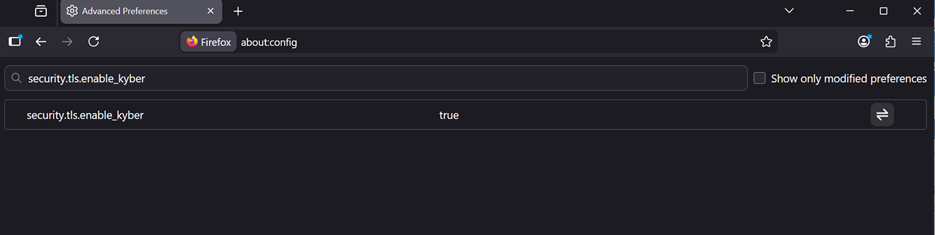
security.tls.enable_kyber
- Change the value to true.
- Restart the Firefox browser.
- After restarting, Firefox will attempt hybrid TLS handshakes using Kyber or ML-KEM when connecting to servers that support PQC.
Verifying PQC Support in Web Browsers
After enabling PQC support in your browser, the next step is to verify whether the browser is negotiating a post-quantum key exchange during the TLS handshake.
Via Cloudflare
One of the easiest ways to test this is by using the PQC test page provided by Cloudflare. Below are the steps to verify PQC support.
- Open your browser.
- Navigate to the following website: https://pq.cloudflareresearch.com
- Once the page loads, it will display the key exchange mechanism used during the TLS handshake between your browser and the server.
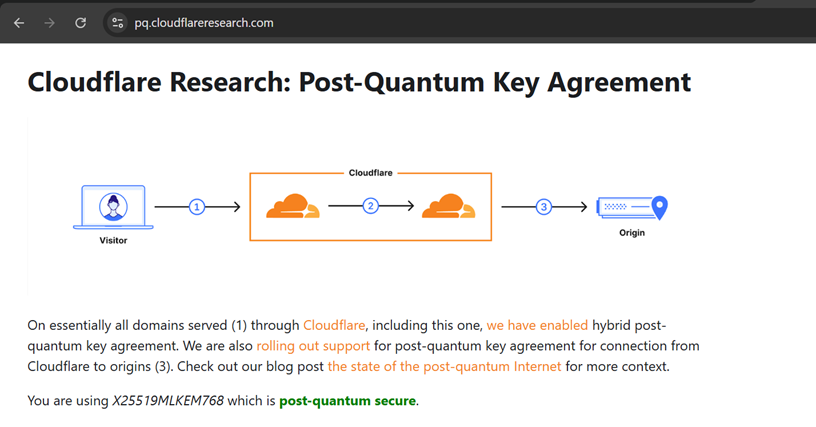
If PQC is successfully enabled and supported by your browser, the test page from Cloudflare may display a message such as “You are using X25519MLKEM768 which is post-quantum secure.” This indicates that the TLS connection between your browser and the server is using a hybrid post-quantum key exchange mechanism.
Via Browser
You can also check which cipher is used for a connection directly from the browser. Steps are mentioned below.
- Launch Google Chrome.
- Open the URL of the website you want to test.
- Click the ellipsis (three dots) in the top-right corner of the browser.
- Navigate to More Tools → Developer Tools.
- Open the Privacy and Security or Security tab in the Developer Tools panel.
- In the Connection section, review the details to see the protocol and cipher suite used for the secure connection.
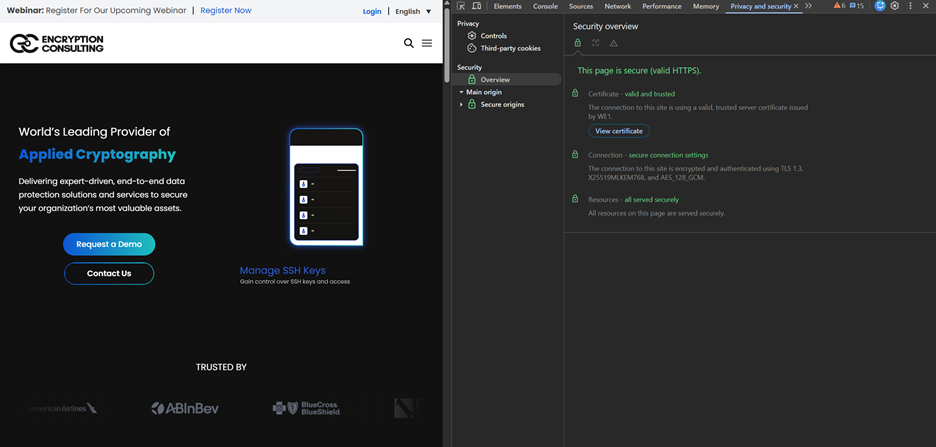
The algorithm X25519MLKEM768 combines two cryptographic techniques: X25519, which is a classical elliptic-curve Diffie-Hellman key exchange algorithm commonly used in modern TLS implementations, and ML-KEM-768, which is a post-quantum key encapsulation mechanism.
Hybrid cryptography is used because it provides security against both present-day and future threats. The classical component (X25519) ensures compatibility and protection against current attackers, while the post-quantum component (ML-KEM-768) is designed to remain secure even in the presence of large-scale quantum computers. During the TLS handshake, the shared secret is derived from both algorithms, which means that the connection remains secure as long as at least one of the algorithms remains unbroken.
If PQC is not enabled or supported by the browser, the page may instead show a classical key exchange algorithm such as X25519. In that case, the connection is still protected by traditional cryptographic methods but does not yet include post-quantum protection.
However, this also highlights the transitional state of modern cryptography. Many environments today operate in hybrid or fallback modes depending on client and server capabilities. Therefore, as organizations begin introducing quantum-resistant mechanisms, ensuring compatibility across browsers, libraries, and infrastructure becomes a critical consideration.
PQC Migration and Challenges
Migrating to PQC is an important step toward protecting digital infrastructure from the future risks posed by quantum computing. However, transitioning from traditional public-key cryptographic systems to quantum-resistant alternatives presents several technical, operational, and organizational challenges. These challenges must be carefully addressed to ensure a secure and efficient migration process. Some of them are mentioned below:
Cryptographic Discovery and Inventory
One of the first challenges in PQC migration is identifying where cryptography is used across an organization’s infrastructure. Cryptographic components are often deeply embedded in applications, APIs, network protocols, databases, and hardware devices. Without a comprehensive inventory of cryptographic assets, such as keys, certificates, algorithms, and dependencies, it becomes difficult to determine which systems are vulnerable and require migration. This is the same gap the DigiCert survey cited above points to: organizations cannot migrate cryptography they cannot see. CBOM Secure, EC’s cryptographic discovery and inventory platform, and our guide on how to create a CBOM both walk through building that inventory as the first concrete step.
Compatibility with Existing Systems
Many existing systems and protocols were designed around classical cryptographic algorithms such as RSA and Elliptic Curve Cryptography. Integrating PQC algorithms into these environments may require changes to protocols, libraries, and infrastructure components. Ensuring backward compatibility with legacy systems while introducing quantum-resistant mechanisms can be complex.
Performance and Resource Overhead
Many PQC algorithms introduce larger key sizes, ciphertexts, or signatures compared to classical algorithms. This can increase computational overhead, memory usage, and network bandwidth requirements. Systems with limited resources, such as embedded devices or IoT systems, may face additional constraints when adopting PQC.
Protocol and Infrastructure Updates
Security protocols such as TLS and digital certificate infrastructures must be updated to support PQC algorithms. This often involves upgrading cryptographic libraries, certificate authorities, and authentication systems. Coordinating these updates across distributed systems and services can be a complex operational task.
Migration Planning and Risk Management
Beyond technical integration, organizations must carefully plan how and when to transition to PQC. Migration decisions must consider factors such as system criticality, data sensitivity, and the expected lifetime of protected information. For example, data that must remain confidential for many years may require earlier migration due to potential HNDL risks. Organizations should adopt phased or hybrid approaches during the transition period to balance security improvements with operational stability and minimize disruptions to existing services. EC’s 9-phase PQC migration guide and our post on building cryptographic agility both lay out what a phased plan looks like in practice.
What This Means for Your Organization
Here is the point worth being direct about: your browser being post-quantum secure says nothing about whether your organization is. Browser vendors control one leg of one protocol, the TLS key exchange between a client and a supporting server, and they have moved fast because that leg was straightforward to fix without breaking anything. Your organization’s certificates, code-signing keys, VPN tunnels, internal service-to-service traffic, and embedded device cryptography are a different problem, and nobody is going to fix them for you by shipping a browser update.
That is exactly the gap the DigiCert numbers above describe: 87% of organizations have a plan, and only 7% have actually deployed quantum-safe cryptography broadly. We would rather organizations spend less time worrying about which browser flag to flip and more time on the two things that actually move that 7% number: knowing where their cryptography lives (a real, continuously updated inventory, not a spreadsheet from two years ago) and building the crypto-agility to swap algorithms without a multi-year rebuild every time a standard changes. Verifying your own browser takes a minute using the steps above. Verifying your organization takes a discovery project, and that project should start now, not after the next NIST deadline moves closer.
How Can Encryption Consulting Help?
Encryption Consulting is your trusted partner in achieving quantum-safe security. We guide you through every phase, from discovery to migration, following the same structure as our 9-phase PQC migration guide, with clarity, confidence, and proven expertise.
- Cryptographic Discovery & Inventory: The first step in quantum-readiness is conducting a comprehensive discovery and inventory of an organization’s cryptographic assets. Then we begin by mapping your entire cryptographic landscape. This includes identifying all systems (on-prem, cloud, hybrid) using cryptographic keys, certificates, algorithms, and dependencies across applications, APIs, networks, and databases.
- PQC Impact Assessment: Next, we evaluate vulnerabilities to quantum threats by analyzing cryptographic assets relying on RSA, ECC, and similar algorithms. We assess your PKI, HSMs, and applications for PQC readiness and deliver a prioritized report highlighting high-risk areas and migration needs.
- PQC Strategy & Roadmap: With risks defined, we create a tailored, phased migration strategy aligned with your business, compliance, and technical goals. This includes policy updates, algorithm agility design, and a clear roadmap outlining pilot, hybrid, and full deployment stages.
- Vendor Evaluation & Proof of Concept: We help you select and test PQC-ready solutions. We will help you define technical and business requirements for RFI/RFP, run PoCs to evaluate vendor offerings, and deliver vendor comparison matrix and recommendation report to ensure optimal technology selection for your environment.
- Pilot Testing & Scaling: Before full deployment, we validate PQC models in pilot environments to ensure interoperability and minimize disruption. Feedback from technical and business teams fine-tunes the rollout for scalability and efficiency.
- PQC Implementation: Finally, we execute full-scale migration, integrating PQC into your live environment while maintaining compliance, continuity, and hybrid algorithm support. Rolling out PQC support across your PKI, applications, infrastructure, cloud services, and APIs. Providing hands-on training for your teams along with detailed technical documentation for ongoing maintenance. Setting up monitoring systems and lifecycle management processes to track cryptographic health, detect anomalies, and support future upgrades.
Transitioning to PQC is complex, but you don’t have to do it alone. Encryption Consulting ensures a smooth, secure journey. Reach out to us at [email protected] and let us build a customized roadmap that aligns with your organization’s specific needs.
Conclusion
The transition to post-quantum security is gradually becoming a priority for the modern internet ecosystem. PQC refers to cryptographic algorithms designed to remain secure against both classical and quantum computers. These algorithms aim to replace or augment current public-key systems that could become vulnerable once large-scale quantum computers become practical.
As researchers and organizations continue to prepare for the potential impact of quantum computing, technologies such as PQC are being integrated into everyday platforms and tools. Major browsers like Google Chrome, Microsoft Edge, and Mozilla Firefox have already moved to hybrid cryptographic mechanisms that combine classical algorithms with quantum-resistant techniques by default, and more than two-thirds of the TLS traffic on Cloudflare’s network already reflects that shift.
Enabling and verifying PQC support in your own browser is a five-minute exercise that helps you understand how these mechanisms work in practice. But the browser side of this transition is the easy half. The harder, more consequential half is the one inside your own organization, where certificates, keys, and legacy systems still run on algorithms a quantum computer will eventually break. Start there, and start with an inventory, not a flag.
Frequently Asked Questions
Do I need to manually enable post-quantum cryptography in my browser?
Usually not. Current versions of Chrome and Edge negotiate hybrid post-quantum key exchange automatically, and Chrome 138 and later removed the ability to turn it off at all. Firefox has been rolling this out as a default too, though some builds still keep it behind the security.tls.enable_kyber flag in about:config. Check your connection with a test page first rather than assuming you need to change a setting.
How can I check whether my browser connection is post-quantum secure?
The fastest way is to visit pq.cloudflareresearch.com, which tells you directly whether your connection used a post-quantum key exchange. You can also open Chrome DevTools, go to the Security tab, and look at the protocol and cipher suite listed under the Connection details for the site you have open.
What does X25519MLKEM768 mean?
X25519MLKEM768 is a hybrid TLS key exchange that combines X25519, a classical elliptic-curve Diffie-Hellman algorithm, with ML-KEM-768, a post-quantum key encapsulation mechanism standardized by NIST as FIPS 203. The two run together during the handshake, so the connection stays secure as long as at least one of the two algorithms remains unbroken.
Does browser-side PQC protect my organization against harvest-now-decrypt-later attacks by itself?
Only for the specific connection between a visitor’s browser and a server that also supports post-quantum key exchange. It does not protect your organization’s certificates, code-signing keys, VPN tunnels, internal traffic, or archived data that was encrypted before PQC was in place. Those require a separate, deliberate migration that starts with a cryptographic inventory.
Is Safari post-quantum ready yet?
Safari’s rollout has been slower and less consistent than Chromium-based browsers and Firefox, and support varies by macOS and iOS version as of mid-2026, with no user-facing setting to toggle it. If you use Safari, the most reliable way to check is the same Cloudflare test page used for other browsers, since Apple has not published a single, definitive timeline for full support.