
- Executive Summary
- TL;DR
- What is a Certificate Lifecycle Management (CLM) solution?
- Common Challenges for Organizations Without CLM
- Policy Management during Certificate Issuance and Revocation
- Prerequisites and Implementation Workflow
- CertSecure Manager: Certificate Lifecycle Management Solution
- Who Owns This: Impact and Action by Team
- Common Errors and Rollback Guidance
- Success Metrics
- What to Do Next
- How Encryption Consulting Can Help
- Conclusion
- Frequently Asked Questions
Quick answer: CertSecure Manager is Encryption Consulting’s Certificate Lifecycle Management (CLM) platform. It automates certificate discovery, issuance, renewal, and revocation across every public and private CA, replacing the manual, spreadsheet-based tracking that leaves most enterprises exposed to certificate-related outages.
A single expired certificate can take down a VPN, a customer portal, or a building’s badge readers without warning, and it is happening more often than most security teams would like to admit. 72% of organizations experienced at least one certificate-related outage in the past year, with 45% reporting weekly outages, according to CyberArk’s 2025 State of Machine Identity Security Report. At the same time, machine identities requiring certificates now outnumber human identities 109 to 1, per Palo Alto Networks’ 2026 Identity Security Landscape Report, up from 82:1 just a year earlier. Manual, spreadsheet-driven certificate tracking simply cannot keep pace with that growth, which is exactly the gap a Certificate Lifecycle Management (CLM) solution is built to close.
Executive Summary
CertSecure Manager is Encryption Consulting’s Certificate Lifecycle Management (CLM) platform: it automates certificate discovery, issuance, renewal, and revocation across every public and private CA in an environment, replacing the spreadsheet tracking that leaves 72% of organizations exposed to at least one certificate-related outage a year. The urgency is compounding. DigiCert’s July 2025 Trust Pulse Survey found 45% of organizations had certificate-related downtime in the past year, with 37.5% traced to an expired certificate (Source: DigiCert Trust Pulse Survey, July 2025), and the CA/Browser Forum has already approved the schedule that phases maximum public TLS certificate validity down to 200 days in March 2026, 100 days in March 2027, and 47-day TLS certificates by March 2029 (Source: CA/Browser Forum ballot, via Sectigo). Manual renewal cannot survive that cadence. CertSecure Manager closes the gap with automated certificate discovery and certificate automation across Microsoft AD CS and public CAs alike, and the same inventory that powers certificate lifecycle management also underpins crypto agility and PQC readiness: a live CBOM gives security and compliance teams the algorithm-level visibility both disciplines depend on.
Jump to: Prerequisites and Implementation Workflow | Impact by Team | Common Errors and Rollback | Success Metrics | What to Do Next | How Encryption Consulting Can Help | FAQ
TL;DR
- Manual certificate management is breaking down: 72% of organizations had a certificate outage in the past year, and machine identities now outnumber humans 109:1.
- A CLM solution automates discovery, issuance, renewal, and revocation across every CA in your environment, public and private.
- CertSecure Manager adds automated lifecycle management, centralized visibility, policy enforcement, least-privilege access, and scheduled reporting on top of Microsoft AD CS and any public CA.
- With public certificate lifetimes shrinking to 47 days under CA/Browser Forum Ballot SC-081v3, and post-quantum migration on the horizon, CLM is becoming a baseline requirement rather than a nice-to-have.
Certificates have become a key component in today’s cyberspace, where each component requires a certificate to confirm its identity. From users to servers to applications, every part of the organization requires a certificate to function as intended. While this enhances the organization’s overall security, as the organization grows, it becomes difficult to manage such certificates, which include renewing them, revoking them, and sometimes issuing certificates on a large scale.
While MDM solutions like Intune can make it easier to issue required certificates to machines and technologies like auto-enrollment can provide certificates to users and machines as well, the problem arises when we need to issue those certificates to servers and applications.
PKI serves as the backbone of these certificates. While some certificates are issued by public CAs, the majority of the certificates are issued by private CAs, and managing such private CAs becomes the responsibility of the SOC team (or other security team), which increases the operational complexity of the overall process.
In this blog, let us take a deeper dive into the world of certificate management, some of the best practices, some common challenges, and finally, how Encryption Consulting can help with their expertise, as well as with our own CertSecure Manager solution.
What is a Certificate Lifecycle Management (CLM) solution?
As we already established above, every organization needs a proper, valid certificate to function, which is trusted by the whole organization. These certificates would be issued to end-entities such as users, computers, networking equipment, servers, applications, and so on. If the underlying PKI, which is providing trust and visibility of these certificates, is facing an outage, then none of the components of the organization will work. Employees cannot get into buildings without proper smartcards, people cannot use VPNs, machines, servers, and applications will cease functioning, and it will be complete chaos.
Managing these certificates and their underlying infrastructure is crucial for the organization to function normally. These certificates go through phases from issuance to revocation, where each phase of the lifecycle is crucial for the organization to maintain properly. And if a certificate that is about to expire isn’t monitored or renewed in a timely manner, then it may cause unforeseen outages in the server/application using said certificate. Hence, proper monitoring, ownership, and renewal of certificates become important.
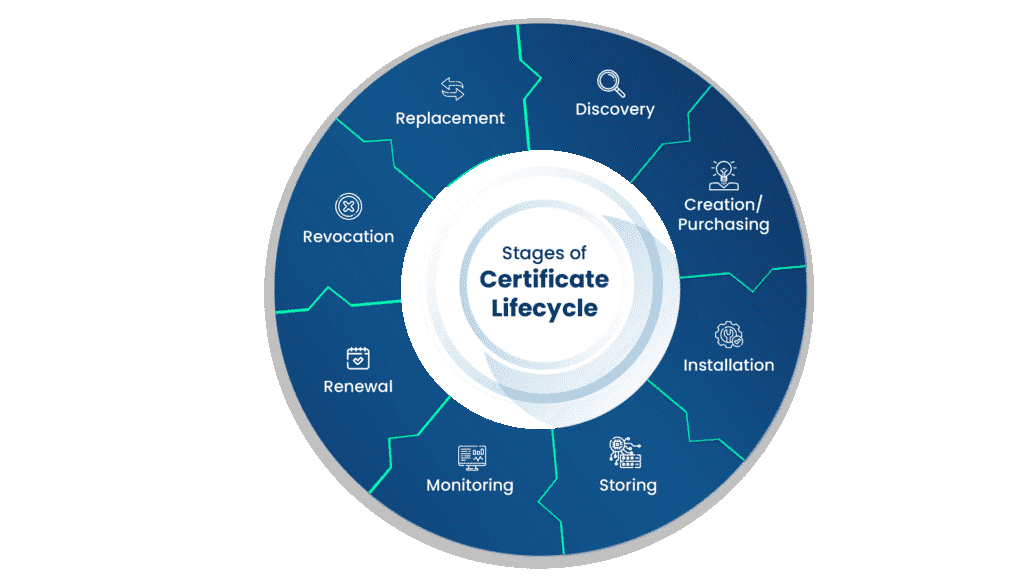
The stages of the certificate lifecycle are as follows:
-
Discovery
The discovery phase of the certificate lifecycle involves searching the network for missing, expired, compromised, or unused certificates that must be revoked, renewed, or replaced. This is an important part of the process, as it finds gaps in the security of certificates and relays these gaps to the monitoring phase, allowing for the sealing of these breaches. Normally, this phase also deals with the inventorying of certificates to help in future Discovery phases, along with any certificate audits that may occur.
-
Creation/Purchasing
This is the phase where the certificate is created. An online user, organization, or device requests a certificate from a Certificate Authority, which contains the public key and other enrollment information needed to enroll the user. The Certificate Authority used to create the certificate can be owned by the organization that desires the certificate or by a third party. If the certificate is obtained from a third party, then it must be purchased from them.
-
Installation
The installation of the certificate is straightforward, but still just as important. The certificate must be installed in a secure, but reachable, location, as users attempting to verify the authenticity of the certificate must have access to it. When the certificate is installed, the CA puts policies in place to ensure the security and proper handling of the certificate.
-
Storage
As previously mentioned, when the certificate is installed, it must be in a secure location to prevent compromise. It should not, however, be so secure that the users who need to read the certificate cannot reach it. The proper policies and regulations to implement for the storage of certificates will be discussed later in this document.
-
Monitoring
Monitoring is one of the most important stages of the certificate lifecycle. This is an almost constant phase where the certificate management systems, whether automatic or manual, watch for breaches, expirations, or compromises of digital certificates. The Monitoring stage uses the inventory created in the Discovery phase to keep track of when certificates should be revoked, renewed, or replaced. The certificate management system then moves those certificates to the next phase, which can be renewal, revocation, or replacement.
-
Renewal
Renewal of a certificate occurs when the expiry date of the certificate is reached. This occurs naturally with certificates, as best practice is not to use a certificate for more than 5 years at the most. Certificates can be set to renew automatically, or a list can be kept of certificate expiration dates, and the administrator of the certificates can renew them at the proper time.
-
Revocation
If a certificate is found to be compromised, stolen, or otherwise negatively affected, then that certificate will be revoked. When a certificate is revoked, it is put on a Certificate Revocation List (CRL). This list ensures that other CAs know that this is no longer a valid certificate.
-
Replacement
The certificate is replaced when users switch from paying for certificates to creating their own Public Key Infrastructures (PKIs) and CAs. This is rarely done, as renewing a certificate from the original provider is much easier than replacing it.
Common Challenges for Organizations Without CLM
With Microsoft AD CS being widely used in the industry with no proper CLM solution built with it, many organizations often face some challenges while operating their private as well as their public PKI, such as Digicert. These challenges are only intensifying: under CA/Browser Forum Ballot SC-081v3, approved in April 2025, public TLS certificate validity is being cut in stages down to just 47 days by March 2029, which makes manual, spreadsheet-based tracking effectively unworkable at scale:
-
Manual CLM
Without a proper CLM solution, teams are often responsible for issuing, renewing, and revoking certificates manually, tracking their owners, and renewing them in a timely manner before expiration. This type of process is prone to human error, which can lead to outages and operational inefficiencies.
-
Lack of central visibility/Purchasing
Organizations tend to have multiple CAs, including at least one Microsoft CA acting as a private CA and one public CA, such as Digicert. Managing certificates from different CAs can often be challenging, as it involves tracking expiring certificates, renewing the certificates separately with their own defined process, and tracking the ownership of the certificates.
-
Limited reporting and insights
ADCS alone may not provide the detailed reporting and insights needed for proactive certificate management. A CLM solution enhances visibility into certificate usage and health.
-
Improper Policy Management
With multiple CAs being used to manage and issue certificates, the implementation of organizational policies and ensuring it is adhered to can seem challenging, as each CAs functions differently, and sometimes there are no mechanisms to apply such policies, making the procedures prone to human errors.
| Capability | Without CLM (Manual / AD CS-only) | With CertSecure Manager |
|---|---|---|
| Certificate discovery | Manual spreadsheets or scripts; blind spots across CAs | Automated discovery and inventory across every connected CA |
| Renewal & issuance | Manual tracking of expiration dates; high risk of missed renewals | Automated renewal agents for servers, load balancers, and applications |
| Visibility across CAs | Siloed, per-CA views with no single pane of glass | Centralized dashboard across public and private CAs |
| Policy enforcement | Inconsistent, dependent on individual admins | Global and departmental policy enforcement applied automatically |
| Approval workflow | Ad hoc, undocumented approvals | Configurable multi-approver workflows |
| Readiness for 47-day certificates | Not sustainable at scale | Built for high-frequency automated renewal |
Policy Management during Certificate Issuance and Revocation
Every organization has its internal policies that it needs to abide by. These policies often contain restrictions such as:
- What should be the minimum key size of the certificate?
- What information should be contained inside the certificate, such as organization, Organization unit, etc., and should an email ID be present inside the certificate itself to track its owner?
- The approval process for certain types of certificates is essential. Who should approve the type of certificate before issuance is often inscribed in the policies themselves, including how many approvals are needed for certain types of certificates.
- If wildcard certificates are allowed to be issued.
- If CSR can be reused to issue certificates again
- What domains should be allowed as SAN attributes in the certificate?
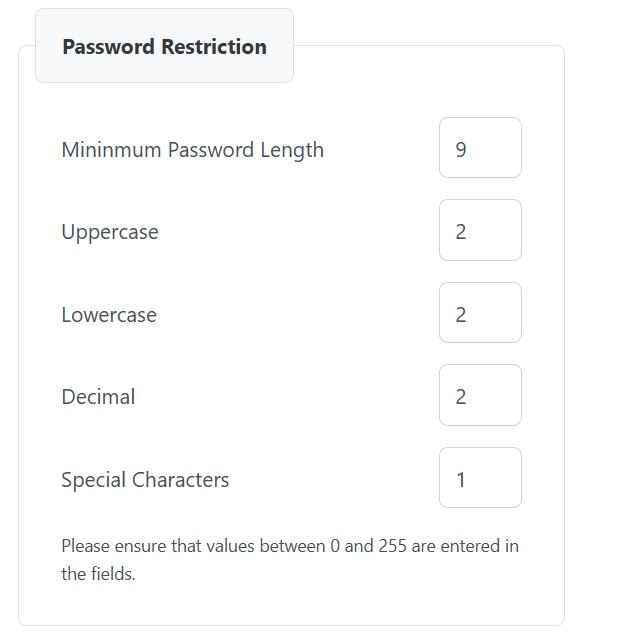
- Password policies in cases of PFX certificate
Governance by these policies can often be challenging for teams not using any CLM solution. We have encountered customers in the past who do not check any of these details or track proper ownership of the certificate. That would significantly increase risks and potential insider attacks within the organization.
CertSecure Manager also includes one-click renewal and revocation procedures, where appropriate owners and admins can renew or revoke a certificate using a single click. After the required permissions certificates are renewed/revoked from the CA, a confirmation message is sent to the owners via email and Teams.
Prerequisites and Implementation Workflow
Before connecting a CA or deploying a renewal agent, confirm the groundwork below is in place. Skipping it is the most common reason a CLM rollout stalls or causes an unexpected disruption.
Prerequisites Checklist
- Administrative or API access to every CA in scope, including Microsoft AD CS and any public CA such as DigiCert.
- A working inventory of servers, load balancers, and applications that currently hold certificates issued outside a central system.
- Network connectivity from CertSecure Manager to each CA endpoint, whether on cloud or on premises.
- Defined certificate policies: minimum key size, required subject fields, wildcard and CSR reuse rules, SAN whitelisting, and PFX password policy.
- An Active Directory or Azure AD group structure to map onboarding and departmental template access.
- A named owner or team to sign off on policy and approval workflows before go-live.
Implementation Workflow at a Glance
- Discover and connect your CAs. Link every Microsoft AD CS instance and public CA into a single dashboard before changing any renewal process. See Centralized Visibility and Control.
- Deploy automated renewal agents. Install agents on servers, load balancers, and applications so certificates rotate without manual requests. See Automated Lifecycle Management.
- Define and enforce policy. Set key size, SAN, wildcard, CSR reuse, and PFX password rules globally and per department. See Policy Enforcement.
- Assign least-privilege roles. Map approval and access rights to named roles rather than shared admin credentials. See Principle of Least Privilege.
- Configure monitoring and alerts. Route expiration and downtime alerts to Teams, email, or ServiceNow with escalation paths. See Comprehensive Monitoring and Alerts.
- Schedule recurring reports. Turn on weekly or monthly reporting for audit and compliance evidence. See Scheduled Reports.
- Onboard users through AD groups. Use Active Directory or Azure AD groups so ownership transfers automatically when staff change roles. See Easy Onboarding.
- Extend the inventory to PQC readiness. Use the same certificate and algorithm inventory to plan a post-quantum migration. See Post-Quantum and Cryptographic Posture Readiness.
CertSecure Manager: Certificate Lifecycle Management Solution
While interacting with our clients, we learned about many of their issues. While there are many CLM solutions out there, none focus primarily on Microsoft AD CS, which still maintains the operational and monitoring sides of the PKI manually. This motivated us to create our own solution, which would help our customers with the problems they have been encountering with their own CLM solutions.
While constructing our solution, we focused on solving the key challenges first.
1. Automated Lifecycle Management
With CertSecure Manager, clients can integrate renewal agents with their servers, such as Tomcat, Apache, ISS, load balancers such as F5, as well as their own internal applications. This will help the servers and applications rotate certificates automatically without any human intervention, thereby minimizing outages as well as ensuring proper certificates are pushed to the server every time in a timely manner.
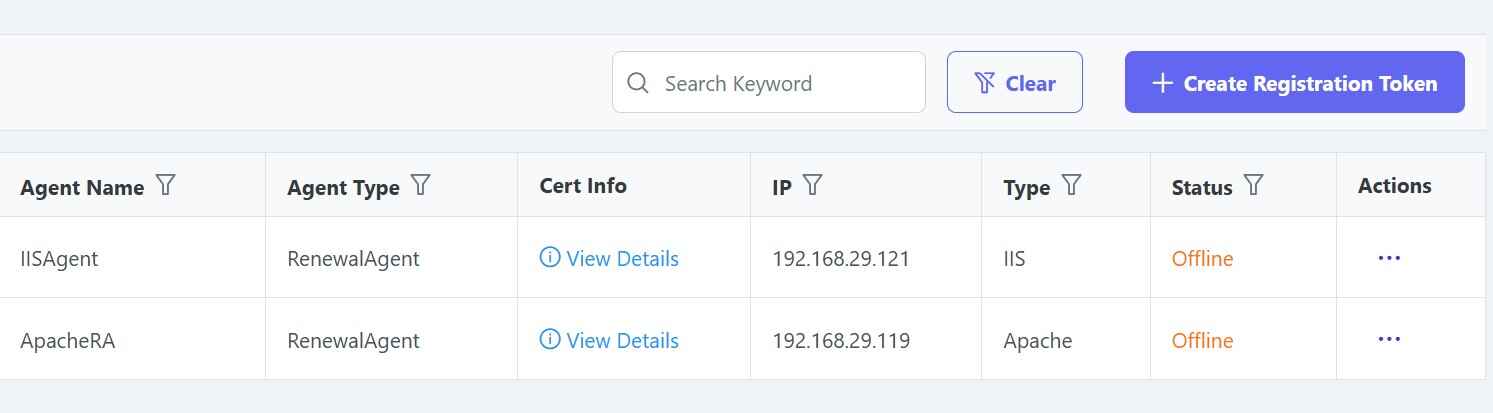
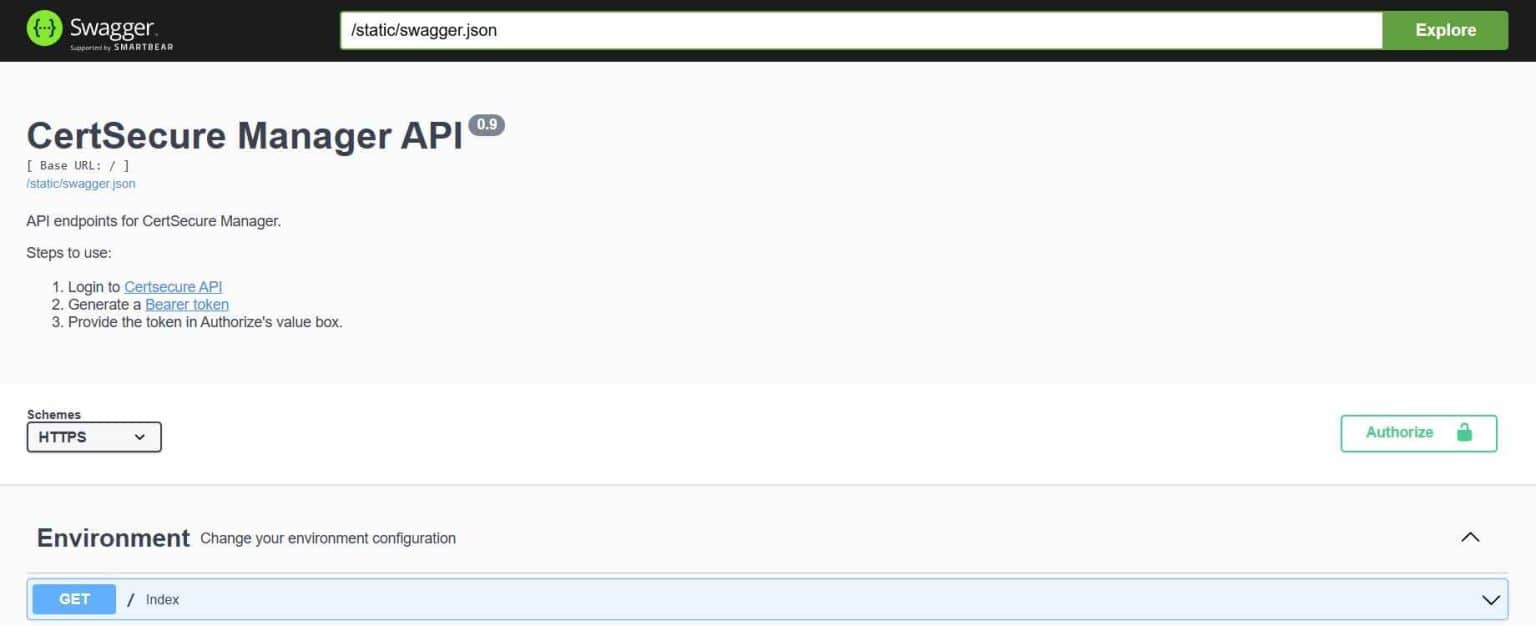
Clients can also integrate their own solutions with ACME or Rest APIs, which will make it easier to get certificates easily for their application.
2. Centralized Visibility and Control
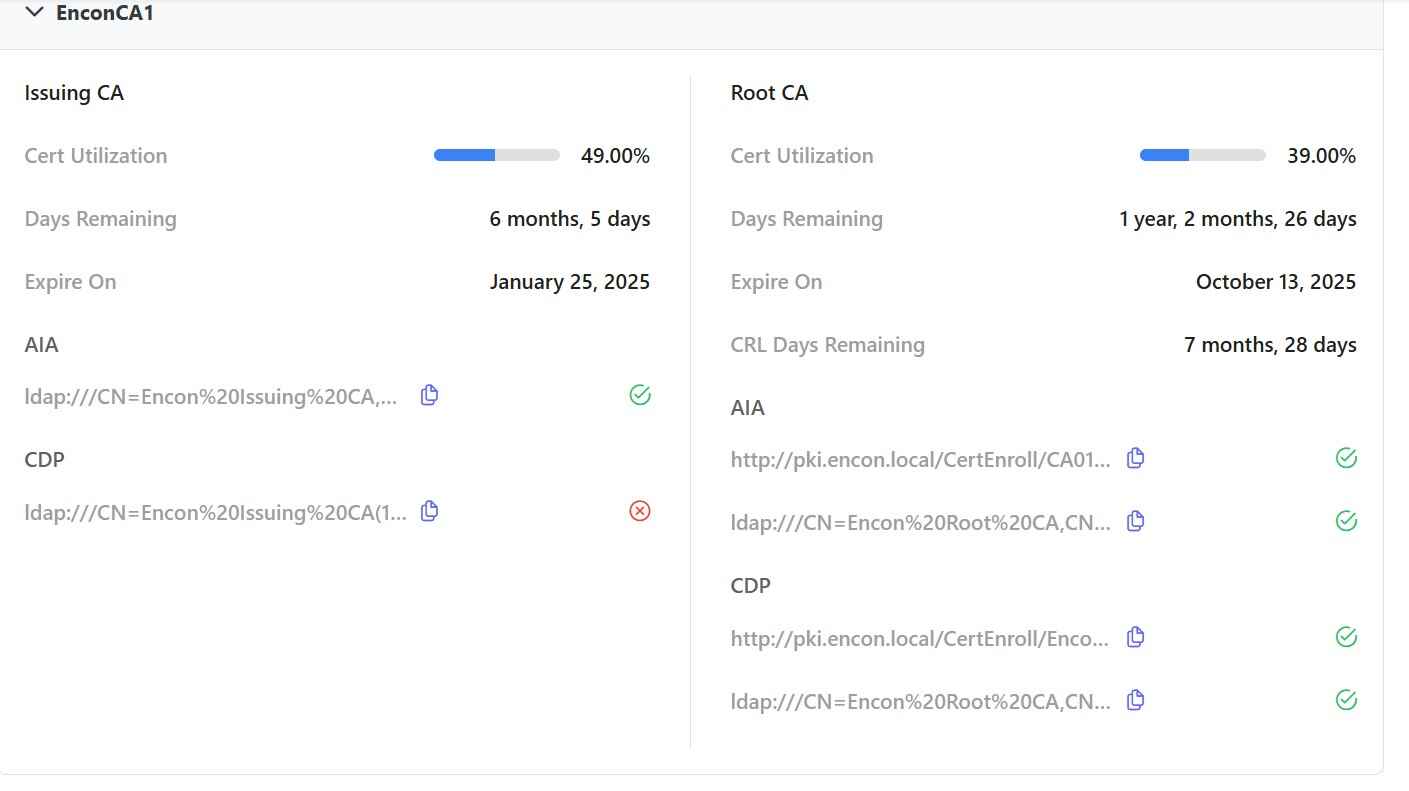
With CertSecure’s HA architecture and connectors, clients can integrate all their CAs with CertSecure with no major network configuration needed. This will ensure that any and all CAs, no matter if they are on cloud or on premises, can be integrated with CertSecure. This will provide a single pane of glass for managing and issuing certificates across multiple private and public CAs.
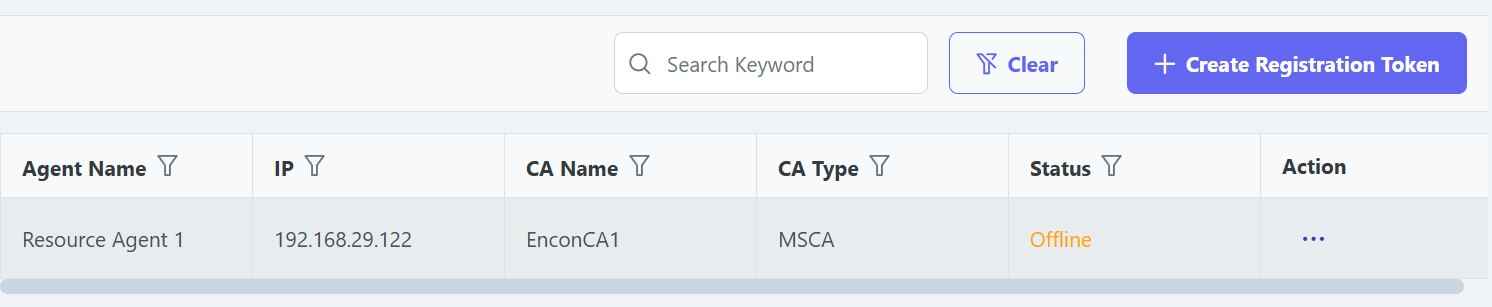
This can also help the operations team monitor their PKI directly from the dashboard. This will help ensure that all CDP/AIA points related to the CA are always active while also providing major updates on CRL and CA certificate renewal.
3. Policy Enforcement
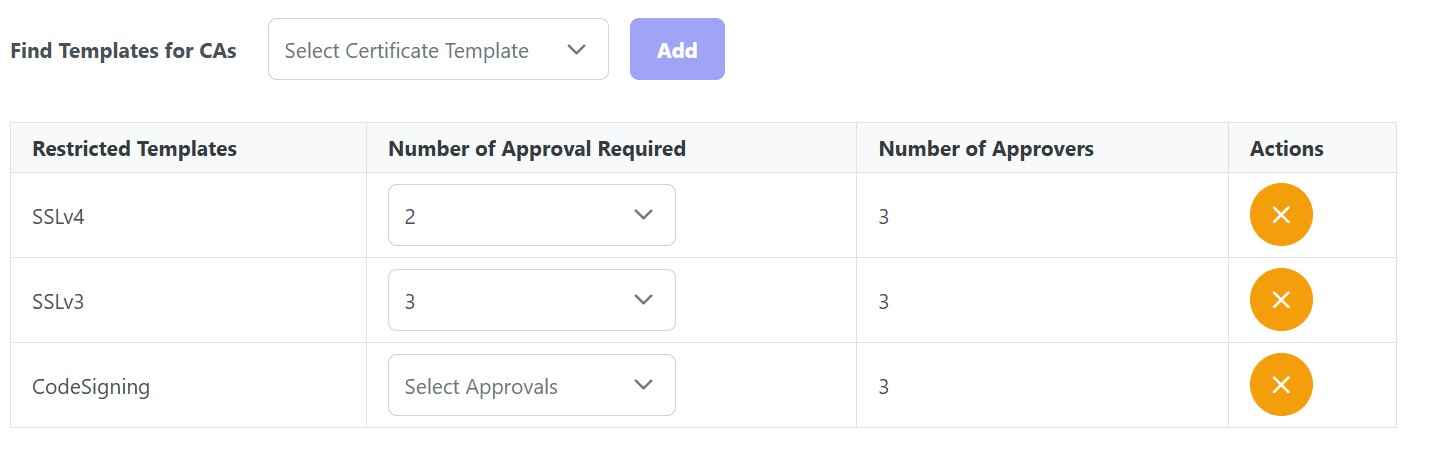
CertSecure can help clients set up a policy on a global as well as on a departmental level. This will ensure all users are abiding by the policies defined. These policies help dictate information such as:
a. How many approvals are needed to issue a certificate
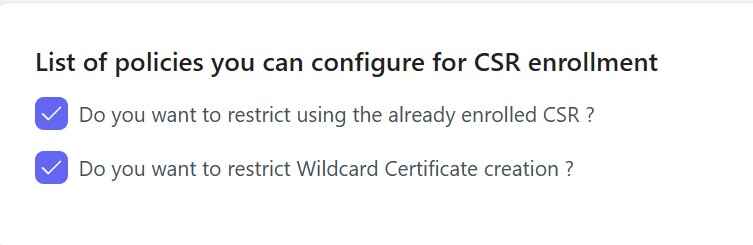
b. If CSR can be reused and if users can request wildcard certificates
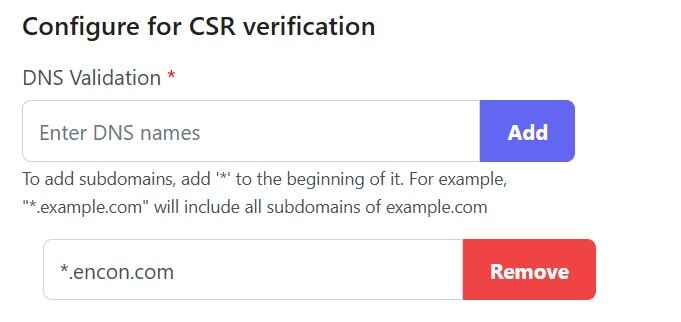
c. What DNS names are whitelisted, which can be added to the certificates
d. And finally, password policies for the PFX files
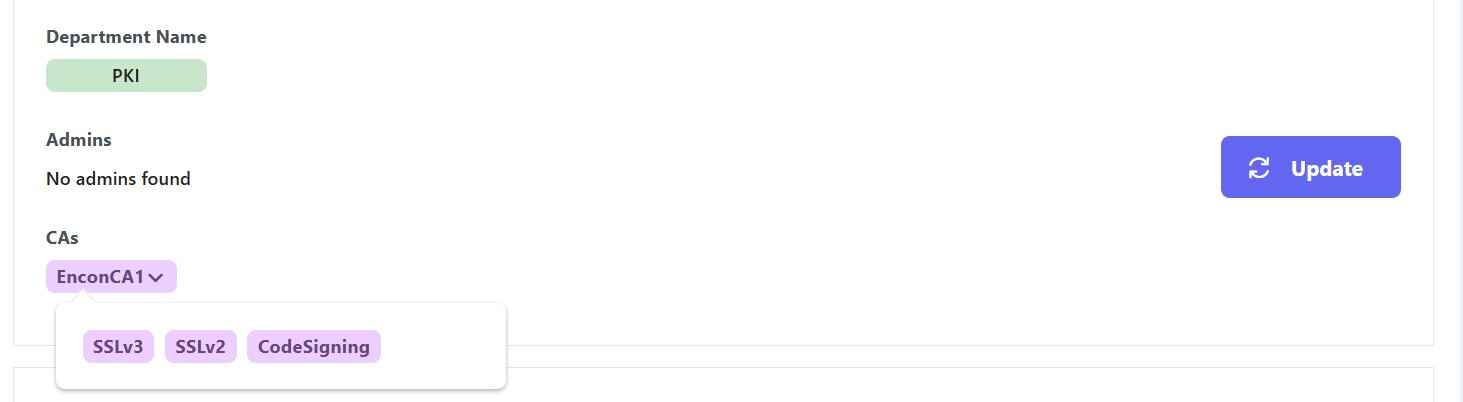
Moreover, we can also define which department gets access to which templates, which creates further restrictions on what templates a user can access. So, for example, the production team will need access to DigiCert, which the development team will not. Similarly, the IT team may need access to web server templates, while they would not need codesigning certificates.
4. Principle of Least Privilege
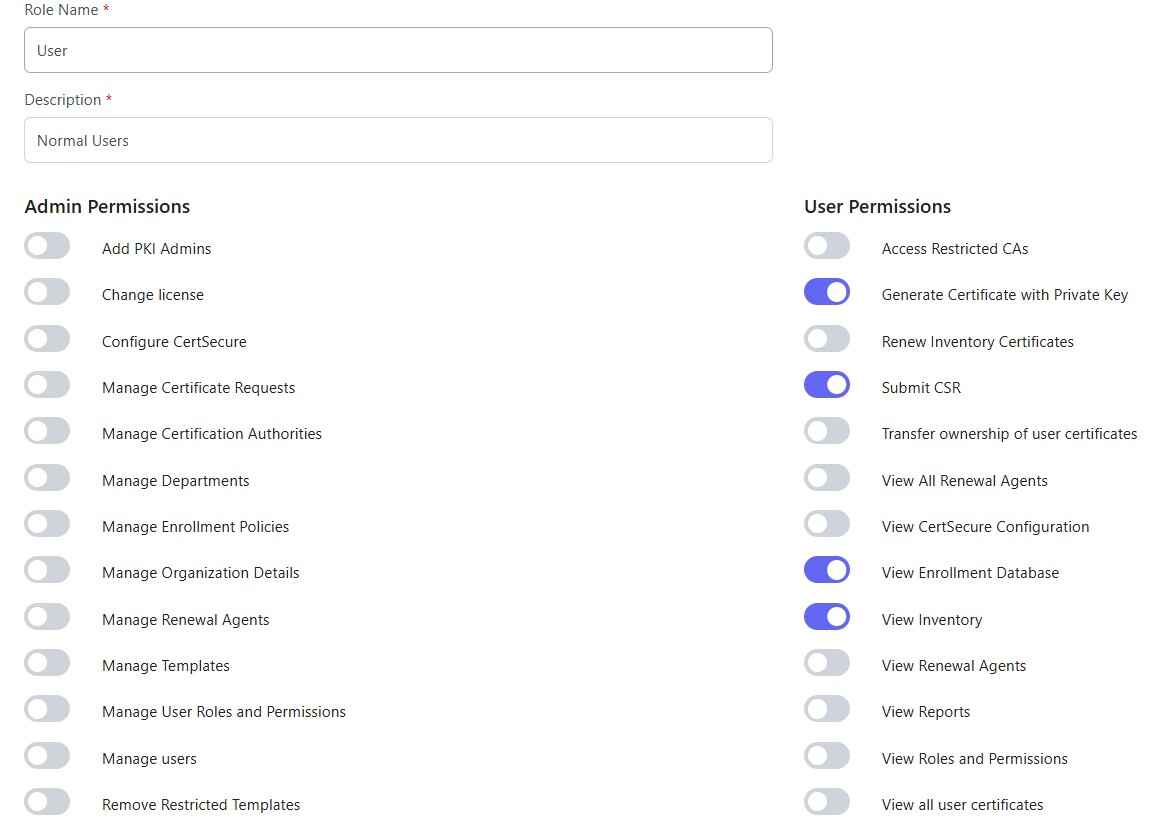
With policies defined, clients can also define roles that can be assigned to the users. Users can then conduct functions that are only defined by the permissions that are set by the administrator.
5. Comprehensive Monitoring and Alerts
With CertSecure, clients can integrate alerts with Teams, Email, Service Now, with proper escalation protocol to ensure expiring certificates or PKI downtime are brought to attention at the earliest interval. This helps organizations minimize downtime while also having the ease of mind to maintain the security and functionality of the underlying infrastructure, as well as of the certificates it issues.
6. Scheduled Reports
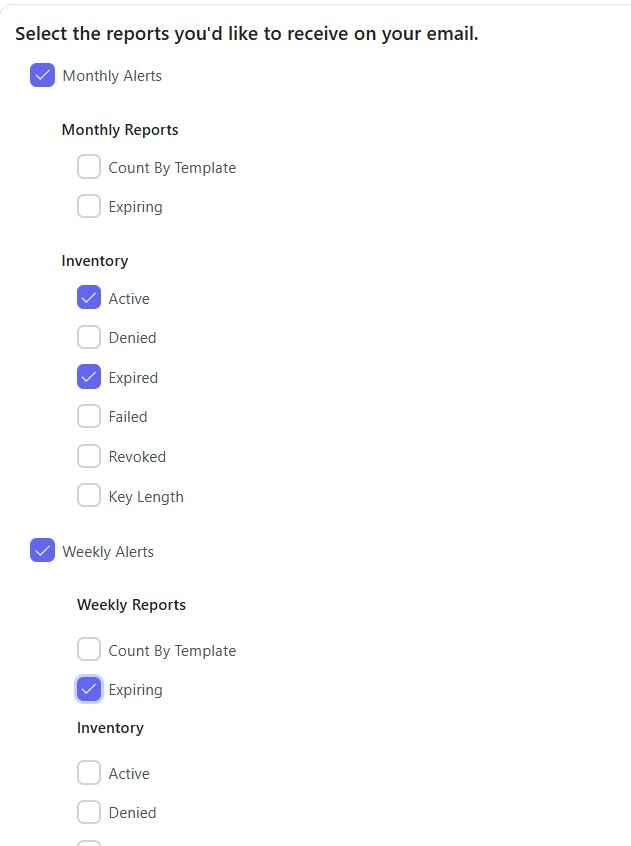
With CertSecure, users can schedule reports that will be delivered directly to their emails in a weekly or monthly manner. This will ease the operational side of things as well as provide visibility and a record of operations conducted by the PKI.
7. Easy Onboarding
Users can easily be onboarded using AD groups (including Azure AD Groups) into CertSecure, which helps CertSecure monitor and add/remove users as they are added or removed from the group. Deregistering of the user results in transfer of ownership of certificates to department admins, which makes it easier to manage and keep the ownership of certificates, as well as the alerts defined, easier to process.

8. Post-Quantum and Cryptographic Posture Readiness
Certificate lifecycle management doesn’t exist in isolation from the rest of your cryptographic estate. As organizations begin migrating to post-quantum cryptography, having centralized visibility into every certificate, its algorithm, and its issuing CA becomes the foundation for a successful transition. CertSecure Manager’s inventory and reporting capabilities make it easier to identify which certificates still rely on classical algorithms and which have moved to ML-DSA and other NIST-standardized PQC algorithms on Microsoft PKI.
This same visibility also feeds directly into broader cryptographic posture management efforts and supports building an accurate Cryptography Bill of Materials (CBOM), an increasingly common requirement for regulated organizations that need to demonstrate exactly which cryptographic algorithms and key sizes are in use, where, and for how long. Treating CLM as the operational layer beneath your CBOM and PQC migration strategy means fewer surprises when it comes time to swap algorithms or rotate keys at scale.
Who Owns This: Impact and Action by Team
A CLM rollout touches PKI, security, platform, and compliance functions differently, and each needs a distinct action rather than a shared memo.
| Team | What Changes For Them | Immediate Action |
|---|---|---|
| PKI Team | Owns CA connections, certificate templates, and policy configuration inside CertSecure Manager | Inventory every CA and certificate template before connecting them to the platform |
| Security Team | Depends on accurate discovery and monitoring to catch expired or shadow certificates | Confirm alert routing and escalation paths are live before decommissioning any manual tracking spreadsheet |
| Platform and Infrastructure Team | Runs the servers, load balancers, and applications where renewal agents get installed | Prioritize agent deployment on the highest-traffic, most business-critical systems first |
| Compliance Team | Uses scheduled reports and the certificate inventory as audit evidence | Confirm reporting cadence and CBOM output satisfy the frameworks your organization is audited against |
Common Errors and Rollback Guidance
Most rollout problems trace back to skipped prerequisites rather than a flaw in the platform itself. Watch for these:
- Connecting a CA before its certificate templates and policies are defined, which produces inconsistent certificates that need to be reissued.
- Deploying renewal agents to production systems before testing them in a staging environment, which can interrupt a live service if an agent misconfigures a certificate binding.
- Skipping the AD or Azure AD group mapping step, which leaves certificate ownership unassigned when staff change roles.
- Enabling automated revocation without a maker-checker approval step, which risks an accidental mass revocation.
Rollback guidance: If an automated renewal or policy change causes an unexpected issue, CertSecure Manager’s agents can be paused per server or application without affecting the rest of the environment, and the previous certificate remains valid until its original expiration date unless it was explicitly revoked. Keep the prior manual tracking spreadsheet or export active in parallel for at least one full renewal cycle after go-live, and retire it only once the automated dashboard has confirmed a complete, current inventory.
Success Metrics
Readiness is not a one-time rollout status. Track these metrics on an ongoing basis after implementation. For context, an organization tracking 5,000 certificates manually today would face roughly 39,000 renewal actions a year once 47-day validity is fully in effect, which is the scale automated renewal exists to absorb.
- Percentage of certificates renewed automatically versus manually.
- Number of certificates under active discovery and inventory, and how that count changes quarter over quarter.
- Mean time to deploy a renewal agent to a newly onboarded server or application.
- Number of certificate-related outages or near-misses per quarter, compared against the pre-implementation baseline.
- Time required to produce a complete, audit-ready certificate inventory on demand.
What to Do Next
- PKI teams: Run a discovery pass across every CA before making any policy changes, and confirm template ownership.
- Security teams: Validate alert routing and escalation paths, then formally retire manual spreadsheet tracking once the dashboard is complete.
- Platform and infrastructure teams: Pilot renewal agents on a small, non-critical system before rolling out to production.
- Compliance teams: Confirm scheduled reporting output matches the evidence your auditors require, including CBOM-level algorithm visibility.
How Encryption Consulting Can Help
Encryption Consulting’s PKI advisory team helps organizations plan and execute a CertSecure Manager rollout end to end: auditing existing CAs and certificate inventories, defining policy before go-live, and sequencing agent deployment to avoid disrupting production systems. Where certificate readiness intersects with post-quantum planning, our PQC Center of Excellence uses the same certificate and algorithm inventory to help sequence a structured PQC migration instead of starting from scratch, and our guidance on turning a CBOM into an operational capability keeps that inventory current long after the initial rollout.
Conclusion
CertSecure Manager stands out as a comprehensive solution designed to address the complex challenges of CLM. By seamlessly integrating with both private and public Certificate Authorities, CertSecure Manager offers unparalleled centralized visibility and control, empowering organizations to manage their certificates with greater efficiency and security.
Through features like automated lifecycle management, policy enforcement, comprehensive monitoring, and scheduled reporting, CertSecure Manager ensures that your certificate infrastructure is not only robust but also resilient against potential disruptions. Its focus on the principle of least privilege further enhances security, ensuring that users have access only to the resources they need, thereby minimizing the risk of insider threats.
The ease of onboarding, coupled with integrations with Microsoft AD and Azure AD, simplifies user management and streamlines certificate lifecycle processes. With alerts and escalation protocols, CertSecure Manager provides peace of mind, ensuring that critical issues are promptly addressed, minimizing downtime, and maintaining the integrity of your PKI infrastructure.
Encryption Consulting’s commitment to continuous improvement and customer-centric solutions is evident in the development of CertSecure Manager. We remain dedicated to helping organizations achieve higher standards of security, compliance, and operational efficiency. Let CertSecure Manager be your trusted partner in navigating the complexities of certificate management, ensuring that your digital assets remain secure, compliant, and fully operational.
Frequently Asked Questions
What is the main takeaway from Introduction to CertSecure Manager: Encryption Consulting’s Flagship Certificate Management Solution?
CertSecure Manager replaces manual, spreadsheet-driven certificate tracking with automated discovery, issuance, renewal, and revocation across every CA, public and private, in an environment. The core takeaway is that manual tracking cannot keep pace with 72% of organizations already experiencing certificate-related outages and machine identities outnumbering humans 109 to 1, so automated lifecycle management is now a baseline requirement rather than an optional upgrade.
Why does this matter for enterprise certificate lifecycle management?
Certificate lifecycle management determines whether an expiring or misconfigured certificate causes a routine automated renewal or an unplanned outage. As the CA/Browser Forum phases maximum public TLS certificate validity down to 47 days by 2029, the operational margin for manual processes keeps shrinking, making automated CLM a baseline requirement for any organization running production PKI.
What teams are responsible for acting on this guidance?
PKI teams own CA connections, certificate templates, and policy configuration. Security teams own alert routing, escalation, and shadow-certificate detection. Platform and infrastructure teams operate the servers, load balancers, and applications where renewal agents are deployed. Compliance teams rely on scheduled reporting and the certificate inventory as audit evidence.
What risks increase if this topic is handled manually?
Manual certificate management raises the risk of missed renewals, inconsistent policy enforcement across CAs, unassigned certificate ownership when staff change roles, and outages that only surface once a service already fails. DigiCert’s July 2025 Trust Pulse Survey found 45% of organizations had certificate-related downtime in the past year, with 37.5% traced to an expired certificate.
How does automation reduce certificate outage risk?
Automated discovery finds every certificate across connected CAs without relying on someone remembering it exists, while renewal agents and ACME or REST API integrations reissue certificates before they expire without a manual request. That combination removes the human delay behind most certificate-related outages.
What metrics should teams track after implementation?
Track the percentage of certificates renewed automatically versus manually, the number of certificates under active discovery and how that count changes quarter over quarter, mean time to deploy a renewal agent to a newly onboarded system, the number of certificate-related outages or near-misses per quarter, and the time required to produce a complete, audit-ready inventory on demand.
How does this connect to 47-day TLS certificate readiness?
CertSecure Manager’s automated renewal agents and API integrations are built for high-frequency renewal, which is exactly what the CA/Browser Forum’s shift to 47-day TLS certificates by March 2029 requires. Organizations that already automate certificate discovery and renewal today will not need to rebuild their process when the shorter validity periods take effect.
How should this be handled in multi-cloud or hybrid PKI environments?
Multi-cloud and hybrid PKI environments should connect every CA, whether Microsoft AD CS on premises or a public CA in the cloud, into a single centralized dashboard rather than managing each one separately. CertSecure Manager’s connectors are designed to integrate with CAs regardless of whether they run on cloud or on-premises infrastructure, without major network reconfiguration.
What prerequisites are needed before implementation?
Before implementation, confirm administrative or API access to every CA in scope, inventory the servers and applications currently holding certificates outside a central system, verify network connectivity from CertSecure Manager to each CA endpoint, define certificate policies in advance, and map AD or Azure AD groups for onboarding.
What screenshots or configuration examples should be included?
Configuration examples should show the CertSecure Manager agent window, the API integration view, the CA and CRL dashboard, approval and policy workflows, DNS and CSR validation rules, PFX password policy settings, departmental access controls, role and permission assignment, scheduled reporting configuration, and Active Directory group onboarding, each with descriptive alt text identifying the specific screen shown.
- Executive Summary
- TL;DR
- What is a Certificate Lifecycle Management (CLM) solution?
- Common Challenges for Organizations Without CLM
- Policy Management during Certificate Issuance and Revocation
- Prerequisites and Implementation Workflow
- CertSecure Manager: Certificate Lifecycle Management Solution
- Who Owns This: Impact and Action by Team
- Common Errors and Rollback Guidance
- Success Metrics
- What to Do Next
- How Encryption Consulting Can Help
- Conclusion
- Frequently Asked Questions